THE PP GAME!

And if part of the process was masking an area off... and they want feedback on their work... but the image is 800 pixels?

Then I'd advise you to start a new game that will probably be quite successful too - the get feedback on my processing thread.

This thread however is about challenging yourself to think outside the box, learning from others and having a little competitive streak at the same time. There's absolutely no need to get off track - analysing in depth every part of your processing. Not here anyway.

According to new rules, there's no reason why you can't give and get critique and feedback though, so I don't know if there's a reason to go off in a huff...

..........

Getting back to the game - if David is in it seems we have two entries and if he's out then unless someone puts one it, looks like ill be the winner tomorrow lol.
 
Opened both in ACR, hit auto on both and opened in PS.
Made a selection of the “yellow bird sitting in a banana tree” (That would be a good title for a song). The poly lasso and refine edge being the tools used, dragged the touched up selection into the robin image.
Bit of D and B.
Altered the pitch of the import using free transform and then a slight resize.
Rotated the robin to liking, flattened and cropped, filled the gaps made by crop using fill, content aware.
Added a worm filter.
Added a border.

TP-BIRDS-WEB.jpg


Rhodese.
 
Last edited:
Opened both in ACR, hit auto on both and opened in PS.
Made a selection of the “yellow bird sitting in a lemon tree” (That would be a good title for a song). The poly lasso and refine edge being the tools used, dragged the touched up selection into the robin image.
Bit of D and B.
Altered the pitch of the import using free transform and then a slight resize.
Rotated the robin to liking, flattened and cropped, filled the gaps made by crop using fill, content aware.
Added a worm filter.
Added a border.

Rhodese.

That's..... quite cool!
 
so I don't know if there's a reason to go off in a huff...

I haven't :) Just saying that is in depth crit is not what this is about... then I'll not look here for it. I'll still take part when an interesting image pops up.. and abide by the rules of this thread. No need to remove my entry... it's already there.. it may as well stay. I've amended it as per the rules... and removed the hi-res links.
 
Added a worm filter.

Did you really - for the birdys was it :lol:

Very very inventive edit Rhodese :thumbs: although I must admit I never thought we could do this sort of thing on this thread - :thinking: Oh yes I did put a few pencils through the eye of a needle the other week & wasn't jumped on by the thread cop :police: (Phil that's you but I'm sure you know that :clap: )
 
From the opening post;

"Adding to improve the image is allowed, this does not include foreign objects that clearly do not belong, or improve an image's presentation."

I've read the opening post but sorry Phil, to me, it isn't that clear :shrug: But I've broken quite a few of you rules, as have many of us, but we all love you :love:
 
Did you really - for the birdys was it :lol:

Very very inventive edit Rhodese :thumbs: although I must admit I never thought we could do this sort of thing on this thread - :thinking: Oh yes I did put a few pencils through the eye of a needle the other week & wasn't jumped on by the thread cop :police: (Phil that's you but I'm sure you know that :clap: )

I’m glad to see my sense of humour hasn’t gone unnoticed.
Regarding the edit, if it is against the rules I withdraw, I did it in the spirit of the game sorry.
Rhodese
 
Last edited:
From the opening post;

"Adding to improve the image is allowed, this does not include foreign objects that clearly do not belong, or improve an image's presentation."

I've read the opening post but sorry Phil, to me, it isn't that clear :shrug: But I've broken quite a few of you rules, as have many of us, but we all love you :love:

It's not.

Phil I still feel that the originally posted rules are not that clear & that's why I was seeking clarification/to be written more clearly more for new members that decide to read the rules before entering.

After all I've posted hundreds of times on the thread (possibly the most prolific on your thread - much rubbish though :lol:) & have felt the point unclear.

So what exactly do you mean by "adding to improve the image" adding exactly what?
 
Regarding the edit, if it is against the rules I withdraw, I did it in the spirit of the game sorry.
Rhodese

Rhodese my apologies to you if you feel in the slightest I have picked on you but I genuinely do feel clarification is needed hence the post to Phil.

Keep up the hidden bits of humour as this thread thrives on that. :thumbs:
 
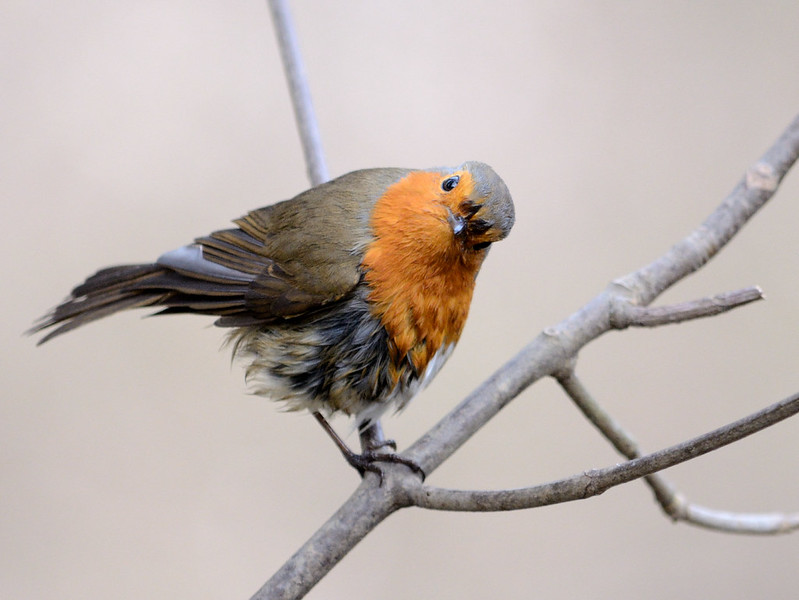
I had to have a go at the robin, but didn't want to fiddle with it too much as he's just too cute!

Mostly done in ACR, selected strong contrast in curves, cropped it, added a slight vignette. Selected saturation and used the touch/ drag slider to increase the lovely colours in his chest feathers.
Used the adjustment brush to sharpen his feathers a touch, then reduced the noise by taking the luminance up to 30.
Increased the fill light to brighten his face a bit and added a splash of clarity.

Opened in photoshop.

Used one of my presets to sharpen the feathers and body just a touch more.
Given a slight levels and curves adjust.

 
woow!!
There's been a lot going on here!! :thinking:
anyway here's my edit:

image.jpg


In Photoshop:
Cloned the branch (not a great job, i know :shake: )

In LR:
Increased clarity, contrast, highlights
That's basically it :)

took me about 10-15 min
 
ok, here be the judging....... I'm going to tread quite carefully here.

David, definately right with the less is more approach here. Both really nice and clean, like the pop in the colour of the siskin more that that of the robin..

phil, another good job - removing that branch coming out his back makes a huge difference, and well done too. un-noticable.

Rhodese, First I'm more than happy to count this as in. great idea and faultless execution. nice pop to the colours, I'm sure I probably have another pair where this might work even better, (light direction, DOF etc) but you only had these 2 to work with, and have done a great job.

Sponner, great edit, clean, clear, bright, branch removal working really well, the match to the BG is seamless. (slight over clone onto the bird...;))

Marsha, :wave:, liking it, definately right to go "less is more", possible a lightening vignette rather than a darkening one might have been more to my liking.
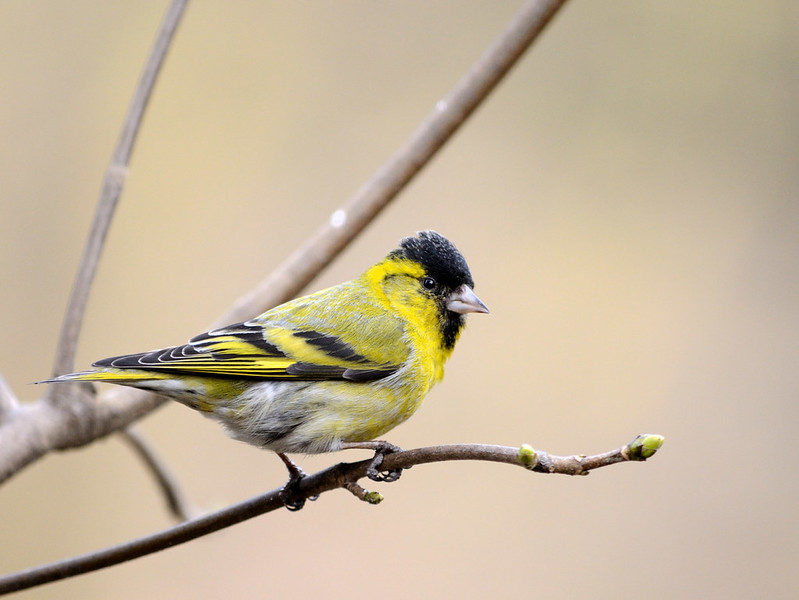
SMAM, think you were right to clone the twigs out, needed a bit more time spending but those similar colour / gradiented backgrounds are impossible for me to clone well too. :thumbs:

Hope no-one takes offence at my feedback, I have tried to stay positive.

Overall, my decision goes to SPONNER. This is the image closest to what what I see from the pro's in the bird forum, with their super lenses and manicured perches.

:thumbs:


---------------------

oops - forgot to add my own edits

Robin


And Siskin
 
Last edited:
Good un Sponner :thumbs:
 
Thanks :) (and yes I did go over the bird a bit, I think I had too much feather on the brush, if you will pardon the pun).

Crumbs I have to try and look out an image, I haven't saved the originals of many, anyone else fancy posting one?
 
Thanks :) (and yes I did go over the bird a bit, I think I had too much feather on the brush, if you will pardon the pun).

:lol:

Crumbs I have to try and look out an image, I haven't saved the originals of many, anyone else fancy posting one?

A jpg will do..... don't fret too much..... :thumbs:

I did have Rhodese down as my runner up if you really are intent on passing over your crown.

Not sure we can handle more controversy..... :eek:
 
Crumbs I have to try and look out an image, I haven't saved the originals of many, anyone else fancy posting one?

I'm exactly the same as you rarely saving much & not shooting in RAW so as Graham says please get one up - don't pass it over as you need to enjoy your shot being fiddled with & then letting loose on us with your comments.

BUT well done Rhodese for the mention as your edit was also very very good :thumbs:
 
Edit, I found this one

monkeyjpg-1.jpg
 
Last edited:
Beautiful shot & shame to chop down but my first step was deciding on crop.

Next as per the LR4 flow screen shots plus slight vignette.

About 20 minutes & critique as you wish :love:

Back to Hob Knobs anyone :thinking:


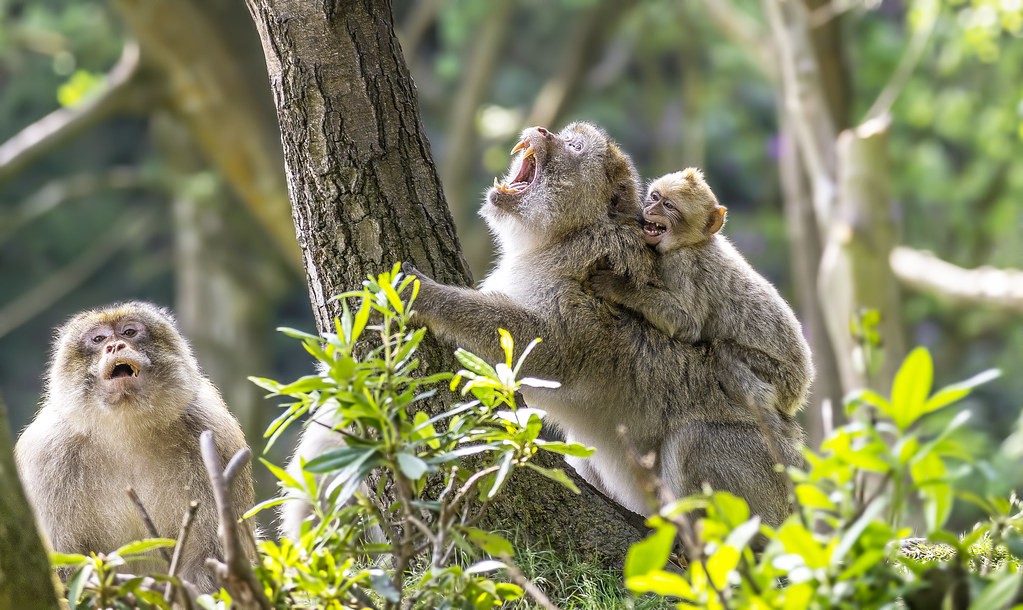
All in ACR:

cropped and re-aligned.

For the entire image I then added some contrast, brought the highlights down a touch and went onto use the adjustment brush.

With the adjustment brush...

Selected the monkeys, sharpened, added clarity, decreased blacks a touch.

Selected the background, decreased sharpness, increased NR, decreased clarity.

Selected the branch, increased clarity, increased sharpness.

Added a vignette.

1013481_10153037956680305_1579306165_n.jpg


Total time: 10mins.
 
Well done sponner.
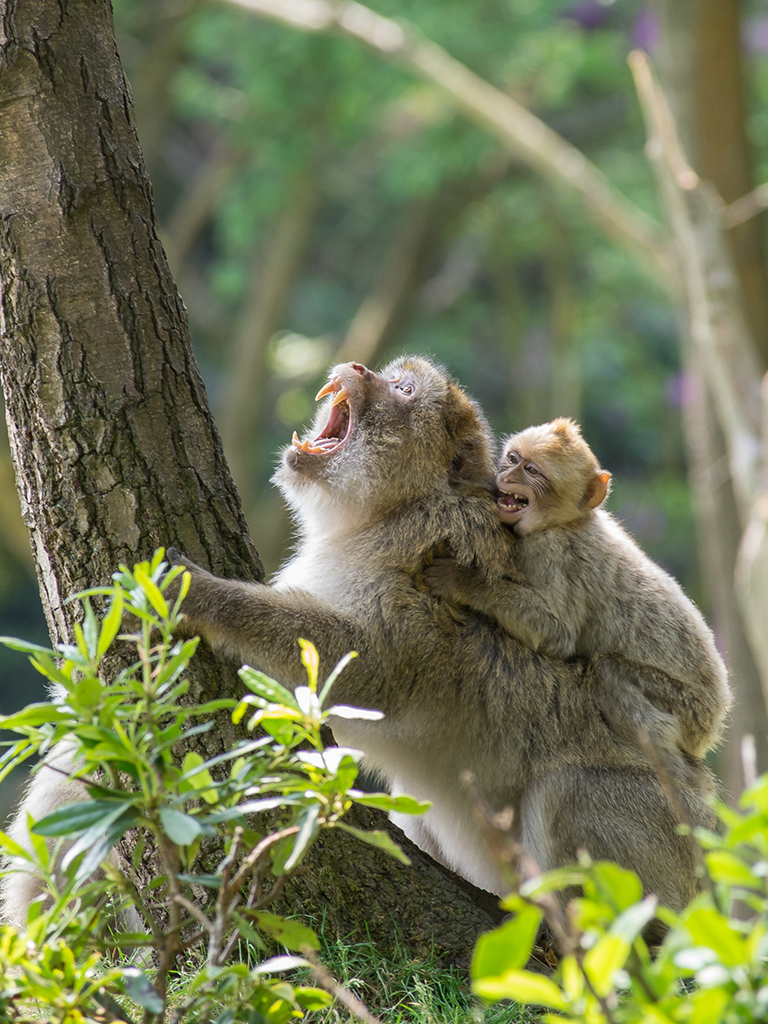
The monkey edit.
Open in ACR, auto and sharpen slightly. Open in PS.
Copy layer.
Laid an 8x 10” crop frame and moved the image around until I had a picture that I liked.
I removed the part of the bright branch on the upper centre that was in frame using the healing brush.
I did the same with the branch on the bottom right.
SAVE.
I made multiple selections of the parts of the partially hidden monkey then used content aware to remove it, then I selected that area feathered by 50 pixels and used lens blur to hide any faults.
SAVE.
I then made a selection, feathered by 100 pixels of the tree in the centre of the original image, now on the edge of my crop. Using brightness and contrast control, I quietened it down.
I used the spot healing brush to remove the highlights in the foliage.
Then applied the crop at 300ppi.
Select all, add border using stroke.
Flatten.
SAVE.
Save for web.

TP-monkey-WEB.jpg


Rhodese.
 
Last edited:
Ok, so someone mentioned about using the adjustment brush in ACR on one of the birdy images. OMG I've never used those before and they're SOOOO useful!

I bow down to the PP game and must spare more time to enter for learning sake!

Here's my go.


Gave it a level and curves tweak, then used a few actions from the Florabella Collection colorplay set to tweak the colours. All with reduced opacity so the effect is minimal.

Cropped to include the stupid looking monkey on the left as he made me chuckle!

Then went off to Google to learn how to add a small vignette, whilst in I saw the transform vertical perspective and decided to try it, added +13 and that just removed the tree peeking in bottom left.

Back to PS and cloned out the last of the tree bottom left.


created 2 copies, one for the monkeys and foreground,
with reduced highlights, increased contrast and midtone contrast

and one for the BG
merged them together manually with a layer mask in PS
lens blur to the bg, being carful not to apply to edges of central tree and monkeys / foliage in foreground
crop to exclude tree on right.

15-20 mins.
 
crop, basic sliders and sharpen slightly
hi pass on monkeys, denoise on backround to blur
brighten
lighten parts of monkey with dodge
save

monkey-1 by flying giraffe, on Flickr
 
Last edited:
Mornin all.
I think I should clarify one of my edit moves. Where I said “Laid an 8”x10”crop frame” this is NOT the crop tool. It is a saved image of a 50% opacity frame made in PS by going to ---FILE---NEW, and with the tabs set as---Preset, Custom. Dimensions set to inches. Width 8, height 10. resolution 300. Colour mode RGB 8bit. Background White. OK.
Open the new canvas and drag the lock on the background layer into the bin, now drop the opacity to 50% and save as PS DOC.
Sorry if this was confusion in my edit.
The saved white mask was the frame I used on the monkey image, switching it on and of as needed.
Rhodese.
 
Last edited:
great edits, I'll call it tomorrow lunchtime if I get chance
 
Some great edits, here's my uninformed take on them.

Daydreamer - great edit really bought out the details

Phil - again details enhanced nicely, not sure about the crop

Rhodese - great edit of the background , I hadn't even noticed the bit of monkey at the base of the tree! monkeys look a little flat for my taste

The goblin - Like the crop including dozy monkey on the left, some of the fur highlights a bit too bright for me

Overbez - really like this one, great contrast between bg and sharp monkeys. Incidentally it looks much better to me when clicked on rather than resized by the forum)

Flying Giraffe - another great one bringing out the detail and emphasising the monkeys

SymetricalOCD - nice conversion but I think the mono loses something of the feel of the pic.

Close to call, struggling between three or four.

I will plump for Overbez.
 
This was how I originally edited it, I may do things slightly differently after seeing your efforts.( It was just basic adjustments in LR and a crop)


monkey4-1 by sponner (staffs), on Flickr
 
oh crap.... I propose a new rule... no passing the win back to the previous winner. :lol:

Graham - well done - we are not worthy :notworthy:

I second, & third, & fourth, your new rule :lol:
 
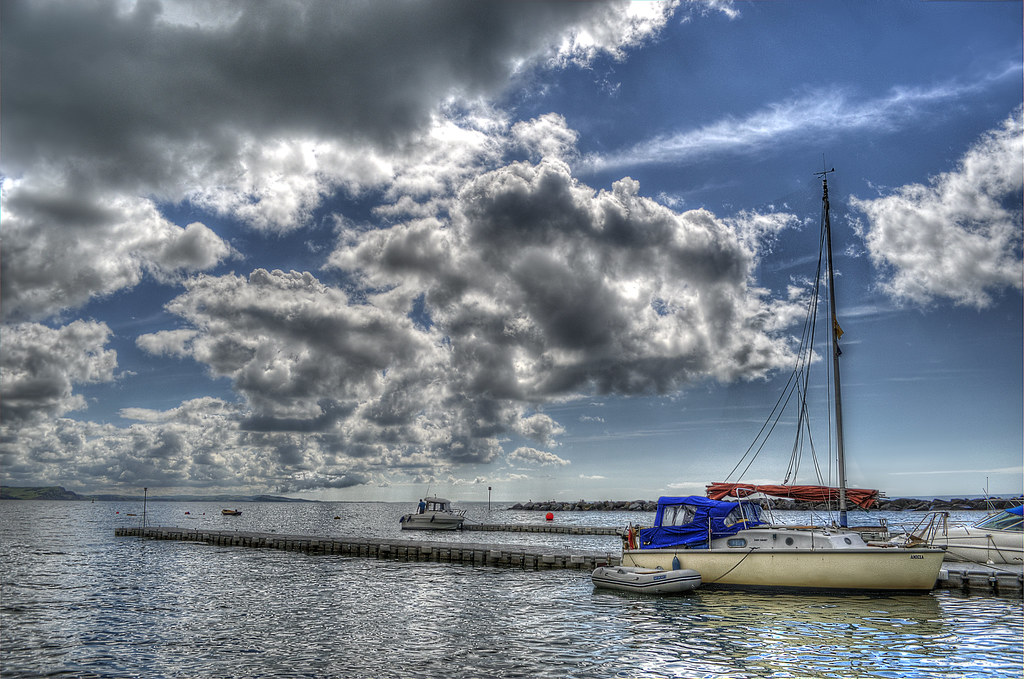
basic slider in raw
lens correction and sharpen
save 3 copies -1. 0, and + 1
merge in photmatix, remove chromatic abberations
save
increase contrast on boat
done

ppboat by flying giraffe, on Flickr
 
Last edited:
Back
Top