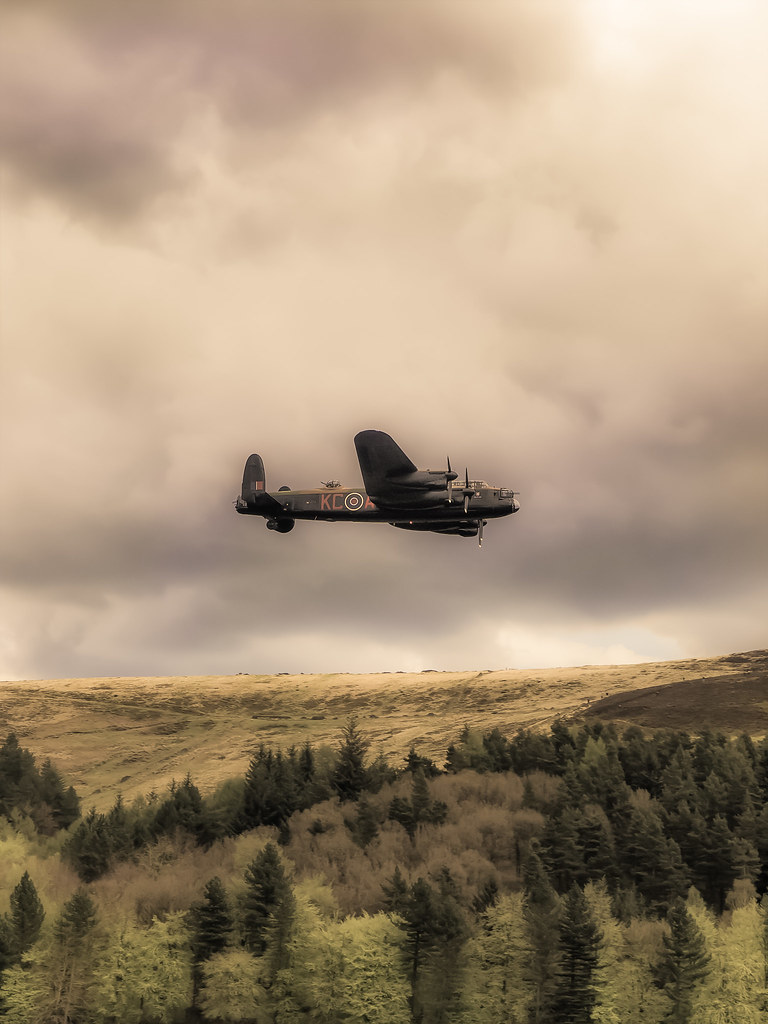
THE PP GAME!

Thanks John :)

You're welcome Lee - us Devon folk must stick together :clap:

Buckfast Abbey - I was there a week or two ago taking shots around the area of your image. An area that looks good to the 'naked eye' but when I got back there wasn't one shot I saved :eek: But I did take shots around the rest of the grounds & inside the Abbey despite one 'nosy parker' pointing out photography wasn't allowed inside. There's a big note on the entrance door saying OK but no flash & I also checked with one of the officials just inside the doorway. So Mr NP ......!!!

 
Not sure much needs doing to this, and I always try to avoid processing for the sake of it.

The obvious thing is lost detail in the sky, the traffic cone, and distortions caused by camera angle.

LR4

5UsGzsl.jpg


Then into PS.

Edit/Transform - Distort to correct verticals against a grid.
Remove traffic cone
Remove patch of grass bottom right
created a B&W layer with heavy blue filtering to darken the sky, and merged with the colour layer using luminosity.

Done.

5 minutes approx.

u5g0l1E.jpg
 
SymmetricalOCD: Very interesting sky... where's the green coming from? LOL No idea how you did that... kind of like a Monét painting. I feel the face is too dark though... and use of +clarity hasn't done her any favours.... made her skin look more shiny.

I did study colour in great detail in my college days. It did look much better on black, in hindsight I'd have created a pitch black border to emphasize the shadow detail that can disappear on whites! :gag:
 
I have the forum set to black here.
 
Last edited:
Well done Lee on the winning edit.
David thanks for the critique.
Setting the forum to black does make the viewing of images better.
Rhodese.
 
David thanks for the critique.

Another great image to work on.


mill-1pp by sponner (staffs), on Flickr

Lightroom set black, white point adjusted shadows and increased clarity.
Converted to mono (topaz bw platinum filter)
reduced cyan sensitivity to put a bit of life in the sky
made right hand edge of foreground building vertical
cloned out grass bottom right corner and the sign.
went mad with the clone stamp and got rid of the hand railing.
Looking to age the scene by 50-80 years
 
Last edited:


Couldn;t get the sky to come back in DPP, so....

made three copies (-2, 0 and +2) and merged them with HDR software
PS to clone out traffic cone,
clone over sign
correct verticals
B&W conversion with channel mixer
slight boost to contrast

10-15 mins
 
Thanks David, your actually right, i checked the image in another device and it was too yellow but strangely my monitor shows it different :)
Well done solo man :clap:

Here is my edit:

DMT_4409_003.jpg


in LR:
increased the temp, contrast, shadows, blacks, clarity
decreased the highlights whites, exposure
I did some other things that cant remember :bonk:
done!

took me about 15-20 min
 
I wanted muted colour but at the same time to give more definition to parts which seemed a little washed out & to get more colour interest in the water & foreground grasses.

The same as SMAM I would have great difficulty in outlining how as it started in LR4 & I've counted about 100 steps in the history channel. That's apart from a copy which I was working on B&W but the end result looked a straight copy of Grahams :lol:

Next into PE10 where I was brushing lots of areas individually to saturate, desaturate, & burn & really trying to get colour in the sky which was flat.

Then into PIcasa but only a very slight tweak on temperature & a very very slight vignette or did I take it off :lol:

At the outset I tried every crop in the book but stuck with the original but with straightening, etc.

 
I've gone all vintage today.

Edit in LR5 trial.

DMT_4409.jpg


Painted out the cone and the sign.
Boosted shadows and dropped highlights and adjusted whites and blacks.
Clarity up and vibrance down.
Further tweaks to these and contrast/exp throughout.

Biggest change for the vintage look:
Spot of split toning with hues 60 and 260.
Curves - lift red and green in middle slightly and make a shallow s curve on the blue channel (approx 25@31%, 75@70%)
And for RGB curves (0@15%, 25@33%, 50@50%, 75@72%, 100@93%) to squeeze the histogram in on both sides.

I put a really tight gradient filter down the edge of the wall on the left and make the right side slightly cooler and dropped the exp.

Squarish vignette.

Edit: And a crop somewhere.
 
Ok, I'm calling this early as I have no Internet connection, and am viewing on my phone.
Interesting set of edits, I couldn't decide whether I wanted this as black and white or colour when it came to editing (as my processing isn't that good)so crops and details aren't high on my list of things to consider.
So bearing in mind I'm viewing on my phone.....
Andrewp: I liked your vintage look, I wasn't keen on the vignette though.
Daydreamer:I really like the crispness of your edit, but, you removed the sign, as it seems a few others did too.
SMAM: Your's was interesting, gives a warm feel, but maybe too much, and your sky looks green ish in places.
Overbez: a nice black and white edit similar to mine, although you opted to remove the sign.
Sponner: A real nice contrasty black and white edit, although not sure removing the railings was how I pictured it.
Pookeyhead: a really nice simple edit, probably the closest to how I saw it, and the most pleasing of the colour images.

I'm going to give this one to Sponner though, I really liked your edit as soon as I saw it..... and, black and white was how I saw it when I took the image.
Pookeyhead and Overbez come a close second.

So well done Sponner.
 
Last edited:
well done sponner. :clap:....

like the surprise early ending Lee, that'll keep everyone on their toes.. :thumbs:

onto the next one please sponner. :thumbs:
 
Thanks for the vote :)

I don't mind posting an image, but being an absolute mewb not sure I am qualified to critique any resulting edits.

I don't have the raws for anything but have a dng or tiff file would that do ?
 
Thanks for the vote :)

I don't mind posting an image, but being an absolute mewb not sure I am qualified to critique any resulting edits.

I don't have the raws for anything but have a dng or tiff file would that do ?

Don't worry about RAW's anything will do - I rarely put up RAWs.

Don't worry about critique of end results - do it my way & just tell us the winner and why you like it but sod the pixel peeping nerds amongst us :D

And well done Sponner for winning :thumbs:
 
CLICK FOR BIGGER


All in PS......
selected foreground trees using magic wand (actually selected sky and inverted selection)
Selected plane by similar method, and adding bits that were missed manually
Foreground, increased contrast
sky, increased midtone contrast
(layer mask used to fade join between sky and foreground over the original tiff)
plane, duplicated layer, blend mode set to screen to lighten
slight noise reduction
high pass filter to sharpen (soft light blend mode)
B&W conversion with channel mixer
moved dark clouds from top left down a bit using select / move tool (plus layer mask to feather join)
Crop
20-30 mins while the wife was watching hollyoaks. :lol:
 
Last edited:
Ok here goes

Gone for am old faded colour photo feel. predictable but i thought the image would look nice. I left the image as is as id imagine a shot form the era would be framed similar.

I need to start loggging my tweaks as i lose myself in them and then struggle reiterating what ive done.


softened the image slightly so i could boost levels without jaggies
all one inphotoshop then loaded into lightroom for zeroing the levels..
extensive dodging and burning of the craft/ sky and trees

3 layers first over dramatised wand saturated the
second black and white over sharpened opacity 11 percent
the 3rd neutralised levels and blended with soft light opacity 23 percent
film filter 24 percent orange

lightroom softened 8 percent and then duplicated then zeroed levels

about 25 mins while surfing youtube :)


bomber-Edit-Edit.jpg by dark mavis, on Flickr
 
Last edited:
here's my effort! I went for an analog film look with the colours. I highly recommend viewing it on black.


lanc-1_Tyreman_edit_240ppi-1 by btyreman, on Flickr

this looks best in LARGE here:

http://farm4.staticflickr.com/3746/9139304372_f24b43793c_o.jpg

Opened TIFF in LR4.4;

Highlights -49,
Shadows +12,
Whites +23,
Blacks -58.

Clarity +23,
Vibrance +59,
Saturation +15.

Tone Curve: Highlights +36.

Split Toning;

Highlights Blue + 34
Shadows Red + 32

Sharpening +55 radius 0.5

removed the red light underneath using the heal brush and another spot near the tail..
used the brush tool with saturation and clarity increased on the plane letters and symbols.
used 2x filters, one for the sky one for the forest, both with improved clarity and in the sky decreased highlights.

exported as jpeg with screen 'standard' settings.
 
Last edited:
Lots of highlight recover over several passes in LR.
created B&W layer with filtration to seperate foliage tones
set B&W layer to 80% opacity
Flattened
Saturation increased to restore colour

LR

Custom Kodak Portra 160VC to add film look.

Done

5 mins approx.

click for big, then click again to zoom
 
Last edited:
Had a quick go at editing this.
Done in Lightroom 4.....
Cropped.... decreased temp.
Increase exposure, decreased contrast
Increased shadows and blacks
Increased clarity, vibrance and saturation
Tone curve sliders decreased highlights, and shadows, and increased lights and darks
HSL luminance sliders
Increased orange, yellow, purple, and decreased blue and green
Sharpened and applied noise reduction
Using the adjustment brush, I adjusted contrast, temp(on the plane), clarity(on the plane)

 
Just downloaded the Lightroom 5 30 day trial so I thought i'd test it out quickly.


PP Game-2 by Jason-Gardiner, on Flickr

Upped the contrast by +16, +35 whites, +33 vibrance and a touch of sharpening.
-10 blacks.
Applied the new radial filter around the plane: -.50 exposure, -50 clarity, -9 saturation.
Took me maybe 3 minutes, 2 of which was figuring out the new radial filter :lol:.

A bit simple, but I like it that way :)
 
Well, I went to the oxpickle and when I got back, it was all over, an edit I had not.
So I garra be quicker this time.

Well done Lee.

The moment I set eyes on this I knew what I wanted to try, a picture that had come form one of the original aircrews wallet. It wouldn’t fit so he folded it, and each time he viewed it the picture became more and more faded more and more damaged, the fold crease starting to brake through and the image fading, as it and the crewman grew older.
But I romance.

The edit.
Open in PS. Copy layer.
Convert to sepia. Then make a selection of the upper third of the image, feather by 150 pixels’ copy and paste into new layer and move down to bring the dark cloud nearer to the plane.
Apply layer mask and mask the clouds over plane. Flatten. Add noise, Square crop.
SAVE.
New layer, select all, select a near white colour from image, stroke 60 pixels. Drop the opacity down low.
Now I imported a mask, an image edge from an old Digital Photo disc, sized and moved into position, changed blend to screen.
Flatten.
SAVE.
Now with a mixture of brushes and tools I created the crease, tears, holes, etc.
SAVE.
Save for web.

TP-PLANE-WEB-1.jpg


Rhodese.
 
Last edited:
In relation to my edit, does anyone know of a method for removing the background that the picture is on, so that when viewed on the web it is seen as being torn and not on a white backing?
 
Christian, thanks for the response, now how do I save it for the web keeping it bellow 200k. I use PS.
Rhodese.
 
Christian, thanks for the response, now how do I save it for the web keeping it bellow 200k. I use PS.
Rhodese.

What I do for FB is resize it so the longest edge is 960px (give a little sharpen) then hold shift, ctrl, alt & S at the same time, that opens the save for web box.
 
Ok, so had my first go in LR5, just kind of played around a bit with all the sliders then corrected bits here and there. Tried the graduated filter thingy too to darken the sky a bit.
It's very clever but I'm still pretty clueless with it! Anyhow here's my edit.

 
click save for web, but under 200k may be a struggle as transparencys and pngs are bigger than jpegs theres no need for a 200k limit though with todays web connections?

Thanks again :thumbs: but TPs limit is 200k
Rhodese.
 
What I do for FB is resize it so the longest edge is 960px (give a little sharpen) then hold shift, ctrl, alt & S at the same time, that opens the save for web box.

Thanks I'll try that.
Rhodese.
 
Thanks everyone, I’ve just re-read the rules on posting images and it’s only if you use TP to host that the 200k rule applies. Silly me, I put it down to being born into the age of “steam wireless”.
Rhodese.
 
Thanks everyone, I’ve just re-read the rules on posting images and it’s only if you use TP to host that the 200k rule applies. Silly me, I put it down to being born into the age of “steam wireless”.
Rhodese.

So your real name is Fred Flintstone :lol:
 
Oh, no no no, he's my grandson.
Rhodese. :lol:
 
Back
Top