
and help to keep the site free for all
You are using an out of date browser. It may not display this or other websites correctly.
You should upgrade or use an alternative browser.
You should upgrade or use an alternative browser.
THE PP GAME!
- Thread starter Phil Young
- Start date

Dr_O
Suspended / Banned
- Messages
- 1,517
- Name
- Dr Ozone
- Edit My Images
- Yes
Hi Jim,
It’s not the getting it into PS that concerns me. It’s the saving it from PS that’s the problem, if I save for the web, PS edits the image, i.e. brightness, resulting in an image that is not an untouched RAW.
Rhodese.
I'm sure it's your 'save for web' stuff- I didn't even know that existed

I just save as then choose quality of jpeg from max- if I'm sending to print to anywhere from 4-8 for here

Farmerjim
Suspended / Banned
- Messages
- 1,756
- Name
- Jim
- Edit My Images
- Yes
Ah, I understand.
Solution is....Don't "Save for web".
If you've got a huge file size, reduce image size, say 2000 x 1500 then save as xxxx.jpg, that'll give you the quality size so save at about 7-10 and that should be a decent size for uploading .
Solution is....Don't "Save for web".
If you've got a huge file size, reduce image size, say 2000 x 1500 then save as xxxx.jpg, that'll give you the quality size so save at about 7-10 and that should be a decent size for uploading .
Hi Jim,
It’s not the getting it into PS that concerns me. It’s the saving it from PS that’s the problem, if I save for the web, PS edits the image, i.e. brightness, resulting in an image that is not an untouched RAW.
Rhodese.

nicholi
Suspended / Banned
- Messages
- 230
- Name
- Nicholas
- Edit My Images
- Yes
open file in Lightroom and do all the tweaks i like to do. picture is below
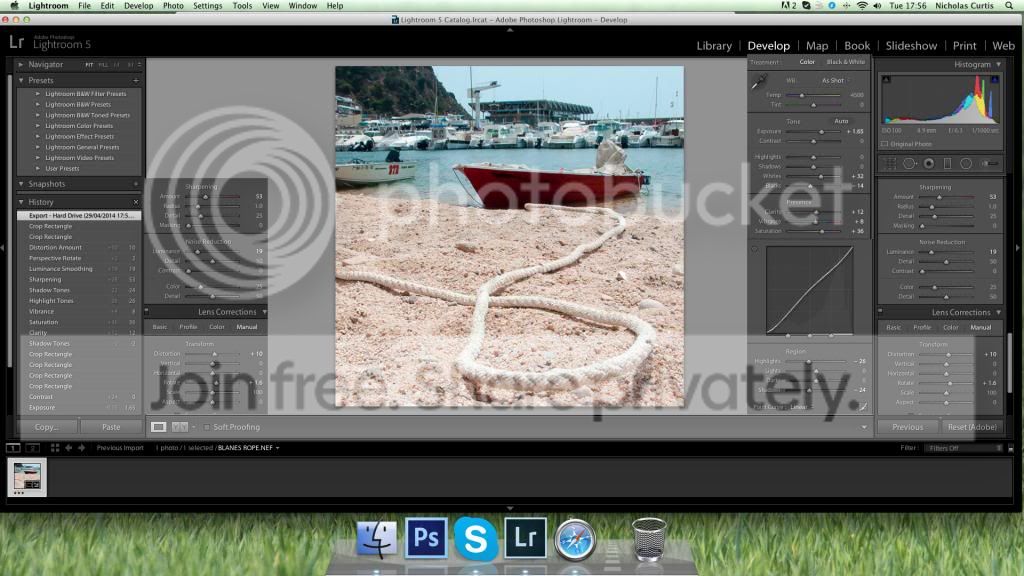
a nice tight crop to try and remove most of the distracting things to the right. save to .jpg and open in Photoshop, clone out the boat to the left (as best i could) and have a look at the picture and thought it was missing something so went back into light room and saved the full picture (un-cropped) then opened that file and cloned the end of the rope into the final image, and up the saturation by +4, flatten image and post to here.
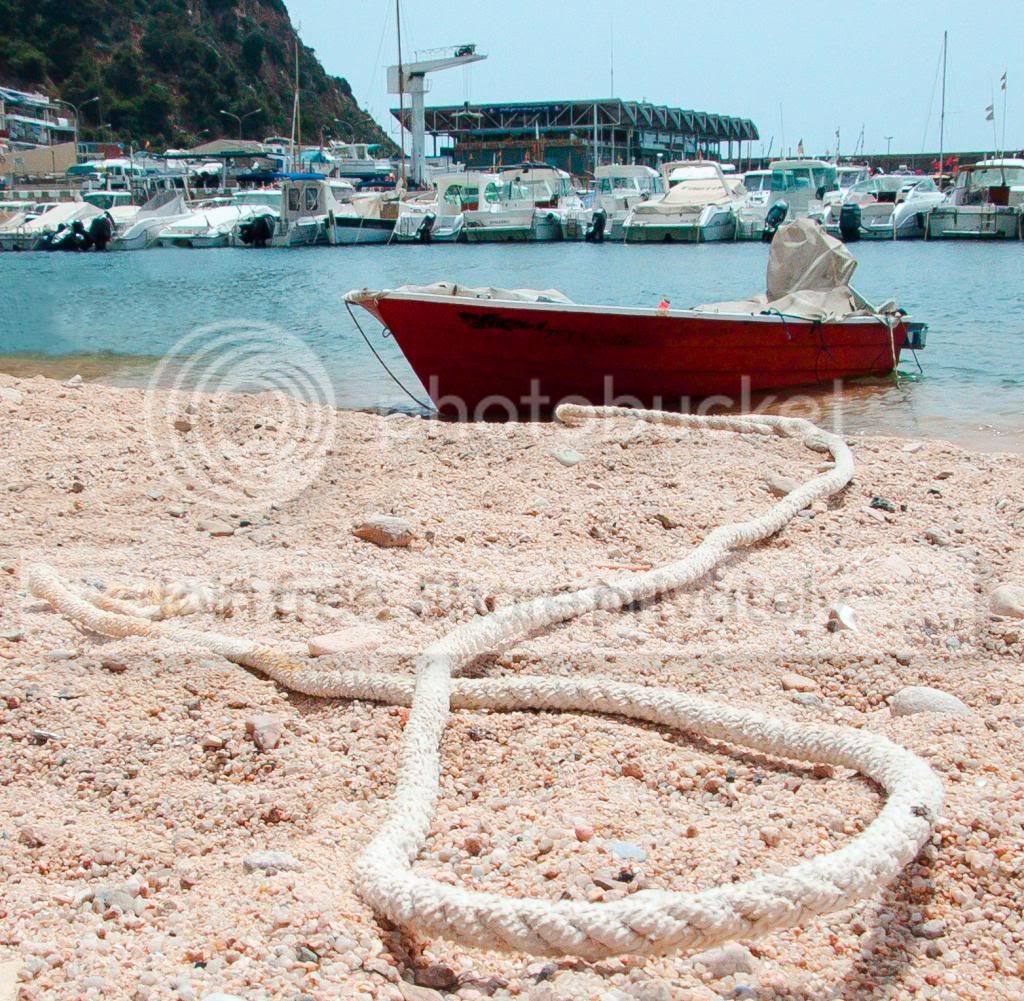

a nice tight crop to try and remove most of the distracting things to the right. save to .jpg and open in Photoshop, clone out the boat to the left (as best i could) and have a look at the picture and thought it was missing something so went back into light room and saved the full picture (un-cropped) then opened that file and cloned the end of the rope into the final image, and up the saturation by +4, flatten image and post to here.


overbez
Suspended / Banned
- Messages
- 4,088
- Name
- Graham
- Edit My Images
- Yes
Nice one Nicholas... anyone else having a crack, don't want to make it too easy for Rhodese to judge, he could flip a coin to decide at the moment.
I couldn't get the WB right hence my B&W conversion, and this (smaller) file seemed a lot slower to respond in ViewNX2 than my D5100 files, which was odd.
I couldn't get the WB right hence my B&W conversion, and this (smaller) file seemed a lot slower to respond in ViewNX2 than my D5100 files, which was odd.

Rhodese
Suspended / Banned
- Messages
- 1,154
- Edit My Images
- Yes
Good morning each,
Graham you are a tease, me flip a coin, never. .
.
The file is an old one 25/06/ 2006 so it’s getting on a bit. Taken with Nikon Coolpix 5700 a 5mp bridge camera, my first digital. I still have it and use it; I bought it from Jessop’s Wolverhampton on the 25/05/ 2005 along with a lens hood, a telephoto converter and 2 x 256mb cards, all for £1095.
The bill has faded so much that I cannot read how much I paid for the cards but I think it was something like £60, how much would 500mb of memory cost today if you could buy such a small amount.
I say my first digital, it was but I had bought a little 2mp Fuji A201 earlier for the missus. A 16mb smart media card for that cost as much as a little compact film camera. The wife never lets me forget. .
.
Come on you lot out there, show this puny little file from a bygone age what you can do. .
.
Rhodese.
Graham you are a tease, me flip a coin, never.
.The file is an old one 25/06/ 2006 so it’s getting on a bit. Taken with Nikon Coolpix 5700 a 5mp bridge camera, my first digital. I still have it and use it; I bought it from Jessop’s Wolverhampton on the 25/05/ 2005 along with a lens hood, a telephoto converter and 2 x 256mb cards, all for £1095.
The bill has faded so much that I cannot read how much I paid for the cards but I think it was something like £60, how much would 500mb of memory cost today if you could buy such a small amount.
I say my first digital, it was but I had bought a little 2mp Fuji A201 earlier for the missus. A 16mb smart media card for that cost as much as a little compact film camera. The wife never lets me forget.
.Come on you lot out there, show this puny little file from a bygone age what you can do.
.Rhodese.
Last edited:
Dr_O
Suspended / Banned
- Messages
- 1,517
- Name
- Dr Ozone
- Edit My Images
- Yes
In LR
Increase saturation on red +22
Increase satuartion on blue +40
With adjustment brush paint shadows on boat +38
Increase vibrancy +31
Add clairty +21
Sharpened to 64
Noise reduction +30 luminance
Tried upping exposure but a lot of noise creeping in- still a fair amount of noise on the boat but will need to do
In PS
Added brightness/ contrast layer and increased brightness to 23
Added levels layer 0,1.14,218
Straightened with ruler but not convinced so used perspective and did it myself- couldn't get it right to my liking but better
Done
 Edit108 by Dr_Ozone, on Flickr
Increase saturation on red +22
Increase satuartion on blue +40
With adjustment brush paint shadows on boat +38
Increase vibrancy +31
Add clairty +21
Sharpened to 64
Noise reduction +30 luminance
Tried upping exposure but a lot of noise creeping in- still a fair amount of noise on the boat but will need to do
In PS
Added brightness/ contrast layer and increased brightness to 23
Added levels layer 0,1.14,218
Straightened with ruler but not convinced so used perspective and did it myself- couldn't get it right to my liking but better
Done
Edit108 by Dr_Ozone, on Flickr
PaulButler
Suspended / Banned
- Messages
- 3,194
- Name
- Paul
- Edit My Images
- No
Been a bit busy of late, unfortunately work has been getting in the way but shouldn't grumble Tried a different take on this, not entirely sure about it but what the heck ...
Import into LR
Apply lens corrections
Crop
Adjust exposure + 1.2
Set WB to daylight (5500, tint +10)
Upped whites +30
Dropped blacks -10
Really pushed clarity +75
Pushed vibrance +30
Pushed saturation +10
Exported as jpg qual 75 set max size to 2048x2048, std sharpening for screen
 not_mine--6 by PabloRosso, on Flickr
Tried a different take on this, not entirely sure about it but what the heck ...Import into LR
Apply lens corrections
Crop
Adjust exposure + 1.2
Set WB to daylight (5500, tint +10)
Upped whites +30
Dropped blacks -10
Really pushed clarity +75
Pushed vibrance +30
Pushed saturation +10
Exported as jpg qual 75 set max size to 2048x2048, std sharpening for screen
not_mine--6 by PabloRosso, on Flickr
Dr_O
Suspended / Banned
- Messages
- 1,517
- Name
- Dr Ozone
- Edit My Images
- Yes
Now that is 'out there' Paul. I'm kind of undecided but good to try- if the rope itself had a shallower DOF and was a bit sharper I think it would lend itself more. I did consider taking a bit of the rope , copying and then somehow joining up to make a figure of 8- but that was far too hard
I did miss a bit though;
 Edit109 by Dr_Ozone, on Flickr
In this case, this isn't an official entry
. I'm kind of undecided but good to try- if the rope itself had a shallower DOF and was a bit sharper I think it would lend itself more. I did consider taking a bit of the rope , copying and then somehow joining up to make a figure of 8- but that was far too hardI did miss a bit though
;Edit109 by Dr_Ozone, on FlickrIn this case, this isn't an official entry
 lol
lol
Rhodese
Suspended / Banned
- Messages
- 1,154
- Edit My Images
- Yes
Good afternoon,
Blimy what am I like, first the snooker and then I forgot it was jab day. So let’s get gooin as they say around here.
Graham,
The flip was a good move, making the viewer read from left to right, though old school, still works.
Black and white? Well err, not sure about that. There is a distinct lack of blacks and if you would excuse the pun, the sand needs to be grittier. It's not quite there but I do like the flip.
Nicholas,
I like the crop (it’s similar to mine). The cloning leaves a bit to be desired, but the removal of the boat and that cover is beneficial.
Alas, the big minus to my eye is the blue/green cast on the upper half of the image; the foreground tone is quite pleasing.
Doc,
I have mixed feelings about this one, it’s sort of OK but it doesn’t move me, the noise? Is it meant to be grain? This is not “Dr_O” standard.
Paul,
Talk about not running with the pack. I like this.
The crux, is Paul’s the same picture? Grahams flip works well, eeny, meeny, miny, moe.
, I will go,………. with Graham, even though it lacks the blacks.
Sorry Paul, well done Graham over to you.
My apologies for my tardiness.
My Edit,
Open in ACR, auto plus warm up the WB. Open in PS.
Copy layer.
Reduce the length of the rope with content aware move.
Crop.
Clone over the grey/black mass on the left.
Enhance the rope and its shadows with dodge and burn.
Create depth of field with, filter- blur-tilt and shift.
Flatten
SAVE.
Save for web.

CLICK IMAGE FOR BIG.
Rhodese.
Blimy what am I like, first the snooker and then I forgot it was jab day. So let’s get gooin as they say around here.
Graham,
The flip was a good move, making the viewer read from left to right, though old school, still works.
Black and white? Well err, not sure about that. There is a distinct lack of blacks and if you would excuse the pun, the sand needs to be grittier. It's not quite there but I do like the flip.
Nicholas,
I like the crop (it’s similar to mine). The cloning leaves a bit to be desired, but the removal of the boat and that cover is beneficial.
Alas, the big minus to my eye is the blue/green cast on the upper half of the image; the foreground tone is quite pleasing.
Doc,
I have mixed feelings about this one, it’s sort of OK but it doesn’t move me, the noise? Is it meant to be grain? This is not “Dr_O” standard.
Paul,
Talk about not running with the pack. I like this.
The crux, is Paul’s the same picture? Grahams flip works well, eeny, meeny, miny, moe.
, I will go,………. with Graham, even though it lacks the blacks.
Sorry Paul, well done Graham over to you.
My apologies for my tardiness.
My Edit,
Open in ACR, auto plus warm up the WB. Open in PS.
Copy layer.
Reduce the length of the rope with content aware move.
Crop.
Clone over the grey/black mass on the left.
Enhance the rope and its shadows with dodge and burn.
Create depth of field with, filter- blur-tilt and shift.
Flatten
SAVE.
Save for web.

CLICK IMAGE FOR BIG.
Rhodese.
PaulButler
Suspended / Banned
- Messages
- 3,194
- Name
- Paul
- Edit My Images
- No
No apology needed Rhodese, glad you liked the edit
overbez
Suspended / Banned
- Messages
- 4,088
- Name
- Graham
- Edit My Images
- Yes
Thankyou Rhodese for your thoughts, and the others for their edits.  This won't be the first time I have had my B&W conversions pulled up for being more grey and white, something I need to pay more attention to.
OK - while we're on "older" cameras, I've dug out the only RAW file I kept from my previous Fuji HS10 bridge camera, I never used to shoot RAW with this as I could never get the results anywhere near as good as the in camera jpegs. One of the reasons was the barrell distortion I always got. But for some reason I shot this one in RAW, and kept it. It does open in Lightzone, which hopefully means it will open elsewhere, or I've converted it to dng.
I'll call it possibly Sunday evening, or if not definately Monday morning... might even treat you to my edit from 2 years ago... it's horrific!
Here's the preview

RAW file link - https://www.dropbox.com/s/vp2b32zcezfj0ky/DSCF9592.RAF
And dng file - https://www.dropbox.com/s/ce3inct9x9mzezc/DSCF9592.dng
This won't be the first time I have had my B&W conversions pulled up for being more grey and white, something I need to pay more attention to.OK - while we're on "older" cameras, I've dug out the only RAW file I kept from my previous Fuji HS10 bridge camera, I never used to shoot RAW with this as I could never get the results anywhere near as good as the in camera jpegs. One of the reasons was the barrell distortion I always got. But for some reason I shot this one in RAW, and kept it. It does open in Lightzone, which hopefully means it will open elsewhere, or I've converted it to dng.
I'll call it possibly Sunday evening, or if not definately Monday morning... might even treat you to my edit from 2 years ago... it's horrific!
Here's the preview
RAW file link - https://www.dropbox.com/s/vp2b32zcezfj0ky/DSCF9592.RAF
And dng file - https://www.dropbox.com/s/ce3inct9x9mzezc/DSCF9592.dng
Dr_O
Suspended / Banned
- Messages
- 1,517
- Name
- Dr Ozone
- Edit My Images
- Yes
Well done Graham . It would be interesting to see a comparison of your original edit against what you can achieve now- might give some hope to the rest of us
Thanks Rhodese- the noise was introduced when I was sliding things to get a look I wanted- didn't seem to easily undo either so had to just go with it. If I'd known I had more time I might have fixed... (no I wouldn't)
. It would be interesting to see a comparison of your original edit against what you can achieve now- might give some hope to the rest of usThanks Rhodese- the noise was introduced when I was sliding things to get a look I wanted- didn't seem to easily undo either so had to just go with it
. If I'd known I had more time I might have fixed... (no I wouldn't)
overbez
Suspended / Banned
- Messages
- 4,088
- Name
- Graham
- Edit My Images
- Yes
It would be interesting to see a comparison of your original edit against what you can achieve now
Cheers Doc.... Oh go on then...... setting the bar REALLY LOW here..... Anyone can do better than this! I'll see if I can over the next few days.
Linked rather than embedded just in case anyone doesn't want to be swayed... http://i.imgur.com/vgrQDDD.jpg
nicholi
Suspended / Banned
- Messages
- 230
- Name
- Nicholas
- Edit My Images
- Yes
only spotted it because you said, now i look at it and its so obvious it hurts my eyes lolNicholas,
Alas, the big minus to my eye is the blue/green cast on the upper half of the image.
well done Graham
i had the fuji hs10 its the camera that started it all for me (not picture taking but loosing money to WEX)
PaulButler
Suspended / Banned
- Messages
- 3,194
- Name
- Paul
- Edit My Images
- No
More boats! Lovely
Slightly more traditional edit this time
Import into LR.
Apply lens profile correction as best as poss (Fujifilm x100 and distortion @ 110)
Crop to remove building far right and much of the dead mud @ bottom.
Exposure bumped 2/3rds stop
Highlights +33
Shadows +20
Whites+20
Blacks -10
Clarity +10
Vibrance +10
Added grad filter from top to 3/4 way down Temp -5, exposure -.5 (darken and blue the sky a bit).
Sharpening Mask 70 Sharpened 60, radius 1, detail 25
NR Luminance 20, detail 50.
Export as sRGB qual 75, max size 2048x2048, std sharpen for screen.
 not_mine-9592 by PabloRosso, on Flickr
Slightly more traditional edit this time
Import into LR.
Apply lens profile correction as best as poss (Fujifilm x100 and distortion @ 110)
Crop to remove building far right and much of the dead mud @ bottom.
Exposure bumped 2/3rds stop
Highlights +33
Shadows +20
Whites+20
Blacks -10
Clarity +10
Vibrance +10
Added grad filter from top to 3/4 way down Temp -5, exposure -.5 (darken and blue the sky a bit).
Sharpening Mask 70 Sharpened 60, radius 1, detail 25
NR Luminance 20, detail 50.
Export as sRGB qual 75, max size 2048x2048, std sharpen for screen.
not_mine-9592 by PabloRosso, on Flickr
Flying giraffe
Suspended / Banned
- Messages
- 1,189
- Name
- Neil
- Edit My Images
- No
expo +0.30
hi lights -43
shads +100
whites+3
blacks -23
clarity +68
vibe +25
sharpen, and reduce noise
topaz filter
done!
 DSCF9592 by flying giraffe, on Flickr
hi lights -43
shads +100
whites+3
blacks -23
clarity +68
vibe +25
sharpen, and reduce noise
topaz filter
done!
DSCF9592 by flying giraffe, on Flickr
Last edited:
Rhodese
Suspended / Banned
- Messages
- 1,154
- Edit My Images
- Yes
I guess most will go for colourful bright sunny day approach, so I think I will go for a mono 1970s camera club look. .
Open in ACR, auto, plus WB change to daylight, open in PS.
Crop and mess with a touch of warp on the foreground left.
Copy layer.
Open a B&W adjustment layer.
Move the blues to the left to darken them, mainly the sky.
The same with the reds to darken the foreground and planking in particular.
SAVE.
New layer, fill with 50% grey, change the blend mode to soft light then painting with black and white dodge and burn for ages and ages..
SAVE.
Flatten.
Sharpen with shake reduction. (Thought the boats may have been swaying on the water.)
Added a brightness and contrast layer.
Flatten.
Add the border with stroke.
SAVE.
Save for web

CLICKIMAGEFORABIGUN.
Rhodese.
.Open in ACR, auto, plus WB change to daylight, open in PS.
Crop and mess with a touch of warp on the foreground left.
Copy layer.
Open a B&W adjustment layer.
Move the blues to the left to darken them, mainly the sky.
The same with the reds to darken the foreground and planking in particular.
SAVE.
New layer, fill with 50% grey, change the blend mode to soft light then painting with black and white dodge and burn for ages and ages.
.SAVE.
Flatten.
Sharpen with shake reduction. (Thought the boats may have been swaying on the water.)
Added a brightness and contrast layer.
Flatten.
Add the border with stroke.
SAVE.
Save for web

CLICKIMAGEFORABIGUN.
Rhodese.
Last edited:
Dr_O
Suspended / Banned
- Messages
- 1,517
- Name
- Dr Ozone
- Edit My Images
- Yes
In LR:
Wont bore you with the details but went down colour option first and then decided didn't really like it so hit a bunch of B&W presets and went from there although not sure if it kept my tweaks and I sharpened twice or not as I didn't reset- could be why I am getting more noise on last couple as I am just building on changes rather than resetting entirely.
Anyway- creamtone preset then;
red +7, green +24, blue -47
sharpening 57
luminance 42, colour 43
In PS:
Add levels layer and increase grey tones
Add brightness layer and brighten
Add 50% grey layer and burn the sky as highlights a bit blown after brightening
Changed to 8 bit then filter gallery and chose dry brush- altered settings a touch but had exported and closed before I remembered to note
 Edit110 by Dr_Ozone, on Flickr
Wont bore you with the details but went down colour option first and then decided didn't really like it so hit a bunch of B&W presets and went from there although not sure if it kept my tweaks and I sharpened twice or not as I didn't reset- could be why I am getting more noise on last couple as I am just building on changes rather than resetting entirely.
Anyway- creamtone preset then;
red +7, green +24, blue -47
sharpening 57
luminance 42, colour 43
In PS:
Add levels layer and increase grey tones
Add brightness layer and brighten
Add 50% grey layer and burn the sky as highlights a bit blown after brightening
Changed to 8 bit then filter gallery and chose dry brush- altered settings a touch but had exported and closed before I remembered to note
Edit110 by Dr_Ozone, on Flickr
Dr_O
Suspended / Banned
- Messages
- 1,517
- Name
- Dr Ozone
- Edit My Images
- Yes
Ok, just had a look at your original edit Graham- you certainly went for it but at least you didn't blow the highlights like me
I like the fact you have put the clouds reflection in as well. Almost has a kind of diorama effect too.
Overall I think I need to get myself a ladder to get over this bar
I like the fact you have put the clouds reflection in as well. Almost has a kind of diorama effect too.
Overall I think I need to get myself a ladder to get over this bar
overbez
Suspended / Banned
- Messages
- 4,088
- Name
- Graham
- Edit My Images
- Yes
Morning chaps, so four to pick from... 2 mono and 2 colour.
Compositionally for me it needed some of the mud going from the bottom to also put the pontoon in the lower left corner. The 'building' far r right is the isle of wig ht ferry, this is Lymington yacht marina IIRC. And also needed to go.
The distortion most visible on the pontoon was another thing I was looking for correcting, all done to some degree, but feel they all need a bit more?
In no particular order.....
Rhodese, nice mono converrsion liking the sky, the crop, the contrast of the black's with the whites,
Dr O, crop would have helped, quite bright, you've mentioned the bright ness of the sky too,
Neil, good to see you in here again, a nice familiar style to the edit, my sort of sky going on there too, crop would have lifted it somewhat, like the choice of colour to.
Paul, lovely look created here, got the crop, the colour of the sky and the splashes of colour among the boats pop nicely. Also not done anything to lower the already low quality of the image.
So I hand the poison chalice to @PaulButler , well done. A further pul to the distortion and maybe clone some water over the mud bottom right would have been the icing on the cake.
I've not done mine yet, and still have half a patio to lay today, I might get time tonight if my hands still work, so over to you Paul,
Cheers guys, enjoy the the bank holiday sunshine
Compositionally for me it needed some of the mud going from the bottom to also put the pontoon in the lower left corner. The 'building' far r right is the isle of wig ht ferry, this is Lymington yacht marina IIRC. And also needed to go.
The distortion most visible on the pontoon was another thing I was looking for correcting, all done to some degree, but feel they all need a bit more?
In no particular order.....
Rhodese, nice mono converrsion liking the sky, the crop, the contrast of the black's with the whites,
Dr O, crop would have helped, quite bright, you've mentioned the bright ness of the sky too,
Neil,
good to see you in here again, a nice familiar style to the edit, my sort of sky going on there too, crop would have lifted it somewhat, like the choice of colour to.Paul, lovely look created here, got the crop, the colour of the sky and the splashes of colour among the boats pop nicely. Also not done anything to lower the already low quality of the image.
So I hand the poison chalice to @PaulButler , well done. A further pul to the distortion and maybe clone some water over the mud bottom right would have been the icing on the cake.
I've not done mine yet, and still have half a patio to lay today, I might get time tonight if my hands still work, so over to you Paul,
Cheers guys, enjoy the the bank holiday sunshine
Last edited:
PaulButler
Suspended / Banned
- Messages
- 3,194
- Name
- Paul
- Edit My Images
- No
Graham, many thanks for the kind words, appreciated Hope the patio laying goes well. I did try a few different things to straighten the pontoon a bit, but I'm too ham fisted at the moment with that sort of thing.
So, continuing with the boat theme, here's one from a couple of years ago https://www.dropbox.com/s/ubgvrbodpjlc162/Eastney_Boat_D600-0070.nef hopefully the link works
And here is a preview of that image
 eastney_boat_unedited by PabloRosso, on Flickr
I'll call it Friday early evening.
Hope the patio laying goes well. I did try a few different things to straighten the pontoon a bit, but I'm too ham fisted at the moment with that sort of thing.So, continuing with the boat theme, here's one from a couple of years ago https://www.dropbox.com/s/ubgvrbodpjlc162/Eastney_Boat_D600-0070.nef hopefully the link works
And here is a preview of that image
eastney_boat_unedited by PabloRosso, on FlickrI'll call it Friday early evening.
Rhodese
Suspended / Banned
- Messages
- 1,154
- Edit My Images
- Yes
Blimmy its quiet in here, where is everybody? .
Cheers Graham..
Gudun Paul, well dun..
I know this is a winter morning shot but I thought it had more of a hazy summer evening feel.
Open in ACR, auto, open in PS.
Crop 16x9 loosing the building on the right.
Copy layer.
Clone to shorten the boat shadow and remove the lamppost.
SAVE.
New layer, fill with 50% grey, change blend mode to overlay.
Sample the foreground colour from the dark blue of the boat.
With a largish soft round brush at 20% opacity, paint/burn the over lit areas of the hull, building up the colour depth.
Do the same with the light blue/green on the upper parts of the boat.
SAVE.
Change the foreground colour to red, with a soft brush just covering the width from the ships to above the land line, the opacity at 2% paint into the land/skyline and a little on the water.
Changing the foreground to white (hit the X key) dodge the white bar down the length of the boat.
Still on the fill layer, select a sky blue colour for the foreground, then using the gradient tool strike a 50% grad from the top to just below the skyline.
SAVE.
On the copy layer make a selection across the image taking in the skyline/trees/ ships and a little of the water and sand in front, feather by 100 pixels and apply lens blur.
Apply a color lookup layer, crisp warm look at 55% opacity.
Flatten.
Add the border with stroke.
SAVE.
Save for web.

CLICK4BIGANDAGAIN2ZOOM.
Rhodese.
.Cheers Graham.
.Gudun Paul, well dun.
.I know this is a winter morning shot but I thought it had more of a hazy summer evening feel.
Open in ACR, auto, open in PS.
Crop 16x9 loosing the building on the right.
Copy layer.
Clone to shorten the boat shadow and remove the lamppost.
SAVE.
New layer, fill with 50% grey, change blend mode to overlay.
Sample the foreground colour from the dark blue of the boat.
With a largish soft round brush at 20% opacity, paint/burn the over lit areas of the hull, building up the colour depth.
Do the same with the light blue/green on the upper parts of the boat.
SAVE.
Change the foreground colour to red, with a soft brush just covering the width from the ships to above the land line, the opacity at 2% paint into the land/skyline and a little on the water.
Changing the foreground to white (hit the X key) dodge the white bar down the length of the boat.
Still on the fill layer, select a sky blue colour for the foreground, then using the gradient tool strike a 50% grad from the top to just below the skyline.
SAVE.
On the copy layer make a selection across the image taking in the skyline/trees/ ships and a little of the water and sand in front, feather by 100 pixels and apply lens blur.
Apply a color lookup layer, crisp warm look at 55% opacity.
Flatten.
Add the border with stroke.
SAVE.
Save for web.

CLICK4BIGANDAGAIN2ZOOM.
Rhodese.
Flying giraffe
Suspended / Banned
- Messages
- 1,189
- Name
- Neil
- Edit My Images
- No
sharpen and adjust in raw
topaz grunge and crop
dust bunnies and blur background
save
 not mine Eastney_Boat by flying giraffe, on Flickr
topaz grunge and crop
dust bunnies and blur background
save
not mine Eastney_Boat by flying giraffe, on Flickr
Dr_O
Suspended / Banned
- Messages
- 1,517
- Name
- Dr Ozone
- Edit My Images
- Yes
OK, took a bit of a different approach
In LR
Standard stuff-
Began in colour with some vibrancy/saturation but couldn't get something I liked
Enter the B&W conversion
Red +13
Orange -22
Yellow -26
Green -73
Aqua -18
Blue +18
Purple +29
Magneta +11
Sharpened 59
Contrast 31
Colour +35
In PS
Sky looking a bit peely-wally
Needs some clouds- in a new layer, created various different brush textures and overlapped with differing colour
Changed opacity to 58%
Added gradient layer to sky with opacity set to 61%
Added new layer and created boat damage
Added new layer , filled with black and then added noise (b&w)
Converted to smart object- added motion blur- angle 65 and distance 83
Added levels linked to smart object - 0,0.52, 166
Still a bit light- added global adjustment levels layer- 19, 0.67, 247
Was going to add lightning strike on boat but decide would take to long to create
Done
 Edit112 by Dr_Ozone, on Flickr
In LR
Standard stuff-
Began in colour with some vibrancy/saturation but couldn't get something I liked
Enter the B&W conversion
Red +13
Orange -22
Yellow -26
Green -73
Aqua -18
Blue +18
Purple +29
Magneta +11
Sharpened 59
Contrast 31
Colour +35
In PS
Sky looking a bit peely-wally
Needs some clouds- in a new layer, created various different brush textures and overlapped with differing colour
Changed opacity to 58%
Added gradient layer to sky with opacity set to 61%
Added new layer and created boat damage
Added new layer , filled with black and then added noise (b&w)
Converted to smart object- added motion blur- angle 65 and distance 83
Added levels linked to smart object - 0,0.52, 166
Still a bit light- added global adjustment levels layer- 19, 0.67, 247
Was going to add lightning strike on boat but decide would take to long to create
Done
Edit112 by Dr_Ozone, on Flickr
Rhodese
Suspended / Banned
- Messages
- 1,154
- Edit My Images
- Yes
Mornin all,
Doc I know what you mean about not looking the same, it happened to my images too.
I have taken the liberty of downloading the full size original and looking at it in PS. It does look better.
I’ve tried allsorts, “Flickr” being the worst. I settled on using the Talk Photography gallery to host the preview for this competition and other images that I post on TP, I then use “imgur” to host the full sized/zoom version.
In an earlier post I asked about the “save for web” option in PS altering the image, it does, but overall I think it does a good job.
Rhodese.
Doc I know what you mean about not looking the same, it happened to my images too.
I have taken the liberty of downloading the full size original and looking at it in PS. It does look better.
I’ve tried allsorts, “Flickr” being the worst. I settled on using the Talk Photography gallery to host the preview for this competition and other images that I post on TP, I then use “imgur” to host the full sized/zoom version.
In an earlier post I asked about the “save for web” option in PS altering the image, it does, but overall I think it does a good job.
Rhodese.
overbez
Suspended / Banned
- Messages
- 4,088
- Name
- Graham
- Edit My Images
- Yes
All in lightzone
upped exposure
increased WB to warm
inc contrast with zonemapper
added detail and adjusted shadows with relight tool
increased vibrance
gaussian blur to foreground
increased detail on boat using colour and polygon selection tools
clone 2 bits from right under building
crop
click for big

upped exposure
increased WB to warm
inc contrast with zonemapper
added detail and adjusted shadows with relight tool
increased vibrance
gaussian blur to foreground
increased detail on boat using colour and polygon selection tools
clone 2 bits from right under building
crop
click for big

PaulButler
Suspended / Banned
- Messages
- 3,194
- Name
- Paul
- Edit My Images
- No
OK, four to choose from
This was shot about 20 minutes after sunrise in mid November, but it was a lovely winters day, with nice warm, soft light. So for me the warmth needed preserving.
@Rhodese - I like this edit, the warmth and softness of the light has been kept, I like the crop and the fact that the boat seems totally abandoned. Only minor niggle is the pier in the background just catches the eye (but only just).
@Flying giraffe - this has lost the warmth and depth of colour and feels very cold. Like the crop and the same niggle as Rhodese re the pier (minor though).
@Dr_O - Definitely a different approach I quite like the mono conversion, it looks like it was taken just as a flash of lightening happened ... not convinced by the rain and the clouds though, sorry.
@overbez - Nice edit here Graham, the sky is good, like the tones and warmth and like the way the pier is less intrusive. Would have preferred the building cropped out, but was also torn with keeping the shadow intact.
For me it comes down to a choice between Rhodese and Graham. Rhodese has the best crop and the colours are lovely, Graham has the best sky and lovely colours though the crop isn't quite there for me. But I think Graham just edges it, sorry Rhodese.
Over to you Graham.
Here's my edit fwiw.
 Eastney_Boat_D600-0070 by PabloRosso, on Flickr
This was shot about 20 minutes after sunrise in mid November, but it was a lovely winters day, with nice warm, soft light. So for me the warmth needed preserving.
@Rhodese - I like this edit, the warmth and softness of the light has been kept, I like the crop and the fact that the boat seems totally abandoned. Only minor niggle is the pier in the background just catches the eye (but only just).
@Flying giraffe - this has lost the warmth and depth of colour and feels very cold. Like the crop and the same niggle as Rhodese re the pier (minor though).
@Dr_O - Definitely a different approach
I quite like the mono conversion, it looks like it was taken just as a flash of lightening happened ... not convinced by the rain and the clouds though, sorry.@overbez - Nice edit here Graham, the sky is good, like the tones and warmth and like the way the pier is less intrusive. Would have preferred the building cropped out, but was also torn with keeping the shadow intact.
For me it comes down to a choice between Rhodese and Graham. Rhodese has the best crop and the colours are lovely, Graham has the best sky and lovely colours though the crop isn't quite there for me. But I think Graham just edges it, sorry Rhodese.
Over to you Graham.
Here's my edit fwiw.
Eastney_Boat_D600-0070 by PabloRosso, on Flickr
Dr_O
Suspended / Banned
- Messages
- 1,517
- Name
- Dr Ozone
- Edit My Images
- Yes
Well done Graham
Thanks for feedback Paul- rain is very difficult to get right although I primarily did it for the different approach of smart object which is not what I would usually do- and I scaled it which I just remembered- usually I would have to crop because of how motion blur treats it. Clouds need a lot more time to get right- building up gradually so I had to compromise a tad. A good composition like that would probably take around 8-10hrs for me to get it looking real.
All good fun though and good to see what everyone did- interesting the majority binned the hotel
Thanks for feedback Paul- rain is very difficult to get right although I primarily did it for the different approach of smart object which is not what I would usually do- and I scaled it which I just remembered- usually I would have to crop because of how motion blur treats it. Clouds need a lot more time to get right- building up gradually so I had to compromise a tad
. A good composition like that would probably take around 8-10hrs for me to get it looking real.All good fun though and good to see what everyone did- interesting the majority binned the hotel
overbez
Suspended / Banned
- Messages
- 4,088
- Name
- Graham
- Edit My Images
- Yes
cheers paul - did consider (briefly) removing the building.... but it would have had to be a clone rather than a crop.
Go to town on this one... I did...

https://www.dropbox.com/s/g7l038ohbpi13zb/DSC_8724.NEF
Probably have to be Tuesday sometime.
Go to town on this one... I did...
https://www.dropbox.com/s/g7l038ohbpi13zb/DSC_8724.NEF
Probably have to be Tuesday sometime.