The Official Fuji X10/X20/X30/XF1/XQ1 Thread

When I upload it from memory card it says it was shot at 7.1mm (how is that possible?!?)

Nice shot, Mirus. To answer your question: the real focal length of the lens is 7.1mm, and due to the crop factor of the small sensor that's used, this translates to about 28mm in 35mm film terms.

Hope that helps.

Have (more) fun with your X10!

Regards,
Rob

P.S. Sorry, missed the reply from VftN...
 
Last edited:
Thanks now its clear! Doh!

AJ welcome to the forum :) I think there will be lots more macro fans soon!
 
Would anyone mind sharing how long the x10 refurb took from purchase to delivery?
 
Thanks MisterRigsby :-)

Is it worth buying accessories at the same time? I see they are offering 40% off if you buy it at the same time as the camera.

If so what is best to buy now e.g. spare battery, memory card, Lens cap etc?
 
Thanks MisterRigsby :-)

Is it worth buying accessories at the same time? I see they are offering 40% off if you buy it at the same time as the camera.

If so what is best to buy now e.g. spare battery, memory card, Lens cap etc?

Souldeep

For memory card go to Amazon. For spare battery, wait and see if Fuji throws one in. For lens hood, Amazon has best offer. Case is up to you ;)


IMHO naturally :wave:
 
Oh no - Mr Houston you've just brought the last one!!! It was in my basket as well but now says out of stock. I can't believe it just as I was about to click buy! Amazing lol.
 
Oh no - Mr Houston you've just brought the last one!!! It was in my basket as well but now says out of stock. I can't believe it just as I was about to click buy! Amazing lol.


Yes I know and I'm truly sorry. I spoke to Fuji about shutter counts and zonal focusing and was encouraged by what they said and did the business on the basis of the tel discussion before I logged in here and saw your interest. They did say when I asked that they do get a supply of units so if the stock does run out, it won't be long before it replenishes. Again, I'm sorry to have jumped in just before you. Had I seen your interest I might have held back since my needs may not be as pressing.
 
Hehe - I'm off to Wales for a long weekend next Friday - that’s why I was checking out how long delivery took. Still you weren’t to know it was the last so no worries. How’s my luck! That will teach me for asking too many questions rather than buying the d*mn thing lol!
 
Hehe - I'm off to Wales for a long weekend next Friday - that’s why I was checking out how long delivery took. Still you weren’t to know it was the last so no worries. How’s my luck! That will teach me for asking too many questions rather than buying the d*mn thing lol!


Well Souldeep, I received the dispatch notification 40 minutes after the order was confirmed so assuming supplies come in early or by the middle of next week, you'll be singing and dancing. Again, my apologies for being just a little too quick on the draw.

Enjoy your weekend.
 
i ordered mine on sunday evening and received it on wednesday and that was just the normal delivery
it got dispatched monday
i have not had a chance to get out and use mine other than a few shots around the house and messing with the super macro mode
anybody care to share any settings such as
dynamic range
colour settings
sharpness etc
 
Want to know how the X10 HD video performs in real life conditions? Well I have put my first sample video up on my blog and you can check it out here! Its in 1080 so dont forget to change the quality if you can :)
 
Last edited:
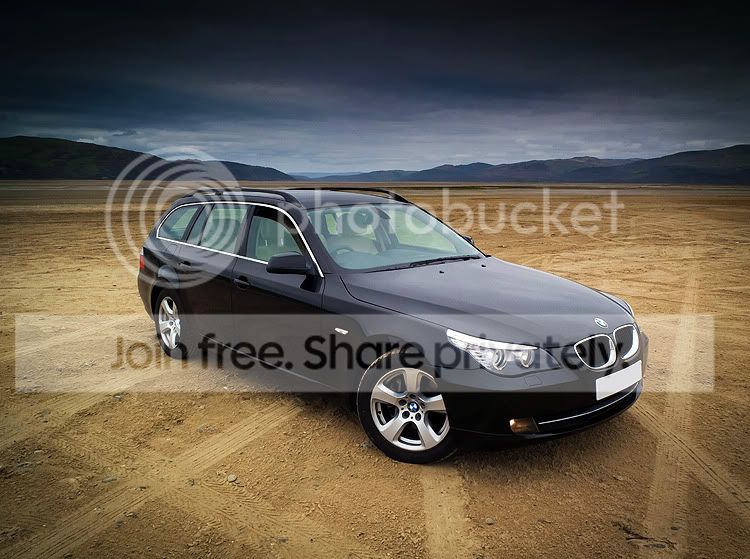
Top Gear Style PP Shot Of My Car With X10
DSCF35672Small.jpg


Daz
 
Top Gear Style PP Shot Of My Car With X10
Daz

Well done mate... That's a cracker!

Ynyslas beach lends itself nicely to this sort of shot too. ;)

I'm going to put my X10 through its paces at Chester Zoo tomorrow... Should be interesting!
 
Well done mate... That's a cracker!

Ynyslas beach lends itself nicely to this sort of shot too. ;)

I'm going to put my X10 through its paces at Chester Zoo tomorrow... Should be interesting!

well spotted Si :) have fun at the zoo tomorrow, There are some Animatronic Dinosaurs arrived there for the season i believe, could make some interesting shots

Daz
 
well spotted Si :) have fun at the zoo tomorrow, There are some Animatronic Dinosaurs arrived there for the season i believe, could make some interesting shots

Daz

Cool... I'll look out for those! I'm hoping to see the tiger cubs being incredibly photogenic and cooperative (fat chance on the latter)! ;)

Can't wait to give the new 300mm F4L IS a run for its money too.

Si
 
Cool... I'll look out for those! I'm hoping to see the tiger cubs being incredibly photogenic and cooperative (fat chance on the latter)! ;)

Can't wait to give the new 300mm F4L IS a run for its money too.

Si

new 300mm F4L IS + Zoo.......... I am not Jealous..... At all :thinking::thinking::thinking:
 
Just a quick note re using off camera flash with the X10. I struggled earlier to identify why it wasn't working. I have established the camera has to be in single frame drive mode, and either regular or macro mode. It will not work in super macro mode. You also need to go into the menu and switch external flash to on. Hope that helps :)
 
Order placed.

Thanks for the private heads up Houston1863 :-)

Bring on Wales and the good weather :crossed:
 
Order placed.

Thanks for the private heads up Houston1863 :-)

Bring on Wales and the good weather :crossed:


Joy to you Souldeep :clap:

Indeed may you have good weather though I'm sure you'll enjoy using the X10 in any weather.

Mine arrived this morning ( my first non-Canon for quite a while ) and I've since been buying little toys such as the lens hood and protector filter for it. Have to think of a bag now. I'm not into ER cases and don't want to look like a tourist :lol:

You'll love the X10 friend. It's a neat little thing that feels very well-made :thumbs: Best to read through the menu so as to get the best from the camera.
 
Last edited:
Oh Dear.... Sorry to be a bit of a party pooper....
But last nights sunset turned out very orb-tastic.

ISO 100, 7.1mm, f3.2, 1/450s, RAW processed with LR4 defaults; this is full frame!
i-d3gvbWV-XL.jpg


This is the first in the set - I got my composition sorted out in later images.
I've shown this one because in the later images I wound the X10 up to f11 for full on star bursts, which look great and hides the worst of the orb.
But now I've seen the orb it kinda spoils the later images for me....
 
I really do love my X10. So far I can live with the orbs but there is one other thing that troubles me a bit: quite often the autofocus needs several attempts to lock on.
Anybody else having that problem? I'm in AF-S mode.
 
I only bought mine yesterday so bit early to judge but I noticed the same (also in AF-S as testing with screen turned off and can't do that with AF-C??). However, I was indoors in low light (damned energy efficient bulbs!)
Now and again it just wouldn't focus straight off but release and try again and it focused straight away without even moving camera. Will see if it does this outdoors as luckily I don't actually do low light, all my photography is daylight outdoor stuff but not really the point. What I was impressed with is how well the images came out in such poor light.

I have been through a number of cameras over the last few months and the X10 is the first one that just feels right. I tended to buy used and sell on as not really losing any money that way but have tried LX3, Ricoh GRD, Samsung NX100 and maybe some others I have forgotten! None had the same feel and none had a viewfinder which is the thing I missed most when not using an SLR.

I think I was underestimating how much difference it makes to have a camera that actually feels nice to use and only bit the bullet on the X10 when saw Jessops were selling for £391 with interest free (I am a sucker for interest free!)
 
Last edited:
Unless you have some of the fancy features turned on, the X10 uses contrast detection in the centre of the screen (the green square).
You need to place the green square on something with a hint of texture, then recompose.
There is no magic. You get used to it :)
 
What I was finding is that on first press it would focus. Release and try again and it would focus (without moving camera, so still pointing at exactly the same thing)

Will be able to properly check the camera out tonight but pretty impressed with the operational speed of it. Quick focusing (when working!) and virtually non existent shuter lag.

For me personally the combination of zoom using lens barrel and a viewfinder make it feel like a proper camera to hold and use.
 
Hi all,

I've had some great shots with the X10 but last night was my first disappointment. I took some night time shots in EXR and pro low light mode and they all consistently over exposed. All highlights blown to bits and generally bad images. In aperture mode I needed to drop two stops. Anyone seem this?

Regards
Steve
 
:clap: stunning! Is that straight out the cam - taken in Velvia mode?

Cheers :beer:
Velvia mode - but not straight out the camera.
I love the way shadow detail can be pulled back using LR4; really shows how good the RAW is.
LR3 wasn't this good at pulling shadow detail back.
My new mantra is going to be expose for the highlights - the shadows seem to be just fine!

Here's straight from the camera (LR4 defaults) - I'm not sure this uses the Velvia rendering hint so will look rather dull; but I may have slightly overcooked my PP :)
i-pF3dJGc-M.jpg
 
Last edited:
I assume thats Light Room V4? Havn't ever used it - I use corel or PhotoShop. Is Light Room the app to get into for PP?

Thanks for posting the comparisons. Interesting to see the difference a bit of PP can do!
 
Duncan, may be misunderstanding what you have stated but do the film modes get applied to the RAW file as usually those sort of settings are only applied to JPEGs. What settings are applied to RAW files on X10?

(Sorry if all this is in manual, haven't opened it yet!)
 
I assume thats Light Room V4? Havn't ever used it - I use corel or PhotoShop. Is Light Room the app to get into for PP?

Thanks for posting the comparisons. Interesting to see the difference a bit of PP can do!

Lightroom is not just about PP - it is about the whole camera to print/export lifecycle including storage, keywording, publishing and printing.
The PP is plenty good enough for 99% of my needs - I still use Photoshop, but not very often.
LR4 does amazing things with highlights and shadows that just weren't possible with LR3.
I've posted a few examples on pages 4 and 5 of this LR4 thread.
http://www.talkphotography.co.uk/forums/showthread.php?t=391451&page=4
The differences look fairly subtle at this size unless you save the images and are able to flip between them - but the differences are REALLY impressive viewed full screen.
If you want to see some job-lot processing in LR4, then I recommend having a glance at my recent Frome Folk Festival blog entry as every image in there needed breathing on in PP to cope with dodgy stage lighting and bad contrast. This was the first set of concert images I've put through LR4 and I was really impressed with what is achieves.
For interest, no other application was used on this festival set other than Lightroom. If an image ever gets chosen for use on an album sleeve then I'll polish it up in Photoshop; but I'll worry about that when/if it happens.

Duncan, may be misunderstanding what you have stated but do the film modes get applied to the RAW file as usually those sort of settings are only applied to JPEGs. What settings are applied to RAW files on X10?

(Sorry if all this is in manual, haven't opened it yet!)

You know - I'm not really sure!!!!! :thinking:

Most settings only affect the in camera JPEG. Just a few parameters like white balance get passed over to Lightroom as rendering hints for the RAW conversion.
I've been assuming that Film Simulation applies just to the JPEG; but I've not checked.
It needs someone to run some quick tests; if nobody posts the answer this afternoon then I'll do some testing later.

 
Last edited:
I posted some time ago that the film simulations weren't carried over to Lightroom when using raw. Then I reversed my opinion.

Having just taken some test shots in four different film simulations and opened the RAF files in Lightroom 3 they all looked the same. Sepia and B+W opened for development in colour. The initial previews looked as shot, but once clicked on them they reverted to a default colour setting.

I'll get my coat...
 
I posted some time ago that the film simulations weren't carried over to Lightroom when using raw. Then I reversed my opinion.

Having just taken some test shots in four different film simulations and opened the RAF files in Lightroom 3 they all looked the same. Sepia and B+W opened for development in colour. The initial previews looked as shot, but once clicked on them they reverted to a default colour setting.

I'll get my coat...

Cheers Ed :thumbs:

The initial rendering comes from the thumbnail embedded inside the RAW; this is generated by the camera which is why it looks like you expected.
Lightroom then replaces the embedded thumbnail with one of its own, but it has to generate it first.
Hence the flash of B&W before reverting to colour.

I've also seen this with the 5DII regards hot pixels.
You get a momentary flash of the embedded thumbnail including the hot pixels before LR stamps on them permanently.....

Edited to add.....
Losing the B&W is sometimes really annoying.
I believe that the Canon and Fuji software supplied with the cameras honour the settings and will convert the RAW with the film style applied.
But the consensus opinion is that both software programs are rubbish and LR is vastly preferable.

Bottom line is when experimenting with B&W, set the X10 to save both RAW + JPEG.
Get the best of both worlds :)
 
Last edited:
Back
Top