The Fabulous Fuji X owners thread

And I don't know if it makes a difference.... But shooting RAW/jpeg I have DR200, HL -2, SH -1, Colour/Sharp/NR all set to zero.

I'm not sure how LR gets the 'preview' images for Fuji? From in camera jpeg settings? I've never shot jpeg on the Sony bodies!
 
And I don't know if it makes a difference.... But shooting RAW/jpeg I have DR200, HL -2, SH -1, Colour/Sharp/NR all set to zero.

I'm not sure how LR gets the 'preview' images for Fuji? From in camera jpeg settings? I've never shot jpeg on the Sony bodies!

Lee

I've just gone back and looked at some X100F files from the original touch and try day back in 2017 - this is before I set up import profiles for my Fuji files - The RAW file has a color profile of Adobe Standard and a default sharpening set to 25, the corresponding JPG has a profile of 'Embedded' and a deafult sharpening of 0. But I don't know what would happen if lightroom has any default import profiles set up, do you have any? (I have a Fuji Import Profile that I made, that stes the sharpening of teh RAWs to 0 and sets the basic colour profile to Provia on import (Edit > Preferences menu)

There is JPG preview embedded in the RAW so thats how lightroom sees the initial Fuji profile in the RAF files.

I'm not sure how you are seeing the original sharper before you apply details, unless the act of editing (developing) the RAW it is taking it out of the embedded JPG image (which has the camera settings applied, and putting to basic lightroom import settings)

Are you have this issue on RAWs of JPGs (or both)

 
Can anyone share their 'sharpening' settings for LR for Fuji please? Just been playing around on a lazy Sunday afternoon.......
Like David, I have an import filter set up which sets the sharpening value to 0. I edit, crop etc in LR, then export to PS to resize, sharpen (using unsharp mask) if necessary, and add a border. That is my basic workflow that I've been running on my Fuji files for a number of years now. Sometimes, on things like portraits I'll enhance the eyes etc, but I keep most things fairly basic.

I have found that removing the sharpening in LR allows you to be in control of what is sharpened, by how much, and by which method and doing it in PS gives me better results (not that my images are that good anyway, but it's a method at least :LOL: ).
 
Lee

I've just gone back and looked at some X100F files from the original touch and try day back in 2017 - this is before I set up import profiles for my Fuji files - The RAW file has a color profile of Adobe Standard and a default sharpening set to 25, the corresponding JPG has a profile of 'Embedded' and a deafult sharpening of 0. But I don't know what would happen if lightroom has any default import profiles set up, do you have any? (I have a Fuji Import Profile that I made, that stes the sharpening of teh RAWs to 0 and sets the basic colour profile to Provia on import (Edit > Preferences menu)

There is JPG preview embedded in the RAW so thats how lightroom sees the initial Fuji profile in the RAF files.

I'm not sure how you are seeing the original sharper before you apply details, unless the act of editing (developing) the RAW it is taking it out of the embedded JPG image (which has the camera settings applied, and putting to basic lightroom import settings)

Are you have this issue on RAWs of JPGs (or both)

Everything for RAW Import is set to 'Adobe Default' - I've never used or set anything up in there.

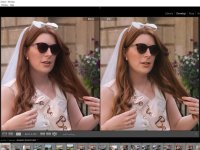
This is the RAW files in LR - the actual jpegs from camera were in Acros and they are SOOC in the folder. I don't actually use the jpegs.


Okay..... SO I have a few 'Portra' presets that I use which have the same base 'profile' in them.

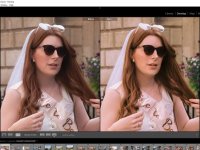
If I just pick JUST the 'profile' (top right) sharpness is fine.
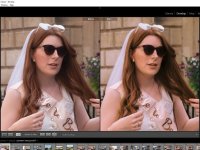
If I click a usual Portra 'preset' that I use the sharpness goes - if I switch ALL the adjustment tabs off (tone curve, HSL, etc) it's still unsharp which is what I don't get as surely that's just the 'profile' applied..... the same profile as above.....
 
Everything for RAW Import is set to 'Adobe Default' - I've never used or set anything up in there.

This is the RAW files in LR - the actual jpegs from camera were in Acros and they are SOOC in the folder. I don't actually use the jpegs.


Okay..... SO I have a few 'Portra' presets that I use which have the same base 'profile' in them.

If I just pick JUST the 'profile' (top right) sharpness is fine.
If I click a usual Portra 'preset' that I use the sharpness goes - if I switch ALL the adjustment tabs off (tone curve, HSL, etc) it's still unsharp which is what I don't get as surely that's just the 'profile' applied..... the same profile as above.....
Does Adobe LR default to a sharpness of 25 when importing the RAWs?? It certainly used to with Fuji RAFs

Is it possible that your profile has less sharpness than the default of 25 hence you are seeing softer images with the profile applied?

Or am I missing the point?
 
Does Adobe LR default to a sharpness of 25 when importing the RAWs?? It certainly used to with Fuji RAFs

Is it possible that your profile has less sharpness than the default of 25 hence you are seeing softer images with the profile applied?

Or am I missing the point?

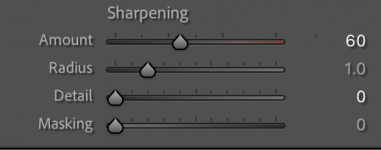
If I RESET the RAW I get this for sharpening

Amount - 20
Radius - 1.0
Detail - 25

What I can't understand is....

screenshot 3 above (the last one) is JUST the Portra profile applied - direct from the 'adobe colour' drop down.
screenshot 2 is my preset applied which includes the same Portra profile BUT with everything switched off - tone curve/HSL/etc etc

screenshot 3 is good, 2 isn't - but surely 2 is JUST the Portra profile?

It's okay. I'll work it out......

I just wanted some DETAIL settings from other people to look into.

Thank you for your input & suggestions David :)
 
Wish I could help, but only use PS and ACR...
 
I know what you mean, I sent another 5 rolls off yesterday, hopefully get the negatives back early next week, and then the scanning will start!
Not yet. Been a bit busy and I got film scans back yesterday so. .... I had something else to do :ROFLMAO:
Are you guys scanning with a camera or dedicated scanners?
 
I haven't had much opportunity to use my new X100vi but one thing I would find useful is a very low profile shutter release button.
I bought a couple from Amazon but they stick up quite a long way above the top of the camera.

Any suggestions for a low profile one?
 
I haven't had much opportunity to use my new X100vi but one thing I would find useful is a very low profile shutter release button.
I bought a couple from Amazon but they stick up quite a long way above the top of the camera.

Any suggestions for a low profile one?

Not used one sorry. Got it as standard on the X100f.
 
I haven't had much opportunity to use my new X100vi but one thing I would find useful is a very low profile shutter release button.
I bought a couple from Amazon but they stick up quite a long way above the top of the camera.

Any suggestions for a low profile one?
Which ones did you try? When I had one on my T2 it was concave.
You could try filing the thread down a little, but potentially risky.
 
I haven't had much opportunity to use my new X100vi but one thing I would find useful is a very low profile shutter release button.
I bought a couple from Amazon but they stick up quite a long way above the top of the camera.

Any suggestions for a low profile one?
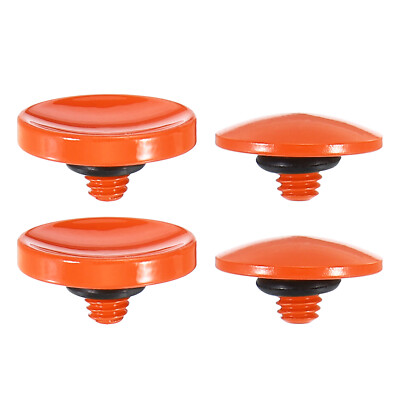
I've just had a look on eBay to see if I could find one like mine: it's concave, but metal and very thin, there's no knurling on the edge.

Couldn't find it; but I did find these, and the convex ones look quite a lot lower than the concave...

 
My son, Eddie setting up his Sony A7iv at Dinorwic, This is a SOOC JPG (other than the 5:4 crop) from the X-Pro1 + XF35mm F1,4

B/W + Yellow filter, Hightlight +1, Shadow +1


Eddie at Dinorwic by David Yeoman, on Flickr
Fabulous capture that, a brilliant combo that .....XP1 and the fabulous 35/1.4


Regards.
peter
 
Back
Top