What's the pros/cons of them compared to each other?That makes the H2 a really good buy.


You are using an out of date browser. It may not display this or other websites correctly.
You should upgrade or use an alternative browser.
You should upgrade or use an alternative browser.
The Fabulous Fuji X owners thread
- Thread starter mart77
- Start date

trevorbray
Suspended / Banned
- Messages
- 9,141
- Name
- Trevor
- Edit My Images
- No
They both produce the same end result. It’ll come down to individual handling preferences. Traditional T5 versus the SPAM dial and better EVF of the H2. I prefer the H2 especially with the C1-C7 custom settings on the SPAM dial. I’d love a silver T5. They are so pretty.What's the pros/cons of them compared to each other?

Lost_Manc
Suspended / Banned
- Messages
- 339
- Name
- Rob
- Edit My Images
- No
Compared to an XT-5?What's the pros/cons of them compared to each other?
I don’t own either, but to add to what @trevorbray has said…
Size. The H2 is bigger and with a bigger hand grip.
The screens. Fully articulated on H2 vs the 3 way tilt on the T5.
Faster buffer on the H2 possibly solely down the the CFex card but think I read it might be more than just the card.
Speaking of cards. 2x SD with T5 and 1 of each with the H2 (CF & SD)
Battery grip not available for the T5 if that matters.
Full size HDMI on the H2.
If you use a remote release then the H2 doesn’t have the traditional shutter release with the thread like the T5 however, if you use the a ‘modern’ release cable and an L-Bracket then the H2 has this relocated to the right hand side of the body and this then doesn’t interfere with the L-Bracket I believe. Possibly the same with the headphone point.
Those are the standouts to me beyond what Trevor mentions.
D
Deleted member 90866
Guest
Looks like. £869 was the lowest I've seen - MPB, good condition with 6 month warranty.X-T4 prices is creeping down, seen decent condition ones at £900 on a few sites now. Meaning they probably bought them from people for £700?
I'm itching to get one right now, because my X-T2 is gone and I'm camera-less for the first time in ages. But I suppose that waiting a couple of weeks is a good idea, given the postal service and extra pressure on couriers.
After trying the X-H2 and being realistic about my needs and wants (really wanted a bit more flexible custom settings than my X-T3 and IS) I bought an £879 from them. Came unboxed and with an EU charger plug and with a couple paint scuffs here and there but other than that for half the price of an X-T5 kinda makes sense. I do think though that either the silver versions feel a bit cheaper made or the X-T3 was a better built camera. Especially the shutter button and the click wheels feel much better on the X-T3.Looks like. £869 was the lowest I've seen - MPB, good condition with 6 month warranty.
I'm itching to get one right now, because my X-T2 is gone and I'm camera-less for the first time in ages. But I suppose that waiting a couple of weeks is a good idea, given the postal service and extra pressure on couriers.
On a slightly different note does anyone know if on the X-T4 I can assign Auto-ISO to a custom setting? I thought I could but can't seem to. Am I missing something or is this something they just brought to their newer cameras (definitely can on the X-H2)?
Last edited:
I think the other big difference is that for smaller hands the X-H2 can be quite awkward to handle. My hand struggles to wrap around the grip and I find the back wheel hard to use unless I hold the camera with both hands. I absolutely loved the build quality and the EVF of the X-H2 though. If it was not for the awkward ergonomics (again just for people with small hands, if you have normal sized hands you'd probably prefer it) I might have just decided to face the wrath of the other half and gone for it regardless instead of a much cheaper X-T4.They both produce the same end result. It’ll come down to individual handling preferences. Traditional T5 versus the SPAM dial and better EVF of the H2. I prefer the H2 especially with the C1-C7 custom settings on the SPAM dial. I’d love a silver T5. They are so pretty.
Lost_Manc
Suspended / Banned
- Messages
- 339
- Name
- Rob
- Edit My Images
- No
As in can you assign the auto 1, 2 & 3 profiles to a button or are you meaning something else?On a slightly different note does anyone know if on the X-T4 I can assign Auto-ISO to a custom setting? I thought I could but can't seem to. Am I missing something or is this something they just brought to their newer cameras (definitely can on the X-H2)?
You can most definitely assign a button to switch between auto 1-3.
Set up you min/max/ss for each of the profiles.
Exit the menu and press and hold the back/disp button.
You can then assign any of the buttons to suit. (I use one of the d-pad buttons) to auto iso.
Then just stick the iso command dial to ‘A’ and use the assigned button to switch between profiles as needed.
That all assumes of course that’s what you were referring to!
Sorry not quite, I don't think I am explaining this very well. So I have different setups for custom settings C1-C7. Some of those setups work better with different Auto-ISO settings. For example my C1 setup works best with Auto-ISO min above 800. So I have Auto-ISO 1 setup with min ISO 800, max 3200 and min SS 1/15. I would like to be able to have this assigned to custom setting C1 so when I have selected C1 Auto-ISO 1 is applied.As in can you assign the auto 1, 2 & 3 profiles to a button or are you meaning something else?
You can most definitely assign a button to switch between auto 1-3.
Set up you min/max/ss for each of the profiles.
Exit the menu and press and hold the back/disp button.
You can then assign any of the buttons to suit. (I use one of the d-pad buttons) to auto iso.
Then just stick the iso command dial to ‘A’ and use the assigned button to switch between profiles as needed.
That all assumes of course that’s what you were referring to!
I can't do that with the X-T3 but I can with an X-H2. I was under the impression I could with an X-T4 but it does not look like I can and was wondering if I am just missing something.
Lost_Manc
Suspended / Banned
- Messages
- 339
- Name
- Rob
- Edit My Images
- No
Sorry. With you now.Sorry not quite, I don't think I am explaining this very well. So I have different setups for custom settings C1-C7. Some of those setups work better with different Auto-ISO settings. For example my C1 setup works best with Auto-ISO min above 800. So I have Auto-ISO 1 setup with min ISO 800, max 3200 and min SS 1/15. I would like to be able to have this assigned to custom setting C1 so when I have selected C1 Auto-ISO 1 is applied.
I can't do that with the X-T3 but I can with an X-H2. I was under the impression I could with an X-T4 but it does not look like I can and was wondering if I am just missing something.
Honestly I’m not sure as it’s not something I’ve considered.
I wonder however if you could do something with the profiles within the ‘Q’ menu.
Obviously you can have base, c1, c2 etc so I wonder if one of the settings could be changed to an auto iso profile.
I have no idea. Just speculation.
Might be something for you to try though.
Yeah that would have been a solution but there is no Auto-ISO option for the Q menu sadly. Another small win for the X-T5/X-H2 level cameras. I will just settle and set one of the click wheels to it. Thanks for the replies though !Sorry. With you now.
Honestly I’m not sure as it’s not something I’ve considered.
I wonder however if you could do something with the profiles within the ‘Q’ menu.
Obviously you can have base, c1, c2 etc so I wonder if one of the settings could be changed to an auto iso profile.
I have no idea. Just speculation.
Might be something for you to try though.
Lost_Manc
Suspended / Banned
- Messages
- 339
- Name
- Rob
- Edit My Images
- No
Shame.Yeah that would have been a solution but there is no Auto-ISO option for the Q menu sadly. Another small win for the X-T5/X-H2 level cameras. I will just settle and set one of the click wheels to it. Thanks for the replies though !
Seems a silly omission to the menu system in that case.
Cuchulainn
Suspended / Banned
- Messages
- 2,206
- Name
- Brian
- Edit My Images
- No
I'm seriously tempted to upgrade from my XT4 myself at the moment. Let me know if you put a wanted ad up!Looks like. £869 was the lowest I've seen - MPB, good condition with 6 month warranty.
I'm itching to get one right now, because my X-T2 is gone and I'm camera-less for the first time in ages. But I suppose that waiting a couple of weeks is a good idea, given the postal service and extra pressure on couriers.
AgentOrange76
Suspended / Banned
- Messages
- 1,146
- Name
- James
- Edit My Images
- Yes
I have my XT3 set up so that the front dial does shutter speed and the rear dial ISO. I just spin it past 12800 and it goes to AUTO ISO 1, 2 or 3.

Tatts
Suspended / Banned
- Messages
- 196
- Edit My Images
- Yes
80% off fees this weekend, I’d take advantage of that before the prices drop if it was me.I'm seriously tempted to upgrade from my XT4 myself at the moment. Let me know if you put a wanted ad up!
yes that's what i'll have to do it is just that it will then require it for me to remember which custom setting needs the different auti-iso and after changing the custom setting also changing auto iso. A bit annoying.I have my XT3 set up so that the front dial does shutter speed and the rear dial ISO. I just spin it past 12800 and it goes to AUTO ISO 1, 2 or 3.

yamahatdm900
Suspended / Banned
- Messages
- 6,200
- Name
- Graham
- Edit My Images
- Yes
A couple from a very cold and foggy Sparsholt Firs on the Ridgeway.
 The Tree by Graham Norton, on Flickr
 Frosty Morning on the Ridgeway by Graham Norton, on Flickr
The Tree by Graham Norton, on FlickrFrosty Morning on the Ridgeway by Graham Norton, on Flickr
Paulie-W
Suspended / Banned
- Messages
- 9,194
- Name
- Paul
- Edit My Images
- Yes

Last edited:

G.K.Jnr.
Suspended / Banned
- Messages
- 34,213
- Name
- George.
- Edit My Images
- No
"Excellent" creative style capture Mate, really nice to see a different slant on a winters scene.
Paulie-W
Suspended / Banned
- Messages
- 9,194
- Name
- Paul
- Edit My Images
- Yes
"Excellent" creative style capture Mate, really nice to see a different slant on a winters scene.
Thank you, George

I`d been waiting for this all week, but been too dark when I get home from work. Had to go get my daughter from Norwich yesterday, so missed any light then. This morning was my last chance lol

Speedy136
Suspended / Banned
- Messages
- 2,878
- Name
- Nick
- Edit My Images
- Yes
Brilliant! Awesome models also, very life like! Well more so Mando lol


Pedro Dias
Suspended / Banned
- Messages
- 10
- Name
- Pedro Dias
- Edit My Images
- Yes
As a previous owner of XT3 and now the XH2, was a hard decision to make the transition for the PASM dial. Do I regret? No, not at all. The XH2 body it's way more comfortable, solid and professional camera. It's a wonder. Buttons and dials, at the end of the day, you get used to it. The screen is maybe the only awkward bit. But it has its advantages. I see myself looking more through the viewfinder, as I was used to do with my Nikons in the past, which is a good thing. The detail coming from these RAW files is incredible... Leave you with a quick edit of a Robin in my backyard...Compared to an XT-5?
I don’t own either, but to add to what @trevorbray has said…
Size. The H2 is bigger and with a bigger hand grip.
The screens. Fully articulated on H2 vs the 3 way tilt on the T5.
Faster buffer on the H2 possibly solely down the the CFex card but think I read it might be more than just the card.
Speaking of cards. 2x SD with T5 and 1 of each with the H2 (CF & SD)
Battery grip not available for the T5 if that matters.
Full size HDMI on the H2.
If you use a remote release then the H2 doesn’t have the traditional shutter release with the thread like the T5 however, if you use the a ‘modern’ release cable and an L-Bracket then the H2 has this relocated to the right hand side of the body and this then doesn’t interfere with the L-Bracket I believe. Possibly the same with the headphone point.
Those are the standouts to me beyond what Trevor mentions.

Last edited:
Paulie-W
Suspended / Banned
- Messages
- 9,194
- Name
- Paul
- Edit My Images
- Yes
Thanks, mateBrilliant! Awesome models also, very life like! Well more so Mando lol
They are fun to shoot.

RichardC27
Suspended / Banned
- Messages
- 3,839
- Name
- Richard
- Edit My Images
- Yes
My loaner 33mm F1.4 lens arrived early this morning so I obviously had to try it out on my resident model. Very impressed so far, the image quality is amazing wide open at f1.4

Last edited:

- Messages
- 10,503
- Name
- Raymond
- Edit My Images
- No
X100V for sale for £1049! Except it comes with nothing but battery and cap....not even the charging cable? How is the X100V gets charged? with a battery charger?
Second hand cameras, camera part exchange, digital cameras UK, used cameras, photographic shops, England
The London Camera Exchange supplies second hand cameras, new cameras, digital cameras and other camera equipment and provides a camera part exchange in photographic shops all over England, UK.
www.lcegroup.co.uk
X-T4 and later (so I am assuming X100V is the same) do not come with external battery chargers just a USB-C cable to charge the battery in camera so it looks like that if it is just camera and battery then you 'll need to get a usb-c cable or an external battery charger.X100V for sale for £1049! Except it comes with nothing but battery and cap....not even the charging cable? How is the X100V gets charged? with a battery charger?
Second hand cameras, camera part exchange, digital cameras UK, used cameras, photographic shops, England
The London Camera Exchange supplies second hand cameras, new cameras, digital cameras and other camera equipment and provides a camera part exchange in photographic shops all over England, UK.www.lcegroup.co.uk
Pedro Dias
Suspended / Banned
- Messages
- 10
- Name
- Pedro Dias
- Edit My Images
- Yes
Remember someone in DPP asking how a Zeiss Touit 12mm would perform with the XT5 or XH2. Here it is. Its sharp, despite this website doesn't show it... Flickr Link for all that matters:
View: https://flic.kr/p/2o6Vv9t
View: https://flic.kr/p/2o6Vv9t
Attachments

Last edited:
RichardC27
Suspended / Banned
- Messages
- 3,839
- Name
- Richard
- Edit My Images
- Yes
X100V for sale for £1049! Except it comes with nothing but battery and cap....not even the charging cable? How is the X100V gets charged? with a battery charger?
Second hand cameras, camera part exchange, digital cameras UK, used cameras, photographic shops, England
The London Camera Exchange supplies second hand cameras, new cameras, digital cameras and other camera equipment and provides a camera part exchange in photographic shops all over England, UK.www.lcegroup.co.uk
I don't think any of the USB-C port Fuji cameras come with a charger, just a cable and plug. But since it's USB-C you can use any charger. I charge my X-T4 with my iPad charger, which is permanently plugged in at my home office desk as a universal charger for my phone, iPad, watch or camera. I do have a cheapo Amazon dual battery charger but it's very slow, much faster to just directly charge the battery in the cameraX-T4 and later (so I am assuming X100V is the same) do not come with external battery chargers just a USB-C cable to charge the battery in camera so it looks like that if it is just camera and battery then you 'll need to get a usb-c cable or an external battery charger.
- Messages
- 10,503
- Name
- Raymond
- Edit My Images
- No
Gone already....
RichardC27
Suspended / Banned
- Messages
- 3,839
- Name
- Richard
- Edit My Images
- Yes

G.K.Jnr.
Suspended / Banned
- Messages
- 34,213
- Name
- George.
- Edit My Images
- No


trevorbray
Suspended / Banned
- Messages
- 9,141
- Name
- Trevor
- Edit My Images
- No
X-H2/S owners. I’ve set the Fn2 button to switch exposure compensation when in Manual Mode on/off. I’ve updated firmware and it only works in Auto ISO. Cannot remember if it worked in fixed ISO before. I’d like it to. Anyone help..?



Speedy136
Suspended / Banned
- Messages
- 2,878
- Name
- Nick
- Edit My Images
- Yes
Don't believe you can use exposure compensation in manual mode Trevor. Would imagine the expectation is you do all the settings via aperture, iso or shutter speed to get the effect required.X-H2/S owners. I’ve set the Fn2 button to switch exposure compensation when in Manual Mode on/off. I’ve updated firmware and it only works in Auto ISO. Cannot remember if it worked in fixed ISO before. I’d like it to. Anyone help..?
Edit
I stand corrected, from the xh2/s manual
In manual mode, exposure can be adjusted by rotating the front or rear command dial after pressing a control to which (comp button)WHEN SET TO Manual(ON/OFF SWITCH) is assigned.
Last edited:
trevorbray
Suspended / Banned
- Messages
- 9,141
- Name
- Trevor
- Edit My Images
- No
Yep. As you can see that’s what I’ve done. But, it only seems to work in Auto ISO. NOT fixed ISO.Don't believe you can use exposure compensation in manual mode Trevor. Would imagine the expectation is you do all the settings via aperture, iso or shutter speed to get the effect required.
Edit
I stand corrected, from the xh2/s manual
In manual mode, exposure can be adjusted by rotating the front or rear command dial after pressing a control to which dWHEN SET TO B(ON/OFF SWITCH) is assigned.
D
Deleted member 95430
Guest
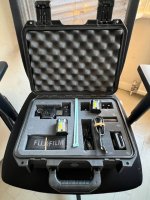
Holiday xh2 rental arrived, pairing it with my cashback 16-55 2.8 I recently bought
trevorbray
Suspended / Banned
- Messages
- 9,141
- Name
- Trevor
- Edit My Images
- No
KewlView attachment 376660
Holiday xh2 rental arrived, pairing it with my cashback 16-55 2.8 I recently bought
Just checked on both my bodies and it only works in Auto ISO as you say. Unfortunately I have updated the firmware: the X-H2 is Version 1.11 and the X-H2S is Version 2.10.X-H2/S owners. I’ve set the Fn2 button to switch exposure compensation when in Manual Mode on/off. I’ve updated firmware and it only works in Auto ISO. Cannot remember if it worked in fixed ISO before. I’d like it to. Anyone help..?
I don't remember if it worked in fixed ISO as I never assigned a button to it. The manual only states that a command button can be assigned to switch on/off in M mode. There is no mention of Auto ISO/Fixed ISO.
Hopefully someone with a pre-latest update version will chime in.
PeteStewardson
Suspended / Banned
- Messages
- 2,481
- Name
- Pete
- Edit My Images
- Yes
I have an x-h2 coming to me early in the new year to try out, really want to see how the AF compares to the x-h2s I had a while ago.View attachment 376660
Holiday xh2 rental arrived, pairing it with my cashback 16-55 2.8 I recently bought
D
Deleted member 95430
Guest
Im coming from the xt30 so its all a massive upgrade for me! The iso back dial direction is grinding my gears tho - we all know right is upI have an x-h2 coming to me early in the new year to try out, really want to see how the AF compares to the x-h2s I had a while ago.