The Fabulous Fuji X owners thread

I'll be interested to know how they compare, especially as X-T20s are now appearing on the refurb site at a price that's hard to resist.

Indeed, which is where I got mine :) I'm going to make an effort to start a proper blog and will feedback my findings and comparisons. I have a wedding to shoot in August so need to decide relatively quickly, as I can't afford (and don't really want!) an X-T20, X-T1 AND an X-T10 :D
 
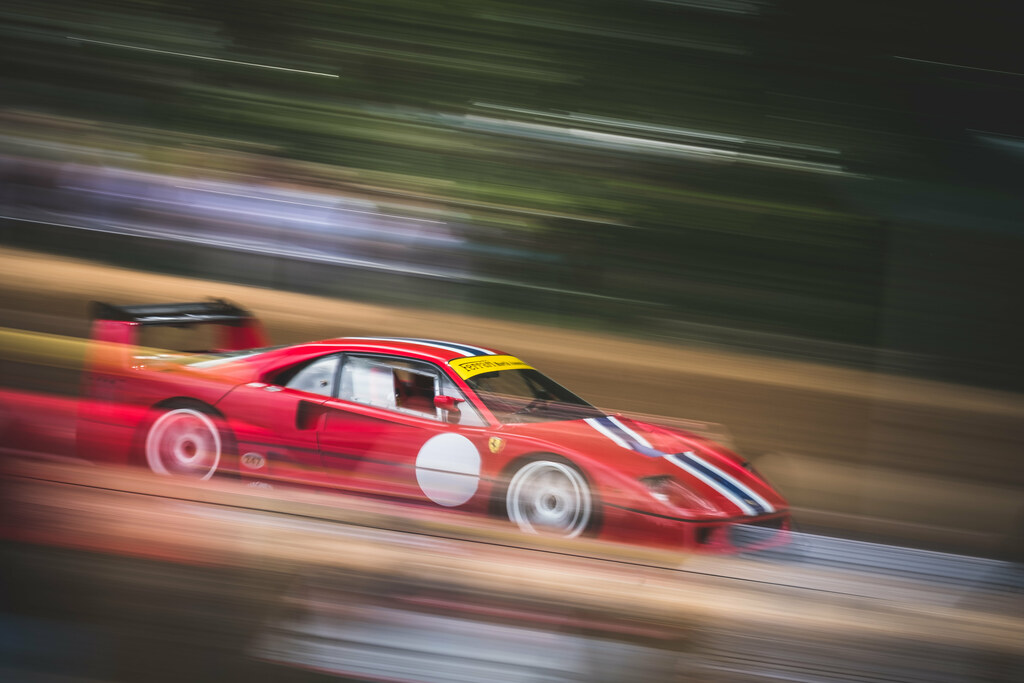
First use of my boxfresh XT2 and 100-400mm yesterday...

FoS 2017 by -Harry_S-

100mm, 1/20th, f18

The EVF blackout, slight lag etc never bothered me too much on the XT1, but I doubt I could go back now, this beast (with the grip in Boost Mode) is such an upgrade in these extreme conditions. It's really, genuinely DSLR quick.
Stunning shows what can be achieved. Mind you I do think you are probably the best panning motorsport tog I know.
 
Last edited:
Been going through some folders having a tidy up and found a few to work on...

2f3bfd0429fb2c45d6bcf3727564e04e
That's lovely.
 
This was back on Eigg in May, on day 4 of 7. From the exposure time, I'd guess this was probably with an ND filter, on the usual 18-55 zoom. Pixel-peeping corner mavens may find the lower right of this shot of interest, as there's plenty of detail. I can't find much to complain about!


Mirage
by David Hallett, on Flickr
They get better and better David you sure you are not saving the best to last just to tease us.
 
Quick question on using flash, why would ISO still be up at 6400 if I'm using flash, shouldn't it drop down or do I have a setting wrong somewhere?

The camera can't meter for flash. You need to set a fixed ISO
 
The camera can't meter for flash. You need to set a fixed ISO

Cheers Trevor, thats pretty much what my researches came back with, it seems the camera isn't psychic and can't guess what I'm planning to do with the flash so instead pretends its a normal image.

My workaround has been to add ISO and Preview settings to My Menu and will have to try and remember to set it back when not using flash.

Thanks for getting back though :)
 
They get better and better David you sure you are not saving the best to last just to tease us.
Dear me. Thank you! I shall expire of flattery at this rate. I'm sure the location deserves most of the credit. I've never had such a hit rate in the past...and probably never will again! :-)
 
Very nice! And how great to get a double spread. Almost like the glory days of the colour supplements! Lovely job.
 
Two fantastic action shots.
 
Back again ;-)

Actually got out trackside again with the X-T2

First one with the 50-140 and second with the 100-400

i-q4dSWMX-X2.jpg


i-LnD6hfr-X2.jpg

"Excellent" work Sir, keep up the good work.(y)

George.
 
Here's a few I took yesterday, on the Isle of Lunga, Scotland. X-T2 plus 100-400.

Untitled by Steve Jelly, on Flickr

Untitled by Steve Jelly, on Flickr

And my personal favourite....

Untitled by Steve Jelly, on Flickr

I have loads more from my stay on Mull, just haven't processed them yet, these were straight out of the camera with a little bit of cropping...
 
Back again ;-)

Actually got out trackside again with the X-T2

First one with the 50-140 and second with the 100-400

i-q4dSWMX-X2.jpg


i-LnD6hfr-X2.jpg
They actually caused me to post this,excellent shots,colours look great and lovely and sharp clean ,really nice.
 
Here's a few I took yesterday, on the Isle of Lunga, Scotland. X-T2 plus 100-400.

Untitled by Steve Jelly, on Flickr

Untitled by Steve Jelly, on Flickr

And my personal favourite....

Untitled by Steve Jelly, on Flickr

I have loads more from my stay on Mull, just haven't processed them yet, these were straight out of the camera with a little bit of cropping...
Same again,these are great,colours clean sharp ,show the excellent fuji iq
 
Here's a few I took yesterday, on the Isle of Lunga, Scotland. X-T2 plus 100-400.

Untitled by Steve Jelly, on Flickr

Untitled by Steve Jelly, on Flickr

And my personal favourite....

Untitled by Steve Jelly, on Flickr

I have loads more from my stay on Mull, just haven't processed them yet, these were straight out of the camera with a little bit of cropping...

Just love the little puffin shot! Well done for capturing them. I've only had the opportunity to grab puffin shots once and they were too far away. One day...
 
Here's a few I took yesterday, on the Isle of Lunga, Scotland. X-T2 plus 100-400.

Untitled by Steve Jelly, on Flickr

Untitled by Steve Jelly, on Flickr

And my personal favourite....

Untitled by Steve Jelly, on Flickr

I have loads more from my stay on Mull, just haven't processed them yet, these were straight out of the camera with a little bit of cropping...

Three very nice shots Sir, I'm afraid I don't know one bird from another but I do recognize good photography. #1 would be my fav'.(y)

George.
 
here's a question. I shot a few frames in london today, i put the camera in black and white mode and shooting raw. x-t2. Now i get home, import them into lightroom and the thumbnails are black and white, but when i click on them they convert to colour! Whats going on there. and is there a way to keep them black and white?

*edit* actually in typing this in i watched the last few thumbnails that i hadn't clicked on convert themselves back into colour.
 
Last edited:
here's a question. I shot a few frames in london today, i put the camera in black and white mode and shooting raw. x-t2. Now i get home, import them into lightroom and the thumbnails are black and white, but when i click on them they convert to colour! Whats going on there. and is there a way to keep them black and white?

That happened to me a while ago on my 70D, Lightroom can`t see your B&W even though the camera did, hope that helps. I think it is something to do with the Raw file being a negative file I think.
 
Last edited:
thats a bit annoying then to have film modes that are useless if you use lightroom.
 
here's a question. I shot a few frames in london today, i put the camera in black and white mode and shooting raw. x-t2. Now i get home, import them into lightroom and the thumbnails are black and white, but when i click on them they convert to colour! Whats going on there. and is there a way to keep them black and white?

*edit* actually in typing this in i watched the last few thumbnails that i hadn't clicked on convert themselves back into colour.

Ashley, In Lightroom the RAWs are just that the original colour file, the B&W in camera are JPGs, change your import preferences to:-

Edit --> Preferences --> General and tick box next to Treat JPEG files next to raw files as separate photos

Then it will import both the original colour RAW and the JPG from the camera with whatever in-camera processing you applied


Note if you only want to view the in-camera JPGs in LR, then copy those to a seperate folder from the card and then import that folder into LR.

Hope that helps
 
here's a question. I shot a few frames in london today, i put the camera in black and white mode and shooting raw. x-t2. Now i get home, import them into lightroom and the thumbnails are black and white, but when i click on them they convert to colour! Whats going on there. and is there a way to keep them black and white?

*edit* actually in typing this in i watched the last few thumbnails that i hadn't clicked on convert themselves back into colour.
That's LR building its preview files. If you shoot raw but with some in-camera profile LR will initially show that profile but as it builds its previews from the imported raw file it then shows the raw file with no profiles added, unless of course you choose for it to apply profiles on import.
 
Here's a few I took yesterday, on the Isle of Lunga, Scotland. X-T2 plus 100-400.

Untitled by Steve Jelly, on Flickr

Untitled by Steve Jelly, on Flickr

And my personal favourite....

Untitled by Steve Jelly, on Flickr

I have loads more from my stay on Mull, just haven't processed them yet, these were straight out of the camera with a little bit of cropping...


Lovely work Steve especially like the first one.
 
I shoot in raw and jpeg. If I use film mode and the outcome is what I want, I will just keep the jpeg. If ther jpeg with film mode doesn't look quite what I want, I can revert back to the RAW which is in colour and flat colours.
 
Back
Top