

You are using an out of date browser. It may not display this or other websites correctly.
You should upgrade or use an alternative browser.
You should upgrade or use an alternative browser.
The Amazing Sony A1/A7/A9/APS-C & Anything else welcome Mega Thread!
- Thread starter woof woof
- Start date

OP

- Messages
- 43,206
- Name
- Alan
- Edit My Images
- No
Is this something I could replicate on the A7riiia you think?
Maybe. But careful... If it doesn't look right and if you're as obsessive as me you just might not be able to move on.

snerkler
Suspended / Banned
- Messages
- 26,078
- Name
- Toby
- Edit My Images
- No
Doesn't matter if it's a little thing or not, if it's annoying it's annoying simple as that.It might only be a little thing but I find it annoying
Can you get to speak to them on the phone and explain rather than email?

LeeRatters
Suspended / Banned
- Messages
- 7,354
- Name
- Lee
- Edit My Images
- Yes
I'm have to double double check.
But I'm sure if I try to delete images in camera, it'll only do it individually or by 'day' rather than 'all'
But I know if I plug in and import through LR, I just click "camera" on the top left for source and it shows everything that is on the card.
But I'm sure if I try to delete images in camera, it'll only do it individually or by 'day' rather than 'all'
But I know if I plug in and import through LR, I just click "camera" on the top left for source and it shows everything that is on the card.

snerkler
Suspended / Banned
- Messages
- 26,078
- Name
- Toby
- Edit My Images
- No
Alan's issue is that it's saving photos taken on different days into different folders so whilst he has no issue accessing them he has to go into each individual folder to retreive themI'm have to double double check.
But I'm sure if I try to delete images in camera, it'll only do it individually or by 'day' rather than 'all'
But I know if I plug in and import through LR, I just click "camera" on the top left for source and it shows everything that is on the card.

I believe this was the first thing he triedTry this
the_accidental
Suspended / Banned
- Messages
- 501
- Edit My Images
- No
There are solutions to his import woes but that doesn't really matter - the camera should work as he wants!
Can you post pictures of your settings and a screenshot of how the directory structure on the card ends up? It would make it very clear (for us to help test, and for you to share with Wex). As an aside, if the camera came from Wex and isn't working right it's on them to fix not Sony (with regards to consumer law etc). This is a grey area of "not working" mind. Also what version of firmware are you on?
Can you post pictures of your settings and a screenshot of how the directory structure on the card ends up? It would make it very clear (for us to help test, and for you to share with Wex). As an aside, if the camera came from Wex and isn't working right it's on them to fix not Sony (with regards to consumer law etc). This is a grey area of "not working" mind. Also what version of firmware are you on?
LeeRatters
Suspended / Banned
- Messages
- 7,354
- Name
- Lee
- Edit My Images
- Yes
Alan's issue is that it's saving photos taken on different days into different folders so whilst he has no issue accessing them he has to go into each individual folder to retreive them
That what mine seems to do "in camera". I used to delete in camera and it was either "single" or "all". All of a sudden it started giving me the choice of "single" or "by day" rather than all. That was ages ago now and I never got to the bottom of it.
snerkler
Suspended / Banned
- Messages
- 26,078
- Name
- Toby
- Edit My Images
- No
Ahh I see. I've never deleted in camera so no idea how mine 'works'That what mine seems to do "in camera". I used to delete in camera and it was either "single" or "all". All of a sudden it started giving me the choice of "single" or "by day" rather than all. That was ages ago now and I never got to the bottom of it.


ancient_mariner
Moderator
- Messages
- 27,780
- Name
- Toni
- Edit My Images
- No
Out of interest Alan, have you popped out the memory card to download load to the computer?
OP
- Messages
- 43,206
- Name
- Alan
- Edit My Images
- No
Try this
I believe this was the first thing he tried
Yes, this is the 1st thing I did and as stated it has no effect. It's as if the camera is stuck in "date form."
Out of interest Alan, have you popped out the memory card to download load to the computer?
Unfortunately my laptop hasn't got an input and I don't have a card reader anymore.
OP
- Messages
- 43,206
- Name
- Alan
- Edit My Images
- No
That what mine seems to do "in camera". I used to delete in camera and it was either "single" or "all". All of a sudden it started giving me the choice of "single" or "by day" rather than all. That was ages ago now and I never got to the bottom of it.
I plug the camera into my pc and copy the files across and then turn the camera off leaving it plugged in. Very often by the time I've finished processing the pictures the camera is fully charged. It's only once I'm happy that all the pictures are copied across that I then format the card in the camera.
I could live with this, it's just an irritation. I can't see how it's normal as my A7 works as per the menu and saves in one folder or multiple ones as per the settings in the menu but the A7III doesn't and remains in date form no matter what the menu says. If it's a fault I can only assume that the menu option has become corrupted somehow, if it's "normal" then I really don't understand how or why.
OP
- Messages
- 43,206
- Name
- Alan
- Edit My Images
- No
There are solutions to his import woes but that doesn't really matter - the camera should work as he wants!
Can you post pictures of your settings and a screenshot of how the directory structure on the card ends up? It would make it very clear (for us to help test, and for you to share with Wex). As an aside, if the camera came from Wex and isn't working right it's on them to fix not Sony (with regards to consumer law etc). This is a grey area of "not working" mind. Also what version of firmware are you on?
Toolbox, setup page 6, option 4 from the top is "Folder Name." In this there are two options, "Standard Form" and "Date Form." Standard Form saves files in one folder until the max number is reached (this may be 4,000, I can't remember) and once this number is reached another folder is created and so on. Date Form creates a new folder for each day. So, in date form if I take one picture on Monday and one picture on Tuesday etc these pictures appear in separate folders. One in Mondays folder and one in Tuesdays folder etc. The problem is that the A7III does this in "Standard Form". That's not too bad for three days but two weeks in Thailand could irritate me more especially as the camera doesn't seem to want to copy more than one folder at a time. It's just an irritant and I really would like an answer even if I end up living with this.
I only noticed this when we went to Holland and I took pictures on three days and thus ended up with three folders. Normally I'd copy the pictures across on the same day I took them and the "problem" would therefore never show up.
Last edited:

mike_6480
Suspended / Banned
- Messages
- 2,372
- Name
- Mike
- Edit My Images
- Yes
I don't have a A7III anymore (have the A7IV now) but when I did have an A7III mine definitely never did this. It did what you expect it to i.e. saves everything in one folder until it reaches the limit and then creates a new folder.Can anyone with an A7III please check something for me????
Mine is saving pictures taken over a period of days in separate folders even if I change the menu option to "standard" rather than date. Can someone with an A7III please give this a go and let me know what happens. You obviously don't have to take a picture today and then wait until tomorrow to take another, all you need to do is take a picture and then go into the menu and advance the date and then take another picture.
I wrote to Sony and they gave me a list of things to try, none of which worked. So, I wrote to them again and I've just received the following reply...
"Thank you for your patience.
With reference to your enquiry regarding your Sony ILCE-7M3, after reviewing the case with our relevant team, we can confirm that this is within specifications and it is not an issue.
Should you have any further questions, please feel free to reply to this email.
Thank you for your enquiry.
Yours sincerely,
Dina"
I don't believe them but if anyone can check this before I write back I'd appreciate it.
PS.
I've just tried my old A7 and it behaves as expected. In "date form" it saves each days pictures in separate folders and in "standard" it just saves everything into one folder, until it reaches the limit. A7III is stuck in "date form" no matter what option is set in the menu.
OP
- Messages
- 43,206
- Name
- Alan
- Edit My Images
- No
I don't have a A7III anymore (have the A7IV now) but when I did have an A7III mine definitely never did this. It did what you expect it to i.e. saves everything in one folder until it reaches the limit and then creates a new folder.
Just as per the question above, did you plug the camera into a pc or remove the card and either plug it into the pc directly or via a card reader?
the_accidental
Suspended / Banned
- Messages
- 501
- Edit My Images
- No
Unfortunately my laptop hasn't got an input and I don't have a card reader anymore.
Possible clue here if you're directly connecting the camera- what USB mode do you have the camera in? If it's in PTP vs mass transfer it could be changing how it presents the files to the computer.
the_accidental
Suspended / Banned
- Messages
- 501
- Edit My Images
- No
You should have Auto, Mass storage or MTP on a A7ii - set it to "mass storage" if you haven't.
the_accidental
Suspended / Banned
- Messages
- 501
- Edit My Images
- No
Hang on, another clue in the manual when I was checking that out:
- If [Recording Mode] is set to other than [Standard], a new folder is created with a folder number one greater than the largest folder number currently used on both memory cards inserted in the memory card slots.
- If [Recording Mode] is set to other than [Standard] and an image is shot, a new folder may be automatically created.
- MENU →
(Setup) → [Rec. Media Settings] → [Recording Mode] → desired setting.

snerkler
Suspended / Banned
- Messages
- 26,078
- Name
- Toby
- Edit My Images
- No
See aboveHang on, another clue in the manual when I was checking that out:
What do you have set in:
- If [Recording Mode] is set to other than [Standard], a new folder is created with a folder number one greater than the largest folder number currently used on both memory cards inserted in the memory card slots.
- If [Recording Mode] is set to other than [Standard] and an image is shot, a new folder may be automatically created.
Is it standard or something else? Try standard if it's not.
- MENU →
(Setup) → [Rec. Media Settings] → [Recording Mode] → desired setting.

the_accidental
Suspended / Banned
- Messages
- 501
- Edit My Images
- No
See above
Where?
This hasn't been covered I think? I'm _not_ talking about the "folder name" setting that is mentioned above. I'm talking about the notes on that setting that say to check the recording mode also.
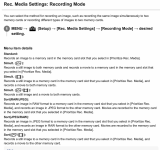
This setting affects the date/folder setting AFAIK.
Apologies if this was covered though.
Last edited:
LeeRatters
Suspended / Banned
- Messages
- 7,354
- Name
- Lee
- Edit My Images
- Yes
I plug the camera into my pc and copy the files across and then turn the camera off leaving it plugged in. Very often by the time I've finished processing the pictures the camera is fully charged. It's only once I'm happy that all the pictures are copied across that I then format the card in the camera.
I could live with this, it's just an irritation. I can't see how it's normal as my A7 works as per the menu and saves in one folder or multiple ones as per the settings in the menu but the A7III doesn't and remains in date form no matter what the menu says. If it's a fault I can only assume that the menu option has become corrupted somehow, if it's "normal" then I really don't understand how or why.
I've just checked mine. It 'deletes' in camera, per day rather than all.
I checked in the menus & I have it set to 'standard'. In the menu's I checked the option for 'select recording folder' (it was a vertical scroll type selection) and I only have one folder there which is the DSC1000 or whatever it is.
So it appears although mine deletes by the day from the menu, the images aren't in folders per day.
When I plug in to the PC & switch the camera on, Lightroom automatically opens and all photos on the card are on the import screen (after I've selected the camera as source)
Mine is obviously the Riii but I can't see it being any different to the iii
snerkler
Suspended / Banned
- Messages
- 26,078
- Name
- Toby
- Edit My Images
- No
Ahh apologies. AFAIK this doesn’t create folders per day, it just creates a folder per file type (raw, jpeg etc) if you have it set that way.Where?
This hasn't been covered I think? I'm _not_ talking about the "folder name" setting that is mentioned above. I'm talking about the notes on that setting that say to check the recording mode also.
View attachment 450814
This setting affects the date/folder setting AFAIK.
Apologies if this was covered though.

f/1.2
Suspended / Banned
- Messages
- 7,424
- Name
- Tommy
- Edit My Images
- No
New firmware for the A1II, A1 and A9III
 www.sonyalpharumors.com
Sony released a new firmware update for the Sony A1II, A1 and A9III | sonyalpharumors
A1II (download here) Benefits and Improvements Fixes an issue where setting Recording Media to Sort Recording may cause a restart during still image capture Fixes an issue where the effectiveness of the Soft Skin Effect when recording movies in S-Log3 was not properly adjusted A9III (download...
www.sonyalpharumors.com
snerkler
Suspended / Banned
- Messages
- 26,078
- Name
- Toby
- Edit My Images
- No
Looks like it's just a big fix update rather than adding anythingNew firmware for the A1II, A1 and A9III
Sony released a new firmware update for the Sony A1II, A1 and A9III | sonyalpharumors
A1II (download here) Benefits and Improvements Fixes an issue where setting Recording Media to Sort Recording may cause a restart during still image capture Fixes an issue where the effectiveness of the Soft Skin Effect when recording movies in S-Log3 was not properly adjusted A9III (download...
OP
- Messages
- 43,206
- Name
- Alan
- Edit My Images
- No
You should have Auto, Mass storage or MTP on a A7ii - set it to "mass storage" if you haven't.
Tried auto and mass.
I was a bit confused after Sony told me to check this as the camera doesn't give an option for this when you plug it in whereas my Panasonic cameras come up with this every time I plug them in to the pc, I then found that with the Sony it's just in the menu and you don't get a prompt when connecting it to the pc but it made no difference. I don't use a lot of the menu options so I think I'll have a mooch around and see if anything else doesn't look right or if there are any other settings in the chain, I might also try updating the firmware even though it's at the version Sony linked.
I'm busy for the next 4 days, going away again, so I'll have another look on Monday. Thanks all for the pointers.
Last edited:
snerkler
Suspended / Banned
- Messages
- 26,078
- Name
- Toby
- Edit My Images
- No
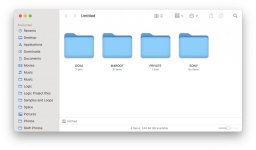
This is what mine looks like, I've just tried it connecting directly to the computer, and using a card reader and it comes up the same for bothThis is what my sd card looks like when plugged into a reader, i had set the folders to date as earlier post.
mike_6480
Suspended / Banned
- Messages
- 2,372
- Name
- Mike
- Edit My Images
- Yes
Both - both did the same. However normal method via plugging camera into PC with card still in cameraJust as per the question above, did you plug the camera into a pc or remove the card and either plug it into the pc directly or via a card reader?
OP
- Messages
- 43,206
- Name
- Alan
- Edit My Images
- No
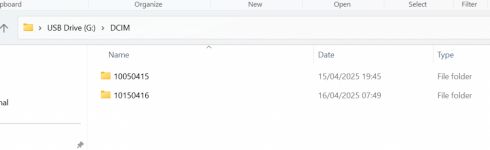
With the camera plugged into the pc when I go into dcim (I think that's what it's called) I see the folders, there should be one but in the case of my III there's one for each day.
I think I gave my old card reader away in a box of bits and pieces I thought I didn't need any more but I'd rather solve this than work around it. I did email Wex but they weren't any help. I'll have a look next week and more than likely update the firmware if it will overwrite an existing same version. If this or something else works I might solve this but never know exactly what the cause was.
Thanks again all. I'll report back but as when I "fixed" my A7 I might not be able to say exactly how
I think I gave my old card reader away in a box of bits and pieces I thought I didn't need any more but I'd rather solve this than work around it. I did email Wex but they weren't any help. I'll have a look next week and more than likely update the firmware if it will overwrite an existing same version. If this or something else works I might solve this but never know exactly what the cause was.
Thanks again all. I'll report back but as when I "fixed" my A7 I might not be able to say exactly how
OP
- Messages
- 43,206
- Name
- Alan
- Edit My Images
- No
There are several reviews on this page...
www.sonyalpharumors.com
Just announced: new Viltrox 35mm f/1.2 FE lens | sonyalpharumors
You can preorder the lens now for $999 at Amazon USA (Click here), Pergear, Viltrox store, €1,099 at Amazon DE, Amazon FR, Amazon IT, Amazon ES, and £959 at Amazon UK. USA readers should get this lens now before the Stock runs dry :( Here are some youtube reviews...
www.sonyalpharumors.com
snerkler
Suspended / Banned
- Messages
- 26,078
- Name
- Toby
- Edit My Images
- No
I'm sure it'll be lovely, but at 910g I'll give it a miss.There are several reviews on this page...
Just announced: new Viltrox 35mm f/1.2 FE lens | sonyalpharumors
You can preorder the lens now for $999 at Amazon USA (Click here), Pergear, Viltrox store, €1,099 at Amazon DE, Amazon FR, Amazon IT, Amazon ES, and £959 at Amazon UK. USA readers should get this lens now before the Stock runs dry :( Here are some youtube reviews...
OP
- Messages
- 43,206
- Name
- Alan
- Edit My Images
- No
I'm sure it'll be lovely, but at 910g I'll give it a miss.
Someone commented on the rumor site that they don't see f1.2 being worth the additional weight over the Sony f1.4 and whilst that might be true others might be swayed by the price. I keep think that an AF f1.2 or f1.4 would be nice but I know I wouldn't be happy with the bulk and weight and I do have the Voigtlander f1.2 35 and 50mm and the even smaller 35mm f1.4 for when MF is ok and I do have my Sony f1.8's which if I'm being honest are enough for me.
Last edited:
snerkler
Suspended / Banned
- Messages
- 26,078
- Name
- Toby
- Edit My Images
- No
I was swayed on the f1.2 50mm GM over the f1.4, but I do much prefer the size and weight of the f1.4, and I do keep considering ‘downgrading’. I think the Viltrox is just that bit too big and heavy over the GM to justify it for me.Someone commented on the rumor site that they don't see f1.2 being worth the additional weight over the Sony f1.4 and whilst that might be true others might be swayed by the price. I keep think that an AF f1.2 or f1.4 would be nice but I know I wouldn't be happy with the bulk and weight and I do have the Voigtlander f1.2 35 and 50mm and the even smaller 35mm f1.4 for when MF is ok and I do have my Sony f1.8's which if I'm being honest are enough for me.

Mr Perceptive
Suspended / Banned
- Messages
- 9,347
- Name
- David
- Edit My Images
- Yes
I do keep considering ‘downgrading’.
I think the "once seen never unseen" labcoat might come into play here

Best way of saving weight is to go out with less gear, obviously that has its compromises (FOMO anxiety!!)
f/1.2
Suspended / Banned
- Messages
- 7,424
- Name
- Tommy
- Edit My Images
- No
Here we go…..
www.sonyalpharumors.com
Just announced: new Viltrox 35mm f/1.2 FE lens | sonyalpharumors
You can preorder the lens now for $999 at Amazon USA (Click here), Pergear, Viltrox store, €1,099 at Amazon DE, Amazon FR, Amazon IT, Amazon ES, and £959 at Amazon UK. USA readers should get this lens now before the Stock runs dry :( Here are some youtube reviews...
www.sonyalpharumors.com
snerkler
Suspended / Banned
- Messages
- 26,078
- Name
- Toby
- Edit My Images
- No
There's an echoHere we go…..
Just announced: new Viltrox 35mm f/1.2 FE lens | sonyalpharumors
You can preorder the lens now for $999 at Amazon USA (Click here), Pergear, Viltrox store, €1,099 at Amazon DE, Amazon FR, Amazon IT, Amazon ES, and £959 at Amazon UK. USA readers should get this lens now before the Stock runs dry :( Here are some youtube reviews...

snerkler
Suspended / Banned
- Messages
- 26,078
- Name
- Toby
- Edit My Images
- No
I often go out with just one lensI think the "once seen never unseen" labcoat might come into play here
Best way of saving weight is to go out with less gear, obviously that has its compromises (FOMO anxiety!!)
LeeRatters
Suspended / Banned
- Messages
- 7,354
- Name
- Lee
- Edit My Images
- Yes

jonneymendoza
Suspended / Banned
- Messages
- 8,530
- Edit My Images
- No
Sony released a new firmware update for the Sony A1II, A1 and A9III | sonyalpharumors
A1II (download here) Benefits and Improvements Fixes an issue where setting Recording Media to Sort Recording may cause a restart during still image capture Fixes an issue where the effectiveness of the Soft Skin Effect when recording movies in S-Log3 was not properly adjusted A9III (download...
www.sonyalpharumors.com
Are you brave enough to update? Lol