The Amazing Sony A1/A7/A9/APS-C & Anything else welcome Mega Thread!

This past few months the fastest shutter speed I shot at was 1/1600 and that was shooting SEO's in flight

It's coz I'm Darn Sarf. ;)

FWIW I think the Samyang 50 f1.4 may have had greater light gathering power than the 50 f1.2. I tend to expose to the left a bit, knowing I can recover shadows but not lost highlights.
 
M

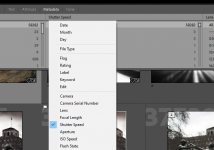
Metadata. Click on the title bar of one of the groups you can search (camera body, lens etc) & a drop down appears offering you all the different groups that can be searched, including shutter speed.
Thanks, I'm still not seeing that. In the library module I can see the metadata for that photo on the right. I can also see Metadata in the menu bar at the top but if I click that there's no option to search :thinking:
 
Thanks, I'm still not seeing that. In the library module I can see the metadata for that photo on the right. I can also see Metadata in the menu bar at the top but if I click that there's no option to search :thinking:
In Library mode, set view to Grid, then top right of the grid by the little padlock icon select 'Camera Info' - for me it then provides filters for Camera, Lens, Focal Length, Flash State - you can click on those filter titles to select an alternative, or on the right of each header click to get a drop down to add a new column or delete that filter.
 
In Library mode, set view to Grid, then top right of the grid by the little padlock icon select 'Camera Info' - for me it then provides filters for Camera, Lens, Focal Length, Flash State - you can click on those filter titles to select an alternative, or on the right of each header click to get a drop down to add a new column or delete that filter.

Thanks for this I've found it now. The only problem for me is that I have multiple catalogues (eg landscapes 2023, dog walks 2023), I don't just have a 2023 one so I'd have to go through each catalogue and add them up :headbang:
 
Thanks for this I've found it now. The only problem for me is that I have multiple catalogues (eg landscapes 2023, dog walks 2023), I don't just have a 2023 one so I'd have to go through each catalogue and add them up :headbang:
Much simpler to have a single catalogue and use collections and keywords within it - also means you can include the same image in multiple collections (for a landscape you took on a dog walk, for example).
 
Much simpler to have a single catalogue and use collections and keywords within it - also means you can include the same image in multiple collections (for a landscape you took on a dog walk, for example).

That will work great until your catalogue corrupts....
 
Much simpler to have a single catalogue and use collections and keywords within it - also means you can include the same image in multiple collections (for a landscape you took on a dog walk, for example).
I've never used collections, just have multiple folders in a catalogue. I used to have all images in one catalogue and just have multiple folders but I found over time it slowed things down so prefer not to 'overload' a single catalogue.
 
That will work great until your catalogue corrupts....
That's why you have LR set to backup the catalogue regularly on exit, so you can recover if this happens.
Personally I've never had a catalogue get corrupted, but provided you have a backup, it makes little difference if you use 1 or 10 catalogues - you have the same chance of corruption, and a similar amount of work to recover anything from the last backup.
 
I've never used collections, just have multiple folders in a catalogue. I used to have all images in one catalogue and just have multiple folders but I found over time it slowed things down so prefer not to 'overload' a single catalogue.
Not noticed anything particularly slowing down with catalogue size, but I do keep everything on SSD (catalogue is on a different SSD to the images).
I do probably have a lot less images than you through, as I only shoot a few thousand a year.
 
Last edited:
Not noticed anything particularly slowing down with catalogue size, but I do keep everything on SSD (catalogue is on a different SSD to the images).
I do probably have a lot less images than you through, as I only shoot a few thousand a year.
What’s the difference between folders and collections?
 
That's why you have LR set to backup the catalogue regularly on exit, so you can recover if this happens.
Personally I've never had a catalogue get corrupted, but provided you have a backup, it makes little difference if you use 1 or 10 catalogues - you have the same chance of corruption, and a similar amount of work to recover anything from the last backup.

It’s still a pain in the bum backed up or not.

It’s prob less of a problem depending on how many images you have in your catalogue. Last year alone I had I over 300k images one catalogue would be a disaster
 
It’s still a pain in the bum backed up or not.

It’s prob less of a problem depending on how many images you have in your catalogue. Last year alone I had I over 300k images one catalogue would be a disaster

Your use-case is a little more specialised than that for most of us. And loss might also be a commercial disaster.
 
I've never used collections, just have multiple folders in a catalogue. I used to have all images in one catalogue and just have multiple folders but I found over time it slowed things down so prefer not to 'overload' a single catalogue.
I have 10 years worth in one catalogue. been through various upgrades along they way too. Hasn't slowed down so far.
I have total of 25K images in my catalogue so far - YMMV.
 
What’s the difference between folders and collections?
From what I can tell folders is a location/path on your computer or harddrive and is tied to that specific file structure.

Collections are mostly a "virtual" organisational tool within LR catalogue. its not backed by any location on physical disk

For me LR automatically organises my imports into folders split by year and dates (I believe that's the default). I don't mess with that. I just get Amazon photos to back it up in the same structure i.e. backup only my keepers.
I use collections to organise i.e. "landscapes", "birthday - 22" etc
 
Last edited:
20-70mm currently down to £789 at Cotswolds. More tempted by this over E-Infinity due to warranty repairs carried out in UK. Never used them before though.
 
20-70mm currently down to £789 at Cotswolds. More tempted by this over E-Infinity due to warranty repairs carried out in UK. Never used them before though.

I have used them a few times. Never ran into issues that meant testing their warranty though.

Why would you want the 20-70?
 
I have 10 years worth in one catalogue. been through various upgrades along they way too. Hasn't slowed down so far.
I have total of 25K images in my catalogue so far - YMMV.

I'm at 58k :oops: :$ I didn't realise it was so few. Gives me confidence my A7 might last a bit longer :D
 
20-70mm currently down to £789 at Cotswolds. More tempted by this over E-Infinity due to warranty repairs carried out in UK. Never used them before though.
I’ve used them a lot. Highly recommended.
 
20-70mm currently down to £789 at Cotswolds. More tempted by this over E-Infinity due to warranty repairs carried out in UK. Never used them before though.
That's a great price for UK stock. Only £40 more than E-Infin.

Edit: Never mind looks like they're just another grey importer. So cheaper to use E-Infin.
 
Last edited:
20-70mm currently down to £789 at Cotswolds. More tempted by this over E-Infinity due to warranty repairs carried out in UK. Never used them before though.

I’ve used them a lot. Highly recommended.
Oops. Sorry. It’s Clifton I’ve used a lot. That’ll teach me not to speed read.
 
I have used them a few times. Never ran into issues that meant testing their warranty though.

Why would you want the 20-70?
Because it would make a great travel lens and general walkabout lens for me.
That's a great price for UK stock. Only £40 more than E-Infin.

Edit: Never mind looks like they're just another grey importer. So cheaper to use E-Infin.
Yep grey importer, for me it's possibly worth paying more for the UK warranty.
 
Because it would make a great travel lens and general walkabout lens for me.

Yep grey importer, for me it's possibly worth paying more for the UK warranty.
I like that they let you use PayPal as well, bit annoying E-Infin stopped it, love the 4 months free credit.
20-70 is on my radar as a general walk around lens as well.
 
As above just the A9III. Any reason you want/need a high res camera like that?
It is the best option for me to travel light on planes. With the high res and a Sony 70-350. I can drop to APS-C and get a similar reach and quality as I get using a large FF telephoto lens and my A7III. When I'm in the UK I will use FF with my big telephoto lens for RIAT etc, so win win.
 
Because it would make a great travel lens and general walkabout lens for me.

Yep grey importer, for me it's possibly worth paying more for the UK warranty.
I bought a fe 20-70m f4 over the Christmas period from Park Cameras - paid £1169 with £200 cashback to come, making it £969.
I’ve also got some Sony £100 discount codes, so hopefully if I can also use one of those it netts out at £869, a worthwhile extra premium for a genuine UK purchase.
Does any one know if you can get two cashbacks on one purchase?

BTW - I’ve not yet had the opportunity to do some proper shooting with the lens, but the trial shots look great - terrific focal lengths as well for a walkabout lens.
 
BTW - I’ve not yet had the opportunity to do some proper shooting with the lens, but the trial shots look great - terrific focal lengths as well for a walkabout lens.
Do you have a 24-105? I'd be very interested in a comparison.
 
DPR on the global shutter hit to image quality.

 
Last edited:
It’s still a pain in the bum backed up or not.

It’s prob less of a problem depending on how many images you have in your catalogue. Last year alone I had I over 300k images one catalogue would be a disaster
So I have LR set to auto backup the catalogue once a week.
So worst case with catalogue corruption is you have to re-import images from the previous week, as the backup has everything prior to that.
Multiple catalogues will reduce the work to do that re-import - but only if you use several different catalogues during the week - if you (for example) shot a wedding over a weekend, imported it into one of your catalogues and worked on it the following week, then multiple catalogues would gain you nothing over a single catalogue in terms of recovery time if the catalogue became corrupted and you had to go back to backup.
 
Do you have a 24-105? I'd be very interested in a comparison.

Sorry, I don’t have the 24-105mm.
I did a lot of research before buying the 20-70. There are quite a few articles/youtubes comparing the two lenses - the general conclusion is that the new lens has faster autofocus and superior image quality. The clincher for me was the extra 4mm on the wide end.
 
Sorry, I don’t have the 24-105mm.
I did a lot of research before buying the 20-70. There are quite a few articles/youtubes comparing the two lenses - the general conclusion is that the new lens has faster autofocus and superior image quality. The clincher for me was the extra 4mm on the wide end.
I really liked my old 24-70 f4, but fell for the hype of the Tamron 28-200. I don't really get on with it so the 20-70 ticks a lot of boxes for me.
 
I find the idea of the Tamron 28-200 very attractive, but really like the 24 (apparently closer to 22 un-corrected) at the wide end. This lens is great (apart from size & weight) as a city walkabout lens, though a little wider would be nice. OTOH I'm sure that I would want longer from the 20-70, and I'd end up changing lenses frequently.
 
I like that they let you use PayPal as well, bit annoying E-Infin stopped it, love the 4 months free credit.
20-70 is on my radar as a general walk around lens as well.
I’ve been using the following method to use PayPal with e-infin. Not used it for a while though.

There are few steps for access to PayPal option:
1. During your checkout, please click " Ten Times" between the logos of "Visa Secure" and "MasterCard Secure Code"
2. Paypal option is now available
 
I’ve been using the following method to use PayPal with e-infin. Not used it for a while though.

There are few steps for access to PayPal option:
1. During your checkout, please click " Ten Times" between the logos of "Visa Secure" and "MasterCard Secure Code"
2. Paypal option is now available
That's not worked for some time now.
 
I find the idea of the Tamron 28-200 very attractive, but really like the 24 (apparently closer to 22 un-corrected) at the wide end. This lens is great (apart from size & weight) as a city walkabout lens, though a little wider would be nice. OTOH I'm sure that I would want longer from the 20-70, and I'd end up changing lenses frequently.

I have the 20-70 and in the past had 28-200, 24-105 and 28-75/2.8 before that (in that order)

I guess it depends on how and what you shoot.

I don't much miss the f2.8 tbh. So I don't think I'll ever go back to 28-75/2.8 or bother trying 24-70/2.8

20-70mm is the smallest of the bunch which is nice. I think my favourite is still the 24-105mm overall but it's the largest of the three.

With the other lenses I had to carry a UWA lens to compliment. With 20-70mm I don't any more.
Plus with a high res body I'm happy to crop a little if needed.

But now I do carry a 70-200mm f4 which is much larger than most UWA lenses. But the 70-200mm removes the need for owning a separate macro lens. So there's that....

I think overall I end up carry roughly the same amount but with 20-70mm I just change less often I think.
 
On my last city holiday (Athens 2020) I took 24-105 and 12-24. A couple of times popped the 12-24 on, but it was really too wide at the long end, and many of the photos didn't please me especially. The 24-105 was mostly OK, but could have usefully been longer at times. Really in an ideal world I'd have had 2 bodies and shot 16-35 and 28-200 in order not to have to keep changing lenses, but that's never going to happen.
 
Back
Top