The Amazing Sony A1/A7/A9/APS-C & Anything else welcome Mega Thread!

Whats wrong with viewing them in windows?
 
Whats wrong with viewing them in windows?
Don't have windows.... But generally speaking the default OS viewer is slow for reviewing RAW (unless Windows has greatly improved since I last used it). You can't then mark/rank ones you like.
 
Not had that problem, i can go through them even on my NAS as fast as i can press a directional button. Ranking and what not i do in Lightroom.
 
Out of interest for those with the A1 are you still limited to 15fps with 3rd party lenses? Also can you shoot at the maximum fps using lossless compression or do you still need to be using compressed raw?
 
Out of interest for those with the A1 are you still limited to 15fps with 3rd party lenses? Also can you shoot at the maximum fps using lossless compression or do you still need to be using compressed raw?

Uh oh .. that's where it starts.

I remember when you had a D850 and were asking questions about Sony "just out of interest" :p
 
Whats wrong with viewing them in windows?

I couldn't zoom in at all with my usual windows programms, for some reason Sony RAW files are different to everyone elses (something to do with the small jpeg size embedded in them apparently). I paid for Fastrawviewer after @nandbytes recommendation which works really well.
 
I couldn't zoom in at all with my usual windows programms, for some reason Sony RAW files are different to everyone elses (something to do with the small jpeg size embedded in them apparently). I paid for Fastrawviewer after @nandbytes recommendation which works really well.
I wonder why it differs on mine. Im not using anything other than Windows 10 file browser. Open a RAW up and i can scroll in to 700%, can even crop.
 
Not had that problem, i can go through them even on my NAS as fast as i can press a directional button. Ranking and what not i do in Lightroom.
How fast is it for checking critical focus on RAW files?
Also how do you short list your keepers?

My Mac won't even recognize A1 RAW files...
 
How fast is it for checking critical focus on RAW files?
Also how do you short list your keepers?

My Mac won't even recognize A1 RAW files...
Can scroll through full size as fast as i can move my fingers. Personally I don't do any of that via this method, i just use Lightroom, rather use the one program for everything that mess around twice, Lightroom is so fast these days I can have my initial checks done really fast.

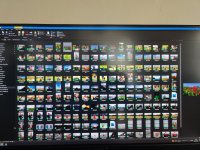
IMG_20210921_161251.jpg
That's my backup folder, these get backed up on import so are the original RAW files.

Are you using Windows professional?
No just the Home edition. Shows ARW and DNG just fine even some old CRW files from my Canon days. Maybe the installation of Lightroom places some extra drivers for Windows than it does MacOS.
 
Last edited:
Uh oh .. that's where it starts.

I remember when you had a D850 and were asking questions about Sony "just out of interest" :p
Haha, very true. I can’t afford an A1 even if I wanted one, not to mention the strain on my computer and the cost of memory cards :eek:
 
Haha, very true. I can’t afford an A1 even if I wanted one, not to mention the strain on my computer and the cost of memory cards :eek:
The price of those CFexpress are certainly pricey, though if your buying an A1 to begin with i imagine its not important. Id be happy with the slower SD cards anyway, i almost never do burst shooting.
 
Out of interest for those with the A1 are you still limited to 15fps with 3rd party lenses? Also can you shoot at the maximum fps using lossless compression or do you still need to be using compressed raw?
All 3rd party lenses are still 15fps but once again I think that's the lenses' issue than a body issue.

Lossless compression gives you 20fps.
Lossy compression gives you 30fps.
 
The price of those CFexpress are certainly pricey, though if your buying an A1 to begin with i imagine its not important. Id be happy with the slower SD cards anyway, i almost never do burst shooting.
UHS-ii SD cards work pretty well.
CFexpress is not strictly necessary.
 
The price of those CFexpress are certainly pricey, though if your buying an A1 to begin with i imagine its not important. Id be happy with the slower SD cards anyway, i almost never do burst shooting.

UHS-ii SD cards work pretty well.
CFexpress is not strictly necessary.
I didn’t realise it still took SD cards, that’s a good move by Sony (y) One area that interests me is the improvement in EVF lag when panning with slow shutter speeds, but I’m yet to see much about this on youtube etc. 1/20 etc is pretty laggy on the A9-II.
 
I didn’t realise it still took SD cards, that’s a good move by Sony (y) One area that interests me is the improvement in EVF lag when panning with slow shutter speeds, but I’m yet to see much about this on youtube etc. 1/20 etc is pretty laggy on the A9-II.
How do you make the EVF laggy not noticed that. Though is that the difference between STD and High viewer framrate.
 
Last edited:
I didn’t realise it still took SD cards, that’s a good move by Sony (y) One area that interests me is the improvement in EVF lag when panning with slow shutter speeds, but I’m yet to see much about this on youtube etc. 1/20 etc is pretty laggy on the A9-II.
Yep it takes dual SD cards too. The slots are designed to take both types in both slots. Unlike in other brands you aren't bottlenecked on the slower card slot making it almost pointless in having CFexpress or dual slots
Also the new processor writes quite a bit faster to the SD cards compared to previous gen. So with fastest UHS-II cards you get close to 250MB/s write speed vs. 180-ish MB/s on A9II
 
Last edited:
Yep it takes dual SD cards too. The slots are designed to take both types in both slots. Unlike in other brands you aren't bottlenecked on the slower card slot making it almost pointless in having CFexpress or dual slots
Also the new processor writes quite a bit faster to the SD cards compared to previous gen. So with fastest UHS-II cards you get close to 250MB/s write speed vs. 180-ish MB/s on A9II
Yeah i think other Sony's are generally capped at about 140MB/s aren't they.
 
How do you make the EVF laggy not noticed that. Though is that the difference between STD and High viewer framrate.
its not really lag tbh.
So on other bodies the camera is blacked out for the period of time the shutter closes.
With the stacked sensor bodies you can do blackout free shooting. So if you are using very long shutter speeds it will seem "laggy". On any other camera you'd just have a longer blackout.
Yeah i think other Sony's are generally capped at about 140MB/s aren't they.
its not really capped I think, its just the limitation of the older processor
You can checkout some speed tests here.

For A1 take a look at A7SIII tests which has the same new processor (so speeds will be roughly the same).

 
its not really lag tbh.
So on other bodies the camera is blacked out for the period of time the shutter closes.
With the stacked sensor bodies you can do blackout free shooting. So if you are using very long shutter speeds it will seem "laggy". On any other camera you'd just have a longer blackout.

its not really capped I think, its just the limitation of the older processor
You can checkout some speed tests here.

For A1 take a look at A7SIII tests which has the same new processor (so speeds will be roughly the same).

That makes sense, I can definitely see why people photographing birds would want blackout free shooting. Though I have learnt to use both eyes and position the target with the non evf eye so I can 80% of the time keep the subject framed.
I'm still just using a 95MB/s card. lol

Its interesting how its all done from one processor really, in my world of cameras we use dedicated processors for particular tasks.
 
Last edited:
its not really lag tbh.
So on other bodies the camera is blacked out for the period of time the shutter closes.
With the stacked sensor bodies you can do blackout free shooting. So if you are using very long shutter speeds it will seem "laggy". On any other camera you'd just have a longer blackout.

its not really capped I think, its just the limitation of the older processor
You can checkout some speed tests here.

For A1 take a look at A7SIII tests which has the same new processor (so speeds will be roughly the same).
OK, so Sony call it reduced display response is this not the same thing as lag? I might have more luck finding more info if I use the correct term them :lol:
 
Last edited:
"Tin Mask Sculpture" "It Made Explore" Today :) :)

Just a simple candid street style Snapograph taken at Kent UK of what I can only describe as a Tin Mask Sculpture.

Tin Mask Sculpture-03571 by G.K.Jnr., on Flickr

:ty: for looking., (y):sony:

Very impressive sculpture and well captured. Congrats on Explore, George. (y)
 
Very impressive sculpture and well captured. Congrats on Explore, George. (y)

Thank you kindly Lee, appreciate your reply.
 
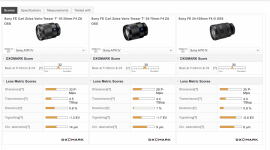
So I know that DXO has come into question regarding their sensor measurement, but I'm now questioning their lens scores as well. According to them, the 24-70mm f4 is sharper than the 24-105mm f4. At f4 they're very similar but at f11 the 24-105mm is sharper in the centre and way sharper at the edges and corners.

Screenshot 2021-09-22 at 09.05.40.png


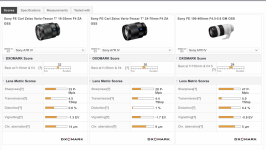
Also, the overall score of the 100-400mm GM is lower than the above lenses yet if you look at the individual scores it outshines them in all areas except transmission, sharpness by quite a margin, so why the low overall score?
Screenshot 2021-09-22 at 09.06.37.png
 
This seems to reflect the differences more to what I see, although my 24-70mm f4 isn't as soft at f4 as their copy
 
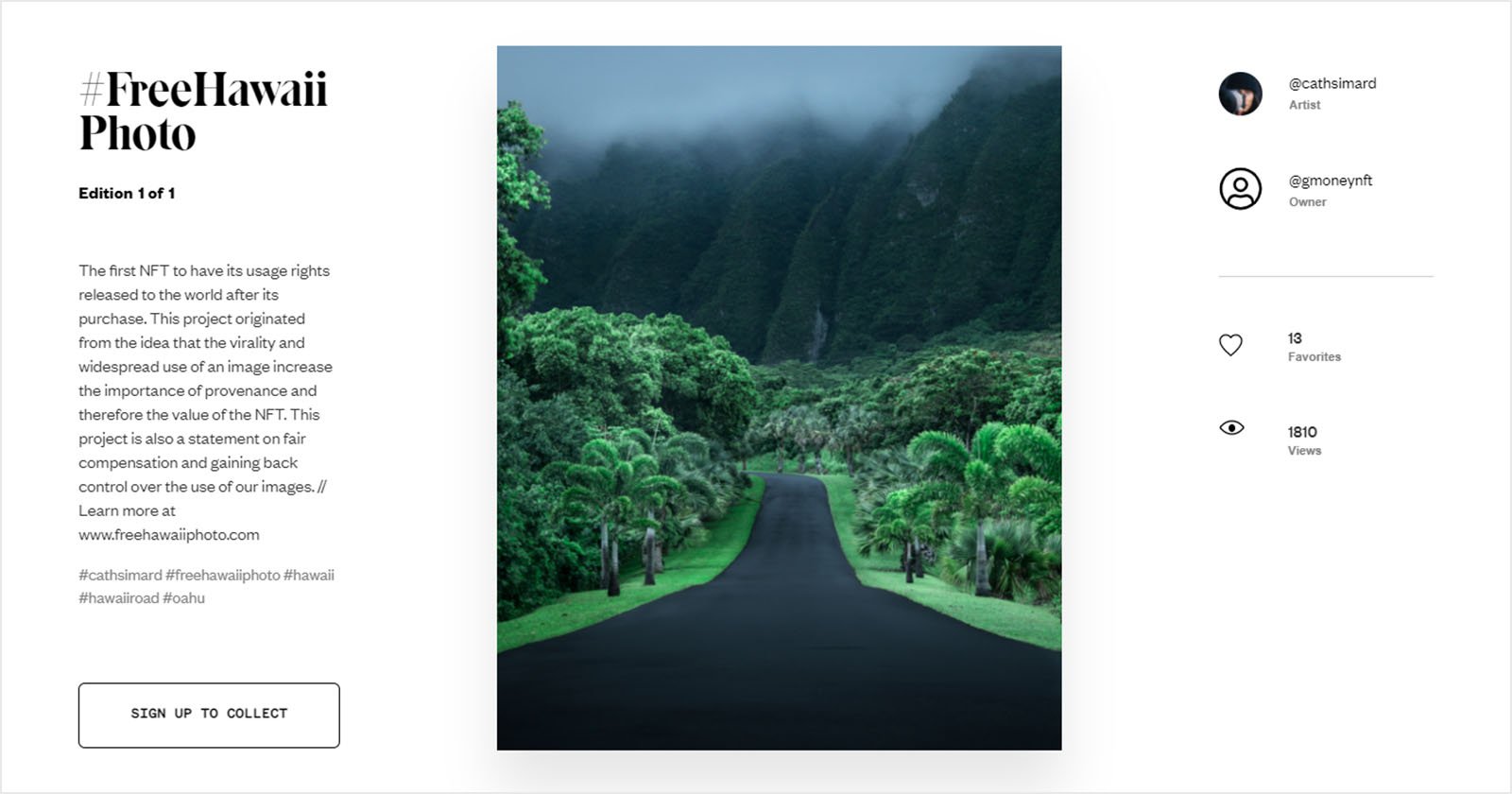
More on NFT's, this time at DPR...

 
Last edited:
Lovely pictures.

On the posting stuff question. No idea.

I use imgur, upload the picture, copy the BBCode and post it here.
 
Use the bbcode when sharing from Flickr. I tend to post the largest of the medium options.
 
Although I have a NAS, the drives are getting old now and I have to think about thinking of replacing them, which is expensive when you have an 8 bay NAS.:(
Im also conscious of the piles of usb drives I have as back ups, my photo storage/backup system is a mess.
I was googling around and I came across this
Cubbit
Seems like a potentially neat solution, Im going to do some more research but Im a big fan of distributed storage architectures
 
Although I have a NAS, the drives are getting old now and I have to think about thinking of replacing them, which is expensive when you have an 8 bay NAS.:(
Im also conscious of the piles of usb drives I have as back ups, my photo storage/backup system is a mess.
I was googling around and I came across this
Cubbit
Seems like a potentially neat solution, Im going to do some more research but Im a big fan of distributed storage architectures

The big issue for you is probably volume of data.
Cubbit is a 1Tb cell, expandable to 4Tb by adding storage yourself (you need to add 6Tb to get the full 4Tb).
Since you have an 8 bay NAS, you are likely to be needing multiple Cubbit cells to get the volume you need - and simply replacing the drives in your NAS quickly looks like a much cheaper option.
You might also want to add a cloud backup (I personally use Backblaze) which while you do have an ongoing charge, you get several years worth for the cost of a Cubbit!
 
I did look at backblaze, but there were too many negative reviews. The cost difference isn't as much as it initially looks, though it is more expensive, I run RAID 10 so I only get 50% of the total disk space for storage so I have 8 x 6TB which gives me 24TB usable
If I went for a 4TB cell @ approx £370, I could expand that with one of my USB drives up to 7TB for no extra cost.
To get 7TB on a RAID 10 NAS, I would need to buy 4 x 4TB drives which would be around £400-£440, I know Im cheating a bit as I have multiple large USB drives I can repurpose, but the cost is closer than I thought.

Im balking at the cost of swapping out all the drives, as even If I went for a modest upgrade and bought 8TB drives, Id be looking at £1200+ which is making me question actually having a NAS now, back then it was the only option, now there are other options.
Im also a bit wary of my NAS as the last update provided by the manufacturer actually borked the OS and I had to manually wipe and reload the OS into it its flash partition. Im a network engineer with 25yrs of experience, but I followed the instructions provided by QNAP and even I was a bit wary, Id hate for my wife or any other non tech person to try this, it wasn't simple by any means.

So I started looking at alternatives, no idea what Im going to do, but if I am going to fork out that much money, I do need to look at alternatives.

Im not thinking of a big bang approach, this would be a gradual migration over a period of time if I did do this..
 
Last edited:
Have all 8 drives failed or something. Whole point of a NAS+RAID is you can replace drives as and when they die.

I'm really happy with my Asustor NAS so far.

You need to calculate the cost per GB as well might be worth running larger capacity drives but only 4 or 6 of them.
RAID 10 seems overkill as well unless I'm missing something you might be okay with RAID 5 or 6.
 
Last edited:
Back
Top