The Amazing Sony A1/A7/A9/APS-C & Anything else welcome Mega Thread!

Just an update on my A7III and also GX80 woes.

The A7III was working fine until I spotted that if taking pictures over a number of days it put them in separate folders which wasn't what I wanted. I tried fiddling with the date and default settings for file saving (I may get the names wrong here as I haven't got the camera in front of me) and also the "mass storage" and alternative settings. Everything looked right and changing the settings to something else and back didn't fix it, tuning on and off and removing the battery didn't fix it and resetting the camera didn't. Annoyingly when I emailed Sony and very clearly told them the issue they said the camera was working within parameters. Hmmmm. Not IMHO.

After I last used the camera I changed the settings to the wrong ones, took the battery out and left it for a couple of days. I then reset the camera and then waded through the menus setting everything to normal and then... It Worked. So, the only thing I did differently was to leave the camera for an extended period with no battery. I can't say that the extra time with no battery did it (these things do also have an internal battery, AFAIK) as it could have been that after so many attempts to try and overwrite whatever was stuck the last attempt just finally worked. I have tried setting the date and storage options to something else and they appear to work too so it looks like whatever was stuck, either in the "standard" or "mass storage" menu sections is now unstuck. Phew.

My GX80 also had a wobble. I have three custom memory options using eye detect and various other things but when out the other day I noticed that eye detect wasn't working in C1. I switched to aperture priority, set eye detect and it worked fine, I then noticed that the two other custom modes were missing. I went into the menu and remade the three custom modes and everything then worked normally. It's quite an involved thing to delete a custom mode or two or to even alter them so I'm sure I didn't do it by accident. Oh well. So that's twice I've had strange glitches in a short period but it just reminded me that although these are cameras there is a big computer element to them.
Glad you've fixed your A7III, it's a pain when they don't work right. Shame about the GX90 though.
 
Hello Sony Chums.

You may recall me moaning about a lack of sharpness in my birding shots taken with A6700 and 70-350 a few weeks back - well I got shot of the 70-350, and now have a Sigma 105mm for macro work. I took a fair number of shots this morning and basically none of them are properly sharp :(

Thinking I must have a duff copy of the camera as it seems too much of a coincidence that it could be the lens again ( I have been shooting macro for 10 years+ so I have a pretty good idea what I am doing and what a sharp shot should look like).

Any thoughts or suggestions, or should I start the warranty process with Cotswolds?

Thanks for any replies
 
Hello Sony Chums.

You may recall me moaning about a lack of sharpness in my birding shots taken with A6700 and 70-350 a few weeks back - well I got shot of the 70-350, and now have a Sigma 105mm for macro work. I took a fair number of shots this morning and basically none of them are properly sharp :(

Thinking I must have a duff copy of the camera as it seems too much of a coincidence that it could be the lens again ( I have been shooting macro for 10 years+ so I have a pretty good idea what I am doing and what a sharp shot should look like).

Any thoughts or suggestions, or should I start the warranty process with Cotswolds?

Thanks for any replies
Oh dear, sorry to hear this. I would definitely contact Cotswolds and explain what’s happened with both lenses and ask for an exchange/warranty repair.
 
Start the warranty claim Mike.
Oh dear, sorry to hear this. I would definitely contact Cotswolds and explain what’s happened with both lenses and ask for an exchange/warranty repair.
Gents - thanks, I think I will have to. I took a reasonably scientific close up shot using manual focus and compared it to a shot taken with my RX10iv and Raynox150 to give roughly the same framing - the A6700 + Sigma 105 should knock it out of the park but if anything the RX10 shot is sharper. Weird.

I've lost confidence in it now to be honest so I at least want Sony to check it over - ho hum :rolleyes:
 
Unsharp pictures seems a bit subtle a fault for mirrorless, or maybe not. Maybe post as many details as you can just in case someone has a bright idea.
Thanks Alan - I shoot macro almost always with the same settings: F16 for depth of field (yes I know about diffraction but this helps DOF), lowish iso, shutter set to max flash sync speed (1/160 for the A6700) and diffused flash on ETL mode. I usually autofocus - many others don't but I find it easier and usually reliable - if I get the chance I'll try a bug shot on manual focus with zebras on.

I was previously shooting on an A7Rii with 90mm and got lots of great shots with this method - please for the love of god don't ask me why I changed this setup :headbang:
 
Thanks Alan - I shoot macro almost always with the same settings: F16 for depth of field (yes I know about diffraction but this helps DOF), lowish iso, shutter set to max flash sync speed (1/160 for the A6700) and diffused flash on ETL mode. I usually autofocus - many others don't but I find it easier and usually reliable - if I get the chance I'll try a bug shot on manual focus with zebras on.

I was previously shooting on an A7Rii with 90mm and got lots of great shots with this method - please for the love of god don't ask me why I changed this setup :headbang:
Have you had sharp shots with any lens on the A6700?
 
Have you had sharp shots with any lens on the A6700?
Yes, a few, such as the below. It's almost like it's slightly missing focus with most of them though (I thought back focussing at one point).

I've emailed Cotswolds to start the warranty process - will see what they say...


Robin by Mike Smith, on Flickr
 
Yes, a few, such as the below. It's almost like it's slightly missing focus with most of them though (I thought back focussing at one point).

I've emailed Cotswolds to start the warranty process - will see what they say...


Robin by Mike Smith, on Flickr
So all lenses are demonstrating the same behaviour?
 
So all lenses are demonstrating the same behaviour?
Yes, that's what it looks like - I wouldn't say I've exhaustively tested the Sigma 105 (might try a few tomorrow on manual focus) but I took a fair few with the 70-350 and the bulk of them were slightly OOF. I also have the 10-20 but haven't taken many shots with it and it's pretty hard to miss focus on a wide angle...
 
Yes, that's what it looks like - I wouldn't say I've exhaustively tested the Sigma 105 (might try a few tomorrow on manual focus) but I took a fair few with the 70-350 and the bulk of them were slightly OOF. I also have the 10-20 but haven't taken many shots with it and it's pretty hard to miss focus on a wide angle...

If you are tripod, decent shutter speed & manual focus with the magnify etc than there isn't much technique wise to go wrong there......
 
Following on from Alan's @woof woof SD card folder thingy issues.....

I've just got some images from the A7Riii, and I've a batch of them in 100MSDCF & another batch in 101MSDCF - It appears that although I format & I am set up in 'series', I reached 9999 during a sunrise shoot & the camera created a new 101 folder & started again from 0001 - I only noticed because in the PC Windows Explorer folder, the blue hour sunrise shot was AFTER the golden hour shots hence I checked the filenames.....
 
Following on from Alan's @woof woof SD card folder thingy issues.....

I've just got some images from the A7Riii, and I've a batch of them in 100MSDCF & another batch in 101MSDCF - It appears that although I format & I am set up in 'series', I reached 9999 during a sunrise shoot & the camera created a new 101 folder & started again from 0001 - I only noticed because in the PC Windows Explorer folder, the blue hour sunrise shot was AFTER the golden hour shots hence I checked the filenames.....
That is how it should work and that is the standard to only go up to 9999 images but that seems different to the problem Alan is describing where it's creating new folders for each day of shooting if I'm understanding correctly.
 
That is how it should work and that is the standard to only go up to 9999 images but that seems different to the problem Alan is describing where it's creating new folders for each day of shooting if I'm understanding correctly.

Yes, I didn't say it was exactly the same. But it's not something I've ever noticed to just automatically create an extra folder before. I've just formatted it, which I do fairly regular, and now if I go into the select recording folder option, it's just showing a single 100MSDCF.
 
Yes, I didn't say it was exactly the same. But it's not something I've ever noticed to just automatically create an extra folder before. I've just formatted it, which I do fairly regular, and now if I go into the select recording folder option, it's just showing a single 100MSDCF.
As above, perfectly normal once your file number reaches 9999, it's done it on every digital camera I've had (y)
 
That is how it should work and that is the standard to only go up to 9999 images but that seems different to the problem Alan is describing where it's creating new folders for each day of shooting if I'm understanding correctly.

I'm now solved.

I think an option had somehow become stuck in either the date or standard folder option or the storage option. I can't say which as if either was stuck I think it'd create pretty much the same effect.

As above, I also had a gremlin in my Panasonic GX80 which deleted a couple of custom modes and eye detect stopped working in the one custom mode it didn't delete. Redoing the custom modes got everything working again and took less than 5 minutes whilst we were sat having a picnic at Redcar so no real harm done with either the Sony or Panasonic gremlins. I don't know why two of my cameras would threw a setup wobble within a short space of time or even maybe at the same time. They're kept in the same drawer but there isn't anything massive and electrical anywhere near them.

The most annoying thing for me was that when I clearly and in detail described my little issue to Sony they said "With reference to your enquiry regarding your Sony ILCE-7M3, after reviewing the case with our relevant team, we can confirm that this is within specifications and it is not an issue." That really p'd me off big time.
 
Last edited:
You're obviously a lot more careful with the number of photos you take than I am :D

Even if the card is formatted if you're using sequential numbering I'm pretty sure it should always create a new directory when it ticks over 9999 even though there's not that number of photos present. It will keep on creating new folders each time it hits 9999, it's a bit of an annoyance with timelapses and similar when you have tens of thousands of images. It's part of the DCF spec:


One DCF directory may contain up to 9999 DCF objects, numbered from "0001" to "9999" (except for some manufacturers like Panasonic which number from "0001" to "0999"). This number is also known as a "file number". Consequently, if the prefix used is "DSC0", it may cause users who are not aware of the DCF standard to wonder why the picture counter wraps around after 9999, while there is seemingly still a significant number left. For example, the next file after DSC09999.JPG will create a new folder containing DSC00001.JPG, rather than continuing in the same folder to DSC10000.JPG.
 
Obviously never noticed it before. But the 101 folder has vanished now anyway. And it's back to just having the original 100 folder.
It will when you format (y)
 
Viltrox 35mm f1.2 review and a Sony camera with a tilting EVF, just like the Panasonic GX9 I've just charged a battery for and will be taking out soon.


Some from today. A7III and Sony 40mm f2.5.

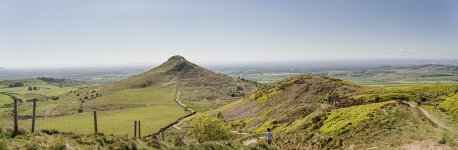
Panorama.

1-Roseberry Topping-9-5-2025-3.jpg

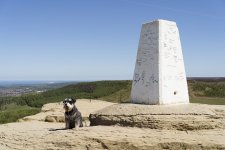
At the top.

1-DSC00154.jpg

He got his bike to the top. His next stop... Saltburn.

1-DSC00155.jpg

Mrs WW telling the world we made it via social media.

1-DSC00158.jpg

1-DSC00161.jpg

I took this same shot a few years ago with my A7 and Sony 35mm f1.8.

1-DSC00175.jpg

On to Captain Cook's monument. Panorama.

1-Roseberry Topping-9-5-2025-5-C.jpg

Just to prove we made it. Roseberry Topping in the distance too.

1-DSC00215.jpg

We did 27,170 steps and Mrs WW says she doesn't want to walk this far again.
 
Last edited:
Some from today. A7III and Sony 40mm f2.5.

Panorama.

View attachment 452830

At the top.

View attachment 452831

He got his bike to the top. His next stop... Saltburn.

View attachment 452836

Mrs WW telling the world we made it via social media.

View attachment 452837

View attachment 452832

I took this same shot a few years ago with my A7 and Sony 35mm f1.8.

View attachment 452833

On to Captain Cook's monument. Panorama.

View attachment 452834

Just to prove we made it. Roseberry Topping in the distance too.

View attachment 452835

We did 27,170 steps and Mrs WW says she doesn't want to walk this far again.

Excellent Alan :)
 
Excellent Alan :)

That's a problem as these pictures could have been taken with any of my Sony lenses. The 40mm f2.5 is a good lens and although I wouldn't say it's clinical as I don't like that term I do think it's pretty transparent as it pretty accurately captures the scene and leave little trace of what lens was used. I think vignetting is its biggest issue but in these pictures even that issue isn't much of an issue. If I'd used a film era lens or even one of my modern manual lenses there'd be more to look at.

I suppose it just depends what we want. A competent modern lens which leaves little if any fingerprints on the pictures you take with it or something which leaves a trace which is recognisable if you know what you're looking at. I have been thinking of selling most of my remaining film era lenses or maybe all of them. I'll have to have a think.

Yellow and an aeroplane.

1-DSC00115.jpg
 
Last edited:
New slippery oblong block coming?


Yipeee!

I/we took a few pictures with my oblong block on our Roseberry Topping day out. I could see that the block was turned on as there was something on the screen but there wasn't enough there to see anywhere near clearly and definitely not enough there to tell if the shot was in focus. There wasn't even enough visible to be totally sure who I'd be calling if I'd wanted to use the block as a phone. Good luck and more power to people who enjoy phone photography but it's just not for me but I suppose if we discount the three sunny days we get per year they'll be useable on many days.

Maybe I'm going a bit OTT and it was a very glary day and I suppose putting a bag over my head and shielding the phone would have made it more useable but I don't enjoy phone photography even when the lighting is more screen friendly. My camera back screen was also unusable but thankfully my evf wasn't.
 
That's a problem as these pictures could have been taken with any of my Sony lenses. The 40mm f2.5 is a good lens and although I wouldn't say it's clinical as I don't like that term I do think it's pretty transparent as it pretty accurately captures the scene and leave little trace of what lens was used. I think vignetting is its biggest issue but in these pictures even that issue isn't much of an issue. If I'd used a film era lens or even one of my modern manual lenses there'd be more to look at.

I suppose it just depends what we want. A competent modern lens which leaves little if any fingerprints on the pictures you take with it or something which leaves a trace which is recognisable if you know what you're looking at. I have been thinking of selling most of my remaining film era lenses or maybe all of them. I'll have to have a think.

Yellow and an aeroplane.

View attachment 452924

"Excellent" was as much for your adventures as for the images :)

And as I've said before, photography should be about fun so use what you (and others) enjoy using :) If you like the look from a manual lens and it's not frustrating to use, then go that route. I've done very little Sony photography lately, but I'm not selling anything :ROFLMAO:
 
It's the time factor that goes against mf lenses and with them a day out becomes more about photography than the day and the people. If I'm by myself then mf is much more of an option. I do like photography but on a day out with my other half or anyone else photography is an add on, not the main event.

PS.
As there aren't many pictures of me I asked Mrs WW to take some at the top of Roseberry Topping. I put my A7III in wide area thinking that gave her the best chance and she took 5 pictures and every one of them was waaaaay OOF. Nothing was in focus. I wondered how it's possible to get 5 pictures so far OOF with a modern camera... Well, what she'd done is press C1 which is I suppose quite close to the shutter button and I have C1 set to AF on/off. If it can go wrong it will go wrong.
 
Last edited:
It's the time factor that goes against mf lenses and with them a day out becomes more about photography than the day and the people. If I'm by myself then mf is much more of an option. I do like photography but on a day out with my other half or anyone else photography is an add on, not the main event.

That's where, for me, the X100f (or any other version I guess) works so well. Quick, simple, no big bag, no selection of filters, no tripod and more often than not, no editing either - I'm about maybe 80% SOOC jpegs, the rest I'll edit the RAW but still with just the Film Simulation profile..... I certainly don't tend to use any masks etc
 
Back
Top