The Amazing Sony A1/A7/A9/APS-C & Anything else welcome Mega Thread!

@snerkler why don't you hire a A9/II to give it a go.
I thought about that but it's £130 just for one day :eek:
LR is quite memory hungry, just playing with some 50MP GFX files on my computer sees the memory usage climb from ambient to 22Gb and peaking at 27Gb - this is a Windows Machine, but suggests that 16Mb is going to cause a lot of page swapping and 32Gb is probably baseline adequate.
I think I'll have to bite the bullet one day with a new computer but I'd want to 'future proof' it as much as I can so I'd go 64GB RAM, and to do that with a decent SSD on MBP I'm looking at £4k :eek: I'm waiting for the M1 chip to come out on the 16" MBP and see what happens to prices. The fact remains that I don't need the 61mp anywhere as much as I thought :help:
 
I thought about that but it's £130 just for one day :eek:

I think I'll have to bite the bullet one day with a new computer but I'd want to 'future proof' it as much as I can so I'd go 64GB RAM, and to do that with a decent SSD on MBP I'm looking at £4k :eek: I'm waiting for the M1 chip to come out on the 16" MBP and see what happens to prices. The fact remains that I don't need the 61mp anywhere as much as I thought :help:

If you want to futureproof then a Windoze Desktop is probably the way to go, the Apple ecosystem forces upgrade computers on you rather than upgrade components.

My desktop was relatively high-spec 5 years ago (inc dual 4K monitors) - cost around £2.2K inc monitors. I've just upgraded HDDs (mainly because I don't like running mechanical spinners over 5 years old for my work), added more memory and upgraded to a quieter case, It still runs quickly, happy to process 50MP image files and should be good for another 3+ years. I'll probably swap out the SSD for a high capacity one in a year or so.
 
My shot ( un-edited a) at ISO 102,400 and NO noise reduction applied= Sony a7Riii

They do seem to handle noise exceptionally well - who needs ne-noise ??

9czAHV5.jpg

I know acceptable noise levels are a personal thing, but that for me would be an instant trash level.

I have just realised something thats annoying me on my camera, why cant you select individual items that are shown on the display, ie i dont want to constantly see what picture profile im using or that dynamic range is off.
 
If you want to futureproof then a Windoze Desktop is probably the way to go, the Apple ecosystem forces upgrade computers on you rather than upgrade components.

My desktop was relatively high-spec 5 years ago (inc dual 4K monitors) - cost around £2.2K inc monitors. I've just upgraded HDDs (mainly because I don't like running mechanical spinners over 5 years old for my work), added more memory and upgraded to a quieter case, It still runs quickly, happy to process 50MP image files and should be good for another 3+ years. I'll probably swap out the SSD for a high capacity one in a year or so.
Windows would definitely make financial sense, but I'm in the Apple ecosystem and much prefer Apple OS over windows.
I know acceptable noise levels are a personal thing, but that for me would be an instant trash level.

I have just realised something thats annoying me on my camera, why cant you select individual items that are shown on the display, ie i dont want to constantly see what picture profile im using or that dynamic range is off.
I've never understood why camera manufacturers don't let you customise the display. Olympus do to a large degree and so I can't get my head around why Canikon and Sony don't offer this. I'm with you, there's too much info on the Sony, but then other displays aren't enough. One thing I'd like (which I had on the Olympus) was to have the histogram with other info as well.
 
[
I know acceptable noise levels are a personal thing, but that for me would be an instant trash level.

I have just realised something thats annoying me on my camera, why cant you select individual items that are shown on the display, ie i dont want to constantly see what picture profile im using or that dynamic range is off.


Purley to test my Camera, I was just seeing how far I could push the ISO before it became - for me unacceptable

I shoot Birds & Wildlife - limiting my ISO between 100 & 8,000 and get some passable results as a quick glance of my Flickr account will show :)

Les

ISO 5,000
DSC05912 Meadow Brown Butterfly by Les Moxon, on Flickr
 
Last edited by a moderator:
Why would you chose the GM?


Much better build quality IMHO and the f1.4 Bokeh is an absolute dream for portraits etc - but hey it's your money Tim :) and I am unaware of your Budget fella
 
Trying to decide between 85 GM or the new Sigma 85mm. Or keep the Sony 85mm 1.8.

Sigma any day.

Did you try it in any backlit situations?

I don't know why everyone asks this, its fine. GM is a tad bit better but the difference is not enough to warrant buying GM over this.
 
Did you try it in any backlit situations?

unfortunatley not as not really had too many golden hour opportunites lately.
having owned both lenses i find the sigma gernerally faster. certainly faster in low low light. sharper. smaller and lighter. nicer build. quieter. bokeh appears to be on par.

the gm is great, it really is. but my money would go on the sigma personally.
 
My a9mkII lets you add a false shutter sound 20fps if you want but i clearly see the box flicker as in the video above so have no sound on as it can scare birds.

Rob.
 
Trying to decide between 85 GM or the new Sigma 85mm. Or keep the Sony 85mm 1.8.
I have the Sigma 85mm f1.4 DG DN and it’s probably the most beautiful rendering lenses I’ve owned. I did a lot of research and from side by side comparisons from reputable reviewers (IMO) I always found the bokeh more pleasing on the Sigma. It’s softer and more often than not more OOF. To my eyes the Sigma has more of the elusive 3D look to it. It’s also smaller, lighter and cheaper. Every review shows that the Sigma is about 1/3 stop brighter too.

The downsides are that it doesn’t handle backlighting as well (although I’ve not had an issue yet) and it suffers distortion, although I never see the latter as I have distortion correction set in LR.

I don’t think you can go wrong with either but some will prefer the advantages of the GM whilst others (like myself) will prefer the advantages of the Sigma. What was surprising is that a number of people in the comments sections have apparently sold or going to sell their GM to get the Sigma :eek:
 
I have the Sigma 85mm f1.4 DG DN and it’s probably the most beautiful rendering lenses I’ve owned. I did a lot of research and from side by side comparisons from reputable reviewers (IMO) I always found the bokeh more pleasing on the Sigma. It’s softer and more often than not more OOF. To my eyes the Sigma has more of the elusive 3D look to it. It’s also smaller, lighter and cheaper. Every review shows that the Sigma is about 1/3 stop brighter too.

The downsides are that it doesn’t handle backlighting as well (although I’ve not had an issue yet) and it suffers distortion, although I never see the latter as I have distortion correction set in LR.

I don’t think you can go wrong with either but some will prefer the advantages of the GM whilst others (like myself) will prefer the advantages of the Sigma. What was surprising is that a number of people in the comments sections have apparently sold or going to sell their GM to get the Sigma :eek:

i think the distortion was a result of the lens design being so small. but an instant fix in lightroom its not an issue.
what a contrast it is from the other 85mm art they offer.
 
Trying to decide between 85 GM or the new Sigma 85mm. Or keep the Sony 85mm 1.8.

The Sigma has slightly faster a.f than the G.M and is very well priced the only downsides being it hunts a bit in backlit situations and also seems to be more prone to banding in backlit situations as well.

For me I prefer the G.M lens but both are great.
 
I thought about that but it's £130 just for one day :eek:

I think I'll have to bite the bullet one day with a new computer but I'd want to 'future proof' it as much as I can so I'd go 64GB RAM, and to do that with a decent SSD on MBP I'm looking at £4k :eek: I'm waiting for the M1 chip to come out on the 16" MBP and see what happens to prices. The fact remains that I don't need the 61mp anywhere as much as I thought :help:

I've gone 128gb ram - dual EPYC 7282, Quadro RTX400 - I keep systems a long time and whilst I have this machine - I can see 100mp in my future :D

Right now 61mp seems massive, in 5 years it will be perfectly ordinary.
 
Be much cheaper just to buy a used one to try. If you don't get on with it and resell I'm sure you'll lose less than that hire cost!
Yep very true (y)
 
Yes.
One uses whatever I choose, the other is always set for fast action tracking.
I'll find the video I saw it on.....
It's a good video....the bit you want starts around 15 minutes in.
It's not just suitable for birds in flight....
View: https://youtu.be/z9hCwoSIKzc
Thanks for this. I've just got around to watching it but I have a couple of questions. The settings of the custom hold button make sense but what he doesn't explain (unless this is later in the video) is how and what you assign the custom hold button too, and then if you set up all three custom hold settings what buttons you assign these to?

I would assume the obvious button to use is the AEL button, and would assume this would work like a BBF button similar to the AFON button, but with all the different settings and focus modes you've chosen? My question is then if you need to press this to change to the new settings, as soon as you press it won't it start focussing and therefore might not focus on what you want as you won't see the AF point until you activate that button (I hope this makes sense?). I would assume therefore that it's better to set the custom hold button NOT to focus, then use the normal shutter button to do this?
 
Thanks for this. I've just got around to watching it but I have a couple of questions. The settings of the custom hold button make sense but what he doesn't explain (unless this is later in the video) is how and what you assign the custom hold button too, and then if you set up all three custom hold settings what buttons you assign these to?

I would assume the obvious button to use is the AEL button, and would assume this would work like a BBF button similar to the AFON button, but with all the different settings and focus modes you've chosen? My question is then if you need to press this to change to the new settings, as soon as you press it won't it start focussing and therefore might not focus on what you want as you won't see the AF point until you activate that button (I hope this makes sense?). I would assume therefore that it's better to set the custom hold button NOT to focus, then use the normal shutter button to do this?

I don't quite understand what you are getting at, seems like you are making it more complex than it needs to, just as Sony does :LOL:

my setup is different to @Bobsyeruncle but we have the same ideology. I rarely change my AF settings thanks to this feature.

So my camera is almost always set to AF-C, realtime tracking with medium flexible spot (sometimes for larger subjects I use tracking zone and expanded flexible spot). This is pretty much a permanent fixture and tbh works for static subjects too especially if you are going to focus recompose because realtime tracking is great at keeping the subject in focus even after you recompose.

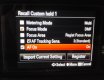
Then I have AEL button set with "Recall Custom hold 1". So pressing and holding this button simply overrides the AF-C to DMF and also autofocuses using DMF (i.e. I have AF-on ticked and focus mode ticked set to DMF). all other setting are left the same. DMF gives me peaking, plus the chance to manually override the AF with MF (really useful in the dark for example). The rest of the settings remains the same. only two things are overriden in my case.
IMG_20210203_122854.jpg

simples :D
 
Last edited:
I don't quite understand what you are getting at, seems like you are making it more complex than it needs to, just as Sony does :LOL:

my setup is different to @Bobsyeruncle but we have the same ideology. I rarely change my AF settings thanks to this feature.

So my camera is almost always set to AF-C, realtime tracking with medium flexible spot (sometimes for larger subjects I use tracking zone and expanded flexible spot). This is pretty much a permanent fixture and tbh works for static subjects too especially if you are going to focus recompose because realtime tracking is great at keeping the subject in focus even after you recompose.

Then I have AEL button set with "Recall Custom hold 1". So pressing and holding this button simply overrides the AF-C to DMF and also autofocuses using DMF (i.e. I have AF-on ticked and focus mode ticked set to DMF). all other setting are left the same. DMF gives me peaking, plus the chance to manually override the AF with MF (really useful in the dark for example). The rest of the settings remains the same. only two things are overriden in my case.
View attachment 307420

simples :D
I have mine set similar.
DMF is my main setting so works on the shutter button.
Then my back button is set to AF-C face/eye tracking, small spot.
Means I almost never have to change settings.
 
I don't quite understand what you are getting at, seems like you are making it more complex than it needs to, just as Sony does :LOL:

my setup is different to @Bobsyeruncle but we have the same ideology. I rarely change my AF settings thanks to this feature.

So my camera is almost always set to AF-C, realtime tracking with medium flexible spot (sometimes for larger subjects I use tracking zone and expanded flexible spot). This is pretty much a permanent fixture and tbh works for static subjects too especially if you are going to focus recompose because realtime tracking is great at keeping the subject in focus even after you recompose.

Then I have AEL button set with "Recall Custom hold 1". So pressing and holding this button simply overrides the AF-C to DMF and also autofocuses using DMF (i.e. I have AF-on ticked and focus mode ticked set to DMF). all other setting are left the same. DMF gives me peaking, plus the chance to manually override the AF with MF (really useful in the dark for example). The rest of the settings remains the same. only two things are overriden in my case.
View attachment 307420

simples :D
Yeah I kind of get all that, but if you have your custom button set up to an AF mode surely as soon as you press that it will activate the AF, which you may not want. For example you may have it set to wide af for normal and flexible spot small on custom hold. You can’t guarantee the small AF point is going to be exactly where you want it straight away and it will therefore start autofocussing on something you don’t want.
 
Yeah I kind of get all that, but if you have your custom button set up to an AF mode surely as soon as you press that it will activate the AF, which you may not want. For example you may have it set to wide af for normal and flexible spot small on custom hold. You can’t guarantee the small AF point is going to be exactly where you want it straight away and it will therefore start autofocussing on something you don’t want.

As mentioned I don't change any other settings apart from AF-C/DMF.
Thanks to real time tracking I seldom move my flexible spot off centre. I focus and recompose with AF-C and realtime tracking keeps it in focus 99.99% of the time.
I don't bother with wide area at all, it's unticked from my focus area options. I have just three options - medium flexible spot, expanded flexible spot and zone.
The rest are unnecessary IMO.
The only time I move the focus point around is when I am manual focusing and I need to manually focus on a different point off the centre (or I need to DMF on a different point which is really rare)
 
Last edited:
As mentioned I don't change any other settings apart from AF-C/DMF.
Thanks to real time tracking I seldom move my flexible spot off centre. I focus and recompose with AF-C and realtime tracking keeps it in focus 99.99% of the time.
I don't bother with wide area at all, it's unticked from my focus area options. I have just three options - medium flexible spot, expanded flexible spot and zone.
The rest are unnecessary IMO.
The only time I move the focus point around is when I am manual focusing and I need to manually focus on a different point off the centre (or I need to DMF on a different point which is really rare)
I’m a more traditional single point shooter and move that around to where I want the focus point. Tracking hasn’t been brilliantly reliable for me. Tbh I’d probably set it so that ael doesn’t focus and use the traditional shutter (y)
 
I’m a more traditional single point shooter and move that around to where I want the focus point. Tracking hasn’t been brilliantly reliable for me. Tbh I’d probably set it so that ael doesn’t focus and use the traditional shutter (y)

A7RIV not perfectly tracking your dog running at you at some speed, I can very well believe.
But A7RIV not being able to keep up with a stationary subject while you focus and recompose I can't believe that! If you A7RIV can't handle that you much have a lemon :ROFLMAO:

Focusing on A7RIV is actually pretty good. Sure it's not perfect and there are some cameras better than it but I'd take A7RIV any day over the old Nikon DSLRs like D810 or D750, even all Nikon/Panasonic mirrorless bodies and old canons like 5DSR.
There aren't many bodies I'd pick over A7RIV, may be D850 and R5 but that's it.
 
Last edited:
A7RIV not perfectly tracking your dog running at you at some speed, I can very well believe, A7RIV not being able to keep up with a stationary subject when you focus and recompose I can't believe that!
I never said that lol, but it’s not the way I’ve done it. I’m sure that could work very well tbh, the only time I could see it being an issue is not having real time animal eye AF or whatever it’s called.

I’m sure I can make it work though regardless, the custom hold button does sound a really good feature.
 
Focusing on A7RIV is actually pretty good. Sure it's not perfect and there are some cameras better than it but I'd take A7RIV any day over the old Nikon DSLRs like D810 or D750, even all Nikon/Panasonic mirrorless bodies and old canons like 5DSR.
There aren't many bodies I'd pick over A7RIV, may be D850 and R5 but that's it.
The A7RIV is a cracking camera, overall it’s probably the best I’ve owned (except in the tracking towards the camera). The ‘issues’ I’ve had aren’t massive by any stretch, despite them now being discussed over several pages :lol:
 
Oh my God, the A9 menu.. :oops: :$
its not great is it :P
but I haven't looked into the menus since I first setup my camera like year ago.

There's plenty of buttons and fn menu title you can customise. And for the odd bits you can't add (eg: formatting memory cards) you can add it to my menu. you can setup the camera menu to pickup from my menu so you never have to see those menus again after you are set up.
 
I’ve kind of got used to the menu tbh, but it’s still difficult trying to remember where everything is. As above, the mymenu helps keep all the most used things in one place.

I just wished the memories stored all settings, for example it’s annoying raw settings (such as compressed/uncompressed) aren’t saved as I use uncompressed for most things, but compressed for sports but it won’t save this to my “sports” memory bank.
 
I just wished the memories stored all settings, for example it’s annoying raw settings (such as compressed/uncompressed) aren’t saved as I use uncompressed for most things, but compressed for sports but it won’t save this to my “sports” memory bank.

yeah that sucks. I use compressed for most things about from landscapes. but I have to change it manually every single time.
 
yeah that sucks. I use compressed for most things about from landscapes. but I have to change it manually every single time.
I've done it and forgot and then realised that I'd shot everything in compressed by mistake. Not a major issue as you can't tell on most occasions. The A1 solves this of course by having lossless compressed (y)
 
Back
Top