Technology winge

  • Thread starter Thread starter Deleted member 49549
  • Start date Start date
D

Deleted member 49549

Guest
Today my ire is aimed at Microsoft. we all know about the strange design choices by Microsoft, like pressing the start button to turn off the machine.

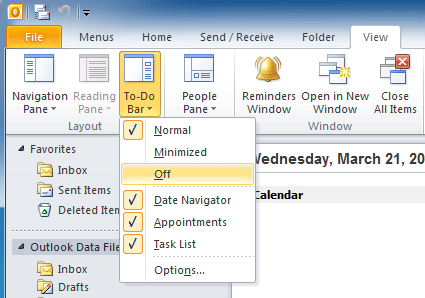
But today I found another equally incomprehensible UI. In outlook, activate the to-do bar, select tasks, and what do you see? Here's a clue, ITS NOT YOUR TASKS! Why oh why must everything Microsoft be sheet. Why would you even make a ui where you have both tasks and todos that are totally separete entities?
 
I see a list of emails requiring action - i.e. tasks. There are tabs at the top that allow one to toggle between tasks and items to do - maybe if you leave it toggled on To Do then it stays that way after opening & closing?

'Start' was an unfortunate title for what might have been called 'control centre' if a very similar name had not already been taken by control panel.
 
I'm not defending Microsoft, but it makes sense if you want to start the shut down or start the sleep mode.

The deeper reason is it was chosen to make finding most things you want to Start, for newbies, a bit more obvious. And it's not as if there was a big choice of buttons to choose from.

Also, I think Microsoft can be better criticised for some of the many really stupid show stoppers they have done, rather than some mild aesthetic.

And lastly, if you don't like their software, dump them and move on to something better, like many others have done. It's the people that stick with them that makes them lazy.

But I do agree that ergonomics in software is important. And worth complaining about.
 
Last edited:
if you want to start the shut down or start the sleep mode.

You can alter the settings to "Shut down the PC" when the lid is closed. Mine is set to "Sleep" when the lid is closed. Only re-boot for updates.
 
TBH I always set my computers with lid to shut down when I press the power button - except those running OSX, where that's not a simple option.
 
TBH I always set my computers with lid to shut down when I press the power button - except those running OSX, where that's not a simple option.

Macs can be gracefully shut down using Ctrl-Alt-Cmd-Power or Ctrl-Alt-Cmd-Eject (depending on what the top right corner key is labelled). Apps will prompt to save files as normal.
 
Macs can be gracefully shut down using Ctrl-Alt-Cmd-Power or Ctrl-Alt-Cmd-Eject (depending on what the top right corner key is labelled). Apps will prompt to save files as normal.

Or open the Terminal and execute 'sudo shutdown -h now' if you want to do it without grace :)
 
Macs can be gracefully shut down using Ctrl-Alt-Cmd-Power or Ctrl-Alt-Cmd-Eject (depending on what the top right corner key is labelled). Apps will prompt to save files as normal.
Wow! Whacky 4-key press combinations!
 
Wow! Whacky 4-key press combinations!

You know Apple - always one better than Microsoft. ;)

Macs can be gracefully shut down using Ctrl-Alt-Cmd-Power or Ctrl-Alt-Cmd-Eject (depending on what the top right corner key is labelled). Apps will prompt to save files as normal.

I really like just hitting the power button and having the machine shut down; there's something very pleasing about that particular action.
 
I see a list of emails requiring action - i.e. tasks. There are tabs at the top that allow one to toggle between tasks and items to do - maybe if you leave it toggled on To Do then it stays that way after opening & closing?

'Start' was an unfortunate title for what might have been called 'control centre' if a very similar name had not already been taken by control panel.

Here's what I'm seeing to get to the view
todo-bar-2.png


And the actual contents of the todo bar when you add 'task list'

6395484.jpg


Those items in red at the bottom aren't 'tasks' but 'to-do's' to use the correct outlook lingo.
Or perhaps i am being particularly dim again....I attempted to creat a dummy task and it didn't appear, it just showed just emails that I had flagged.

Ps I don't have my work laptop nearby so have had to search for approximate images via google images.
 
Ps on a separate winge and to balance things out a winge about apple. Occasioanally i perform a number of actions that may require fingerprint authentication but due to poor network connection the prompt for fipngerpront may be delayed and I may get a prompt some time later. e.g. After downloading an app with no network connection, when I restore network connection I get a number of password prompts. It really would be beneficial to know what I am authorising with each prompt rather than trusting to my increasingly crap memory.
And I just remembered how painful it is to use an mp3 as a ringtone on iOS....
 
I'm not defending Microsoft, but it makes sense if you want to start the shut down or start the sleep mode.

The deeper reason is it was chosen to make finding most things you want to Start, for newbies, a bit more obvious. And it's not as if there was a big choice of buttons to choose from.

Also, I think Microsoft can be better criticised for some of the many really stupid show stoppers they have done, rather than some mild aesthetic.

And lastly, if you don't like their software, dump them and move on to something better, like many others have done. It's the people that stick with them that makes them lazy.

But I do agree that ergonomics in software is important. And worth complaining about.

Not my choice unfortunately, it's a work laptop....
 
you don't have to press Start to shut down your PC.

anyway I don't think it's actually had the word "start" on it since XP?

I have W7. No name on the button, but if I hover my mouse over it the "start" caption appears.

Quirks of that sort are only a pest until you know what is meant.
 
The start menu was introduced in Windows 95. Remember that? 21 years ago this month.
Windows_95_Start_menu.png
People made a big fuss back then that Shutdown was on the start menu. But didn't make such a fuss about the many stupidities and limitations that they had already got used to. Windows 95 did, on the other hand, include many ergonomic advances that we take for granted today.
 
Last edited:
My version of outlook (2013) is one generation behind the current, and looks quite different to the one you've posted, Phil. Maybe it's something that was fixed a few years ago?
 
The start menu was introduced in Windows 95. Remember that? 21 years ago this month. People made a big fuss back then that Shutdown was on the start menu. But didn't make such a fuss about the many stupidities and limitations that they had already got used to. Windows 95 did, on the other hand, include many ergonomic advances that we take for granted today.

ahh i remember moving from 3.11 to 95. amazing times :D

My version of outlook (2013) is one generation behind the current, and looks quite different to the one you've posted, Phil. Maybe it's something that was fixed a few years ago?

2010 shows flagged mail too.
 
My Outlook must be set up differently to your Phil as I don't see what you see.

I recall really liking 3.11 Windows for Workgroups at the time.

The "Start" button is still around, well if you still use Windows 7 it is. I mindlessly accepted "Start" as the way to switch off when it first appeared. It was only a good while after that someone mentioned they thought clicking "Start" to turn the machine off, was odd.

Dave
 
I see a list of emails requiring action - i.e. tasks. There are tabs at the top that allow one to toggle between tasks and items to do - maybe if you leave it toggled on To Do then it stays that way after opening & closing?

'Start' was an unfortunate title for what might have been called 'control centre' if a very similar name had not already been taken by control panel.
And of course it led very nicely to that Rolling Stones song...
 
My version of outlook (2013) is one generation behind the current, and looks quite different to the one you've posted, Phil. Maybe it's something that was fixed a few years ago?

Ill post some screenshots when I'm at my work laptop, but i believe the above are only cosmetically different to 2013.
 
2016 Shows tasks created when you flag and e-mail, and it shows tasks that you create as a task. Exactly how I expect it to work. Does what it says on the tin.
 
Oh and I rarely ever shut down a machine, I really couldn't get excited whether a power button on my Mac does an instant shutdown or brings up a dialog whether you want to shutdown, restart or sleep. Me, I just close the lid and put it in my back. Job done.
 
Light switches are both on and off
in much the same way start and shut down are
on off switches are the norm not the exception....
 
Oh and I rarely ever shut down a machine, I really couldn't get excited whether a power button on my Mac does an instant shutdown or brings up a dialog whether you want to shutdown, restart or sleep. Me, I just close the lid and put it in my back. Job done.
Must be some setting that has been enabled / disabled as no tasks appear in my view, just 'todos' (flagged emails). Problem is the machines are locked down so can't get to many settings to check. May have a word with the exchange team to see why this is the case with my machine (or user error...)
 
Must be some setting that has been enabled / disabled as no tasks appear in my view, just 'todos' (flagged emails). Problem is the machines are locked down so can't get to many settings to check. May have a word with the exchange team to see why this is the case with my machine (or user error...)
But a flagged email is a task. By flagging an email a new object gets created which contains the data attributes for a task such that it gains a due date etc. An e-mail doesn't have those attributes, however the two objects are linked, but are separate. I hope that makes sense :)
 
But a flagged email is a task. By flagging an email a new object gets created which contains the data attributes for a task such that it gains a due date etc. An e-mail doesn't have those attributes, however the two objects are linked, but are separate. I hope that makes sense :)

I thought a flagged email was a 'todo' rather than a task. But you can also flag tasks that will show up in the todo list. So you can have emails and tasks that are todo's, and tasks that are just tasks.

I find the language Microsoft have used to be confusing, why use synonyms (task, todo) to differentiate something?
 
I'm guessing here as in outlook 2016 it seems consistent. In other words it's just tasks. But isn't a todo merely a task object for which a due by date has been set?
 
I thought a flagged email was a 'todo' rather than a task. But you can also flag tasks that will show up in the todo list. So you can have emails and tasks that are todo's, and tasks that are just tasks.

I find the language Microsoft have used to be confusing, why use synonyms (task, todo) to differentiate something?
According to this link; http://www.outlook-tips.net/tips/tip-1052-understanding-tasks-todo-list/

The to-do list contains tasks and flagged email; it is just a view that combines it across various object folders in outlook. It also includes a tip on adding columns to that view that will help identify which folder they reside in.
 
Back
Top