DemiLion
Suspended / Banned
- Messages
- 13,016
- Name
- Mark
- Edit My Images
- No
Slightly delayed from last week, and following on from a suggestion on another thread this centres on metadata, and more specifically IPTC. I'm writing this from both a sports and press perspective, so some ideas and methods may vary from yours!
Rather than a debate as such, I'll stick some of my thoughts and processes down and then feel free to add or disagree as you wish..
Please note that much of what follows is a basic overview. It's not comprehensive and is intended as a basic guide rather than definitive! I've tried to be as accurate as possible, but there may be a couple of slip ups!
Firstly what is IPTC?
More formally what we call the IPTC fields in metadata is the International Press Telecommunications Council International Information Interchange Module, or IPTC IIM. It was developed as a cataloguing tool to enable photographs to be filed correctly and relocated easily in a photo library. More details here:
http://en.wikipedia.org/wiki/International_Press_Telecommunications_Council
There are three main areas of data held in the IPTC:
Copyright ownership and contact details.
Rights Usage and Instructions.
Headline (title) and Captioning.
note: Keywords are not technically part of the IPTC structure (they are a different section of metadata), but for the purposes of this thread we'll include them as such.
Why is it important?
IPTC is a way of attaching freehand written text to a photographic file (in the digital era) so that you can describe what it portrays, who owns it and how someone can buy it.
For staff photographers, agencies and commissioned freelancers it's a way of getting the relevant information to the picture/news/sports editor as quickly and accurately as possible. For freelancers working on spec (and agencies) it's also a sales tool.
To understand why we need to look at what happens to a photograph on submission to a newspaper or agency and how one is chosen for publication.
Firstly how a photograph gets picked:
When a writer (or more usually editor) is compiling a story, he will usually have in mind what sort of image, or a particular moment that he wants to accompany the piece. If it's a live event/match and they have a staffer present or have commissioned photographs, then the choice is fairly straight forward. He checks that the captioning ties up with the particular piece of action that he wants and marries the two together.
If he doesn't have that picture available, then he needs to source one either from the in house library or via an agency.
Almost all photographs supplied by agencies are available to publications via the NID, or Newspaper Image Database, ignoring agencies/freelancers making direct sales pitches with specific images, which is effectively a massive online photo library. This can be searched using a number of parameters, but for relevance here the main information that is sought is contained in the Caption and Keyword data fields. He then picks the image that most suits the story (not always the best one available!)
Secondly what happens to a photo on submission:
Whether commissioned, supplied by a staffer or submitted on spec, an image will either get tossed (for a variety of reasons) or passed/accepted by the relevant publication/agency. From there it will be absorbed into that company's database and will end up available for use usually both in house and also via the NID. The same principle applies to both stock images and hard news/immediate sports/exclusives, except that some of the latter category are more likely to be sold directly (phone call, email etc) in the first place before making it into a library. Once there, the only way that they can be found accurately (apart from by chance) is by searching the IPTC and Keyword fields.
Follow on sales and stock are more immediately important to those that work on a per publication basis, rather than on salary, but good metadata discipline is going to be relevant to either case.
Thus IPTC supports both types of publication use (immediate event and stock) by providing the ability to give accurate information to the editor in the first place, and allowing them to search for and find the photograph in the second.
Relevant types of Metadata.
There are three main subdivisions of metadata that are relevant to this discussion, those being:
IPTC Core
IPTC Extension
Keywords
Core and Keywording are the most important, but sections of Extension can still be relevant.
The major problem with writing something like this, is that despite IPTC guidelines, no unified naming of the fields exists.
Photo Mechanic, Lightroom and Photoshop all name fields differently. Photoshop treats Keywording as integral to IPTC Core whereas Lightroom deals with it in a separate location.
For example IPTC field 120 is referred to as Caption in LR3 and PM, but as Description in Ps CSx. Field 80 gets referred to as Creator, Byline, Photographer or Author.
There is a useful cross comparison of field names here, to match to your specific software:
http://www.controlledvocabulary.com/imagedatabases/iptc_core_mapped.pdf
It doesn't refer to the latest available versions, but the basics are still true. It also gives you the size of the field and how many characters you can enter.
Which Fields to fill in?
There are a couple of must haves on any photograph that you want to get paid for:
Copyright - what it says on the tin
Copyright Status - Copyright, RF, RM etc etc
Caption - What the photograph shows (ie who, what they are doing, where, when,)
Instructions - Usage rights, how to contact and rates required
Credit- who gets the credit for the photograph, either name or name/agency etc
Location - City/Area and Country (ISO Code) The location that the image was taken (not the photographers contact details in Extension)
Date - Usually autofilled from the Exif
Keywords - This could be (and maybe should be) a whole subject on its own
These are all in the IPTC Core area (and keywording) and will show up on most decent 'Exif' readers.
There are far more detailed fields in Extension dealing with admin details, model release/ages, job identifier, licence releases etc, and need a dedicated IPTC reader to see them (PS/Bridge File Info panel or LR3 IPTC Extension fields to most of us). But the basics are as above.
One of the best resources is the IPTC Tool kit, available on their website ( http://www.iptc.org/cms/site/single.html?channel=CH0099&document=CMS1279131209658 ) which describes all the fields relevant to PS in their CS5 IPTC Panels User Guide. Extrapolate the info from there and use it in conjunction with the field description pdf above.
Learning how to use IPTC.
Practice, practice, practice.
Firstly get a decent in browser Exif reader. With Firefox I use a combination of Photome, Fxif, Exif Reader and ExifToolGUI. Record a full set of IPTC data in either PM, LR or PS (or any other decent software), and then drag your image into your browser and see how each reader displays it. Once you've done that, you'll understand which bits to fill in for each specific case, and which you can ignore.
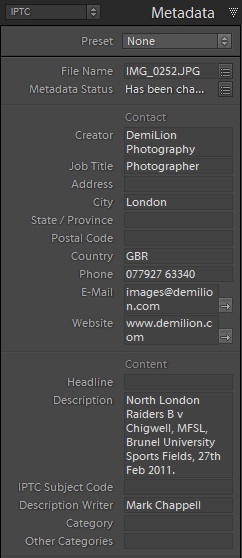
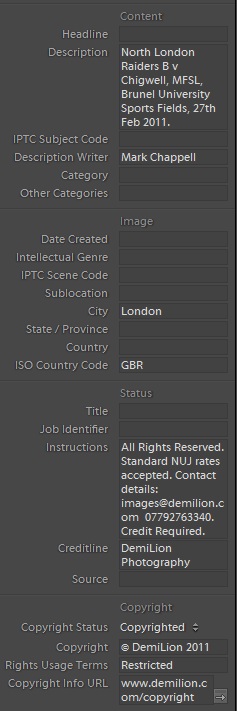
An example:
From this photo:

The following was extracted:

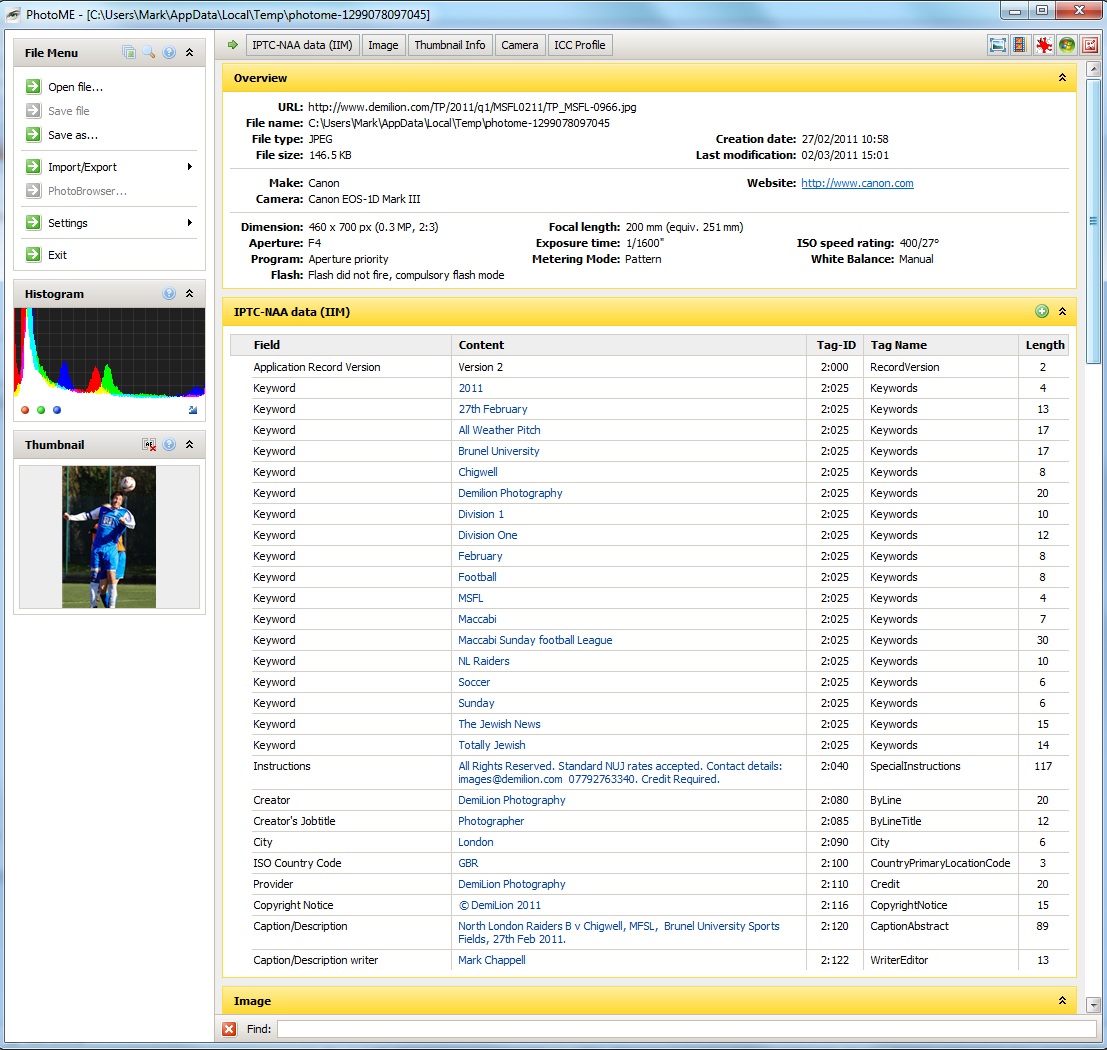
(sorry about the large sizes!!)
Over to you...
Rather than a debate as such, I'll stick some of my thoughts and processes down and then feel free to add or disagree as you wish..
Please note that much of what follows is a basic overview. It's not comprehensive and is intended as a basic guide rather than definitive! I've tried to be as accurate as possible, but there may be a couple of slip ups!
Firstly what is IPTC?
More formally what we call the IPTC fields in metadata is the International Press Telecommunications Council International Information Interchange Module, or IPTC IIM. It was developed as a cataloguing tool to enable photographs to be filed correctly and relocated easily in a photo library. More details here:
http://en.wikipedia.org/wiki/International_Press_Telecommunications_Council
There are three main areas of data held in the IPTC:
Copyright ownership and contact details.
Rights Usage and Instructions.
Headline (title) and Captioning.
note: Keywords are not technically part of the IPTC structure (they are a different section of metadata), but for the purposes of this thread we'll include them as such.
Why is it important?
IPTC is a way of attaching freehand written text to a photographic file (in the digital era) so that you can describe what it portrays, who owns it and how someone can buy it.
For staff photographers, agencies and commissioned freelancers it's a way of getting the relevant information to the picture/news/sports editor as quickly and accurately as possible. For freelancers working on spec (and agencies) it's also a sales tool.
To understand why we need to look at what happens to a photograph on submission to a newspaper or agency and how one is chosen for publication.
Firstly how a photograph gets picked:
When a writer (or more usually editor) is compiling a story, he will usually have in mind what sort of image, or a particular moment that he wants to accompany the piece. If it's a live event/match and they have a staffer present or have commissioned photographs, then the choice is fairly straight forward. He checks that the captioning ties up with the particular piece of action that he wants and marries the two together.
If he doesn't have that picture available, then he needs to source one either from the in house library or via an agency.
Almost all photographs supplied by agencies are available to publications via the NID, or Newspaper Image Database, ignoring agencies/freelancers making direct sales pitches with specific images, which is effectively a massive online photo library. This can be searched using a number of parameters, but for relevance here the main information that is sought is contained in the Caption and Keyword data fields. He then picks the image that most suits the story (not always the best one available!)
Secondly what happens to a photo on submission:
Whether commissioned, supplied by a staffer or submitted on spec, an image will either get tossed (for a variety of reasons) or passed/accepted by the relevant publication/agency. From there it will be absorbed into that company's database and will end up available for use usually both in house and also via the NID. The same principle applies to both stock images and hard news/immediate sports/exclusives, except that some of the latter category are more likely to be sold directly (phone call, email etc) in the first place before making it into a library. Once there, the only way that they can be found accurately (apart from by chance) is by searching the IPTC and Keyword fields.
Follow on sales and stock are more immediately important to those that work on a per publication basis, rather than on salary, but good metadata discipline is going to be relevant to either case.
Thus IPTC supports both types of publication use (immediate event and stock) by providing the ability to give accurate information to the editor in the first place, and allowing them to search for and find the photograph in the second.
Relevant types of Metadata.
There are three main subdivisions of metadata that are relevant to this discussion, those being:
IPTC Core
IPTC Extension
Keywords
Core and Keywording are the most important, but sections of Extension can still be relevant.
The major problem with writing something like this, is that despite IPTC guidelines, no unified naming of the fields exists.
Photo Mechanic, Lightroom and Photoshop all name fields differently. Photoshop treats Keywording as integral to IPTC Core whereas Lightroom deals with it in a separate location.
For example IPTC field 120 is referred to as Caption in LR3 and PM, but as Description in Ps CSx. Field 80 gets referred to as Creator, Byline, Photographer or Author.
There is a useful cross comparison of field names here, to match to your specific software:
http://www.controlledvocabulary.com/imagedatabases/iptc_core_mapped.pdf
It doesn't refer to the latest available versions, but the basics are still true. It also gives you the size of the field and how many characters you can enter.
Which Fields to fill in?
There are a couple of must haves on any photograph that you want to get paid for:
Copyright - what it says on the tin
Copyright Status - Copyright, RF, RM etc etc
Caption - What the photograph shows (ie who, what they are doing, where, when,)
Instructions - Usage rights, how to contact and rates required
Credit- who gets the credit for the photograph, either name or name/agency etc
Location - City/Area and Country (ISO Code) The location that the image was taken (not the photographers contact details in Extension)
Date - Usually autofilled from the Exif
Keywords - This could be (and maybe should be) a whole subject on its own
These are all in the IPTC Core area (and keywording) and will show up on most decent 'Exif' readers.
There are far more detailed fields in Extension dealing with admin details, model release/ages, job identifier, licence releases etc, and need a dedicated IPTC reader to see them (PS/Bridge File Info panel or LR3 IPTC Extension fields to most of us). But the basics are as above.
One of the best resources is the IPTC Tool kit, available on their website ( http://www.iptc.org/cms/site/single.html?channel=CH0099&document=CMS1279131209658 ) which describes all the fields relevant to PS in their CS5 IPTC Panels User Guide. Extrapolate the info from there and use it in conjunction with the field description pdf above.
Learning how to use IPTC.
Practice, practice, practice.
Firstly get a decent in browser Exif reader. With Firefox I use a combination of Photome, Fxif, Exif Reader and ExifToolGUI. Record a full set of IPTC data in either PM, LR or PS (or any other decent software), and then drag your image into your browser and see how each reader displays it. Once you've done that, you'll understand which bits to fill in for each specific case, and which you can ignore.
An example:
From this photo:
The following was extracted:
(sorry about the large sizes!!)
Over to you...