Talk me out of retina

andyscott

Suspended / Banned
Messages
1,968
Name
Andrew
Edit My Images
Yes
So I am gonna get myself a new macbook pro.

My 11inch macbook air is amazing, but I have some funds so a MBP is on the cards.

Should I just settle with the non retina one, upgrade to an SSD and 16gb for around £100 all in.

Or am I silly and should just get a retina model?
 
If you have the cash go for the best you can get.
 

The retina screens are superb but, as photographer, I need screen real estate.
So, if I was in the same position, I would get the 17" previous model and cheer
it up with the maximum RAW and a fat SSD.
 

The retina screens are superb but, as photographer, I need screen real estate.
So, if I was in the same position, I would get the 17" previous model and cheer
it up with the maximum RAW and a fat SSD.

Just set the screen to scaled mode and you'll have your 1920x1080 real estate on a 15" retina MBP. You don't even need to do that as most retina aware programs like Capture One and Photoshop will render the document area at 2880x1800 but keep the UI elements proportional to a 1440x900 screen. See below, that's a 1920px wide image at 100%:

RD8LWfe.jpg
 
Last edited:

The retina screens are superb but, as photographer, I need screen real estate.
So, if I was in the same position, I would get the 17" previous model and cheer
it up with the maximum RAW and a fat SSD.

Go big or go home. 27" on a desk is what the gold standard was for a while.

13" rMBP happily talks with one and is a great travel laptop on its own.

The very old 17" laptops had very poor TN type panel. That alone rules it out for serious work.
 
Just set the screen to scaled mode and you'll have your 1920x1080 real estate on a 15" retina MBP. You don't even need to do that as most retina aware programs like Capture One and Photoshop will render the document area at 2880x1800 but keep the UI elements proportional to a 1440x900 screen. See below, that's a 1920px wide image at 100%:

RD8LWfe.jpg
It is that what I find very clever with what they have done. Windows take a note of that. It impressed me when it was released and years on still does.
 
If you are like me and scrutinise your images for the tiniest fault, keep well clear of Retina! I stuck to a normal MBP, and still 'pixel peep' which only takes time and erodes my confidence. Keep away from the Retina!!! ;)
(Unless of course, macro / wildlife is your thing and then it might be worth it)

Edited to say - if you are going for any accreditations from the various bodies such as RPS, PAGB or FIAP, sharpness and detail are often the little nit-picky things that matter to some of the judges, and may influence the outcome of any assessment you undergo.
 
Last edited:
My 13" Macbook Pro with Retina display is, without doubt, the best portable machine I have ever used.

Also remember the non-retina machine was last updated in June 2012.
 
My heart says a 15inch retina

My head says get a 13inch, as I will carry it more.

Head says get one of the older models, although brand new, update to 16gb ram, and swap out the DVD for a second hard drive.

Heart says, just get the lovely retina screen.
 
I fully understand the dilemma. Portability won it for me in the end as I carry mine with me every day.
 
Surely for any super critical editing, especially where colour accuracy is vital, the ambient lighting is pretty important, so screen colour fidelity is less so on portable devices? Personally, I would go for speed rather than bling!
 
Surely for any super critical editing, especially where colour accuracy is vital, the ambient lighting is pretty important, so screen colour fidelity is less so on portable devices? Personally, I would go for speed rather than bling!

All critical stuff is checked on my mac pro and calibrated monitors before going to the client to
 
Given you can 'adjust' exposure as to how far you 'tilt the screen I wouldn't edit on a laptop.
 
Given you can 'adjust' exposure as to how far you 'tilt the screen I wouldn't edit on a laptop.

The mac screens are very resistant to this compared to the HP work machine I had that became unreadable unless viewed straight on.

EDIT
Regarding size, there really isn't much between a 13 macbook pro retina and a macbook air (in fact I think the macbook pro is smaller in length and width, but a little thicker (1mm), and a little heavier (1.35kg vs 1.58kg). If that difference is size is worth the poorer screen then the air is the one for you. Unfortunately you can't configure them identically to compare cost, but the 2.2 i7 in the upgraded air will be roughly equivalent to the 2.7 i5 in the macbook pro. The comparable macbook pro is less than a £100 more, and for me was a no-brainer.
 
Last edited by a moderator:
I had the 15/13 question in mind for months before I finally bought my macbook after years of cheap 15" windows laptops. Went 13" retina MBP and haven't looked back. I wouldn't switch back to a 15 now - the portability is fantastic.

And the screen is amazing - it's not just the resolution but the colour. Wonderful thing to watch movies on.
 
There's always the Dell XPS 13" or 15"

Its difficult going back to a windows laptop after using a Macbook! I much prefer the OS, and the hardware is of a quality I haven't found on a windows machine, especially the trackpad and keyboard.
 
If you drop it and smash your screen it'll cost about £500 to replace!
 
Wait for the new MacbookPro to come out early next year and grab a current top spec 15" for pennies.

I have a Pro, Air and Dell M4800 (top spec), and use the Pro for fun and Air for everything else. Only use my Dell for running ASTA for work.
 
If you drop it and smash your screen it'll cost about £500 to replace!

If your house is uninsured and you set it on fire it will cost you tens of thousands to rebuild. What exactly is your point?
 
My point is the OP asked us to talk him out of it. Something that's clearly lost on you.
Aha, but obviously the op doesn't really want to be talked out of it ;)
 
Talk me out of retina
My 11inch macbook air is amazing

Talk yourself out of it. ;)

What's a retina MBP in the UK now? About 1400 quid? Keep the cash, stick it in a safe investment, and it will buy you two pints of ale every month, for the rest of your life. Or, you could spend it on a computer when you already have an amazing computer.
 
Talk yourself out of it. ;)

What's a retina MBP in the UK now? About 1400 quid? Keep the cash, stick it in a safe investment, and it will buy you two pints of ale every month, for the rest of your life. Or, you could spend it on a computer when you already have an amazing computer.

I need something slightly larger now though.

for the 128gb and 16gb ram, with discounts applied it is £997
 
I need to be.

Ok. Why do you need a retina then? If you want it because of the revolution and PPI then you might as well go 4k. I'm not saying anybody need a 4k (I've just ordered myself for work an xps 15 with the 4k display :D ) but if the reason you want it is to have the best...well, you won't. And if you don't need the best, then you don't need retina either. Does that help? ;)
 
So I have gone for a new one then, stuck to 8gb but larger SSD.
:)

Will be selling my air now.
 
Its difficult going back to a windows laptop after using a Macbook! I much prefer the OS, and the hardware is of a quality I haven't found on a windows machine, especially the trackpad and keyboard.

Actually I was very pleased to do just that - Dell XPS 15. Yes, the Apple trackpad is better, but for me it was worth the sacrifice not to have to use OSX any more.
 
Actually I was very pleased to do just that - Dell XPS 15. Yes, the Apple trackpad is better, but for me it was worth the sacrifice not to have to use OSX any more.

That's got me wondering, what did you dislike on OS X?
 
That's got me wondering, what did you dislike on OS X?

OSX does not assist the user with workflow, relying entirely on the application to help. So if I had 10+ text documents and another 10 spreadsheets open at the same time and wished to switch between them it would always be a matter of guesswork which page would open because a file would either be open on the desktop or minimised in the dock. With wndows files are always selectable from the taskbar, whether open or minimised. It was frustrating to never be in control of some aspects of the computer or to be prevented from viewing or modifying certain system files. USB handling was attrocious. There was a bunch of stuff that I disliked at the time which I've mostly forgotten now - I still use the Macbook occasionally for travel, but I'm glad it's not my work machine any longer.
 
OSX does not assist the user with workflow, relying entirely on the application to help. So if I had 10+ text documents and another 10 spreadsheets open at the same time and wished to switch between them it would always be a matter of guesswork which page would open because a file would either be open on the desktop or minimised in the dock. With wndows files are always selectable from the taskbar, whether open or minimised. It was frustrating to never be in control of some aspects of the computer or to be prevented from viewing or modifying certain system files. USB handling was attrocious. There was a bunch of stuff that I disliked at the time which I've mostly forgotten now - I still use the Macbook occasionally for travel, but I'm glad it's not my work machine any longer.
Four finger swipe and you'll see all files. That has been there for as long as I can remember.
 
Four finger swipe and you'll see all files. That has been there for as long as I can remember.

As in displaying small versions of them hovering over the desktop? That function is not helpful if you have more than a few files open, and was one of the things I tried (there was a name for it and an icon on the dock in some versions too).
 
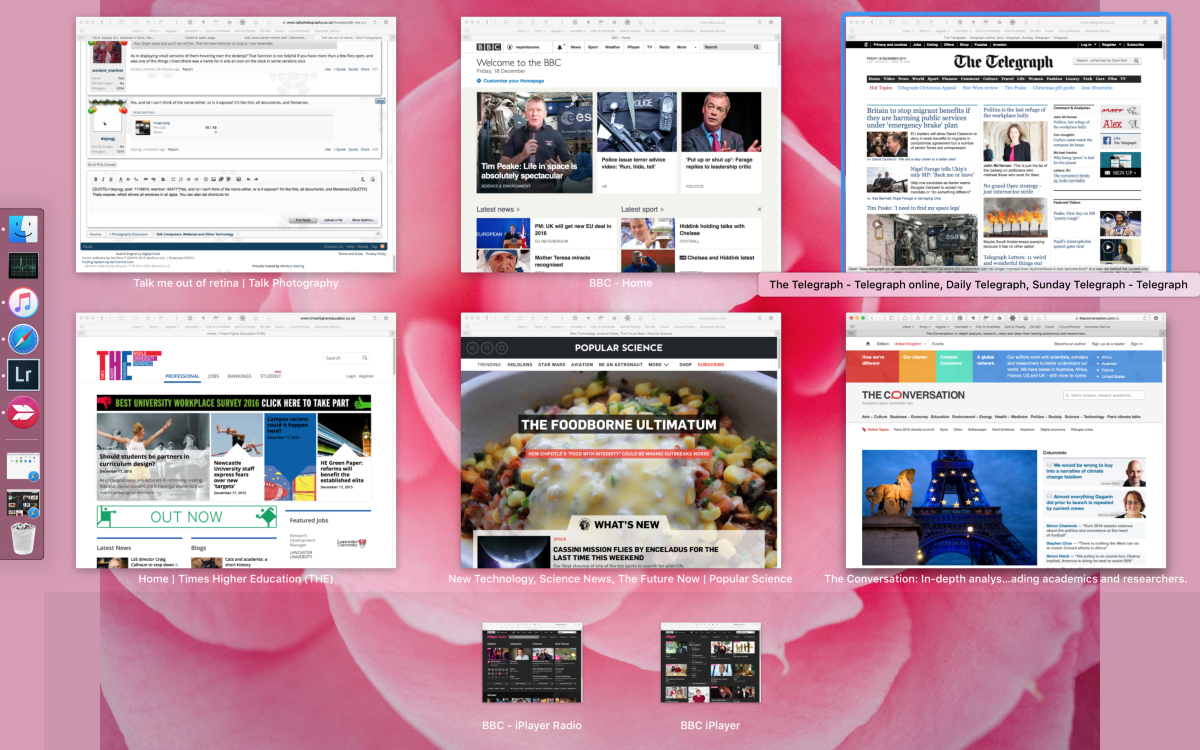
Yes, and lol I can't think of the name either, or is it expose? It's like this; all documents, and filenames.
 

Attachments

  • image.jpeg
    image.jpeg
    98.1 KB · Views: 5
Yes, and lol I can't think of the name either, or is it expose? It's like this; all documents, and filenames.
Thats expose, which shows all windows in all apps. You can also set shortcuts for showing windows of the current up (i use hot corners with a command modifier, e.g. hold CMD and put mouse to top right of screen and I see all open windows of current app). Screenshot below (note how it separates the minimised :-

PS I would also recommend users put the dock on the left as it takes less percentage of the screen, and vertical space is more precious than horizontal space for me.

WH1pyDq4c3-1200x1200.png
 
Yes, it was expose! I did some work helping a company get their web catalogue together when they were starting up, and at one stage had probably 10 word docs and 12 spreadsheets open at the same time. Even using a 20" monitor as I was then, it was completely imposible to tell which file was which (and hovering over the file didn't pop up any info in that version (10.5) either. TBH the Macbook nearly went through the window several times, and it was only the sheer cost of the thing that stopped me damaging it - that was probably the most frustrating time I had with it.

Another issue was that, even though I was running office:mac, documents prepared on the mac always looked a bit different on everyone else's computers, which made me look very stupid when presenting information to customers. Yet another was the TNEF mail problem, where mail sent to me from some devices would arrive blank with a win.dat attachment that required processing to make it readable (thank you TNEF's enough). My colleague here uses apple mail, and if he tries to send an attachment his mails are always blank.
 
Back
Top