
Taking the monitor off a laptop ?

BADGER.BRAD

Suspended / Banned
Messages
4,252
Edit My Images
Yes
Hello all,

My monitor has had it ! As I am a total skinflint and the fact the laptop although old runs Linux really well I'm thinking of removing the inbuilt monitor and just running on an old monitor I have. If I remove the two end plates will the monitor come off ? How is it likely to be connected ?

Thanks all.
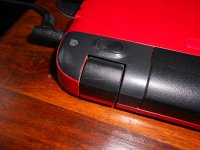
mon.JPG
 
Last edited:
You can very possibly remove the screen from a lap top and use it as a small desk top machine by plugging a monitor into a port on the back (assuming it has one) and indeed I've done this.

It'll be a matter of removing the mechanical fixings and the electrical wiring too. I don't know how easy it'll be for you to do as laptop cases are often held together with plastic clips that can be easy to snap so I think I'd recommend the following...

Firstly check that the laptop has a port you can plug your monitor into.
Secondly I think taking it to your local pc repairer and getting a quote for him to take the screen off might be an idea as this could well avoid any accidental damage to the case.

Good luck with it. I remember I used my laptop without a screen with both an external monitor and an external full sized keyboard.
 
Why would you need to take the screen off in the first place? All laptops are able to drive an external monitor. Easiest if both have an HDMI connection.

 
Last edited:
The dead screen will help keep crap out of the keyboard when folded.
 
Why would you need to take the screen off in the first place? All laptops are able to drive an external monitor. Easiest if both have an HDMI connection.

My intention was to use the original key board keeping the screen on would mean I would have to offset the monitor taking up more room than I really want to.
The dead screen will help keep crap out of the keyboard when folded.

I'll be honest the screen is never folded as it is and I've not really used it as a portable device. It was given to me and is ideal as it is smaller than the old type desktop machine with its tower and separate units plus wires everywhere, Mrs Badger hates the amount of wires I already have with my Ham radio gear, pushing it any further would result in death ( she tells me regularly !)

I did think of going with a Raspberry Pi 400 ( PC built into the Key board) but I already have a working PC ( sort of)
 
Last edited:
The Screen is attached by thin metal hinges, you need to get the bottom of the main case off, there may be screws to undo and thin plastic clips that will need releasing, you may need to remove the keyboard as well on some. There is also a multi core cable for the screen and the antenna wires for the wifi and possibly for the webcam if it has one.

I used to replace several sets of hinges a week when I worked in a school, it took about 20 minutes, but those laptops where designed to be repairable They had lots of screws holding them together), not like most laptops you buy.

TBH using it closed with a separate Usb keyboard is the easiest.
 
Thanks everyone, I think I'm going to use it closed and go for the external monitor,mouse,keyboard approach. At lest that way I can use those devices on a Raspberry Pi when and if the computer finally gives up.
 
Back
Top