Beginner Switching back to Raw + JPG from Raw-Only

Sony Corleone

Suspended / Banned
Messages
213
Edit My Images
Yes
I thought I had the JPG/raw situation figured out. I thought JPG was generally for people who were not very interested in editing, and raw was for people who wanted to be able to edit photos a great deal. Because I was learning to edit, I decided to quit cluttering my drives with JPG's, and I shot only in raw.

Since then, I have bought an OM1II. This has shaken up my view of JPG versus raw.

When I look at OM1II raw photos in Faststone, I am really seeing JPG's the camera created for previews. Often, the color is wonderful. Then I have to spend a lot of time trying to get the raw files to match it, and it's not easy. You can't just tell Photolab to use OM1II rendering and expect a match. You have to keep fiddling with the image. It never really matches.

Today, I switched back to raw + JPG.

I'm not nearly as pleased with what comes out of my Sonys and Canons. With them, raw seems to be the way to go.

My question: do other people have this issue?
 
No - for the simple reason that I’m not trying to match my cameras JPG rendering. Over many years of incremental refinements I have developed a set of my own styles and looks that are distinctly “me” and work well with the style of my photography- but they are also flexible enough to be modified where necessary but still look consistent.

I suppose the question goes back to - what are you trying to achieve? If it’s a neutral rendering, then maybe the JPEGs provide a good solution- out of camera they will be good enough for many purposes. If you are looking to develop your own visual language, and style, getting the raws to do what you want is the best option, but it takes a lot of fiddling and trial and error across many images to get something that feels natural. In my view, it’s worthwhile, but it’s not for everyone.

I guess what I’m saying is if you like the look of the out of camera JPGs I can’t really see point in reinventing the wheel - just use them. Plenty of Fuji shooters use their out of camera files with film sims applied - it’s part of the appeal of the system after all!
 
Last edited:
I thought about this for hours today, and then I shot some photos in raw plus JPG. I thought I understood what was happening.

Came home, wrote the above post. Then I started culling and editing.

To my great surprise, I learned it isn't the camera. It's Faststone. If I take a JPG or ORF that looks good in Faststone and save it in Faststone, it looks great in Microsoft Photos. If I open the JPG that came out of the camera, it's disappointing. I haven't checked other viewers.

So Faststone, not the camera, is the difference. It apparently has its own ideas about rendering. I got it just to use as a viewer for culling, but it is producing some JPG's that look perfect without any editing.

The JPG preview Faststone uses is smaller than the ORF, but I would guess it will be fine for prints of modest size.

I suppose that means 1) I can go back to raw, and 2) I should always check the rendering in Faststone in addition to using Photolab or whatever. Below, Faststone is on the left. OM System is on the right.

Screenshot 2026-02-15 173534.jpg
 
Last edited:
I thought about this for hours today, and then I shot some photos in raw plus JPG. I thought I understood what was happening.

Came home, wrote the above post. Then I started culling and editing.

To my great surprise, I learned it isn't the camera. It's Faststone. If I take a JPG or ORF that looks good in Faststone and save it in Faststone, it looks great in Microsoft Photos. If I open the JPG that came out of the camera, it's disappointing. I haven't checked other viewers.

So Faststone, not the camera, is the difference. It apparently has its own ideas about rendering. I got it just to use as a viewer for culling, but it is producing some JPG's that look perfect without any editing.

The JPG preview Faststone uses is smaller than the ORF, but I would guess it will be fine for prints of modest size.

I suppose that means 1) I can go back to raw, and 2) I should always check the rendering in Faststone in addition to using Photolab or whatever. Below, Faststone is on the left. OM System is on the right.

View attachment 474922
If I've read this correctly, what you think is happening might not be what is actually happening.

According to Google, Faststone uses the embedded preview(JPEG) from the raw file, (which from Olympus cameras is rather small), but Microsoft Photos only uses the embedded preview until it has built its own previews.

This is a common difference between programs designed around culling (uses the embedded preview for speed) , and programs designed around processing/editing (renders its own preview).

When you import the raw files into Microsoft Photos, you should glimpse an image that looks like the images shown in Faststone, and then a switch to a different rendering once Microsoft Photos has built its preview.

When you simply save the embedded preview in Faststone Viewer, and then open that JPEG in Microsoft Photos, you are still seeing camera generated JPEG, as in this instance there is no raw file for Microsoft Photos to render.

I admit, I don't use either program, but what Google suggests matches how all the programs that I do use, work.
 
It is confusing. Both shots above are Snipping Tool screenshots from MS Photos. Actually, it's one screenshot of two windows. The dull JPG came right from the OM. The other was saved from Faststone. If I open an ORF in Faststone and save it, I get the same good result.
 
It is confusing. Both shots above are Snipping Tool screenshots from MS Photos. Actually, it's one screenshot of two windows. The dull JPG came right from the OM. The other was saved from Faststone. If I open an ORF in Faststone and save it, I get the same good result.
Ignoring the ORF, are you saying that the SOOC Jpeg, looks fine in Fastsone, but dull in Microsft Photo?
 
There are several potential issues.
Firstly, Faststone is not fully color managed; it does not convert colors for accurate display by the monitor. Microsoft Photos is fully color managed.

Secondly, Faststone may be ignoring internal image profiles as well. To correct that there is a CMS setting you can enable.

Thirdly, Faststone has an auto-adjust colors function that can change how the image looks.

Less likely potential issues; it is possible that you have the camera set to adobeRGB and Microsoft Photos is interpreting them as sRGB (causes flat/dull colors)... but that shouldn't happen. It's also quite possible (probable even) that the raw file thumbnails are much lower quality; but that shouldn't significantly affect the color rendering as that is the whole point of including the review/preview thumbnail in the first place. And it is possible you have a bad/wrong monitor profile being used by Microsoft Photos.

And finally, if you do not have a fully calibrated and color managed workflow you won't know which colors are "correct." You will not know how the images look (should look) to me when presented here. And you will likely get another different result if you print an image. To an extent this isn't really a big problem as accurate color isn't really required for most images; and you can never fully account for how someone else with an unmanaged/uncalibrated system will view the images.
 
This monitor is calibrated, so I'm not worried about that. I would like other people to see my images as I see them after I edit and save them. Other than that, I have not yet concerned myself a lot with color management.

I am glad Faststone is doing this. I see it as a big help, not a problem. Sometimes the software's choices are better than mine.
 
In this case, the SOOC is not great.
 
I think if I were better at editing, none of this would matter.

I learned some very interesting things which could be useful to other people who use Faststone and sometimes come across a Faststone rendering they like.

If you don't force Faststone to do otherwise, it shows JPG's at a smaller size. Fine if you want a small print, I guess. If you go into the settings, there is a way to force it to display at full size. This also applies to raw, but to get the nice rendering in raw, you have to force Faststone to use high-quality color interpolation. If I have this right, you can save a full-size JPG with the nice rendering from either the JPG or the ORF.

If this is correct, there is no point in shooting in JPG + ORF, at least for me.
 
Last edited:
In the end, I think it’s less about RAW vs JPEG and more about choosing the rendering pipeline that gives you the results you want with the least hassle.

If you like what you’re seeing from the OM-1 II previews, it might be worth digging into the in-camera JPEG settings and fine-tuning those. Most systems let you tweak colour, contrast, sharpening, etc., and even save custom profiles.

I shoot Canon and Fuji. Canon has software that lets you build your own JPEG “recipe” and store it in the camera, and Fuji’s film simulations are great straight out of the box. If you can get close to your preferred look in-camera, it makes the whole workflow a lot simpler and a lot faster if you are working with lots of images.
 
I think what all this adds up to is me getting a useful preset I didn't expect.

I'm trying to get away from the idea that every photo has to have half an hour of editing, while also not turning quick solutions into crutches.
 
I think what all this adds up to is me getting a useful preset I didn't expect.

I'm trying to get away from the idea that every photo has to have half an hour of editing, while also not turning quick solutions into crutches.

You could also set up a preset and batch process your RAWs.

I occasionally use camera presets, but they sometimes need changing between shots, or editing later.
I also use a custom JPG setting with the sharpening and noise reduction turned right down, as in ideal situations it seems to give better quality, and in less than ideal situations I feel I can get a better balance in Affinity.
 
I think what all this adds up to is me getting a useful preset I didn't expect.

I'm trying to get away from the idea that every photo has to have half an hour of editing, while also not turning quick solutions into crutches.

You aren't editing in Faststone though are you?

And, for me, it's only a special landscape with masks etc that takes that much time and be something that I might come back to. Most of my editing is one of a handful of LR preset/profiles and maybe a tweak of the WB and exposure slider - All of my street stuff that you can see on my Flickr or Instagram is edited exactly like that, same as my general walkabout photography.
 
I shoot raw for work and started doing raw+JPG this past year, but only for the odd occasion where I need to deliver something straight away. Otherwise it's raw only for me.
I think the editing side of things gets a bit overstated sometimes. It doesn't have to take ages. Most of my processing is fairly quick - a decent preset as a starting point, a few tweaks, and you're there. It's really only the odd special image where I'll sit and spend proper time on it, and even then it has to justify the effort.
That said, I do think the tools matter more than people realise. Faststone is a decent enough viewer, but it's showing its age a bit now. Editing software has moved on massively - things like Lightroom, Capture One, DxO and the like are built for getting good results quickly, even across big batches. I use Camera Raw on my Mac for the main work and Lightroom on iPad when I'm out and about, and honestly the whole process is pretty painless once you've got it set up.
So yes, that flat look when you first open a raw is completely normal and we've all been there. But with the right software and a bit of time getting your presets sorted, you really shouldn't need to be spending half an hour on every shot.
 
Your using an Olympus camera now so why use fastone when the Olympus/oms developing program is free for you to use and far far more accurate in every way .
 
You aren't editing in Faststone though are you?
No. I just happened to learn that its rendering for JPG's is sometimes very good. I click and save.
 
Your using an Olympus camera now so why use fastone when the Olympus/oms developing program is free for you to use and far far more accurate in every way .
I don't want a new religion, though. I already have Photolab 9, and its noise handling is top of the heap, unless multiple sources have misinformed me.

I would like to be good at using one program instead of doing a poor job with 10.
 
No. I just happened to learn that its rendering for JPG's is sometimes very good. I click and save.

So, I'm a bit confused .....

What is your routine with images from getting them off the camera?

You say you don't edit in Faststone. But then say the images look nice so you save them? From Faststone I presume? What about all your other images? That don't look good.
 
It's all in the above posts. I dump my card into my PC. I use Faststone to review and cull. Generally, I edit in Photolab, but sometimes Faststone's renderings are so good, I save them as they are, even if I also use Photolab and create different versions.
 
............................ but sometimes Faststone's renderings are so good, I save them as they are, even if I also use Photolab and create different versions.

I didn't think that Faststone could edit or render RAW files?
 
I shoot RAW+JPEG routinely - then use JPEG for a first pass at culling... For quick shares I'll simply share the JPEG. Otherwise I'll process the RAW & use that.

Occasionally when I completely ar^H^Hfoul up the exposure and the JPEG is toast it has been possible to rescue something from the RAW...
 
If that's the case, then there is almost zero benefit to recording raw files in the first place. You're just doing some basic/automatic edits and outputting a jpeg; same as the camera can do.
The way I assumed @MacroCroma was using processing presets was the same way as I do. I have a small collection of presets designed for different subject matter and effects, which are in three collections: primary, secondary and tertiary. I mainly use those from my primary collection. of which I think I have about a dozen colour and a dozen B&W

In C1, I almost always start with a linear curve, as I prefer to build up the contrast rather than reduce it, and I will run through my primary preset collection looking for one that best matches how I want the picture to look. Sometimes a preset plus a few tweaks, reasonably quickly, gives me a decent enough result for it to be good enough to be a final image (a record type shot), or good enough to let me better assess whether I'm going to take the image further. At which point, I am grateful that I have a raw, and not just a JPEG.

For me, although there could well be occasions when a SOOC jpeg would give me a picture "fit for purpose", this approach of quick editing a raw with presets takes me part way along my processing work flow, with results that still reflect my personal processing tastes; not those dictated by the camera manufacturer.

I see this as a big benefit over using SOOC Jpegs.
 
If that's the case, then there is almost zero benefit to recording raw files in the first place. You're just doing some basic/automatic edits and outputting a jpeg; same as the camera can do.

Couldn't be further from the truth really. I'm not just being argumentative but there are loads of profiles and presets that you are not going to replicate in camera. People aren't doing just "basic/automatic" edits with these profiles/presets, they are creating a unique look that only those profiles/presets can do. So yes, there is a massive benefit to recording RAW files.
 
I see this as a big benefit over using SOOC Jpegs.
yes, there is a massive benefit to recording RAW files.

The idea that camera produced jpegs are less suitable for editing is largely misplaced... if you're not doing extremely heavy edits/pushes then a camera generated jpeg is fine.
The main thing you don't want is harsh camera settings (contrast/saturation) as that can cause unrecoverable losses. And you don't want to edit them in 8 bit (LR/PS both (can) use 16 bit).

There really isn't any reason why you couldn't set up the camera with "presets" you like for certain subjects/types of photography instead.
 
Last edited:
The idea that camera produced jpegs are less suitable for editing is largely misplaced... if you're not doing extremely heavy edits/pushes then a camera generated jpeg is fine.
The main thing you don't want is harsh camera settings (contrast/saturation) as that can cause unrecoverable losses. And you don't want to edit them in 8 bit (LR/PS both (can) use 16 bit).

There really isn't any reason why you couldn't set up the camera with "presets" you like for certain subjects/types of photography instead.

Can you show me how to set my camera to record jpegs with an Aerochrome profile please? Or a Leica one for Fuji would be great too (y) And also maybe one that replicates Kodak Gold 200 for Sony.
 
With my limited shooting skills, I have had to use editing to pull raw photos back from the edge of the grave, so I want that safety net.
 
Spent a LOT of time fiddling with sliders in PS trying to improve assorted cameras' conversions, using Mrs Nod (mainly) as the arbiter of quality of prints. Gave up on raw since 90%+ of my attempts fell short.

I now use Fujis and Sonys which give me perfectly good results for MY needs with their SOOC JPG files. I'm sure I could rescue some badly exposed shots from raw files but instant review lets me see if the exposure's close enough and to reshoot if needed so I don't need to rescue any (famous last words!!!)
 
Spent a LOT of time fiddling with sliders in PS trying to improve assorted cameras' conversions, using Mrs Nod (mainly) as the arbiter of quality of prints. Gave up on raw since 90%+ of my attempts fell short.

I now use Fujis and Sonys which give me perfectly good results for MY needs with their SOOC JPG files. I'm sure I could rescue some badly exposed shots from raw files but instant review lets me see if the exposure's close enough and to reshoot if needed so I don't need to rescue any (famous last words!!!)
Have you tried Lightroom? Also, Affinity is free. I found Lightroom and Affinity easier to use.
 
The idea that camera produced jpegs are less suitable for editing is largely misplaced... if you're not doing extremely heavy edits/pushes then a camera generated jpeg is fine.
The main thing you don't want is harsh camera settings (contrast/saturation) as that can cause unrecoverable losses. And you don't want to edit them in 8 bit (LR/PS both (can) use 16 bit).

There really isn't any reason why you couldn't set up the camera with "presets" you like for certain subjects/types of photography instead.
Your use of "largely" misplaced may be relevant; for my use I can't see any reason why I wouldn't want to maximise the quality of the data collected at the taking stage. Unless you are suggesting JPEGs are capable of exactly the same quality as RAWs; in every circumstance. Especially in terms of dealing with high contrast subjects.

Although, I've played with the flat and neutral picture controls in my Nikons, I've never designed my own picture styles, and can't see what the benefits would be of having to decide on a picture style before each photograph. Nor do I want to have to decide at the taking stage whether the picture will later need heavy edits or pushes. I want to focus on the subject, composition, exposure and lighting.

If someone doesn't want to do "any" editing (for whatever reason), then fair enough: use JPEGS, but if you are going to do some editing anyway, I don't see the advantage of JPEGS, and my presets do all the "grunt" work on the raw, making it easy and quick to compare different presets on the same photograph, and to apply different presets to different files; before moving on to finesse the processing.

I've tried starting with a camera based profile instead of a linear profile + one of my presets, (which I assume is going to be similar or starting with an SOOC jPEG) and it's not a place I would ever choose to routinely start processing from.
 
Spent a LOT of time fiddling with sliders in PS trying to improve assorted cameras' conversions, using Mrs Nod (mainly) as the arbiter of quality of prints. Gave up on raw since 90%+ of my attempts fell short.
I think that goes for many people, and if it does the job and will print well at the size you want, it is the logical way to go.

If you take photos at night, you can switch to raw&jpg and try.
If it is a daylight very high contrast shot, you can use HDR.

There is nothing wrong with JPEG or RAW if it does what you need.
 
Last edited:
With my limited shooting skills, I have had to use editing to pull raw photos back from the edge of the grave, so I want that safety net.
In my experience camera meters are never far away from producing the ‘correct’ exposure.

It takes a special talent to override a cameras advice to the point your exposure is dramatically wrong. You should be congratulated for managing.

I always shoot JPEG + RAW, but largely speaking the Raws exist for serious colour temperature issues, but again nowadays rarely needed.
 
I think that goes for many people, and if it does the job and will print well at the size you want, it is the logical way to go.

If you take photos at night, you can switch to raw&jpg and try.
If it is a daylight very high contrast shot, you can use HDR.

There is nothing wrong with JPEG or RAW if it does what you need.


I rarely take "photographs" at night (plenty of snaps though!) and dislike HDR.

As you say, whatever format does what you want/need.
 
I rarely take "photographs" at night (plenty of snaps though!) and dislike HDR.

As you say, whatever format does what you want/need.

My "you" wasn't directed to you personally, just people in general, sorry about that.
 
  • Like
Reactions: Nod
In my experience camera meters are never far away from producing the ‘correct’ exposure.

It takes a special talent to override a cameras advice to the point your exposure is dramatically wrong. You should be congratulated for managing.

I always shoot JPEG + RAW, but largely speaking the Raws exist for serious colour temperature issues, but again nowadays rarely needed.
Is that how you shoot professionally?
 
I don't see the advantage of JPEGS
There are many potential benefits... No need for large amounts of storage (drives/cloud etc). No need for a bunch of cards (i.e. backup an entire event/outing/safari on a single card). No need for the fastest/most expensive cards. No/less risk of filling the buffer. No requirement (potentially) to edit the photos. No requirement for a more powerful/capable computer. etc. etc.

In terms of editing there is no advantage; although there is often/potentially no disadvantage either. 8 bits (jpeg) is capable of reproducing more colors than a human can see, and it can reproduce more dynamic range than most cameras can record at ISO's above base. I.e. the "advantages" of raw files are largely overstated for most uses/situations.

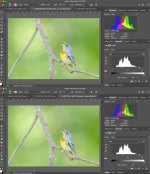
What does matter more is the "accuracy of the math" when doing edits. This is a comparison of editing an 8 bit sRGB jpeg opened in PS in 16 bit mode vs 8 bit mode. Both have had the same hard gamma push. The 8 bit histogram shows the rounding errors (gaps; causes banding etc); the 16 bit mode is perfectly fine (LR only operates in 16 bit mode).

bitDepth.jpg
 
Last edited:
Back
Top