
Sunspot removal

Spark

Suspended / Banned
Messages
39
Name
Adam
Edit My Images
Yes
I know what can be done to reduce the chances of this occuring. But a lens hood was out of the question as I was using a compact p&s. And after taking the photo the spot/flare was only noticable after viewing it downloading. However I find it slightly distracting from the photo as it is right in the centre. Would anyone be able to direct me to a tutorial or give me some pointers on how to remove the sun spot in this image?
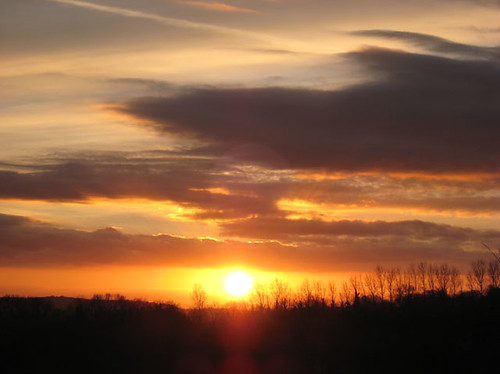
3801303460_0495abd2f7.jpg
 
I'm not too sure a hood would help here, as the source is directly in front.

How about a levels/curves/hue-sat adjustment through a round mask? Might work.

Had another thought, are these flare's caused by the sheer intensity of light? i.e. would an ND filter and a different exposure to compensate reduce the flare?
 
I'd just whip out the clone tool and maybe a bit of patch tool working at 100% magnification and work on cloning it out... It's a tough job, but someone has to do it... :thumbs:

Quick attempt in a rather drunken state:

fixed_image.jpg
 
Make a selection with a feather about 20px of the area copy to new layer, Cntl +c and paste it to a new layer, Cntl V, change the blend mode to Multiply, adjust the opacity, touch up with a layer mask, do Cntl +Alt+ Shift Plue E, to make a new merged layer, make a selection quite a bit bigger than the area and use Gaussian blur sparingly
 
Make a selection with a feather about 20px of the area copy to new layer, Cntl +c and paste it to a new layer, Cntl V, change the blend mode to Multiply, adjust the opacity, touch up with a layer mask, do Cntl +Alt+ Shift Plue E, to make a new merged layer, make a selection quite a bit bigger than the area and use Gaussian blur sparingly

I was going to say that :D

...but then thought.. f*** it, clone tool - whack! Done.
 
Thanks for the advice everyone. I will have a bash at it tomorrow and see how I get on, then let you know. Or ask you where I have screwed up!

ekimeno - for an attempt in half drunken state thats pretty good. It does make the spot much less noticeable. Though I think I keep getting drawn to that area because I know its there.
 
Well I have just had a go at what you suggested Dave and got a bit stuck at the touch up with a layer mask part. I manage to get the spot so it looks right in the centre but it still has a lighter 'halo' around it. Any ideas where I'm going wrong?
 
Lo
try to make your selction a bit bigger and use the lasso to make an irregular selection eg not round feather 20

make a layer mask and with a very soft largish round brush, slowly paint away any harsh edges,

then make a copy of the selection on a new layer, apply Gaussian blur and change the mode to soft light or luminosity or try another blend mode till it looks right
 
Been a bit busy of late and have only just got round to trying it again. I still can't seem to crack it though I am getting a bit closer. I made the selection about 80px larger than the sunspot using the lasso and making a zigzag edge to the shape. Is this big enough or should the selection be even larger.
I followed the rest of the instructions and came up with this:-

3911873145_f4028e30b2_o.jpg
 
I hope you don't mind but I've supplied an edited version of your photograph with this post. Bear in mind I've only spent 30 seconds (literally) on it to demonstrate what I mean, with a little more time and effort the 'sunspot' (?) would be invisible. I used the clone tool set on darken and also lighten at approximately 20% opacity, where necessary, as this does exactly what it suggests and also retains the original textures.

3801303460_0495abd2f7.jpg
 
Thats fine, I don't mind at all. That is a cracking job there Nyte, especially for 30 secs work. :thumbs: Looks as though I need more practice on my PS skills.
Thanks for elaborating on how you achieved it too.
 
Back
Top