Stupid Question

Kell

Suspended / Banned
Messages
5,130
Name
Kell
Edit My Images
Yes
i know the answer to this before I ask really, but the question is this.

If you're shooting a range of film stock on one trip, how do you remember which roll took which pics?

It's probably just habit for most people. Make a note somewhere - handwritten or on your phone.

But I just never think of it at the time.

I've got a load of shots back from the Isle of White festival and some lack a bit of contrast. I'd like to know which roll it was, but of course now have no way of checking.

Any tips or things you do when you swap out films to jog your memory?
 
i know the answer to this before I ask really, but the question is this.

If you're shooting a range of film stock on one trip, how do you remember which roll took which pics?

It's probably just habit for most people. Make a note somewhere - handwritten or on your phone.

But I just never think of it at the time.

I've got a load of shots back from the Isle of White festival and some lack a bit of contrast. I'd like to know which roll it was, but of course now have no way of checking.

Any tips or things you do when you swap out films to jog your memory?

I scan all my own photos, so I'll have the negs to see which is which. I also place all the scans in directories with the date the pictures were made, plus the camera and film used.
 
Don't you get your negs back?
 
  • Like
Reactions: Nod
I'm not sure what you're asking. If it's simply which film stock an image is on, the negatives have that information on the edges ( FP4, PanF in my case) so you can check those. If it's the trickier question of which particular roll of PanF a given photo is on, then the nearest I could get in my own case is remembering the sequence of shots.

I've never actually noted down that sort of information, any more than I note exposure details.
 
In my most organised phase, I used the Film shots app on iPhone to take a record image with the smartphone, and note as many of the exposure settings as seemed relevant. This would also provide GPS coordinates.

This was only really worth the effort if I was carrying out tests of some kind, eg exposing at different film speeds or using filters.
When my iPhone died and I changed to An android phone at a fraction of the cost, I couldnt immediately find an equivalent app, so don't do this any more.
 
I use the Film Shots app too, but only to keep note of what film is currently in which camera and the status of the film (started, in progress, awaiting processing etc). I don't bother capturing details of individual frames except for LF and a pinhole camera I have.
 
Well sometimes it takes me up 9 months to get through 36 exp and of course forget what was on the film earlier, but I do get the fun of seeing all the jpgs back from filmdev :rolleyes:o_O
Why sometimes up to 9 months? well I don't fancy going on a decent holiday on my own anymore, but thought of a new idea of going to say S Wales or Cotswold etc on my motorbike and booking in for the night and if you go in say early June for Sunday to monday, it's surprisingly very cheap e.g. £33 for Premier Inn.....well missed early June (price now £79 on 6th July) but will see prices for later on in the year :)
 
I used to put a slip of paper in the film tub with car crash 1 or golden wedding or whatever, that way I knew which one I needed to dev first if I was in a rush later, small sticky lables would work, if you dont have film tubs you could use small plastic bags, these will keep dust off the films a bit too.
 
Don't you get your negs back?

Should have added that, no I choose to have them developed and scanned.

As such, I don't really need the negs back, so choose for FilmDev to just dispose of them.

It's been so long since I used film regularly, I completely forgot that that info would be on the negs. So it might be a case of that this particular issue has a very small number of people affected by it.

I did start taking a record shot of the box on some rolls, but as I was away, I only took the canisters. Clearly, once they're in the camera, I couldn't then take a pic of it.

And because it was a PAS camera rather than my SLRs, I couldn't do the old 'tear the box top off and put it in the back' trick.

I suppose I could have written it down and taken a shot of that.
 
Last edited:
Personally, I'd never dispose of negs - I still have all mine, despite not having scanned any for several years!

In your case, Kell, I'd use the first shot to record what the film is so it's included in the files when you get them back.
 
Personally, I'd never dispose of negs - I still have all mine, despite not having scanned any for several years!

In your case, Kell, I'd use the first shot to record what the film is so it's included in the files when you get them back.
It's an interesting debate on how many back up files you need if you only have digital copies of images.

Found that out to my cost recently when the hard drive with all my music on just gave up the ghost. I mean, I still have all the CDs, but it's a mammoth task of re-uploading them all into iTunes. I have around 2,000 CDs, but at least several hundred of those are compilation CDs with 2, 3 or more individual CDs in them.
 
I would always keep the negatives.

From personal experience, a long time ago my wife was sorting through our photos and asked if we needed to keep the negs as they were taking up space. I didn't see a reason to at the time - I wasn't particularly interested in photography as I am now, and home scanning was science fiction. Now, many years later, I have no way to scan high quality versions of those pictures and only have the original lab prints.

Keeping your negs means you always have the option to make new, good quality copies of the photographs.
 
To save on postage, I've started to send more than one film off at a time. I have a notebook in which I jot down the camera, lens and film used, as well as the first or last shot taken with which combo. It's helped me to keep track when the negs came back.
 
I always keep my negs. Mind you, finding them again might be a problem. I'm not particularly organised. :D
 
For times when I'm shooting a lot of film I ask my lab to make stickers (Date/My Name/Project Name) for each roll so I can pair them with contact sheets.

As for knowing exactly which camera took what picture, I just remember really -- some of my cameras have unique film gates (for example my Plaubel 670 has rounded corners whereas my Pentax 67 doesn't, my Hasselblad has the notches on the left). I also find that I compose a bit differently depending on the camera I use, and of course each one has pretty unique results as far as image quality goes.

For large format I make notes and quick phone snapshot. Some of my holders are also uniquely notched.

I keep all my negs and I'm glad I did as my processes have changed a lot over the years: I've gone from flatbed scans, dedicated film scanners, a quick dabble with camera scanning, and now darkroom printing.

As for knowing what's in the camera, I just use masking tape and a sharpie if multiple types are being used on the same shoot.
 
Last edited:
Why would you not keep your negatives?
They are an instant archive which do not require a computer.

Admittedly cataloging them is a discipline but none the less, they physically exist.
 
i know the answer to this before I ask really, but the question is this.

If you're shooting a range of film stock on one trip, how do you remember which roll took which pics?

It's probably just habit for most people. Make a note somewhere - handwritten or on your phone.

But I just never think of it at the time.

I've got a load of shots back from the Isle of White festival and some lack a bit of contrast. I'd like to know which roll it was, but of course now have no way of checking.

Any tips or things you do when you swap out films to jog your memory?
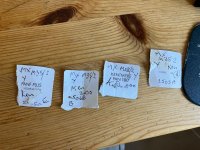
I use the ends of the film boxes, write a few notes on them, eg camera, lens (usually don't change the lens until I change the film), EI if not box, general location, then later add the lab or dev I use (B or E, shorthand for HC-110 dilutions), and maybe an index, like 2505C for the 3rd film finished in May 2025)! But without the negatives, it perhaps would be a waste of time...

IMG_0139.jpeg

EDIT: These tabs go in the film tub while awaiting development. If they're going to the lab, I try very hard to remember to take the tabs out of the film tub!
 
Last edited:
Why would you not keep your negatives?
They are an instant archive which do not require a computer.

Admittedly cataloging them is a discipline but none the less, they physically exist.

I have no real answer to that other than I've been shooting digital since about 2003. I'm used to cataloging and organising all my images in folders and have multiple back ups.

I don't really feel the need to do it now that I've got out of the habit of having them. Plus, when I only had film cameras, I was only using them for snapshots and holidays. I can't recall a single time when I got reprints done. Or used the negatives any other time except when the original prints were done.
 
Last edited:
What type of scans do you get and what format are the supplied as? If they're super high quality scans saved as TIFFs or better, then the files SHOULD be all you ever need (until you have a significant data loss!) but medium quality scans as JPEGs would be a negs back for me.
 
I get them scanned as LARGE JPG files. I did once get them as TIFF files as FilmDev don't charge extra for this service, but couldn't really detect much (if any) improvement over LARGE and it meant each image was around 180MB. Which made working on them a much slower process.

The files I get back are typically 28MB or so. Just opening one they're 6774x4492 at 240PPI. I can't remember which batch I got as TIFFs so can't tell you much about those images currently.
 
Last edited:
Just found one - They're all 182.6MB and same physical dimensions 6774x4492 but 96PPI - what I will say though is that they did come out well after processing and the final files were back to about 25MB.

This flickr link really doesn't do this one justice.

TBH, I put it down to the conditions being good and for the first time that year (my first year in over 20 of using film) it was really sunny. I was using XP2 at box speed (ASA400) and I do remember struggling to get fast enough shutter speeds even shooting at f/22.


University Church of St Mary the Virgin by Kell, on Flickr
 
Last edited:
I get them scanned as LARGE JPG files. I did once get them as TIFF files as FilmDev don't charge extra for this service, but couldn't really detect much (if any) improvement over LARGE and it meant each image was around 180MB. Which made working on them a much slower process.

The files I get back are typically 28MB or so. Just opening one they're 6774x4492 at 240PPI. I can't remember which batch I got as TIFFs so can't tell you much about those images currently.


The biggest difference between JPG and TIFF files is that TIFFs are pretty much raw so can take more PP than JPGs. Personally, I'd go for the TIFFs and PP the shots that deserve it before converting to JPG for storage (if storage was tight).

My way of looking at raw vs. JPG (as a digital photographer these days!) is that raw files allow the fiddling that negatives allow in the darkroom while JPGs are closer to slide film - get it right in camera so you don't need to fiddle! Spent a while down the PP rabbit hole with raw files and found that I (and perhaps as importantly, Mrs Nod!) usually preferred the SOOC JPGs to my fiddled with efforts...
 
I always shoot RAW for precisely that reason on digital.

My understanding of TIFF files is that they’re not the same as RAW files they’re just uncompressed, But they’re way more ‘fixed’ than RAW, so you actually don’t have that much leeway to do anything dramatic in PP.

They’re normally used for high resolution final files rather than for additional manipulation.

I only know that as my very first digital camera back in 2003 was a Pentax Optio 550. One of the options was TIFF rather than RAW. I don’t know enough about it at the time to bother with it for two reasons.

The first being I didn’t do any PP in those days and the second being that memory cards were very expensive back then. The biggest card I could justify was a 64MB and they were about £90 each. The TIFF files would have filled it too quickly.
 
Last edited:
  • Like
Reactions: Nod
Should have added that, no I choose to have them developed and scanned.

As such, I don't really need the negs back, so choose for FilmDev to just dispose of them.
WHAT?! NO. You can't. That defeats the whole object of using film. Wait while I run around the room backwards ten times just to get the thought out of my head.

Wibble wibble. Hopefully I'm just dreaming.
 
I no longer have my first negatives. I mistakenly thought that they, like the original film, were light sensitive and that my taking them out of the packet I got back from the chemist with the prints in one side and the negatives in the other to look at them meant that they were now ruined. So I threw them. Couple of years later (about 1959), when I started making prints I realised my mistake.

My negative files with contact prints go back at least as far as 1963, as dates are written on the contacts.
 
Last edited:
My understanding of TIFF files is that they’re not the same as RAW files they’re just uncompressed,

They're pretty much as close to raw as you'll get scanned files. The only other option would be to shoot the negs/slides with a digital camera set to record raw but for that, you need the processed films.
 
When my father died, I inherited all his negatives , slide & prints. So glad he kept them as I now have photos of him and his work from the 1940's on. Most of which I had never seen before. I have all my negatives and will never get rid of them.
 
When my father died, I inherited all his negatives , slide & prints. So glad he kept them as I now have photos of him and his work from the 1940's on. Most of which I had never seen before. I have all my negatives and will never get rid of them.

I think that's very different.

In an age when the negatives were your only back-up copy I can see the need to have them. If you're making your own prints and/or enlargements, then I can see the need to keep them. But for me, once they're scanned and I have copies then hopefully, I no longer need them.

It's not like I'm totally against having the originals of something you only ever use in a digital format. Like I say, I've still got all my CDs (2,000 or so), plus around 150 LPs, maybe 450 12" and a dozen or so 7". As I mentioned above, not backing that hard drive up was a mistake...
 
Am I being trolled here?
 
Personally I wouldn't consider standard lab scans to be a proper backup of a negative. It'd have to be a decent camera scan or something out of a Coolscan/Flextight/Heidelberg for me to consider it a file with the requisite flexibility and tonality you get with a negative.
 
I think that's very different.

In an age when the negatives were your only back-up copy I can see the need to have them. If you're making your own prints and/or enlargements, then I can see the need to keep them. But for me, once they're scanned and I have copies then hopefully, I no longer need them.

It's not like I'm totally against having the originals of something you only ever use in a digital format. Like I say, I've still got all my CDs (2,000 or so), plus around 150 LPs, maybe 450 12" and a dozen or so 7". As I mentioned above, not backing that hard drive up was a mistake...
Each to your own & I get where you are coming from. I guess that we all have different ways to save our images. You do what works for you, but for me I am glad I still have all my negatives & my fathers as well. Perhaps I'm a horder as I also still have my LP's & CD's !
 
Personally I wouldn't consider standard lab scans to be a proper backup of a negative. It'd have to be a decent camera scan or something out of a Coolscan/Flextight/Heidelberg for me to consider it a file with the requisite flexibility and tonality you get with a negative.

I don't know enough about the various scanners to make much of this info I'm afraid.

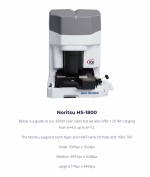
I use FilmDev, and the scanner they use is a noritsu.

1753100735734.png
 
There is a consideration here which I haven't seen mentioned. It is also an issue in the film industry.

That is that with negatives you still have potential for exploiting new scanning or imaging technologies as and when they are developed. This is npt an option in the digital arena. If I have filmed (more importantly, post-processed) a film in a digital format, that is the best resolution I will get from that copy ever. That is, the best copy without interpolation and guessing.

Technically, analogue film may yield an improved result from negatives if new methods emerge. Digital is pretty much locked to the standard that created it.
 
I don't know enough about the various scanners to make much of this info I'm afraid.

I use FilmDev, and the scanner they use is a noritsu.

If you're happy with the scans then don't worry.

I just don't consider Noritsu scans in general to be a substitute for not getting the negs back. You're just too locked in and reliant on whoever is operating the scanner that day.

The scanners I mentioned above are really good quality, but slow and expensive. Best for projects that have been heavily curated and edited down.
 
Back
Top