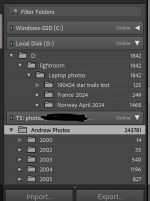
Strage lightroom occurance ive noticed a couple of times in the last week... folders greyed out

A_S

Suspended / Banned
Messages
864
Name
Andrew
Edit My Images
Yes
...but files and locations all there.... i've also just imported some new photos into D:\lightroom\laptop photos and its put it in a complete seperate folder in the tree....

I posted a post about not being able to create collections and it was THIS that drove it. it renders lightroom unusable.... I am really confused as to why its started happening and what is causing it....


I've had it on the laptop i was using when i created the post AND a new laptop which i set up and imported my catelogue into last night..... Confused

1738182616015.png
 
Have you moved the images from the old to the new laptop?
 
Please read the original post thst is not the issue as I have stated - the photos are all there and in the directories - in the correct structure and have been verified when I transfered the catelogue yesterday

This is not a problem of the files being missing
 
The eclipses (…) next to the folder names suggest that the folders are empty, at least the catalog thinks they are.

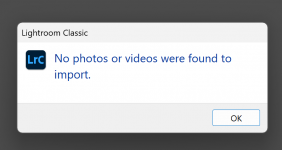
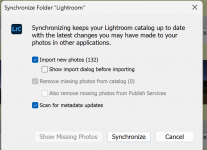
If you click on the folder you should be able to synchronise it which will reimport the images back into the catalog.
 
Your original post was not clear to me. If the folders are greyed out, Lightroom cannot find them, which suggests you have not transferred everything correctly. Elliot’s suggestion should work. If not try Lightroom Queen, that forum usually has all the answers.
 
As far as I am aware the ellipsis (...) means that Lightroom is creating previews, or doing something else in the background.
 
As far as I am aware the ellipsis (...) means that Lightroom is creating previews, or doing something else in the background.

That would make sense because it is not an issue with linking. I had this problem both on the new and old laptop and was loading files fine just a few minutes before this... But i am sure some people will keep telling me otherwise....

Screenshot 2025-01-29 213504.png
 

Attachments

  • Screenshot 2025-01-29 213444.png
    Screenshot 2025-01-29 213444.png
    50.5 KB · Views: 4
Did you create your folders in LR? If not you will have to import them as LR will not know about them.

Dave
 
For the xth time.... its not the folders..... its something else. I'll keep repeating myself..... here is a screenshot of the catelogue re-coppied straight from the old PC this evening I've set the drives and directory structure up to exaclty mirror the old computer AND even if i hadn't I'd just re-link it........ ITS FINE. something else is happening in lightroom.


1738191738363.png

Its happened on BOTH the old system and the new system and MAGICALLY came back without me doing anything on the old system. Without relinking, without resyncing and without moving any folders in windows....! It is not the linking
 
Last edited:
In any case I couldn't find the issue so i've just gone back to the backup from yesterday, lets hope it doesn't happen again.

I also turned off location/GPS in the options.... I am not sure if that could have been it - it was searching through all 250,000 for location info perhaps....
 
Back
Top