Storing passwords

arclight

Oooh that burglar's a cutie
Suspended / Banned
Messages
11,633
Name
Doug
Edit My Images
Yes
Does anyone else have the problem storing passwords in their browser to make logging in to websites easier, but such passwords are not always automatically entered.

I have this problem. It is not constant. Sometimes auto entry works fine, sometimes username only is entered and sometimes it does not work at all. I use IE11 and Firefox. Both have the problem. IE11 is worse than Firefox.

Searching on the web indicates that the problem is fairly common. I have gone through all the mullarkey of disabling add ons, ensuring the appropriate commands are checked, restoring default browser settings and resetting IE. All a waste of time.

Rather than spend more time faffing about with the browsers can some kind soul say whether I would fare better with a password manager and, if so, can you recommend a good freebie.

TIA

Doug
 
Personally i use roboform (everywhere license but desktop version) which costs next to nothing per year, for truly free and still very powerful use http://keepass.info.
 
Personally i use roboform (everywhere license but desktop version) which costs next to nothing per year, for truly free and still very powerful use http://keepass.info.

Thanks for that. Does keepass do the auto entry business ?
 
Thanks for that. Does keepass do the auto entry business ?
Yep, if free and secure so worth trying out :)

I just like the more polished roboform (not the everywhere hosted version however) as i've been using it for so long just keep paying my subs.
 
I also use Lastpass and I don't think I could live without it now. I store so many different passwords everywhere!

The only passwords of course I don't store is the banking stuff. Even then though on some of them I have put secure notes (that are also encrypted to the same standard) with clues on rather than the actual password.
 
Thanks for the help Sharky, Lennard, Gadgeteer (I do the same with banking stuff) and Tom. I'll start by trying the freebies (y)(y)(y)(y)
 
My vote would be LastPass.

I use KeePass in some Linux VMs and it is great (it’s open source after all) but it’s just not as convenient and pleasant to use day to day as LastPass. It is nice that the security is solely your responsibility though and with all the plugins available it can be useful for less run of the mill situations.

The bottom line for me is LastPass keep their security simple and transparent enough that I feel when combined with using good two factor authentication (a YubiKey in my case) it’s suitably secure while still being convenient.

As far as the fundamentals of how much you have to faff around to save autofills etc... LastPass seems as good as any other password manager I've tried; there’s always the odd site that needs a bit of manual intervention to setup but after that it’s flawless.

Before LastPass improved the iOS app (with touch ID etc...) I gave 1Password a go too and while it is very good: I don’t feel the security available is as good, it lacked features of LastPass I use all the time (2FA, equivalent domains, password sharing etc…), it’s also still a bit OSX centric and LastPass Premium is much cheaper.
 
I must be pretty old school. I just use my brain to store my passwords. It came free when I was born, and as far as I'm aware, hasn't been hacked, or accidentally posted all its contents online as yet.

Have read far too many security fail stories from storing auto fill data in the browser, or elsewhere.

I do sometimes wonder what people get up to that means they don't have time to fill out the odd form - then I quickly go back to minding my own business. ;)
 
I must be pretty old school. I just use my brain to store my passwords. It came free when I was born, and as far as I'm aware, hasn't been hacked, or accidentally posted all its contents online as yet.
Depends upon the amount of passwords and their complexity. I have 300 to 400 logins on my main PC, every one a unique password and they range from 10 to 50+ characters depending upon application and any restriction on character length imposed. My office PC probably double that amount. It's easier remembering one 60 odd character password to unlock them than trying to remember each one trust me ;). And a million times better than managing it all manually in an Excel spreadsheet!
 
Last edited:
I must be pretty old school. I just use my brain to store my passwords. It came free when I was born, and as far as I'm aware, hasn't been hacked, or accidentally posted all its contents online as yet.

Each to their own. You've obviously got a far far better memory than me, I'm deeply envious.

I have over 100 unique login passwords in my reputable password manager, all of them along the lines of...
ibTEPE'ecNteEzsH(Y2CnGeJMC27`C
or...
gok)vod+we=hal/oan%i[or^ad)toasm)
or...
u-blil-ed-ur-op-mid-now-i-rek-yic
but most are like the first example, such as...
yZ@xIFXFWIb7JlVcHMAkh}ahY*cQ73

I probably couldn't reliably remember just one of them, let alone 100 completely different ones. :(
 
Glad I don't have need for anything like that number of passwords (I doubt I have that many things or services in my life, let alone ones that require passwords).

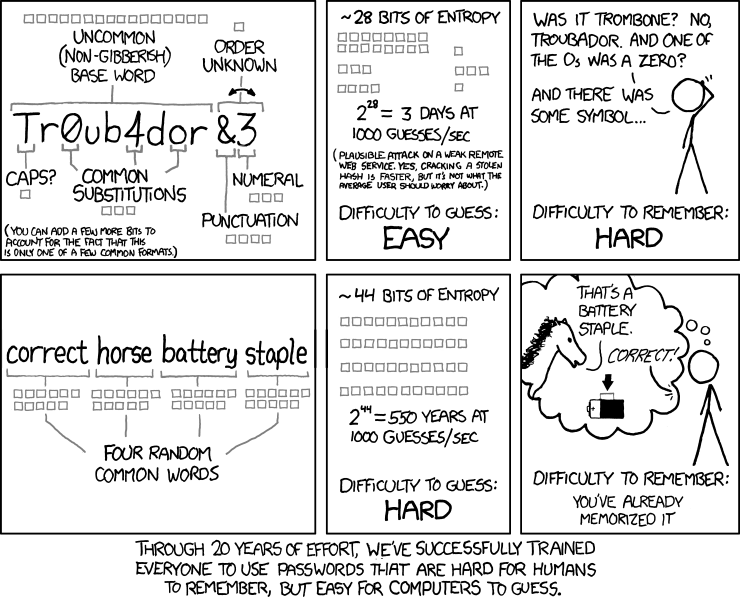
I always think about that xkcd comic when people have billions of passwords. About having passwords that are hard/impossible to remember, but easy for computers to guess. I suppose if you're writing them down then that doesn't matter.
 
If I could remember all my passwords, then I would change them immediately to ones that I couldn't remember. :ROFLMAO:
 
I've been changing all my important passwords, making them different from each other and complexer.

I don't have many but I don't have a great memory. And it's worse when they are all new. Keypass has saved me a few times lately.
 
Last edited:
I use my memory as well as biometrics. I use a unique lead identifier, 3 unrelated words and an end code.
It is adaptable wherre sites for a small password and email, bank, shopping & general websites have a unique system. It sounds complicated but I never forget. Its only a pain when they get hacked & you need to change passwords.

I dont like sites remembering passwords
 
Roboformer here. Tried the free versions (Keepass, Lastpass etc) but didn't get on with them. I'd say I have around 150 to remember. They're nearly all different with combinations of characters, letters & numbers. The work ones change every 30 days and you can't use historic rotation either.
 
If anybody has difficulty storing / remembering Password feel free to email them to me for safe keeping, along with date of birth, mothers maiden name & bank account details...


;)
 
I use Keepass on the desktop and Keepass2Android on my Nexus, database sits in Dropbox.

It's also possible to store documents (or files) in the encrypted database.
 
Roboformer here. Tried the free versions (Keepass, Lastpass etc) but didn't get on with them. I'd say I have around 150 to remember. They're nearly all different with combinations of characters, letters & numbers. The work ones change every 30 days and you can't use historic rotation either.

Am I correct in thinking you mean Roboform, Ian ? If so it looks on the website.
 
Last edited:
Yep. New word: Roboformer... Someone who uses the Roboform tool :cautious:
 
We use keepass, brilliant, auto entry, essential when supporting hundreds of clients and some very large systems with secure passwords.
 
I've been using 1password for many years. Great tool.
 
Just downloaded keepass for android, feeling a bit dumb, it's not that user friendly, will stick with it for a while :$
 
Most passwords are fairly unimportant and If some one cracked them then no real damage done. All my ones of this sort are formulaic and easy for me to remember. However ones that are in any way connected to money are unique and complex But still memorable, at least to me.
Most banks also rely on at least one other defence level.
 
And another Lastpass user here. Good integration into firefox and it synchronises with my home/laptop/work-pc and Iphone without me having to worry. I'm in the process of moving all my passwords to stupidly long generated ones from lastpass :)
 
Bit off topic I know but by and large I agree with Terry. Most sites and user details are not cracked ("hacked") by someone attacking your password, the hackers get in through a back-door, i.e. they access the database on the server that contains your password, at which point it does not matter how difficult it was to crack. That said, obviously overly simple passwords like "password" are always going to be worth a try for a hacker but given they may only get three attempts before being locked out, it is better to run "password" against 10,000 email addresses than it is to make 10,000 attempts at logging in with a single email address and different passwords.

I just use a scheme that generates fairly long passwords, the worry with things that store passwords is if someone finds a crack for keypass or lastpass then all your passwords are open to them; this actually happened to one of the browsers (i think it was Firefox) several years ago.


password_strength.png
 
The sites that annoy are the ones that demand both upper case and a number and I had one even want a symbol recently. How are we supposed to remember those? I've also got work ones that demand a change of password every X weeks just for fun.
Yes, a different one for every site is best (hence lastpass for me) but the demands on complexity take them beyond memorable.
 
Lots of sites want mixed case and symbols and they are harder to remember which is the point the cartoon above is making. Just pick a symbol and use it everywhere - Batt3ry.Hors3.Stapl3 - the real pain in the @rse is sites that DON'T allow symbols, or only allow certain symbols, because then you cannot just use the same pattern everywhere.

The big point of weakness with any system is your email account though. Most sites will send you a password resent link to your email account and so if someone gets control of your email account then they can reset your passwords. An increasing number of people are accessing their email from a smart phone, so think about what happens if you phone is stolen...
 
Surely you'd have your phone locked and wipe it remotely when it gets stolen or lost?
 
The sites that annoy are the ones that demand both upper case and a number and I had one even want a symbol recently. How are we supposed to remember those? I've also got work ones that demand a change of password every X weeks just for fun.
Yes, a different one for every site is best (hence lastpass for me) but the demands on complexity take them beyond memorable.

They ask for that because users use insecure passwords. "123456" is not a good password, nor is "password" or "jamesrobinson69." The sites that p*** me off are the ones that limit password character count to 12 or 14. 16 is alright though, but I love the sites that allow you to have 50-char pass or more. Those are the best.
 
Back
Top