spot on lens

As I'm sure you know a lens is at its max aperture until the shot is taken, therefore if an f5.6 lens is stuck it will stay at f5.6 rather than stopping down to f22.

To check for this I suggested the OP take a pic of a close up subject (not filling the frame) and take a shot at f5.6 and f22 and see if the DOF changes. He came back saying it doesn't stop down so I assume the DOF didn't change.
Ah, I missed that... but given everything else, I'm not convinced.
The shot taken in aperture priority was "correct." And, as I'm sure you know, the exposure is calculated at max aperture based upon the aperture setting. The messed up shot was in manual... and the other settings explain it.

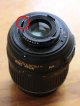
Peter, it's easy to visually determine if a Nikon lens's aperture is messed up. It will either be stuck/sticky, or the spring will be broken/disconnected. Both are fairly unlikely, but a quick flip of the aperture lever will tell (it should easily push open and spring back closed).
This is what it looks like on the 18-55.
 

Attachments
  • Untitled-1.jpg
    Untitled-1.jpg
    31.7 KB · Views: 14
Last edited:
If you look at this shot with the 18-70 settings are f22, 1/125 and ISO 2200 yet is quite dark
https://www.flickr.com/photos/65743741@N07/28896363485/in/photostream/

Yet if you look at this one on the 18-55mm settings are f22, 1/640 and ISO 640. So shutter is 2 and 1/3 faster, and ISO is 1 and 2/3 stops less, therefore I would expect this shot to be 4 stops underexposed compared to the first, which it's not. If the lens was stuck at f5.6 and not stopping down to f22 this would account for the 4 stops difference, ie being 4 stops brighter than the settings would suggest.
https://www.flickr.com/photos/65743741@N07/28281579533/in/photostream/
 
If the lens was stuck at f5.6 and not stopping down to f22 this would account for the 4 stops difference
Yup... and both images were taken on Auto w/ spot metering. The darker 18-70 image is what one should expect (~50%).
And the 18-55 image has an exposure bias setting of -14/3 (~5 stops, I missed that earlier), which would compensate for the aperture not closing down (compared to the white 18-55 image next w/o EC).

So, maybe...
But damn, controlled lighting, manual exposure, and two different aperture settings would be a lot clearer...
 
Yup... and both images were taken on Auto w/ spot metering. The darker 18-70 image is what one should expect (~50%).
And the 18-55 image has an exposure bias setting of -14/3 (~5 stops, I missed that earlier), which would compensate for the aperture not closing down (compared to the white 18-55 image next w/o EC).

So, maybe...
But damn, controlled lighting, manual exposure, and two different aperture settings would be a lot clearer...
Totally agree ;)
 
@StewartR

having taken test shots at f22 - what's the best way in Photoshop Elements to accentuate the grey dust spots..?

thanks
 
@StewartR

having taken test shots at f22 - what's the best way in Photoshop Elements to accentuate the grey dust spots..?

thanks

Just increase exposure and if you need to contrast.
 
@StewartR

having taken test shots at f22 - what's the best way in Photoshop Elements to accentuate the grey dust spots..?

thanks
Just increase exposure and if you need to contrast.
Spot on. (Sorry!)

I recommended increasing the exposure when taking the test shots, because that makes any spots clearer. But if you don't do that, you can do it when viewing them in Elements or Lightroom or whatever.
 
Spot on. (Sorry!)

, you can do it when viewing them in Elements .........

ok I'll try tomorrow - sunny skies..:(

but trying in Elements the image just gets darker and darker
SOOC
600 -DSC_0944.JPG
.
after Elements 7
600 -DSC_0944 edit.jpg
 
Last edited:
...... It won't go darker when increasing exposure!...

i dont see an Exposure tab in Elements 7

so i use
Enhance
then either Auto levels
or Adjust Lighting

:thinking:
PS do you see the circle..odd.It's in other 'adjusted' shots too
 
Last edited:
i dont see an Exposure tab in Elements 7

so i use
Enhance
then either Auto levels
or Adjust Lighting

:thinking:

No auto enhance / levels will try and fix it, that's the opposite to what you want!

Not sure what it's called in Elements, I'm assuming if it's not called exposure it'll be called brightness?
 
Back
Top