"Sort by Time' in LR2 ?

dseered

Suspended / Banned
Messages
2,865
Name
Ian
Edit My Images
Yes
So I use 2 cameras at Weddings and it is now getting reet on my teets that I can't find a way of sorting by time taken. I always end up with '6T9Q******' and then ' IMG_****** ' but I am flummoxed as to how to do it.

Asked my mate last night who is the master of organised images and he just laughed and wished me luck !

I am sure I once saw someone take two images, one from each camera and then somehow synched the rest of the images by 're-timing' the ones that were taken on the 2 different cameras at the same time.

I am seriously losing patience with this !
 
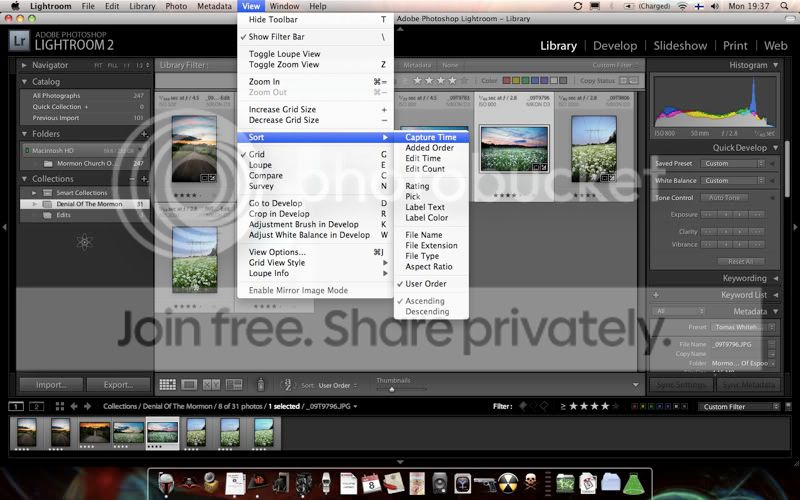
Indeed mate, select all and then either right click or go to view in the menu bar, then sort by capture time :thumbs:

Picture1bab2.jpg


Also, you can organize any order of your choice by making a collection.

In the metadata tab in the library module you can sort through any of the catalogue via a particular camera body, lens, aperture, ISO shutter speed etc too.

Y'gotta love LR!
 
Can't test this right now, but quoted from a Google search; may well not be of help

Go to the library. on the bottom bar above the thumbnails of the images and beside the thumbnail slider is a place where you can select what order they are in. There is a "capture time" one. Use that.
 
In the library module:

View > Sort > Capture time.

Or this is available on the toolbar (press 't' if you don't have it showing).

If you need to adjust the capture time (say the cameras are out of sync):

Metadata > Edit capture time (obviously you do this only on the images from one camera)
 
OK, that was easy enough but when exporting them the have resorted back to how they were shot, dammit - any ideas ?

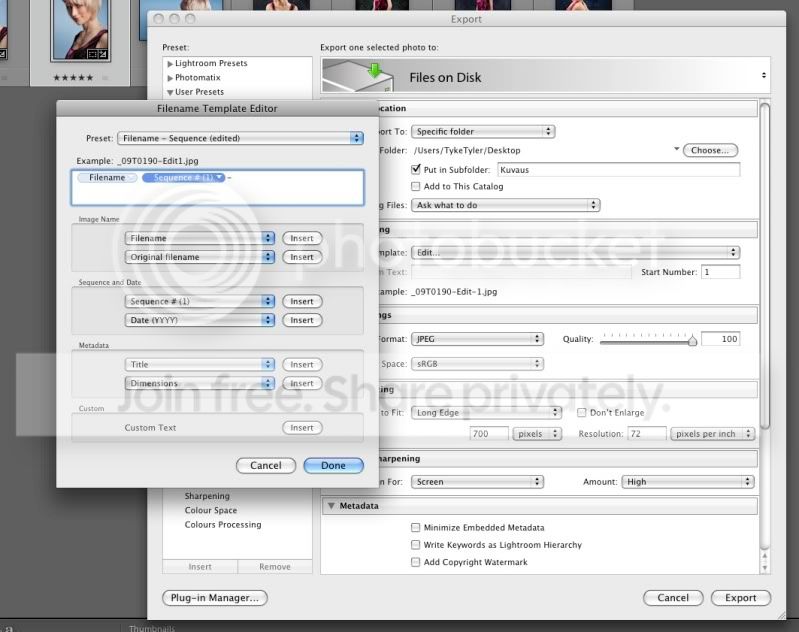
You may have to add a sequence before the filename on export, in the file naming box, click on 'edit' in the drop down menu, then a filename template editor pops up

Picture1-12.jpg


Drag the 'sequence' tab infront of the 'filename' tab and Robert's your dad's bro. This way you can retain your original raw filename and still get the order of your choosing. :thumbs:
 
Tomas, you are a bloody star !

You may have to add a sequence before the filename on export, in the file naming box, click on 'edit' in the drop down menu, then a filename template editor pops up

Picture1-12.jpg


Drag the 'sequence' tab infront of the 'filename' tab and Robert's your dad's bro. This way you can retain your original raw filename and still get the order of your choosing. :thumbs:
 
Back
Top