

Sony A7Rii - Distortion using wide angle and slow shutter

ChrisHeathcote

Suspended / Banned
Messages
3,717
Name
Chris
Edit My Images
Yes
I wondered if anybody else found this and is it something with the camera or the lens?

Basically I was shooting a lighthouse at dawn this morning using the Sony FE16-35mm f4 and when I got the photos back, it looked more like the leaning tower of Pisa. I was wondering is this down to the lens or the camera. I am editing in LRM (now LRCC) on the iPad and have enabled lens correction but wondered if I was missing something, I was using a 4” shutter

Here is the image ( I know there is a strong cast, this os due to the Cokin 3 Stop ND, never used before, however I will be investing in a better set)
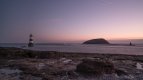
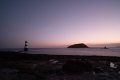
SCO02907.jpg


I would not associate one with the other… nor the body
for that matter. This is normal optical barrel effect of non
rectified wide angle.

Two remedies…
  1. using the pin cushion tool — will solve the barrel
    effect but not the verticals
  2. using the keystone tool — will solve the verticals
    but not the barrel effect
Making sure the combo is levelled will less exacerbate the
problem… less exacerbate but not solve.
 
I would not associate one with the other… nor the body
for that matter. This is normal optical barrel effect of non
rectified wide angle.

Two remedies…
  1. using the pin cushion tool — will solve the barrel
    effect but not the verticals
  2. using the keystone tool — will solve the verticals
    but not the barrel effect
Making sure the combo is levelled will less exacerbate the
problem… less exacerbate but not solve.

I don't disagree with @Kodiak Qc but the fact that inwards distortion occurs below the halfway level in the image, does suggest it was pointing skywards. If it was just barrel distortion then this should be equally applied to both top and bottom of the image, unless of course the image has been cropped, then its an open field!!! @ChrisHeathcote you need to post an uncropped image if it has been cropped.
 
I would not associate one with the other… nor the body
for that matter. This is normal optical barrel effect of non
rectified wide angle.

Two remedies…
  1. using the pin cushion tool — will solve the barrel
    effect but not the verticals
  2. using the keystone tool — will solve the verticals
    but not the barrel effect
Making sure the combo is levelled will less exacerbate the
problem… less exacerbate but not solve.

It's a normal rectilinear wide-angle zoom, ie straight lines are rendered straight, it's not a fish-eye design. It may have a bit of residual barrel distortion though, most wide zooms do.

That's what happens with wide-angles when close to the subject and the camera is tilted up a bit. If vertical subjects are to be shown as vertical, the camera must be perfectly upright. If the camera has a leveling indicator/aid, then use that or a spirit level. It can be fixed in post processing, but you'll lose a lot of sky when the lighthouse is pulled straight.
 
It's a normal rectilinear wide-angle zoom, ie straight lines are rendered straight, it's not a fish-eye design. It may have a bit of residual barrel distortion though, most wide zooms do.

That's what happens with wide-angles when close to the subject and the camera is tilted up a bit. If vertical subjects are to be shown as vertical, the camera must be perfectly upright. If the camera has a leveling indicator/aid, then use that or a spirit level. It can be fixed in post processing, but you'll lose a lot of sky when the lighthouse is pulled straight.

I'd expand that to distant subjects that are big enough in the frame to show the effect.

I have the grid lines on but no level as sadly with my A7 I can have the histogram or the level but not both and I choose to have the histogram. When using wider lenses I try to relate the subject to the grid lines.
 
I'd expand that to distant subjects that are big enough in the frame to show the effect.

I have the grid lines on but no level as sadly with my A7 I can have the histogram or the level but not both and I choose to have the histogram. When using wider lenses I try to relate the subject to the grid lines.

No, it's the angle of tilt that causes it, and that reduces dramatically with distance. It's just a perspective effect, often referred to as 'converging verticals'. So it's common with wide-angles, much less so with telephotos when you have to move much further back to include the whole of the subject.
 
No, it's the angle of tilt that causes it, and that reduces dramatically with distance. It's just a perspective effect, often referred to as 'converging verticals'. So it's common with wide-angles, much less so with telephotos when you have to move much further back to include the whole of the subject.

Hoppy. I know what it is but you're missing my point. You stated close objects but that needn't be the case. Of course it's the angle of tilt but things don't have to be close to the camera to show it. Yes it may be less visible with distance but shoot a big enough distant object when tilting the camera or look with a magnified view and see at what you'll get.

You don't even need a camera to see this, hold a picture frame up to the scene and reference the object to the sides of the frame, tilt your frame and see the effect.
 
Last edited:
Hoppy. I know what it is but you're missing my point. You stated close objects but that needn't be the case. Of course it's the angle of tilt but things don't have to be close to the camera to show it. Yes it may be less visible with distance but shoot a big enough distant object when tilting the camera or look with a magnified view and see at what you'll get.

You don't even need a camera to see this, hold a picture frame up to the scene and reference the object to the sides of the frame, tilt your frame and see the effect.

You can call it how you like Alan, but it's just a perspective effect - how the relative size of things changes with distance. Close-to, relative size changes dramatically (wide-angle, exagerated perspective), further away, it doesn't (telephoto, flattened perspective).
 
Back
Top