Softbox bulb query

mhvz0225

Suspended / Banned
Messages
7
Edit My Images
No
Hi everyone.

I have recently taken over the photography at my place of work and been testing some of the equipment. I have a couple of Neewer S-300N softboxes with the JDD E27 bulb in each, but the light is too warm. All my photography has a yellow tint which I then have to manually remove using photo editing software.

My bulb knowledge is limited but I wondered if there is a bulb that someone can recommend that is:
  • cool white
  • preferably between 4000 and 6000k
  • LED
  • frosted
  • dimmable
  • an E27 screw
Thanks for any advice.
 
Welcome to TP.

The Neewer S-300N is a flash head.
The JDD E27 is the modelling lamp that fits inside the flash head, it's purpose is to provide a low level of light that indicates the shadows created by the flash, i.e you take the photos with the flash, the modelling lamp is neither here nor there and doesn't need to be changed for a modelling lamp of a different type.
 
Welcome to TP.

The Neewer S-300N is a flash head.
The JDD E27 is the modelling lamp that fits inside the flash head, it's purpose is to provide a low level of light that indicates the shadows created by the flash, i.e you take the photos with the flash, the modelling lamp is neither here nor there and doesn't need to be changed for a modelling lamp of a different type.
Ok thanks Garry. I didn't realise that's what that was for. I'll check the camera's white balance setting again and go from there to sort the yellow tinge.
 
Ok thanks Garry. I didn't realise that's what that was for. I'll check the camera's white balance setting again and go from there to sort the yellow tinge.
Maybe I didn't explain it properly.
You don't need to correct the warm colour balance, what you need to do is to use the flash head as a flash head, the flash is many thousands of times more powerful than the modelling lamp, and the "wrong" colour of the modelling lamp won't show.

I assume that you've used flash before? And I assume that you have some means of triggering the flash - a radio trigger or even a sync cable will do, provided that your camera has a connection for the sync cable.
 
Have you got a photo of the equipment on hand?

If it’s anything like my employer it’s a drawer/cupboard full of equipment acquired over a few projects by different staff and the bits needed are there….if you recognise them…
 
Maybe I didn't explain it properly.
You don't need to correct the warm colour balance, what you need to do is to use the flash head as a flash head, the flash is many thousands of times more powerful than the modelling lamp, and the "wrong" colour of the modelling lamp won't show.

I assume that you've used flash before? And I assume that you have some means of triggering the flash - a radio trigger or even a sync cable will do, provided that your camera has a connection for the sync cable.
Yes I have a wireless flash trigger. I've just been playing with it and the images look much better. I now have a much better understanding of the softbox so should be able to create much better photography going forward. Thanks for the help.
 
You're obviously going to have a very steep learning curve here . . .

Take some practice shots, post them here straight out of camera with zero post processing, and I'm sure that people will give you useful guidance on improvements.
 
You're obviously going to have a very steep learning curve here . . .

Take some practice shots, post them here straight out of camera with zero post processing, and I'm sure that people will give you useful guidance on improvements.
Will post some when I get back in the office later this week. Cheers.
 
A free online class "www.strobist.com" doesn't take long to complete and will jumpstart you in flash photography. When I help anyone new to photography I always tell them to take this class before coming to my studio for my help. It has proven to be very helpful. It's a good beginning, or refresher for someone who hasn't kept up with flash photography and the rapidly changing technology.

Charley
 
Wow! That is a truly dreadful website Charley. I'd hate to think how much of a struggle it would be for someone with poor eyesight to use. :eek:

There are lots of tutorials on YouTube if you need them - just avoid the ones that are trying to promote kit, as they'll be biased and trying to get a commission.

Welcome to the forum BTW. :welcome:
 
Last edited:
@Sky, Are you trying to read it on a cell phone? It was written for PC users, but new "Smart TVs" have the ability to allow you to "Cast" your cell phone image to the TV. A little square box shaped icon at the bottom right of the phone image will display if there is a TV nearby that allows this. This little box will have 3 diagonal lines across it's center. If it shows, select it, and one or more TV designations will display in a list. Select the desired TV from the list and your cell phone will have a large screen display while viewing this link.

I have also connected my 60" smart TV to my laptop computer that I use for photography in my studio. With the camera set to use WIFI or a tether cable, and my PC loaded with Capture 1 or the download/light edit software supplied Free from Canon, I have set up the PC software to display a large image of each shot taken as the laptop and the software receive the image from the camera. When shooting living models or subjects, they can see this TV image of themselves as each shot it taken. With my direction, and them being able to see each pose as the shoot progresses, the poses get much better very quickly. Use of the TV helps too when I'm teaching how to WIFI or Tether cameras to PCs too.

I've been a photographer for about 70 years, now have my own small studio in my home. It's no longer a business, just an out-of-control hobby and I do what I want, when I want. I'm 82 now, and with too many health issues to run a business any longer, but I do help friends and photo club members with their problems and questions.

I like to experiment with light to get the best possible shots. Now, because of the health issues, most of what I do is upstairs in my home studio and I almost dnever do photography outside or away from my studio. It is set up for video as well as still shots, and so a minimum of re-configuring is needed to go from one kind of photographyto the other. I have built a ceiling lighting support grid, so the 8 LED light panels that I use for video work are up there hanging from this ceiling grid, so I can set up soft boxes, etc below the LED panels without removing them. I also have black light LED panels up there, for Halloween shots, still or video. I still use light stands, but frequently also attach the strobes and soft boxes to the ceiling light support grid. Power is available along both sides of this grid, on the ceiling, so it's possible to use a powered strobe hanging from an upside-down light stand located anywhere in a 10 X 14' area. All wiring needed is up there, even my tether cable to the PC, so tripod and cable trip hazards on the floor in my studio almost don't exist.

Charley
 
Last edited:
A free online class "www.strobist.com" doesn't take long to complete and will jumpstart you in flash photography. When I help anyone new to photography I always tell them to take this class before coming to my studio for my help. It has proven to be very helpful. It's a good beginning, or refresher for someone who hasn't kept up with flash photography and the rapidly changing technology.

Charley
Thanks for the link Charley, I'll have a look.
 
Wow! That is a truly dreadful website Charley. I'd hate to think how much of a struggle it would be for someone with poor eyesight to use. :eek:

There are lots of tutorials on YouTube if you need them - just avoid the ones that are trying to promote kit, as they'll be biased and trying to get a commission.

Welcome to the forum BTW. :welcome:
I just looked at it on a pc with a smallish monitor and it seems fine for me, the print size seems normal.
 
I used to get a bit upset about some of the ridiculous claims on that used to be on that website, for example that flashgun were perfect for every kind of lighting, but if we ignore the more extreme claims, it's generally a good resource.

The problem with learning lighting is that it's basically a very simple process, entirely based on simple physics, but very hard to explain in simple terms.
 
I just looked at it on a pc with a smallish monitor and it seems fine for me, the print size seems normal.

It doesn't resize. I don't use a particularly large monitor (27"), but on my screen it's like a phone image in the centre. If I zoom it manually it looks absolutely awful. :facepalm:
 
It doesn't resize. I don't use a particularly large monitor (27"), but on my screen it's like a phone image in the centre. If I zoom it manually it looks absolutely awful. :facepalm:
Odd, I'm on a 20 inch monitor for the net and it looks fine. Heres a small grab, looks the same scale as I'm seeing on screen (on checking this is actually slightly smaller. The white row of images is 7 inch on my screen.
Edit if you right click and view image this is exactly the same scale I'm seeing on screen.

ScreenHunter_01 Jan. 08 21.34.jpg
 
Last edited:
A free online class "www.strobist.com" doesn't take long to complete and will jumpstart you in flash photography. When I help anyone new to photography I always tell them to take this class before coming to my studio for my help. It has proven to be very helpful. It's a good beginning, or refresher for someone who hasn't kept up with flash photography and the rapidly changing technology.

Charley
Strobist is useful .. but I'm not convinced that it's the best starting point. Using speedlites and brollies is probably the most difficult way to learn flash and works out no cheaper than using a proper strobe & softbox.
 
You're obviously going to have a very steep learning curve here . . .

Take some practice shots, post them here straight out of camera with zero post processing, and I'm sure that people will give you useful guidance on improvements.
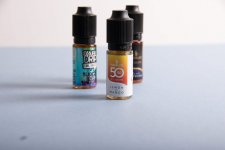
Attached are some practice shots. The blue background one was only a softbox and an additional halogen lamp. The greyish background I used with the flash trigger for the first time. Any feedback would be greatly appreciated!
 

Attachments

  • softbox-halogen-lamp-only.jpg
    softbox-halogen-lamp-only.jpg
    56.1 KB · Views: 15
  • with-flash-trigger.jpg
    with-flash-trigger.jpg
    47.2 KB · Views: 15
OK - just quick thoughts, while looking at the pic on one monitor whilst I type of another one, so not studying the image as such . . .
The continuous light one is a non-starter, so just talking about the flash one here.

Not an easy subject because all that you can really do is to show what it looks at, whatever benefits it may have aren't actually visible in a photo. That's a common problem though, our job is to make the product look good so that potential buyers want it, easy enough for things that we don't actually need, but not so easy for utility products.

The first thing to do is always to think about what we need to show, and my guess is that (for a single shot) you're almost there with the one in the centre, I can't see enough of the one on the right, one on the left is a bit wrong, needs rotating left a bit.

The second thing is to decide on the composition, this is just a test shot and of course the composition has been overlooked.

Next, we decide on the camera height. You've got it almost right, but not quite because the camera is looking down a bit. The camera often does need to look down, but not this time because you don't need to show the top of the screw caps, they don't matter. So, I would position the camera looking up a bit, this makes the product look more important, bigger, dominant, heroic.

And, when all that's done, we move to the lighting. I think that you've pretty much done what can be done here, but I would try having the light a bit closer, to create slightly larger and softer specular highlights (reflections of the light source) and to make the right hand side a bit brighter than the left, to make it look a little less boring, but very little change is probably needed - just experiment with it.

You can also try moving the light much closer (see my article on the ISL here) and add a reflector on the other side, all is explained in that article.

I also think the the light needs to be moved forward, just a bit, so that the knurled knobs don't go black on the left, those knurled knobs, which presumably allow the bottles to be unscrewed easily, are probably an important feature. Again, just experiment.

In product photography, tiny changes to the things I've highlighted above make a huge difference. That statement also applies to other small subjects, so when you have small products to photograph it applies in spades:)

All in all, I think that you've made a good start.

I think that the colour is a bit off, a bit blue, but easily corrected in PP. And you clearly have a focus problem, maybe you need to use a smaller f/number, or move the subjects closer together depth-wise, or use focus stacking, but in product photography everything needs to be either perfectly sharp or very blurred, one extreme or the other. And you need to either arrange the background so that it's behind all of the subject, not just a bit of it. Or just don't bother about the background at all, cut the product out in PP and create your own background - this is the more professional approach but takes time, fine for the odd shot but not for a few hundred of them.

 
OK - just quick thoughts, while looking at the pic on one monitor whilst I type of another one, so not studying the image as such . . .
The continuous light one is a non-starter, so just talking about the flash one here.

Not an easy subject because all that you can really do is to show what it looks at, whatever benefits it may have aren't actually visible in a photo. That's a common problem though, our job is to make the product look good so that potential buyers want it, easy enough for things that we don't actually need, but not so easy for utility products.

The first thing to do is always to think about what we need to show, and my guess is that (for a single shot) you're almost there with the one in the centre, I can't see enough of the one on the right, one on the left is a bit wrong, needs rotating left a bit.

The second thing is to decide on the composition, this is just a test shot and of course the composition has been overlooked.

Next, we decide on the camera height. You've got it almost right, but not quite because the camera is looking down a bit. The camera often does need to look down, but not this time because you don't need to show the top of the screw caps, they don't matter. So, I would position the camera looking up a bit, this makes the product look more important, bigger, dominant, heroic.

And, when all that's done, we move to the lighting. I think that you've pretty much done what can be done here, but I would try having the light a bit closer, to create slightly larger and softer specular highlights (reflections of the light source) and to make the right hand side a bit brighter than the left, to make it look a little less boring, but very little change is probably needed - just experiment with it.

You can also try moving the light much closer (see my article on the ISL here) and add a reflector on the other side, all is explained in that article.

I also think the the light needs to be moved forward, just a bit, so that the knurled knobs don't go black on the left, those knurled knobs, which presumably allow the bottles to be unscrewed easily, are probably an important feature. Again, just experiment.

In product photography, tiny changes to the things I've highlighted above make a huge difference. That statement also applies to other small subjects, so when you have small products to photograph it applies in spades:)

All in all, I think that you've made a good start.

I think that the colour is a bit off, a bit blue, but easily corrected in PP. And you clearly have a focus problem, maybe you need to use a smaller f/number, or move the subjects closer together depth-wise, or use focus stacking, but in product photography everything needs to be either perfectly sharp or very blurred, one extreme or the other. And you need to either arrange the background so that it's behind all of the subject, not just a bit of it. Or just don't bother about the background at all, cut the product out in PP and create your own background - this is the more professional approach but takes time, fine for the odd shot but not for a few hundred of them.

Thanks for the advice @Garry Edwards. These photos were more about playing around with the camera and lighting, as I've never used a flash trigger before and although I have used a DSLR before, I've rarely ventured outside of the auto mode, so learning all the different settings is what I'm currently getting my head around. I like to explore depth of field in my images, especially if it's a generic type subject, but definitely if for a proper product shot, there would be more focus and I would pay more attention to the positioning as well. I like the idea of focus stacking, I'll explore that in more detail.
 
Thanks for the advice @Garry Edwards. These photos were more about playing around with the camera and lighting, as I've never used a flash trigger before and although I have used a DSLR before, I've rarely ventured outside of the auto mode, so learning all the different settings is what I'm currently getting my head around. I like to explore depth of field in my images, especially if it's a generic type subject, but definitely if for a proper product shot, there would be more focus and I would pay more attention to the positioning as well. I like the idea of focus stacking, I'll explore that in more detail.
I get that, my comments weren't intended to be critical, I just picked up on the basics that you need to address.

The radio trigger is neither here nor there, it's just an over-complicated gadget that fires the flash, it doesn't affect the final shot.
Focus stacking is a useful tool, but it takes time - again, fine for the occasional shot that needs it, but best avoided if there are hundreds of shots, and the most effective compromise usually just involves composition that doesn't call for too much DOF - there can be a massive difference in effort and time between adequate and outstanding product shots:)

For now, you just need to concentrate on the basics - the inverse square law, shadow creation, camera position, light position, and the rest will come with practice.
 
Back
Top