Smooth Backgrounds?

Barney12

I like Sailors
Suspended / Banned
Messages
1,489
Edit My Images
Yes
Hi All

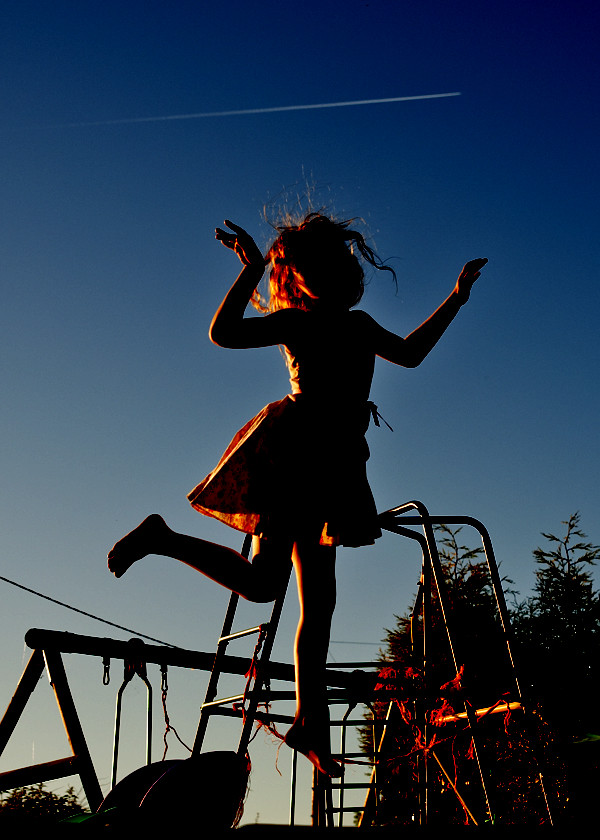
I've been having a problem with very light backgrounds on images after I've done some work (say cloning). As an example see the image below (I've thrown the levels way off so you can see the issue clearly). In this example I've cloned a climbing frame from the bottom of the image the rest of the background is fairly light blue sky.

How do I improve this? Does my cloning skills need to improve or is their some way to balance out the colours across the image. I realise I can add a gradient fill but that seems like overkill to just obliterate whats there?

Hope I'm making sense?

(Sorry also ignore the little black dots)

4649534381_3b0ec974e3_b.jpg


Cheers

Barney
 
This looks like quite a degraded image - wnat steps in PP are you doing from out of camera to this?
 
This looks like quite a degraded image - wnat steps in PP are you doing from out of camera to this?

Yep, your probably right. I've buggered about with it so much now that I think I've killed it :(

Here's the original with the same levels:

4650182552_3d6c4e4260_b.jpg


I guess the same question remains but how should I have done it better.

P.S. I think (it was very late in the night :)) one of the things I tried was surface blur on the sky. Perhaps that cooked it?

Barney
 
answer - I don't know! Cloning a graded background is pretty hard to do though.
 
Anyone else got any tips?
 
Can't see the original image, so don't quite know what you're trying to achieve :)

Sorry, don't know what happened there:

4649534381_e7904dc4ac_b.jpg
 
I might have misunderstood, but if what you're trying to achieve is to remove the banding effect, there's a couple of ways you can do it.

Ideally you'd convert to 32 bit before beginning the editing as sometimes 16 bit isn't enough. But if you don't want to clone again, sometimes adding noise (try fiddling with some of the settings under the Add Noise filter) can save it a bit.

Rosie
 
Just did this really quickly, so it's messy, but is this the sort of thing you were going for?
b4c4r8.jpg


In GIMP, use the colour picker to get the blue from the top as the foreground and greyish-blue from bottom as background. Delete all background from image, so only jumping girl is there, then use the gradient fill tool and drag a line from the top (near the right) to the bottom (near the left) with "foreground to background" gradient selected.
 
I might have misunderstood, but if what you're trying to achieve is to remove the banding effect, there's a couple of ways you can do it.

Ideally you'd convert to 32 bit before beginning the editing as sometimes 16 bit isn't enough. But if you don't want to clone again, sometimes adding noise (try fiddling with some of the settings under the Add Noise filter) can save it a bit.

Rosie

Thanks Rosie, will give that a try.

Barney
 
Just did this really quickly, so it's messy, but is this the sort of thing you were going for?

In GIMP, use the colour picker to get the blue from the top as the foreground and greyish-blue from bottom as background. Delete all background from image, so only jumping girl is there, then use the gradient fill tool and drag a line from the top (near the right) to the bottom (near the left) with "foreground to background" gradient selected.

Cheers. Yep, you are right. I was trying to avoid blowing the orignal background but in this instance I think its my only choice.

Barney
 
Back
Top