Small room microphone set up

Harriers9

Suspended / Banned
Messages
750
Name
Philip
Edit My Images
No
I'm looking for a small microphone set up for a small room that would contain a longish table for around 20 people. It's for when our consultant (Myeloma) comes to have a chat with us and discusses current treatments and answers queries etc.

I'm wanting something more or less standalone if possible that would either be all in one (Mic, amp and speaker) or something that would plug into a laptop. It doesn't need any video capability, just sound,

I've looked at Parrott and Jabra + the lesser known stuff on Ebay but it seems to be a minefield with very little info about what extra items are needed and how it all connects together. We don't want to spend a fortune so no more than £60 really if that's possible.

Any suggestions please.
 
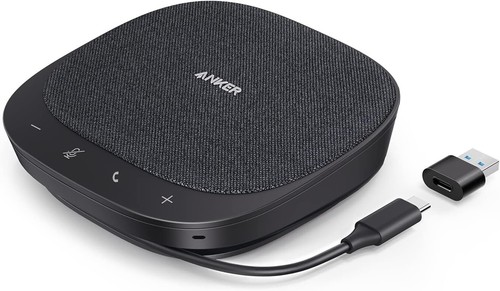
try searching for USB conference mic? something like this?

 
try searching for USB conference mic? something like this?


That looks just the thing Tim.

Got one off Amazon for just over £10 so if it isn't quite what I wanted then I haven't wasted any money really.

Once it arrives I'll give some feedback on it.

Ta again :)
 
Used this and quality is surprisingly good for the price (anker are a reputable brand)

You must have posted at the same time that I bought and replied to Tim. Not to worry.

I have an Anker powerbank and think it's brilliant so no doubt that would be too. Thanks for suggesting it.
 
This has now arrived and after a day of infuriating testing I cannot get it to work as I want.

All it will do is work as an input device that lets me record and then playback what I've recorded. Even that only plays back a few seconds then cuts off.

What I want it to do is broadcast immediately what is being said to the room but there seems no way to enable it as an OUTPUT device.

This video shows what it should be doing but the one I have sadly doesn't. Any clues as to where I'm going wrong please?

 
This has now arrived and after a day of infuriating testing I cannot get it to work as I want.

All it will do is work as an input device that lets me record and then playback what I've recorded. Even that only plays back a few seconds then cuts off.

What I want it to do is broadcast immediately what is being said to the room but there seems no way to enable it as an OUTPUT device.

This video shows what it should be doing but the one I have sadly doesn't. Any clues as to where I'm going wrong please?

Hi Philip, please can you describe more precisely what you need to do, the computer you have, software and the output connection to the room you want to use? I am not clear on the exact problem.
 
Right. We have a meeting. The guest consultant sits down in front of 20 or so 'victims' of Myeloma around a table some six tables long (sometimes in a square).

The purchased speaker would be placed on the table and plugged into a W11 laptop where it utilises the system sound driver. It defaults to 'Input' in the speaker settings where you can test if it's working. It does to a limited extent but just plays back what has been spoken into it. Usually testing, testing.

The output is, I presume, supposed to be the Tonor speaker itself or the laptop speaker. I'm not sure because it's not explained very well.

And that's it. It does no more than that when what we want is for the guest to talk to each of us clearly and for us to be able to reply to him clearly. Basically hold a discussion where everyone can be heard and able to put their points across clearly.

If this purchase isn't able to do that then what system would?
 
Hi there

The one I recommended above is on a 30% off offer on Amazon

Reading the description of the one you bought it looks like it's just a microphone and not mic + speaker combo (which the anker is) so it will be using the laptop speakers.

From what you described above I can't understand the scenario exactly to be able to advise more. Is there a video or conference type call that people in the room join to discuss with others on line? If so what software is being used ie zoom, microsoft teams?
 
Hi there

The one I recommended above is on a 30% off offer on Amazon

Reading the description of the one you bought it looks like it's just a microphone and not mic + speaker combo (which the anker is) so it will be using the laptop speakers.

From what you described above I can't understand the scenario exactly to be able to advise more. Is there a video or conference type call that people in the room join to discuss with others on line? If so what software is being used ie zoom, microsoft teams?

No video etc. No on online. Just people in a room.

The problem we have found is that the consultant that comes to talk to us most is very quietly spoken, and I mean quiet. He knows this himself and says that he doesn't feel comfortable raising his voice all the time so he, too, would appreciate some kind of help.

And that is all we want. To be able to hear him speak and also - not essentially - to be able to respond back.
 
Thanks for the clarification. In that case my recommendation is not applicable.
What you are looking for is an amplified sound system. To be budget friendly what I can think of is a karaoke machine that would come up with microphones. Something like this


One microphone can pe used by the consultant and the other being passed around the room for questions.

Sorry I'm not a specialist in this domain, hopefully others will jump in with their advice.
 
Last edited:
Back
Top