slow wifi with filter connected

joescrivens

Suspended / Banned
Messages
15,052
Name
Joe
Edit My Images
Yes
over the last few weeks i noticed my wifi speed dropping. I looked into it and discovered that if I connect my router directly to the phone line with no filter than I get 14mb download

as soon as I put the filter in I get 4mb download.

Broken filter I guess.

Buy a new filter and exactly the same results. What's the fault here?
 
Is this an adsl filter. Have you fibre broadband or adsl?

If fibre you don't need the filter anymore.
 
how are you connecting direct? with the use of a different cable or adapter to get from the adsl to normal phone connector?

does it have the same amount of contacts as the filter?

edit - basically what im getting at is if the filter has more contacts it may be using the old bell circuit which can introduce noise onto the connection.

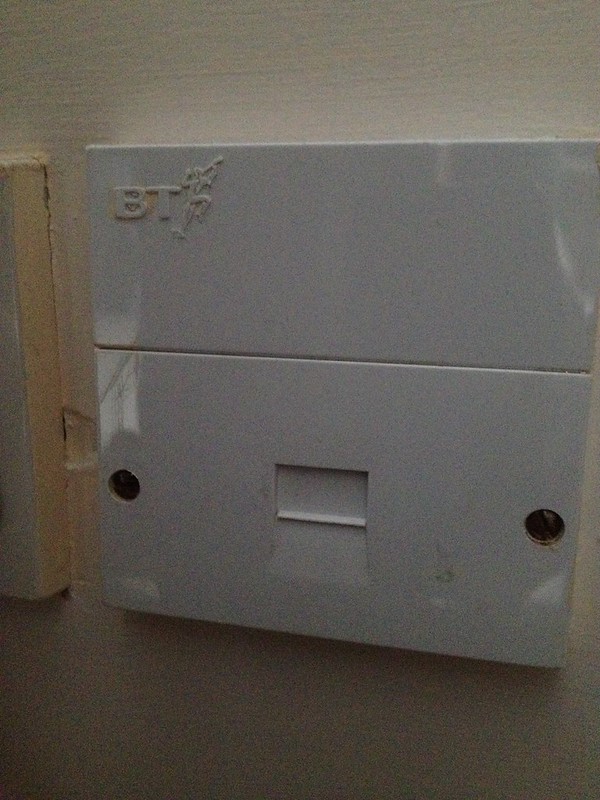
do you have a normal faceplate of an openreach one? may be worth cutting the bell wires or fitting an iplate if not an openreach.
 
Last edited:
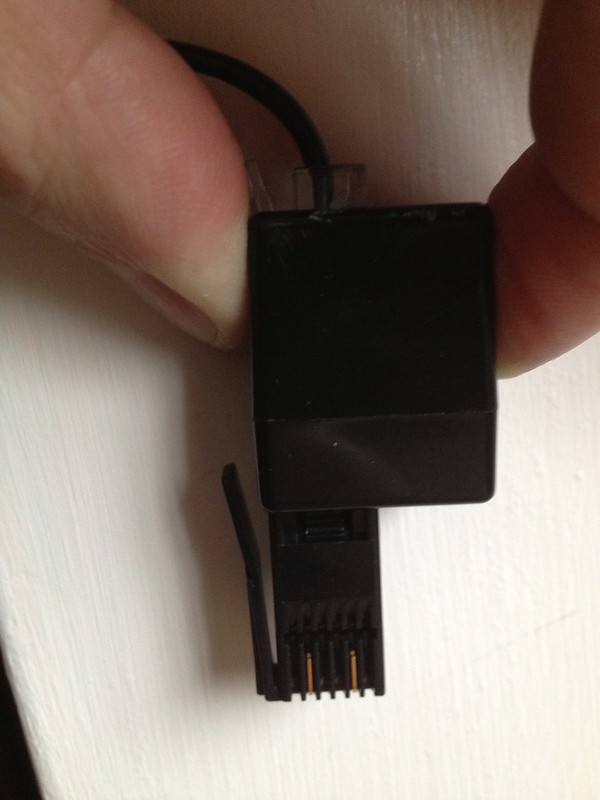
when I connect direct I use this adapter that my phone has on the end of it and it has 2 connections it seems


IMG_1051 by JoeBoyMan, on Flickr

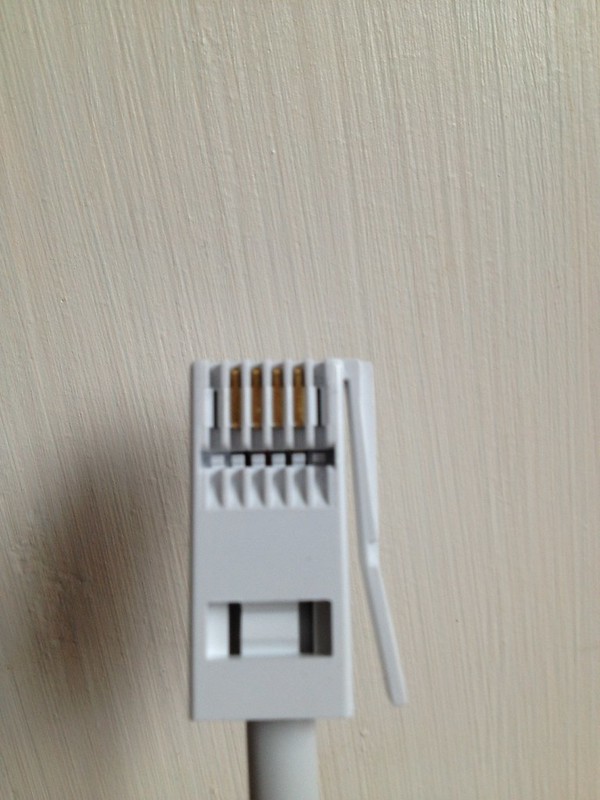
when i use the filter, both filters look like they have 4 connections


IMG_1052 by JoeBoyMan, on Flickr

is this the issue do you think? if so is there a different filter I can buy?
 
ADSL filters die over time. The filters go on the phones not on the router. The router needs to be plugged in directly to the phone socket or if you have the older style master socket with the separate adsl socket on, into that.

The filters filter out the adsl signal for the phones otherwise you have an audible squealing.
 
can I just hack out the middle two pins from the filter?

i guess so

ADSL filters die over time. The filters go on the phones not on the router. The router needs to be plugged in directly to the phone socket or if you have the older style master socket with the separate adsl socket on, into that.

The filters filter out the adsl signal for the phones otherwise you have an audible squealing.

eh? a filter plugs into the phone socket and the two devices connect to that to separate out the different freqs.

a failing filter can cause all sorts of odd issues, like a higher snr or the adsl dropping when the phone rings etc.
 
i guess so


eh? a filter plugs into the phone socket and the two devices connect to that to separate out the different freqs.

a failing filter can cause all sorts of odd issues, like a higher snr or the adsl dropping when the phone rings etc.

Yes it does. When I had adsl the filters only plugged between the phone and phone socket. I thought Joe was saying he had plugged the adsl router into a filter first which is why he said the broadband speed increased when the router was plugged directly into the socket.

Different adsl faceplates have different configurations. Some have the filter in the master socket so that the adsl feed is separated there so you don't need filters on the phone sockets. Mine was like that.

I think we're saying the same thing but in different ways :)
 
The router needs to be plugged in directly to the phone socket or if you have the older style master socket with the separate adsl socket on, into that.

you've just confused me.

my setup is filter into the phone socket then router and phone into the filter

here you are saying i need the router to go direct into the phone socket and then what? if the router is direct into the phone socket there is nowhere for my filter to go to plug my phone in. :suspect:
 
If you have two filters then use the other one and have it in the same configuration it was working in before. The router manual will tell you how to have it. It may be different with the home installs as I had an engineer install and they set those up differently.
 
If you have two filters then use the other one and have it in the same configuration it was working in before. The router manual will tell you how to have it. It may be different with the home installs as I had an engineer install and they set those up differently.

i already said in the op i tried the 2nd filter and the issue was still there.

So I think neil has identified the issue
 
i might try it since i now have 2 filters. let you know how i get on

it didn't like it. no phone signal at all, I guess those two middle connections are needed afterall.

will try the faceplate you suggested

cheers
 
Don't know where you are on this Joe, but Suz is wrong. Everything needs to be filtered - ADSL unit and all phones.

First thing to do is get a decent active filter. You cn normally tell active filters as they have a mousetail between the BT connector and the unit where you plug the ADSL and telephone in.

Next thing to do is plug the unit into the BT side of the master socket. To do this, remove the two lower screws and pull the bottom off. Behind you will see another BT socket. Plug the filter in there and see what your sync speed is. Doing this removes all the internal house extension wiring.
 
Don't know where you are on this Joe, but Suz is wrong. Everything needs to be filtered - ADSL unit and all phones.

First thing to do is get a decent active filter. You cn normally tell active filters as they have a mousetail between the BT connector and the unit where you plug the ADSL and telephone in.

Next thing to do is plug the unit into the BT side of the master socket. To do this, remove the two lower screws and pull the bottom off. Behind you will see another BT socket. Plug the filter in there and see what your sync speed is. Doing this removes all the internal house extension wiring.

It's changed then. With the master plate I had the adsl was on a separate link so you didn't need to have other filters.

I'm sure when I had my broadband and supplied filters it specifically instructed to place filters on the phone connections only but I didn't need to as it was already split from the master socket.

Is it an ADSL2 specific requirement?
 
Don't know where you are on this Joe, but Suz is wrong. Everything needs to be filtered - ADSL unit and all phones.

First thing to do is get a decent active filter. You cn normally tell active filters as they have a mousetail between the BT connector and the unit where you plug the ADSL and telephone in.

Next thing to do is plug the unit into the BT side of the master socket. To do this, remove the two lower screws and pull the bottom off. Behind you will see another BT socket. Plug the filter in there and see what your sync speed is. Doing this removes all the internal house extension wiring.

I was also online with a tech guy who told me to do the same thing.

my speed went up to about 6mb this way with the filter, but when i went straight in with the router i was getting 11mb.

He's going to send me a new router to try. The thing is for 3 years its been fine, its only in the last 2 weeks i've had issues so that surely points too some faulty equipment wouldn't you agree?
 
Scratching my head here?

For a start, Suz, how can you physically plug the router direct into a phone socket?

They are different plugs? Unless your main panel had a phone and separate ADSL socket too? In which case it will be filtered within the panel socket.

Anyway apart from that, you need your router and phones to access the main line via a filter, to prevent interference.

Nowt to do with ADSL2 or +.


Reread your post, Suz and now get your meaning.
 
Last edited:
ADSL multiplexes the audio signal from the phone and the "audio" signal from the router. If you don't filter the ADSL side, the phone line will affect it..

Joe: can you summarise socket/filter/speed combinations you get?
 
I had the older style master socket which filtered both sides from each other independently which is probably why I'm confused as to why you need filters for everything and you're confused as to why I don't :)

The cheapo supplied filters seem to fail more often than the faceplate style ones. It's an arse either way :)
 
Joe: can you summarise socket/filter/speed combinations you get?

sure

with faceplate on

socket - filter - router = 4mb/s download
socket - router - 11/12 mb/s download

faceplate off using the connection behind it

socket - filter - router = 6mb/s download
socket - router - 11/12 mb/s download
 
http://www.kitz.co.uk/adsl/socket.htm

Have a read in that link, helped me go from 0.9mb to 1.2mb download. It may not sound a big difference, but I see it as 25% increase!!!

I know its still crap, but nothing I can do about it! lol
 
Connect your device to your router with a LAN cable and try your tests again.
 
sure

with faceplate on

socket - filter - router = 4mb/s download
socket - router - 11/12 mb/s download

faceplate off using the connection behind it

socket - filter - router = 6mb/s download
socket - router - 11/12 mb/s download
Got to be the filter. I would invest in a decent filter (yes, I know you have just bought one). Look for an ACTIVE ADSL filter.

Connect your device to your router with a LAN cable and try your tests again.
You have done this haven't you Joe?
 
Ok will try an active Adsl filter if the new router by send doesn't work.

Yes LAN is slightly higher than wifi but still disproportionate with the filter on compared to off.
 
The cheapo supplied filters seem to fail more often than the faceplate style ones. It's an arse either way :)

cant say ive ever seen any pattern in router supplied filters failing often.

and thats coming from supporting 25 remote sites all using ADSL over 6 years.

ive never seen any performance difference. including the faceplate built in microfilters. in fact at one site the faceplate failed more times, and was more of a fart to resolve.
 
Last edited:
Got to be the filter. I would invest in a decent filter (yes, I know you have just bought one). Look for an ACTIVE ADSL filter.


actually having looked at active filters online i'm sure that both my filters are active ones - so im hoping the router change will fix my issue
 
i'm curious about where you are getting your download speeds from the routers own status pages or from software on your pc ?

what is the downstream margin ( should be around 6 - 8db ) ?

the first thing that should be plugged into your master socket should be the adsl filter and your router and phone into that you shouldn't need another filter at the phone end as the filter at the master socket takes care of that
it really does sound as if you have 2 duff filters if both are giving the same poor results
 
well just an update for everyone. It looks like the issue was with the router.

BT sent a new router and using all the same wiring and filters the speeds are up faster than every before (15mb/s)!!!! nice!

thanks everyone for your help
 
Glad we could help Ralph....
 
well, you actually didn't help lol

as nobody suggested the router was the problem - but it was the thought that counted

:lol:
 
I reckon it could be the router....
 
The symptoms as described don't match a router fault, but there you go.

do they not? Because when I was on live chat with the tech guy and gave him all of these symptoms that was the first thing he thought it was.
 
might just be something they do as a matter of course?

quite an expensive 'matter of course' isn't it. I would have thought they'd try and eliminate all lower cost alternatives before they just fedex a brand new router.
 
Back
Top