

Skin tone help....

Solo man

Suspended / Banned
Messages
3,628
Name
Lee
Edit My Images
No
When photographing pale children, what is the best way to get the levels right when converting to B&W?.... without getting a soft 'grey' look... as that's all I seem to get...
Portrait style photography and processing are not my forte...
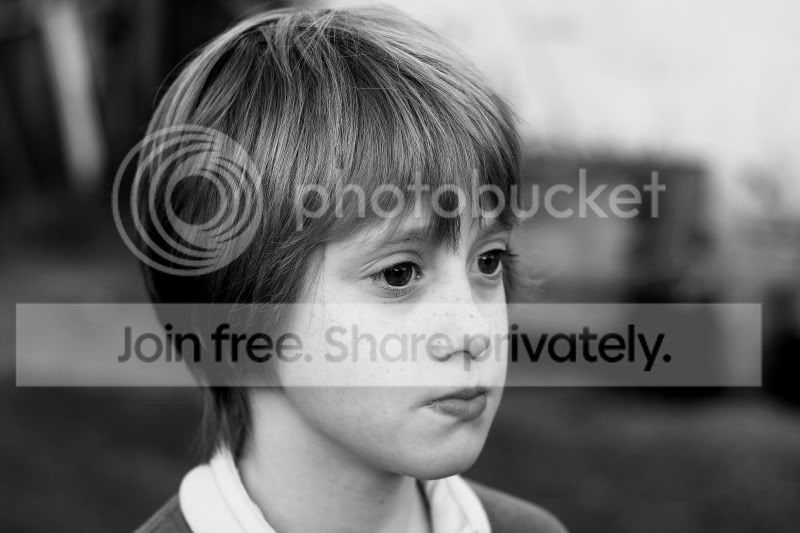
IMG_8418edit3.jpg
 
What software and what B&W conversion technique are you using?
 
DPP and Elements 10...
I converted to grayscale, then adjusted the sliders... contrast and levels..
Having looked at a lot of B&W portraiture on here, every skin tone looks different...
 
Its tricky, I use lab colormode in PS, which is brilliantly customisable but you dont have the option in elements.

I'll hae a look at DPP.
 
Its tricky, I use lab colormode in PS, which is brilliantly customisable but you dont have the option in elements.

I'll hae a look at DPP.

Yes, thank you..... I am aware I might be a bit limited with my software.
 
Haven't had time to play, but try playing with the colours and contrast before you convert to greyscale.

You'll be surprised at the difference it makes. It doesn't have to look good in colour while youre playing.
 
Ok, thank you for your help....
I didn't think of doing that... so, I'll give that a go...
 
its not obvious, until you think that different colours create different greyscales. so changing the colours of an image will create a different greyscale image.
 
Well, I understand what you mean, sort of, but still can't achieve the look that 'looks' right...
I'll keep trying...
Thanks.
 
Try software like Lightroom that allows you to adjust colour levels while in black and white. You'll be surprised the differences you can get.
 
Last edited:
Thank you James.... I don't have Lightroom, I'll have to see if I can get a copy... and I'll try again ...
 
Try software like Lightroom that allows you to adjust colour levels while in black and white. You'll be surprised the differences you can get.

Having downloaded the trial of LR4, and, I can see what you mean by adjusting the colour levels while in B&W...which was useful.
I've decided, after spending ages 'fiddling', that as I wasn't happy with the original image.... it makes more sense to try and improve my images in the first place....so, I'll work on that aspect first...
Thanks for your suggestions...
 
Back
Top