

Skin Colours with flash

mattchewone

Suspended / Banned
Messages
884
Name
Matt
Edit My Images
Yes
Not sure this is the right section but here goes.

I did a practise shoot at home with a small studio style setup and had some friends round to take a few shots. They came out really good I thought especially for my first time. But I feel like the skin tones feel a bit flat possible and the people dont pop out as much to me.

Is it to do with the lighting or is it to do with needing to be done as PP?

I'd like to work towards doing this more often and getting really nice almost magazine style perfect shots. I'd also like to learn to skin smooth to get glamour style portrait shots also (although I probably won't do many but it will be handy to know)

Here is an example shot:
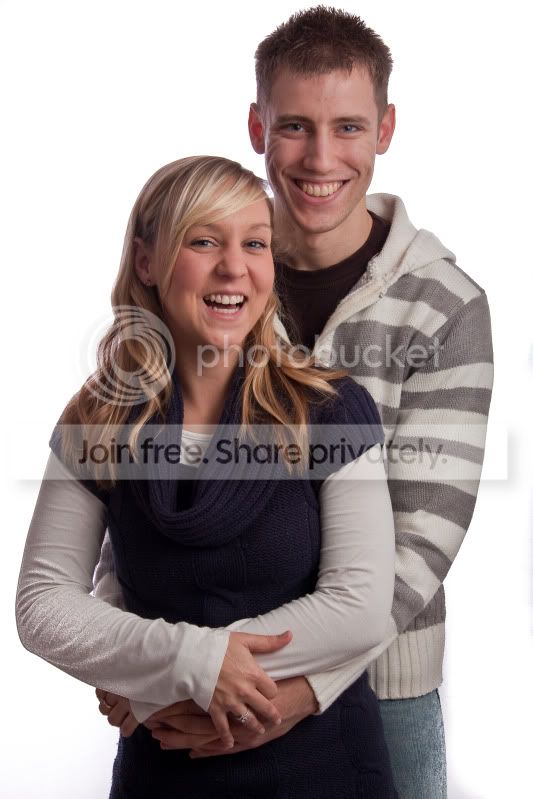
IMG_9007-1.jpg


Thanks
 
The subjects are tad underexposed so that will not help. You could adjust it in PP but that is defeating the object of setting up your lights correctly. I bet someone will do it for you with a levels adjustment but try and get it close in shot first.

It looks like you are concentrating on the background rather than the subject (an you still missed a bit :p)

I did see your other thread on 1st attempt at portraits.
 
tiler65 said:
The subjects are tad underexposed so that will not help. You could adjust it in PP but that is defeating the object of setting up your lights correctly. I bet someone will do it for you with a levels adjustment but try and get it close in shot first.

It looks like you are concentrating on the background rather than the subject (an you still missed a bit :p)

I did see your other thread on 1st attempt at portraits.

Yes if I'm honest that session I was trying to get a pure white background and still missed most of it lol. Not sure if it was because I had those round bowls on the lights and they were projecting to much of a narrow light.

Do you think maybe adjusting the aperture would of solved the under exposure of the subjects I think the flash was on either full power or 1/2. But I was using f/11 so maybe f/9 might of been better.

Any tips on PP to adjust it?
 
Tom (I think:)) is right. Forget about the chavground beautiful white background for now and concentrate on the real subject.

One of the reasons that the subjects don't 'pop' is that unwanted light from the background is spilling onto them, and another reason is that the light coming towards the camera from the background is causing flare.

'Magazine quality' involves a lot of different things.
1. Subjects with good complexions and good bone structure
2. Good makeup
3. Lighting that brings out the quality of the bone structure
4. Good retouching

A lot of people just try to do a short-circuit and ignore all of the preparation and lighting, and just rely on excessive skin smoothing, which always looks terrible.

Also, you'll notice that there are hardly any smiles with good fashion/glamour shots, and there are a couple of reasons for that.
1. People who smile look 'nice' and nice people don't look sexy in photos, most of the good shots that you see are showing attitude, not a nice smile.
2. The skin creases/distortion that smiles create make people look much older, especially when they are extreme, as with this shot.
 
Thanks Garry, I'll try to forget about the background and sort that out after and try to get the shot right for the subjects.

What would you suggest to get a better shot. I was using a flashgun with shoot through brolly. Should I have it closer or further away? Should I move the subjects further away from the BG to remove spillage? Would that decrease the chance of flair as I'll be further away?

Thanks again
 
You do need your subjects further away from the background - but I thought you said you're going to forget about the background for now?

A shoot through brolly is the worst possible choice for this situation, the light goes everywhere, is pretty uncontrolled and also causes lens flare. Use a reflective one instead, place it directly in front of where the subject's face is pointing and high up. Then experiment with distance and height. When you're totally happy with the result from that one light, place a reflector in line with the light but down low, to catch 'spare' light and push it up into the shadow areas. Experiment with distance, the closer it is the greater the effect it will have.

Oh, and start with just one subject, not two. And you'll learn more easily with a still life subject, not a live one, because the buggers move and spoil the shot.
 
Last edited:
Ok Garry thanks very much. I do have a soft box if that's better than a shoot through brolly. I was under the impression from an article I read that reflective brolly was bad as it throws light all around. (only going on what I read) but if you say otherwise I'll try it out when I can afford one.

When I meant ignore the background I mean getting it pure white I'd still like it lit. But moving them forward will improve the photo as they won't be so washed out.

Thanks some good things to try out I'm all excited now :)
 
Garry, I never smile when I have my picture taken - does that make me sexy!! ;) :D

OP - I won't even try to question anything Garry has said - it all sounds good - but what i will say is that for that shot, IMO it would benefit that highlight from camera left (plus the softer main light) if the background had some texture in it. At the moment, they're floating in space.
 
Last edited:
I was thinking soft box and then a reflector to bounce back any light to reduce shadows.

What do you mean about background texture?
 
I'm think either material or even a light grey that can be worked with light on it to create gradients. Maybe a spotlight scraping across the BG to help lift the subjects? I know it can be down using the max sync speed but something other than white might just give it more depth ;)

EDIT: not as extreme as this but this kind of effect:

http://www.flickr.com/photos/vincentrais/6284966688/in/faves-patmacinnes/
http://www.flickr.com/photos/clack/3413016034/in/faves-patmacinnes/

Think light greys instead of the deeper tones in these shots :)
 
Last edited:
Ok I see, I have grey as thats the colour of the pop up, the white/black cover and train are an attachment.

How should I light it using a flash without blowing it and showing some texture and getting a gradient? Do I need to make something to direct the light to one point?
 
A cardboard snoot (basically a tube of cardboard) over the flash will create a 'pool' of light with drop-off. You can get a similar effect using the zoom function and you get more spill so the transition between highlight and shadow is more subtle. Try setting the flash from different directions so it complements the lighting on the subjects; cross lighting can be nice, with the background light say from the left, and the main light on the subjects from the right.

Garry is your man for full-on lighting advice - I'm just a hack who happens to get it right every blue moon :) :)
 
Last edited:
A cardboard snoot (basically a tube of cardboard) over the flash will create a 'pool' of light with drop-off. You can get a similar effect using the zoom function and you get more spill so the transition between highlight and shadow is more subtle. Try setting the flash from different directions so it complements the lighting on the subjects; cross lighting can be nice, with the background light say from the left, and the main light on the subjects from the right.

Garry is your man for full-on lighting advice - I'm just a hack who happens to get it right every blue moon :) :)

Thanks its all worth a try to be honest I thinks most things are trial and error. Is it best to have the light to the side of the background or actually behind the subject to get a good ring of light?

Do you think half a pringles tube would be ok or would a whole one be better?
 
How should I light it using a flash without blowing it and showing some texture and getting a gradient? Do I need to make something to direct the light to one point?
Use anything you like. Anything that controls the spread of the light will work, just experiment until you get the effect you're looking for.

A simple tube, if it's long enough, will produce a soft-edged pool of light on a background, provided that the background is neither black nor pure white.

Hide it immediately behind the subject, square to the background, for a more or less round halo behind the subject. Or put it close to the background at an acute angle to get a splash of light on the background - just use your imagination and experiment.

If the power is low, any light on the background will be subtle and will cover a small area. Turn the power up to light a larger area and to get more dramatic effects/
 
Ok thanks all I'll experiment with the background lighting, means I have to buy some Pringles now lol.

What sort of power or distance should te soft box be to give a good exposure and not wash out the subject or create harsh shadows.

Should the subject have there body facing the light source with heard turned towards the camera? Is that a good base pose to start with?
 
Exposure doesn't come into it, you just adjust the aperture and flash power to get the correct exposure.

Distance depends on the effect you want. It's all about the size of the softbox (or whatever) relative to the size of the subject, and even a giant softbox will produce hard light if it's far enough away. In other words, moving it closer to the subject will produce softer light and will also produce larger/softer shadow transfer edges.

Where you place the light relative to the position of the subject isn't carved in stone, even a small change will create a very different effect - just experiment.
 
Ok thanks sorry for the silly questions.

I hope to have another go this weekend so will post up my results. Hopefully there will be some improvement.
 
Back
Top