

Showing your pics.

FatDave

Suspended / Banned
Messages
7
Name
Dave
Edit My Images
Yes
Daft question but how do you “show” your photos. I am asking this because I am new to using a DSLR and like to get feedback on my images. I currently have Photoshop elements on my computer but what if I want to show someone my pictures at work or a friend’s house where no special software is installed/allowed. The standard Microsoft stuff doesn’t show any where near the detail that is in the original image. The only program I have found that goes some way to showing the image in full detail is QuickTime Viewer.
So how do you show your images in all their detailed glory?
 
Hi Dave, take a look on Play.com and search for memory sticks which has U3 facility this enables you to put your favourite photo viewing program on the mem stick, like what you use at home and then when you get to your friends house you just put it in the USB slot and you can show your photo's using your program and it does not have to be installed on the actual machine, so you have your photo's and a program to show them with and you can then show them on any computer that has a USB slot.

Martin
 
Hi

All Windows operating systems have a means to display .jpegs, but perhaps not at work. Are you saving them as .JPEG. Disk or usb are good ways to carry the pictures. ProwShow Gold is a very entertaining way of showing pictures. Google will answer any questions you may have about ProwShow Gold.

Graham
 
The standard Microsoft stuff doesn’t show any where near the detail that is in the original image. The only program I have found that goes some way to showing the image in full detail is QuickTime Viewer.
So how do you show your images in all their detailed glory?
Not quite sure what you mean there... the picture preview tool in windows shows them just fine... if anything else is showing them different then its probably altering them with some kind of unsharp mask or something.

If your pictures look better in those tools then you need to work on your PP to fix it for everyone else... I guarantee all the photos you wow at on here and elsewhere have had at least some PP work on them - at the very least a USM applied.

The only possible difference when I show mine to others (including you lot in TP land) is whether or not they are viewing the pics on a calibrated screen. That can make a big difference - the laptops my employer has have dreadful screens to start with and nowhere near calibrated. Can make stuff look pretty shocking!
 
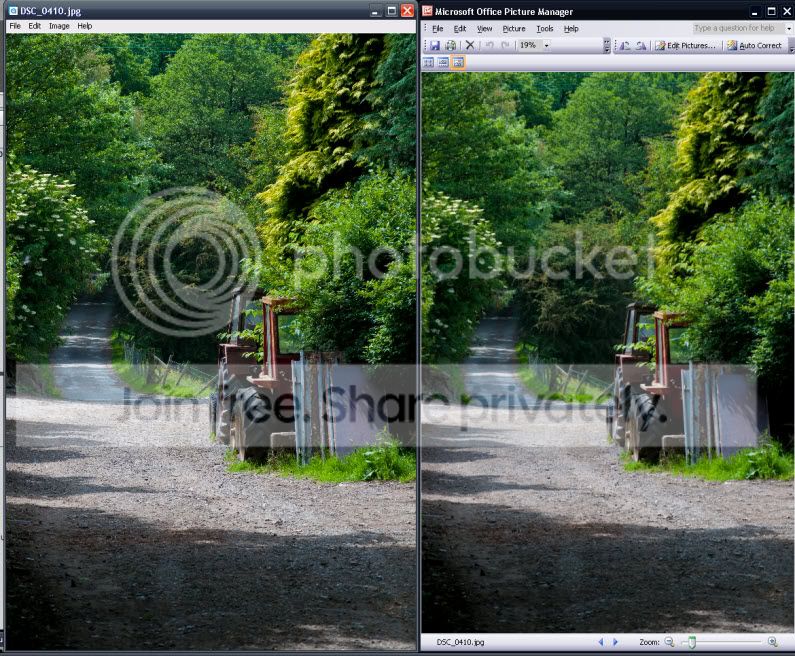
Thanks for the replies. Thought it would be best to show an example.

difference.jpg


The image on the left is being shown with QuickTime viewer and the one on the right in Microsoft picture manager. For me the detail, as shown in the gravel, is missing in the image on the right. On the full versions it is more obvious as the trees are more “fuzzy” as well.
 
the microsoft preview facility imho always detracts from the shot

i look at mine in picassa 3...even then i can sense slight variations from what they look like in ps2...or photofiltre as well

putting them on flikr might work and then use the slide show set facility...then they are stored online as well
 
i look at mine in picassa 3...even then i can sense slight variations from what they look like in ps2...or photofiltre as well

I have tried Picassa 3 as well, and have also noticed some changes to the images.
Thanks all for the advice.:thumbs:
 
I have always found the standard Windows Picture and Fax Viewer in the Operating System about the same as most photo software (with the exception of DPP).
 
Back
Top