Should my CPU run at 70c at idle speed?

davidh6781

Suspended / Banned
Messages
1,181
Name
David
Edit My Images
Yes
I just been doing some diag testing as my pc keeps turning off under very light pressure. just opening outlook can cause a siren and turning off.

when i have run some diag test (when it lets me) i found my AMD Athlon XP running at 70c is this normal?

Did some comparing with my works power house pc, and that runs an intel chip at 34c at idle speed.

any help would be great.
 
It shouldn't be hitting that temp :eek:

Rather obvious questions...

Is the CPU fan running ?

Is the Heatsink full of fluff ?
 
no that is not normal. it should be somewhere in the region of 30-36 at idle.

providing youre not overclocked then your heatsink may need reseating with new thermal paste.
 
thought as much but wanted to check. i remote logged in from work and did some tests.

i think i will turn it off and reseat with some paste.

its not overclocked no, jus tthe standard setting in the bios.
 
That's wayyyy to high, no wonder your having problems. If it hits like 90-100, you will have a dead cpu. 50c is the very most under high load.
 
Does sound like a heating problem, most bios's are set up to shutdown at X degrees. Reseat and paste like you say, but also check case fans etc etc for fluff and dirt.


Speedfan is a great free tool to monitor all temps
 
Probably you just need to take the case apart and thoroughly vacuum it. The inlet and outlet ducts are probably full of dust, stopping air flow, and the heatsink is probably too.
 
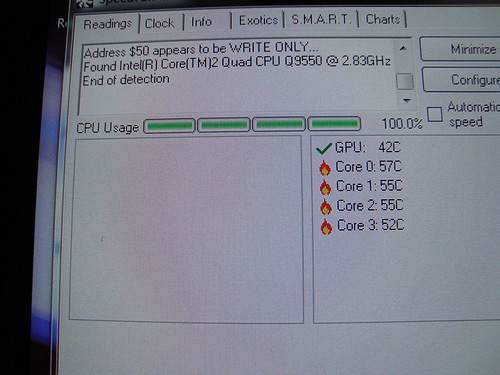
I have just benchmarked my PC running an old 939 Athalon x2 core thats mildly clocked from 2.2ghz to 2.6 per core and the temp just gets over 44 degrees

Capture-14.jpg
 
DM what software is that??
 
Heating problem - clean out all fans heatsinks etc etc, do you have 2 case fans? I find that one at front sucking air in and one at back sucking air out works best, circulates the air well.
 
theres two at the front, two exhaust fans, side panel fan and the cpu fan, so thinking about it there could be a fair bit of dust in there.

The case is an Antec, can't think which model but has three drive bays lol.
 
How long have you had it, and where is it stored ? If it's on the floor, there's a very good chance it'll have far more dust than you'd think... I used to dismantle my floor mounted tower system about once every 3 months and thoroughly hoover it out. It used to drop the idle temperature about 10 degrees each time.
 
its sat on a wood floor in the office (3rd bedroom lol) its a fair old machine now like but some parts get upgraded as an when i feel flush, but generally it does majority even down to dvd authoring etc without an issue. obviously that doesn't happen now other wise probs set on fire.
 
Its a program called sisoft sandra its a free download and benchmarks and tests all the system giving tips on what you can do to make your system run better, you can buy it or download the light version here
 
I just been doing some diag testing as my pc keeps turning off under very light pressure. just opening outlook can cause a siren and turning off.

when i have run some diag test (when it lets me) i found my AMD Athlon XP running at 70c is this normal?
Did some comparing with my works power house pc, and that runs an intel chip at 34c at idle speed.

any help would be great.

I am surprised nobody has asked what CPU it is.

Some of the earlier ones ran well over 60C.
 
My Athlon XP normal idle was about 55C... when it got over 60 I knew it was time to vacuum it. It only ever went over 70, 3 times... twice when I was pushing it really hard, and it hadn't been cleaned out. The third time was just before we replaced it, when the cpu cooler fan became a not very efficient paper weight (but then the temp just spiralled to well over 85 in but moments... )
 
Probably you just need to take the case apart and thoroughly vacuum it. The inlet and outlet ducts are probably full of dust, stopping air flow, and the heatsink is probably too.

woah! do you have any idea how much static electricity builds up around the nozzle of a vacuum cleaner... more than enough to fry sensitive electronic components.
 
woah! do you have any idea how much static electricity builds up around the nozzle of a vacuum cleaner... more than enough to fry sensitive electronic components.

That's why a wee tube is taped on to the nozzle and a wrist-strap used.

Not a problem on the umpteen machines I have used this.
 
I have actually killed a pc with a vacuum it popped when i switched it on. oops.

The Processer is a AMD Athlon XP 2.6+ thoroughbred
 
What sort of Heatsink do you have? Maybe worth reseating the CPU, add some thermal paste too.
 
Back
Top