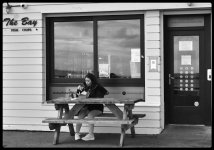
Beginner Shooting at an angle.

Oldbones

Suspended / Banned
Messages
422
Edit My Images
Yes
As I progress along with my camera, I have had some fails and some success, even a couple of light bulb moments.
Done lots of reading and YouTube watching, which has helped me, the people on here have also been great for my photography.
My question now is this, if I am shooting on a flat as as pancake street, I on one side and the subject on the other.
My subject is to my left at an angle of what I would say is 45 degrees they walk past the background I have chosen and I take the shot.
All good so far, I am happy with the shot, I go home to download and process.
This is when I notice that the subject looks like its is going up hill or down hill, so I pick a straight line within the pic and adjust.
I get the back ground which was a door all lined up the subject looking like it is on a flat road, then the main structure behind the focal point just looks off center.
The lens I have is a 35mm Prime which may have something to do with it, but I don't know.
Can someone explain this, I would be very grateful.
Thankyou.
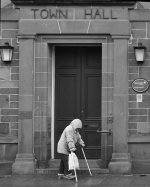
Below is a couple of shots to explain what I am trying to say.
Ps this is a very timid effort at street for me.
Old age does not come alone.
7 BW.JPG

Cold day Hot food.
6 BW.JPG
 
Last edited:
This is perspective causing the issue, the cameras sensor is at an angle to the subject, for everything to be square/flat you'd need to be shooting parallel with the subject.

The right hand side of your images is closer to the sensor, so the camera see's less than is in the left hand side of the frame as that's farther away.

I'm naff at explaining, sorry.

Keystone adjustment may bring it back if you allow for cropping.
 
Last edited:
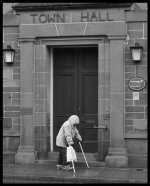
Does the edit below fix the perceived problem? It's very rough and ready, just to illustrate the point. @Gav crossed with my reply, and he has given you the right answer. The problem is perspective distortion, caused by the fact that some parts of the subject are closer to the camera than others.

A more dramatic example would be if you stood with your camera looking up at a tall building, the photo would look odd because the ground floor would be so much closer than the roof, so the building would look as if it's falling over backwards.

The answer is to keep the back of the camera straight and to move the lens up, down or sideways to correct the distortion, which involves a special and very complex camera, called a view camera.

You say that you used a 35mm lens. I assume that it's 35mm equivalent, which is a mild wide-angle. Although the effect is created entirely by viewpoint, and the focal length of the lens makes no difference, a wider lens allows you to be closer, which exaggerates the effect.
7 BW.JPG
 
Does the edit below fix the perceived problem? It's very rough and ready, just to illustrate the point. @Gav crossed with my reply, and he has given you the right answer. The problem is perspective distortion, caused by the fact that some parts of the subject are closer to the camera than others.

A more dramatic example would be if you stood with your camera looking up at a tall building, the photo would look odd because the ground floor would be so much closer than the roof, so the building would look as if it's falling over backwards.

The answer is to keep the back of the camera straight and to move the lens up, down or sideways to correct the distortion, which involves a special and very complex camera, called a view camera.

You say that you used a 35mm lens. I assume that it's 35mm equivalent, which is a mild wide-angle. Although the effect is created entirely by viewpoint, and the focal length of the lens makes no difference, a wider lens allows you to be closer, which exaggerates the effect.
View attachment 469268
Thank you so much for explaining this to me, its an old camera, but I like using it.
Your edit looks good, so I will try and see what I can achieve with my computer, it was raining and I was sheltering under some arches at the town square.
 
This is perspective causing the issue, the cameras sensor is at an angle to the subject, for everything to be square/flat you'd need to be shooting parallel with the subject.

The right hand side of your images is closer to the sensor, so the camera see's less than is in the left hand side of the frame as that's farther away.

I'm naff at explaining, sorry.

Keystone adjustment may bring it back if you allow for cropping.

@Oldbones ^^ this is the reason. Perfectly normal. Just keep the verticals vertical in the centre of the frame and all should be good.
 
Thank you, I have about 3 days left before I go back to work, might give it another try.
 
Back
Top