Sharpening not working fully

Janice

Suspended / Banned
Messages
11,626
Name
Janice
Edit My Images
Yes
This was happening when using CS2 and now its happening with CS3

I do an unsharp mask, or a smart sharpen...get it as sharp as I want... then press OK.

The egg timer comes up for a second or two.... then it works but the sharpness suddenly drops back to being a bit softer than I'd set it.

Not as soft as the original but certainly it doesnt keep as sharp as you have set the settings for.

Has anyone else noticed this.........or can anyone do a test and see if this happens to them too? Just keep a close watch as the timer finishes and it actually stops and it goes a bit softer.

Cant see why it happens in both CS2 and 3. I hoped the upgrade might stop it happening.
 
Not sure if it is related, but I am struggling to see sharpening happen when I do it on CS3. I thought it was just me on two screens, as the sharpening window always pops up on the other screen to the one I have the image on (and I can never be arsed to drag it over). Also sharpening related, but when I sharpen an image on a RAW in CS3 it doesnt show in the preview, but does seem to apply when I tell it too :( very odd!
 
BUMP!

Can anyone throw any light on this please... it is so annoying.. I dont have any control over my sharpening.

It happened in CS2 near the end of when I used it, now it happens again in CS3.

Whatever I set it to look nice, as it does the sharpening, it then sets back to not sharp again.

The only way I can do it is to set the sliders to "very oversharp" and hope it then sets back to something bordering on normal.
 
I have never used CS2 so I can't comment on that bit
Elements 5 works OK
CS3 I find I have to expand the image ( or past of it ) to at least 100% to see any on-screen sharpening improvements whilst editing
Don't know if this helps? :shrug:
I have not had CS3 that long so maybe I am missing something also?
 
In CS3 sharpening works for me the preview works just fine and the amount of sharpening you apply is carried over to the finished image.
 
Janice, I can't help you with this particular problem but have you ever tried High Pass Sharpening? I started using it a few months ago and I find it to be a much better method than USM (which I never use now) and you can vary the amount of sharpening as required. I've set up an action so it is now a one click exercise and if I need to adjust it I go into the history state to make any amendments.

I've also noticed that it doesn't introduce so much noise to an image and another technique I now use with this is on high ISO images where noise is apparent. I apply the High Pass sharpening, use a noise reduction tool (Neat Image in my case) and then sharpen again, it really does do a good job.
 
I have used that before Colin,, it does work but I do find it a bit hit and miss when faced with the grey image and getting just the edges showing......im never sure just how sharp the final image will be.

Probably best to oversharpen a tad.. then bring the opacity down.

I think perhaps i will have to do it this way from now on.

Thanks.
 
With the grey image I have mine set to 10%, this was the advice I was given when I first tried it and I've since seen a couple of tutorials that recommend the same setting. For the action I have set the opacity to 35% which seems to work in the majority of images but if I need to change it I just go back to the history and adjust that way.
 
I can vouch for the greatness of high pass sharpening as well. What blending mode do you use Hacker? I find that if you get the high pass filter fairly faint, then put it to soft light it normally works very nicely straight off. If I need more sharpening, I tend to use vivid light, then lower the opacity to what I need.
 
I wonder if your problem is connected to the viewing screen size%... I find, compared to other drawing software that I've used in the passed, Adobe kinda hides the actual sharpening strength when viewing smaller than 100% ...to make it easier to view possibly ...what size are you viewing/comparing?

...or that may be talking rubbish. :D
 
I wonder if your problem is connected to the viewing screen size%... I find, compared to other drawing software that I've used in the passed, Adobe kinda hides the actual sharpening strength when viewing smaller than 100% ...to make it easier to view possibly ...what size are you viewing/comparing?

...or that may be absolute rubbish. :D

i think it is!! LOL

no ive used photoshop for years and its only just started happening, Adam. it shows fine while im using the slider (although even that takes more up the sliders than it used to) the pops back once it has worked.

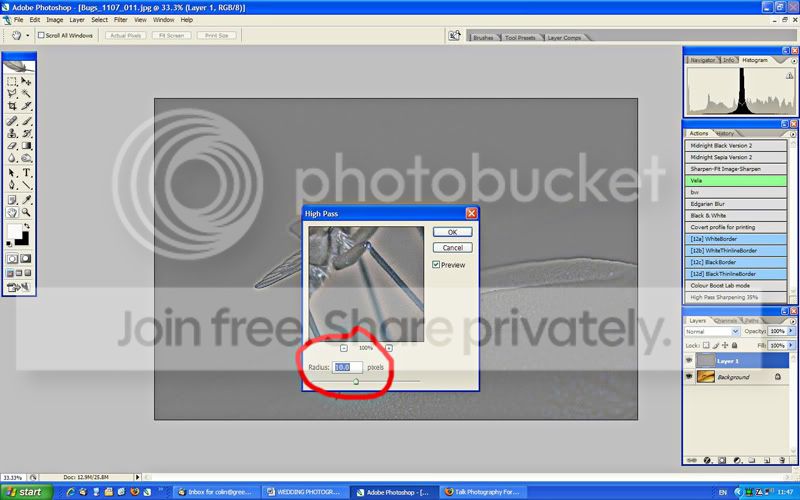
MK...... what No. do you use when actually in the grey picture and finding the edges......there is no percentage there like Colin says......just numbers.
 
Janice, apologies but I've just checked and it is 10 pixels not 10%. :bonk:

High-pass.jpg
 
Hope you dont mind me butting in Janice :D

... but Id be interested in trying out High pass Sharpening, so Colin, Mk ... can you point me in the direction of any of the tutorials?
 
Ah thanks Colin. I was originally told to make it so JUST the edges are showing but i dont think thats quite enough. And this is with the full sized image at camera import size? And then do you do it again if you do a smaller one for the web (Like i wouldve done with USM)?

Janice
 
Hope you dont mind me butting in Janice :D

... but Id be interested in trying out High pass Sharpening, so Colin, Mk ... can you point me in the direction of any of the tutorials?

I'll write one later on.
 
Back
Top