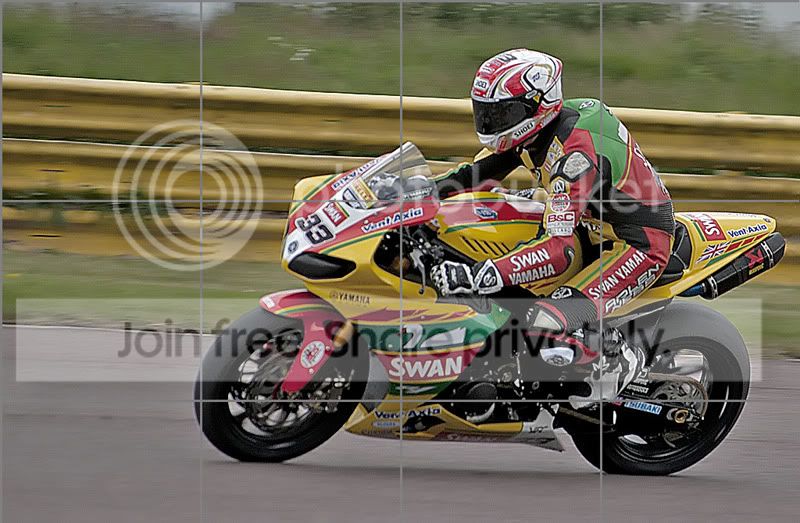
sharpen a picture??????

formula400

Suspended / Banned
Messages
775
Name
lewis
Edit My Images
Yes
can i sharpen this at all, i not its not 100% in focus but can it be made better.??


i have a raw file as well but no clue as to how to post it.
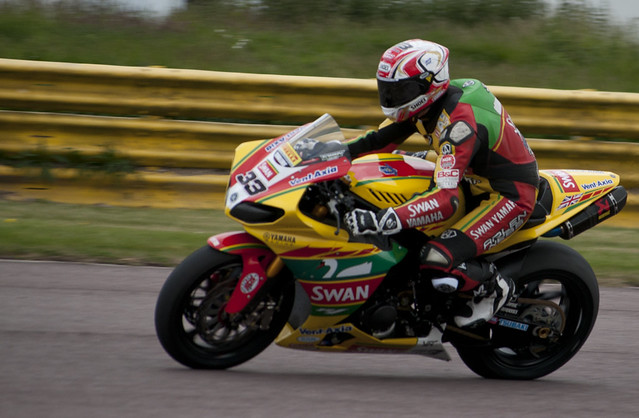


hilledit2 by lewis wilson, on Flickr
 
Last edited:
If it was me it would be one for the bin I'm afraid.
 
I hope you don't mind - I had a quick go at it.

sharpened.jpg


(the grid is because I still have the trial version of noise ninja)

The trouble as I see it is that some parts of the photo, the rider's back for example, are already quite sharp.

I did it with PSE7. I took a little mid tone contrast and saturation out then sharpened two clicks. This made some of the picture very noisy. I then used noise ninja. Not a brilliant result.
 
The problem is motion blur, rather than sharpness, so over sharpening will just look worse.

There was talk on here of a plugin that supposedly rescued blurry photos, but it just seemed to sharpen it to within an inch of its life.
 
That edit is quite wide of the mark imho.

The long and short of it, sharpening is mainly there to help make images appear sharp for web viewing at the fairly low resolutions we view images online. It really wont fix an image that is technically wrong (which i'm afraid this image is).

I've applied the max sharpening to the image (much more and you get lots of haloing) and lifted the colours a little.

1.jpg
 
That edit is quite wide of the mark imho.

I've applied the max sharpening to the image (much more and you get lots of haloing) and lifted the colours a little.

1.jpg


And now the image looks under exposed and still soft ... :shrug:

Roger's edit was great ... :clap: (Perhaps a touch more saturation though)
 
(Perhaps a touch more saturation though)

Actually I have just looked at it on another monitor and you are right. I think mine at home needs a tweak. :(
 
5775847772_08bb7b1cfb_z.jpg


A little focus magic, then passed into CS5 for a touch of levels.

Not sure it's any better but is a tad sharper without loss of detail.

Just noticed I've blown the whites a little.
 
Last edited:
Back
Top