Sharing an external HD between two computers (Win+Mac)?

myotis

Suspended / Banned
Messages
4,503
Name
Graham
Edit My Images
No
As a temporary measure I want to be able to switch an external HD between my Lenovo laptop (Win 10) and my Mac Mini (High Sierra) so I can access my raw photo files from both machines.

It looks like something like this might be the answer:


Or this:


My main set up is with the Mac, (back up drives and cloud back up), but I can't run the current versions of the software I use in High Sierra on the Mac, and at the moment I can't afford to upgrade the Mac, but I can run the latest versions on the Lenovo (I l already share my Eizo monitor with the Lenovo and the Mac).

So I want to carry on managing all my files from the Mac, and then manually switch the external HD to the Lenovo for editing, and then switch it back to the Mac for backing up.

One of the above switches might be the answer, but has anyone any other suggestions/advice.

Thanks
 
Maybe teaching you to suck eggs but unless it's formatted as ex-fat you won't be able to swap between the two because the two formats are incompatible.
 
Maybe teaching you to suck eggs but unless it's formatted as ex-fat you won't be able to swap between the two because the two formats are incompatible.
Thanks, a good point, but the SSD I am planning on sharing is ex-fat.
 
unplugging it from one and plugging it into the other is a lot cheaper.

As Gramps has said, the drive has to be formatted ExFat for both machines to be able to read and write.
Thanks, and yes that's what I am doing now, but was hoping to just flick/press a switch.

And. its obviously a rather important thing to point out, but as I replied to Gramps, the disc is ex-fat,

Edit: having given it more thought, buying a couple of USB data cables and bringing them to the front of my desk, would make plugging and unplugging a much better solution than I originally thought. I think I'd still prefer a switch, but now not ruling out plugging and unplugging.
 
Last edited:
Thanks, and yes that's what I am doing now, but was hoping to just flick/press a switch.

And. its obviously a rather important thing to point out, but as I replied to Gramps, the disc is ex-fat,

Edit: having given it more thought, buying a couple of USB data cables and bringing them to the front of my desk, would make plugging and unplugging a much better solution than I originally thought. I think I'd still prefer a switch, but now not ruling out plugging and unplugging.

Have Apple changed the requirement to unmount a drive before removing it? If they haven't, you'll never get to a simple button press. I ignored warning like this for ages (or mostly forgot to unmount) until I eventually corrupted a drive. Would not recommend :)

Personally I'd run cables under the desk and secure them with something like this


One colour cable for PC, one for Mac. Moving the cable would hopefully remind me to unmount.
 
Have Apple changed the requirement to unmount a drive before removing it? If they haven't, you'll never get to a simple button press. I ignored warning like this for ages (or mostly forgot to unmount) until I eventually corrupted a drive. Would not recommend :)

Personally I'd run cables under the desk and secure them with something like this


One colour cable for PC, one for Mac. Moving the cable would hopefully remind me to unmount.
No, you still have to eject on the Mac, as well as ejecting on Windows.

The switch is just to reduce the number of things I have to do, and although your colour cables do the same thing, to have the LEDs on the switch to make it easy to see which computer the disk is plugged into.

I hadn't even thought about forgetting to do this, and so far I've never forgotten while physically moving the disk between computers, but maybe I would, if I had a simple switch.

Thanks for the thought and link.
 
My home router has a facility for connecting an external drive. Worth checking yours? It'll offer a common storage point available to any device connected to the home network.
 
My home router has a facility for connecting an external drive. Worth checking yours? It'll offer a common storage point available to any device connected to the home network.
That would probably work Ok provided you connected by ethernet for speed
 
My home router has a facility for connecting an external drive. Worth checking yours? It'll offer a common storage point available to any device connected to the home network.
Yes, thanks, speed is an issue, and my cloud backup (Backblaze) only works with disks inside or directly connected to the computer registered with Backblaze.
 
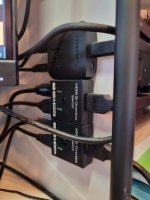
I use a usb switch (along with a couple of HDMI switches) at home so I can quickly switch between my work laptop and home PC. Both are windows machines, I don't know if one being an apple will be an issue.

The USB switche is hooked up to a usb hub which then connects to my mouse/keyboard and a small external hard drive. Has been working fine for the last year or so.

20211126_123632.jpg


This is the switch I used.
 
I use a usb switch (along with a couple of HDMI switches) at home so I can quickly switch between my work laptop and home PC. Both are windows machines, I don't know if one being an apple will be an issue.

The USB switche is hooked up to a usb hub which then connects to my mouse/keyboard and a small external hard drive. Has been working fine for the last year or so.

View attachment 336583


This is the switch I used.
Thanks, the Sabrent was one of my links, but since posting it, I've realised it say Win 10 only. The U-green one, says windows and Mac.

I'm surprised the Sabrent is Win 10 only as they say no drivers are needed. I suspect I will just get the U-green one, I've thought about just getting a couple of cables as has been suggested, but in the end, I think I would rather have a switch.

Edit: I see that B&H say the Sabrent is WIN and Mac compatible, and a users review says they use it with both OSs. Wonder why the Sabrent website and Amazon, say it isn't.
 
Last edited:
Well it looks as if I might well end up with a couple of cables !

Apart from the confusion over whether it works with a Mac or not, the Sabrent manual says it isn't recommended for use with mass storage devices.

The U-green blurb says that their switch isn't suitable for mass storage devices unless the switch is externally powered, but a power supply isn't supplied. So I would need to sort out a mini-usb power supply, and find out what spec is required.

Maybe two cables might be the simplest and cheapest option, even if it isn't what I really wanted.
 
just use some kind of basic NAS that both OS;s can access
 
just use some kind of basic NAS that both OS;s can access
A sensible idea.

You can also use an old computer as a server. I have an original MacBook Air as mine, which replaced an even older Mac Mini. There are two disks permanently attached via a three way USB panel, the second disk being a live backup of the first. All our computers access the first disk as our data server and other disks are plugged in as seems appropriate to act as additional backups.
 
just use some kind of basic NAS that both OS;s can access
Thanks, and a reasonable suggestion but, I think the key bit of my question is "As a temporary measure..."

And as it so happens, until recently when it failed, I did run a NAS for shared access, but none (all three have been Qnaps) I've used have been fast enough to allow editing images from them. Though, I am aware other people use NASs.

I can in theory, run my Mac Mini as a server and connect directly to it from the Windows machine, but again I suspect speed might be the issue, as when I connect between Macs via the network, I can move files easily, and view videos etc, but can't edit anything.

And I've actually tried to connect the WIN10 laptop with my Mac mini before and can't get it to work, even though I think I've done everything right, and have been following very detailed instructions.

For now I want a quick and cheap solution, that just makes it a bit easier than it is now.
 
A sensible idea.

You can also use an old computer as a server. I have an original MacBook Air as mine, which replaced an even older Mac Mini. There are two disks permanently attached via a three way USB panel, the second disk being a live backup of the first. All our computers access the first disk as our data server and other disks are plugged in as seems appropriate to act as additional backups.
NASs are a good solution in principle, but as the first line of my question said "As a temporary measure ..." I don't think it's the best solution in this instance. Maybe I should have said temporary and low cost, but I also said I only needed the solution until I could afford to replace my Mac Mini.

My last NAS failed a few months ago (I've had three (Qnaps) and all have failed relatively quickly), and the plan for my existing Mac Mini, when I get it's replacement, is to do what you have just described (or something similar). But it's not the answer to my temporary problem, and I've never found my NASs fast enough to allow me to edit files on them.

As aside, I'm still grappling with back up disks attached to a Mini as a server, for as far as I can make out Networked disks can't be backed up by Backblaze.
 
Personally I would never use custom NAS devices any more they are expensive, outmoded and a nightmare to recover when things go wrong, just use a super cheap low power PC and just set it up with file shares, pop your cloud provider backup software on it and bobs your uncle.
 
Personally I would never use custom NAS devices any more they are expensive, outmoded and a nightmare to recover when things go wrong, just use a super cheap low power PC and just set it up with file shares, pop your cloud provider backup software on it and bobs your uncle.
See my reply to Andrew, that's why I haven't replaced the NAS. Once I can afford to replace my existing Mac mini, when I will no longer need a temporary solution, the plan was to use the old Mac Mini as a server.

I confess, I hadn't really thought of just leaving the Blackblaze software running on the existing Mac Mini, that is a very good idea - thanks.
 
See my reply to Andrew, that's why I haven't replaced the NAS. Once I can afford to replace my existing Mac mini, when I will no longer need a temporary solution, the plan was to use the old Mac Mini as a server.

I confess, I hadn't really thought of just leaving the Blackblaze software running on the existing Mac Mini, that is a very good idea - thanks.

persevere with the file shares on the windows box, have a play
 
persevere with the file shares on the windows box, have a play
Oh yes, I will get back to it, but it's not a priority just a convenience.

I'm sure I'm missing the obvious, but over the last few years I have tried every so often, as I've found more detailed instructions. The last time I tried, I got the Mac side to work as I could view and move files on the WIN10 laptop from the Mac, but the WIN10 laptop won't connect to the Mac even though it sees it.

However, its not something I can spend time on right now, but I will get back to it one day.

Thanks
 
Back
Top