

Hi I am relatively new to photography and I have a bit of an odd query. The only function I have learnt to use (other than auto) is the AV setting ( though I have played around with other settings). However, whilst I have being trying out other settings I think I may have altered something fundamental. Now when I use the AV setting my shutter speed is really slow and I can’t change it no matter how much I change the ISO etc. Where the shutter speed normally shows on the display screen it is also no longer showing it's just a blank box. Is this a setting issue or is it a technical issue that is going to require fixing professionally? If anybody has any help or advice it would be greatly appreciated. I am scared of playing with the set up too much without advice as I don’t know what I am doing (hence why I think I have caused this) and am worried I will make it worse! Thank you in advance!
You are using an out of date browser. It may not display this or other websites correctly.
You should upgrade or use an alternative browser.
You should upgrade or use an alternative browser.
Settings help please!
- Thread starter CocoFray
- Start date


TimHughes
Suspended / Banned
- Messages
- 3,655
- Name
- Tim
- Edit My Images
- Yes
Hey there, this is normal for the AV setting which takes the aperture you selected and then automatically picks the shutter speed. It looks like the scene you're shooting is rather dark if the shutter speed is too slow. Try the TV mode which is the other way around, you pick the shutter speed. Worth spending a bit of time on an intro to the controls and the manual too.

Box Brownie
Suspended / Banned
- Messages
- 17,645
- Edit My Images
- No
Last edited:

DemiLion
Suspended / Banned
- Messages
- 13,016
- Name
- Mark
- Edit My Images
- No
Hey there, this is normal for the AV setting which takes the aperture you selected and then automatically picks the shutter speed. It looks like the scene you're shooting is rather dark if the shutter speed is too slow. Try the TV mode which is the other way around, you pick the shutter speed. Worth spending a bit of time on an intro to the controls and the manual too.
It's not in the slightest bit normal.
DemiLion
Suspended / Banned
- Messages
- 13,016
- Name
- Mark
- Edit My Images
- No
Hi I am relatively new to photography and I have a bit of an odd query. The only function I have learnt to use (other than auto) is the AV setting ( though I have played around with other settings). However, whilst I have being trying out other settings I think I may have altered something fundamental. Now when I use the AV setting my shutter speed is really slow and I can’t change it no matter how much I change the ISO etc. Where the shutter speed normally shows on the display screen it is also no longer showing it's just a blank box. Is this a setting issue or is it a technical issue that is going to require fixing professionally? If anybody has any help or advice it would be greatly appreciated. I am scared of playing with the set up too much without advice as I don’t know what I am doing (hence why I think I have caused this) and am worried I will make it worse! Thank you in advance!
Have you accidentally put the camera into Bulb mode?
Hi all thanks for the responses indeed I am using a canon 750D...what is bulb mode please and how do I check if I've accidentally switched it on? The lens is a short one 30mm-55mm I think I'll double check when I get home. I was playing about with the settings first and walking the dog at the same time so I fear it may be a case of me accidentally knocking a setting on as we walked along
Thanks
Thanks
Box Brownie
Suspended / Banned
- Messages
- 17,645
- Edit My Images
- No
Have you got the user guide (Canon manual) for the camera?Hi all thanks for the responses indeed I am using a canon 750D...what is bulb mode please and how do I check if I've accidentally switched it on? The lens is a short one 30mm-55mm I think I'll double check when I get home. I was playing about with the settings first and walking the dog at the same time so I fear it may be a case of me accidentally knocking a setting on as we walked along
Thanks
TimHughes
Suspended / Banned
- Messages
- 3,655
- Name
- Tim
- Edit My Images
- Yes
Bulb mode is one where the shutter stays open for as long as you press the shutter. I think the 750D would say "bulb" if it was in that mode?Hi all thanks for the responses indeed I am using a canon 750D...what is bulb mode please and how do I check if I've accidentally switched it on? The lens is a short one 30mm-55mm I think I'll double check when I get home. I was playing about with the settings first and walking the dog at the same time so I fear it may be a case of me accidentally knocking a setting on as we walked along
Thanks
TimHughes
Suspended / Banned
- Messages
- 3,655
- Name
- Tim
- Edit My Images
- Yes
online manual is here https://www.canon.co.uk/support/con...50d.html?type=manuals&manualid=tcm:14-1252968Have you got the user guide (Canon manual) for the camera?
Box Brownie
Suspended / Banned
- Messages
- 17,645
- Edit My Images
- No
You beat me to it


- Messages
- 105,684
- Name
- The other Chris
- Edit My Images
- Yes
Far more often than not these things are a setting. If all else fails there is usually a "Reset to factory settings" option in the menusIs this a setting issue or is it a technical issue that is going to require fixing professionally?
TimHughes
Suspended / Banned
- Messages
- 3,655
- Name
- Tim
- Edit My Images
- Yes
It's not in the slightest bit normal.
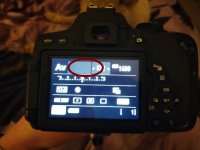
Not sure, here is how the screen looks in Av mode - blank shutter speed as described, no?
Last edited:
TimHughes
Suspended / Banned
- Messages
- 3,655
- Name
- Tim
- Edit My Images
- Yes
This is normal, see the YouTube video link I posted above. The camera is calculating the necessary shutter speed from the aperture and ISO. If the shuttter is too long and you can’t increase ISO then you either need to put the camera on a tripod so it doesn’t move (works for a static subject) or add more light maybe with a flash.Thanks everyone and thanks for the link to the user manual I've misplaced mine ....it's just this bit that is blank... see red circle. Can't see that I says bulb anywhere so may have to resort to trying the factory reset !

Just a quick bit of explanation on this.PS is that F22 or f2.2 in the image? If it’s 22 then open up as wide as possible, ie the lowest possible number.
The Aperture controls the size of the hole which lets in light to the sensor - and a bigger number is a smaller hole (so f/2.2 woudl be a big hole, f/22 would be a very small hole).
As the aperture gets smaller (IE larger number), the time the shutter needs to be open to let in the same amount of light increases - so with f/22 you will have a very long shutter speed, and f/2.2 a much shorter shutter speed.
It may be that f/22 is so small, that the shutter speed is too long - hence it cannot set a value.
TimHughes
Suspended / Banned
- Messages
- 3,655
- Name
- Tim
- Edit My Images
- Yes
I'm curious if that works, sounds good, but I don't recall that being possible on Canon DSLRs.@CocoFray my Panasonic camera has a screen looking similar. Touch the shutter button lightly and your shutter speed will appear in the empty space.

4wd
Suspended / Banned
- Messages
- 3,224
- Name
- North York Moors
- Edit My Images
- Yes
There might be a bad contact to the lens, just taking it off and putting on again might fix it a quick gentle wipe of them too not a bad idea.
I can't really imagine any setting combo other than auto not showing a shutter speed which is pretty basic camera stuff.
I can't really imagine any setting combo other than auto not showing a shutter speed which is pretty basic camera stuff.

Krisstiffer
Suspended / Banned
- Messages
- 722
- Name
- Chris
- Edit My Images
- No
Not seeing the shutter speed on that screen is perfectly normal inAv - it’s not shown on that screen (brief exceptions to that but not muddying the water here) - so don’t worry - nothing’s wrong. Here’s my 600D (get the same on my 5D2 as well……)
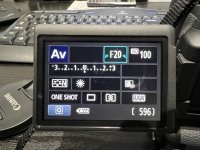
As for the long shutter speed then having an aperture set to f/22 will, as people have said above, will most likely be the cause of that. Try a wider aperture (low f number) and see if that changes things.
As for the long shutter speed then having an aperture set to f/22 will, as people have said above, will most likely be the cause of that. Try a wider aperture (low f number) and see if that changes things.
Krisstiffer
Suspended / Banned
- Messages
- 722
- Name
- Chris
- Edit My Images
- No
Doesn’t apply to Canons. Starting metering with a “half press” switches that display off. The only time you’ll see the shutter speed is if you switch to that display immediately after the half-press (ie while metering is still active) and it then disappears once metering is over. Only way to see the selected speed on the display is to switch to liveview.I'm curious if that works, sounds good, but I don't recall that being possible on Canon DSLRs.

Phil V
Suspended / Banned
- Messages
- 26,303
- Name
- Phil
- Edit My Images
- No
You’re at f22, if that’s in very low light there’s no way the camera will get you a shutter speed shorter than 30 secs.Thank you all so much in the end I had to do the factory reset which has worked! Thank you for all the advice...noted for future reference too!
See what happens at a larger Aperture (smaller number)