Sensor cleaning - stubborn mark

TimHughes

Suspended / Banned
Messages
3,655
Name
Tim
Edit My Images
Yes
My GFX50R has a very small but stubborn mark on the sensor. I spent 5 minutes or so cleaning it yesterday with regular sensor cleaning fluid and wipe. This removed some of the mark, but not all. Any ideas on how to remove the mark completely? Keep going with the normal cleaning method? Or something else?
 
Might be worth leaving a drop of cleaning fluid on it for 30min or so (cover the mount with clingfilm to keep it clean) before trying again. It may just need time to soften/dissolve.
 
the sensor itself is covered with a thin delicate optical glass filter so I'm happy to try the drop of cleaning fluid idea. thanks @ancient_mariner
 
Would not use clingfilm without testing it first, I would want to rule out it softening or partially dissolving in the fluid and causing a much bigger mess.

The cling film should not touch the sensor or fluid, but only cover the open lens mount.
 
Would not use clingfilm without testing it first, I would want to rule out it softening or partially dissolving in the fluid and causing a much bigger mess.
I don't think @ancient_mariner meant put cling film over the drop of fluid on the sensor but to cover the lens mount, though of course you could just the body cap on?

Edit ~ @ancient_mariner has replied before I completed my post :runaway:
 
Last edited:
I would then be trying with an Artic Butterfly with possibly??? sensor cleaning fluid on the brush tip or on the sensor. Works for me anyway
P1013507.JPG
Then using a Loupe to check
 
Last edited:
Sounds like it could be pollen ,the devils own job to remove as it’s sticky ,just has to be done a few times .leaving camera with lens cap fitted on a sunny window shelf may be enough to soften it ..
 
Sounds like it could be pollen ,the devils own job to remove as it’s sticky ,just has to be done a few times .leaving camera with lens cap fitted on a sunny window shelf may be enough to soften it ..

@TimHughes - this^ - I’ve cleaned hundreds of sensors, mainly on industrial cameras, which often are in grubby environments- often they require several goes.

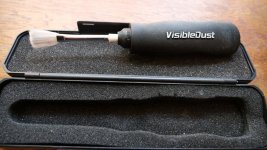
I’ve used Visible Dust products for years and been very pleased with the results, often the corner swabs can be more effective at removing stubborn stains
 
Can anyone point me to a video (or description) about how to go about cleaning the sensor? I've only ever used the in-camera auto cleaning function, but think a manual clean may be useful occasionally and don't want to do more harm than good.
 
Mel sensor cleaning is not difficult if you have the right tools
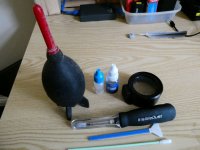
P1070098qqq.JPG
Initial cost outlay may be a bit expensive but consider this against have some moron messing about with your camera and what they charge
Above we have the rocket blower- sensor cleaning fluid- Loupe. Below the Artic butterfly brush and swabs. This is all you need
I don't recommend using the blower as it could disturb and dust inside the camera body.

Method
first of all allow plenty of time and be gentle. Also do the cleaning in a dust free area if possible

The Artic butterfly cleans by another method for light dust. being battery powered by letting it spin for a short time it builds up static electricity. this minute static charge will attact the dust off the sensor without even having to touch the sensor or at least very lightly. Stop it spinning first before use


OK nomal method
With the lens removes place Loupe over opening (it has built in LED lights) to see actually where the mark on the sensor is. You may well be able to tell if it is just dust or something else.

ok to actually clean with swabs

Don't soak the swab in fluid you will have a hard job getting it off the sensor. No, what you do is put a drop on a clean surface and dip the swap into it. that way the swap doesn't get flooded. Next wipe the sensor very gently with a swap and check to see if sensor is cleaned. If not use anothe swap and repeat.

OK I know it sound scary the for the first time which is why you need pLenty of time. The main thing is be gentle and prepared to repeat the process until sensor is clean. Using the loupe is the bEst way to check. Before I had one I used to clean the take a photo of the sky to see if the mark
was still there. It shows up in the oppoite side to where it is on tghe sensor. So i gave up that idea.

Once you have successfully clean the sensor for the first time you wonder you worried so much about it. Now you don't have to arrange sending the camera away- waiting for it to come back and save load of cash into the bargain.

 
Last edited:
Thank you for the comprehensive reply - I actually have most of the cleaning kit in stock, but have never been brave enough to give it a go before!
 
I don't recommend using the blower as it could disturb and dust inside the camera body.

This ^ - using a Rocket Blower can just move stuff about and with IBIS, dust can very easily find its way back onto the sensor - if you use the rocket blower in a 'Vacuum Mode' ie Sucking only then it's not as bad - but you will load your rocket blower with dust inside, which no doubt you'll end up blowing on something else (like lens optics!!)

IME (having cleaned 100s of sensors) a wet clean is the way to go (but some fluids can be a bit smeary, Ive had good experience with VisibleDust) and as @realspeed says don't soak the cleaning pad, less is more - even this means you have to repeat the cleaning cycle.
 
Last edited:
I got mine way back in 2009? at "focus on imaging " show in Birmingham , Cost £115at the show, That was for fhe Loupe artic butterfly etc all in a show packageP1070102.JPG


saved me a small fortune over these years
 
Last edited:
Back
Top