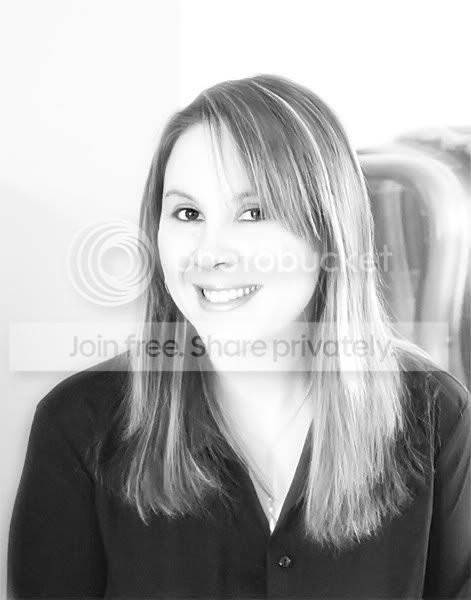
Self portrait

jewel

Suspended / Banned
Messages
2,075
Name
Julie
Edit My Images
Yes
Ok for the life of me I have no idea how to do a "high key" portrait. :confused: Is that the correct term?

Can anyone help me out with this pic. Background has to go obviously, make it high key, than fill me in on how you got to the end result,thanks. I am using photoshop elements 3.0 can it even be done in this program? Sorry if it's a silly question. :D

jewel1_001.jpg


Thanks,

Jewel :)
 
Nice capture :) Makes me want to smile back at you.

DJW did a high key tutorial Link
 
Can I ask that you post a larger size image please? You can go up to 800 pixels and 160Kb and you're below both (well below on size).

It's just so that we can get the best results. You need fairly high bit depth (lots of colour levels) for doing high key well.

:)
 
image changed for higher res shot, got some nice eyes there Jewel, they need highlighting!
 
Nice picture, nice smile and pretty eyes too :innocent:

For the best results have the photo re-taken with you sat in front of a plain white wall, that way people can either remove the background completely or alter/blend it much easier than the one in this picture. I would also suggest wearing something lighter in colour as well, so that the good folks here can blend that better into the finished photograph, it will really help if high key is what you are after.

I am sure that someone will have a go at converting this version for you but it is beyond my skill level to do it justice. I would be willing to attempt a high key on a different version for you though.

BTW this is a lovely photo :)
 
agreed with steves coments, the setting and clothes arent quite right, but it is a nice photo.

i had a quick go, levels adjsuted, curve tweaked to blow out highlights a little dodging and burnign as said in djw's tutorial then some gaussian blur.

not the grandest effort, but ah well
jewel_filtered.jpg


edit: ran through noiseware
 
here's a quick attempt.
Created a channel mask to delete the background.
Converted to monochrome then added a curves adjustment layer, pulling the curve up from the middle and added another vurve point further up and pulled that up.

jewel.jpg
 
Jewel why on earth do you want to hide all those cute features with a high key shot anyway? :Ponders:

High key shots need to be set up for properly much as Steve described, light background, light clothes and careful lighting. It's extremely difficult to duplicate the effect in Photoshop et al without losing all the modelling in the face which ends up looking like a featureless mask.

Some good attempts there and Noah's is pretty close, but personally I think you'd do better to work with what you've got. ;)

test.jpg
 
I agree with what CT has said..... but here's my attempt anyway :)

jewel5qj.jpg


I used this tutorial CLICKY

Mike
 
Oh dear.
Mine looks really bobbins at the side of yours Mike.
Methinks I should have a read of that clicky :embarasse
 
Take the shot again jewel, next time move the fringe back away from your eye and relax a wee bit more (have a couple of glasses of wine) and like everyone says, you have nice eyes. You look just a tiny bit self conscious to me too and the high key processing tends to show it more. Try the camera a bit lower down so you are looking slightly down at it, I think that makes for a better portrait shot.

I won't try to duplicate what others have done, my post processing is too poor.
 
stunning initial photo, and stunning attempts by everyone of a err stunning model. wow stunning. :D
 
Ok I tried :)

jewel.jpg


Bit of selenium toning for effect in there.
 
Or in colour

jewel5.jpg
 
Thanks for all the great attempts made here guys. I think they all look great!! :thumb: Although I wasn't aware that the shot had to be set up initially like that. I was under the impression that it was something you simply achieved in photoshop. :confused: you all seemed to do that though. I will retake the shot and set it up as suggested for best results. Thanks for all the help, and comments. :)

Cheers,

Jewel.
 
I was under the impression that it was something you simply achieved in photoshop

:nono: tut tut.

There was a time when we used to do things like this and much more without a computer at all.

;) :D

now you've made me make myself sound really old. :hissyfit: ......... ;)
 
Any chance of a late entry here..:whistle2:


jewel.jpg
 
I think it looks great busterboy! :D

One question though cos I'm a wee bit confused. :confused:
Technically what is a 'high key' portrait?

Reason being is as I look at all the attempts made here I think they all look great but different at the same time. Some are done all high key, background, face and all while others I look the same with just the background done high key. Know what I mean?

Someone enlighten me please. :)

Jewel
 
Jewel do a Google image search on 'high key' and you'll get loads of examples to look at. Basically it means the overall image is very light as opposed to 'Low key' which is darker more sombre shots. :)
 
Back
Top