

You are using an out of date browser. It may not display this or other websites correctly.
You should upgrade or use an alternative browser.
You should upgrade or use an alternative browser.
Selecting around objects in PS
- Thread starter boolean
- Start date

D
Deleted member 67219
Guest
Wacom tablets are really good.
But what are you trying to select? You can be accurate, if a little slow, by using the mouse with the pen tool in Photoshop.
But what are you trying to select? You can be accurate, if a little slow, by using the mouse with the pen tool in Photoshop.
D
Deleted member 67219
Guest
The pen tool is the most accurate way of doing smooth objects - certainly it would handle a plan quite well. However it's a steep learning tool.
I don't use the lasso tool, any time I've tried I've not been able to make it work accurately.
I don't use the lasso tool, any time I've tried I've not been able to make it work accurately.

Suvv
Suspended / Banned
- Messages
- 2,955
- Name
- Kev
- Edit My Images
- No
I have a Wacom Bamboo and for me its great. Some people on here like the larger tablets but I don't feel limited. I don't do a lot of pixel editing though as I use Capture NX2 which does have brushes for selections etc but you can't cut things out and I only go to PSE occasionally.
I agree with Charlotte about the lasso tool, it always seems to need a lot of tidying up!
I agree with Charlotte about the lasso tool, it always seems to need a lot of tidying up!


Pookeyhead
Suspended / Banned
- Messages
- 11,746
- Name
- David
- Edit My Images
- No
Hi,
Starting to explore more of photoshop and I'm finding it really hard to select objects in pictures using the mouse. I presume I need a tablet but have no idea what. Does anyone have any suggestions please.
Thanks
Practice using the pen tool instead of the free hand marquee tools.
A tablet helps, as previously mentioned, but the pen tool is really the best tool for fine direct masking.

suggs
Suspended / Banned
- Messages
- 2,053
- Name
- Harry
- Edit My Images
- Yes
ive always used the quick selection tool for the out of bounds (pop up) pictures and found it pretty easy, even for cutting out hard shapes..
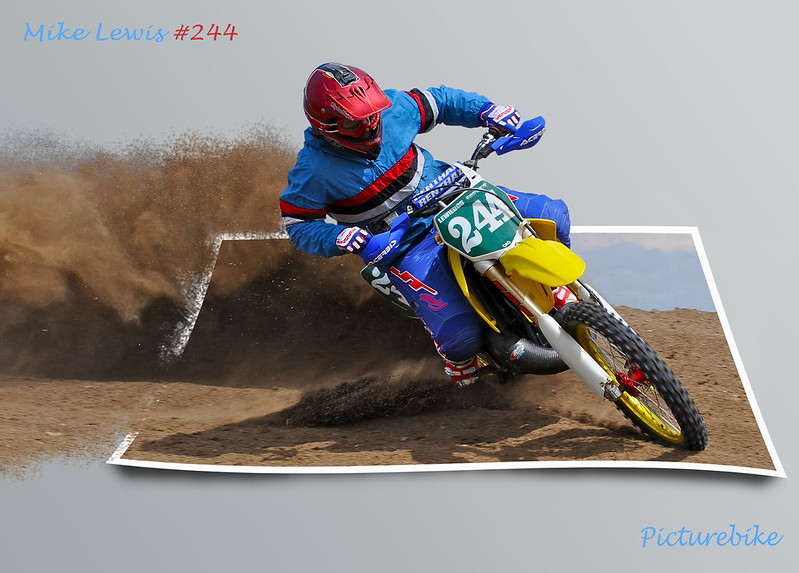
CW8_5740 by harrylessman, on Flickr
CW8_5740 by harrylessman, on Flickr