Second monitor - LR/PS screen arrangement advice

pjm1

Suspended / Banned
Messages
4,155
Name
Paul
Edit My Images
Yes
So, I finally decided to press the button on a refurbed Dell U2713HM to go with my Dell U2412M. I don't need wider gamut and I'm happy with the software calibration my i1 Display gives me so didn't plump for the significantly more expensive H version (which would then leave me the problem of needing two different colour spaces across the two monitors so not ideal).

New monitor will be my main display with the desktop (Win10) extended across both and the 24" being in portrait format. That works best for my normal windows use (Emails in portrait, excel on larger higher res screen in landscape).

Is there an ideal setup for Lightroom and PS using two monitors like this? The larger "main" screen is obviously 2560 x 1440 whereas the portrait one will be 1200 x 1920. I'll probably just continue to use the larger landscape screen as "main" in LR with the second display showing "To Fit" scaled views of the image in question. In PS I can have a larger navigator display in that second, together with a fair few panels, which will be nice.

What do others do? Are there any particularly cunning setups people would recommend?
 
No. There is no ideal setup of two monitors because everyone is different, there is no hard and fast rules on what is the correct way to set up two monitors for use with LR and PS.

The only ideal setup is your own set up. You do have the freedom of choice to move your monitors around, toy with the idea of where to put them, try them in different ways. Try them both landscape, try them both portrait, try portrait on the left hand, landscape on the right hand, try landscape on the left hand, portrait on the right hand, and even if you can, try both landscape, but one above the other.

Move them around, have a go working with LR and PS in different ways, until you find the setup to your own liking.

It's your computer, your monitors, Dell do not have rules telling you which one should be portrait, which should be landscape, which should be in front of you, which should next to the main monitor. It is your freedom to move them around and see how you feel.

I strongly suggest you feel free to try it in different ways until you found the setup that is ideal for you and that is to your liking.

Surely you do the same with your furniture? You are free to move the armchair around until you find the ideal spot.
 
Thanks, it makes sense... to a degree. And I'll certainly be experimenting with what works best.

But the physical monitor setup will mostly be dictated by what works best for work (which is the main use of the computer) so the smaller screen will be portrait, both for emails and document review. I agree, whether it's on the right or the left will be for me to decide. Equally though, we're creatures of habit and once it's set up and I start to get used to it for work that way, I'll be reluctant to change it.

Hence the question: this is an opportunity to learn from what works well for others and start off with something that might be ideal, before whatever I have (otherwise randomly) chosen will start to become embedded. I guess the "what do others do" should have been my main question...
 
Last edited:
PS: If it interest you, my set up is like that...

Two monitors, both same size and same model.

Main one (meaning the one that display the Windows start button) is in portrait format and on my left hand side. The second one is in landscape format and right in front of me, at eye level, for serious typing work with word processor.
 
Thanks, it makes sense... to a degree. And I'll certainly be experimenting with what works best.

But the physical monitor setup will mostly be dictated by what works best for work (which is the main use of the computer) so the smaller screen will be portrait, both for emails and document review. I agree, whether it's on the right or the left will be for me to decide. Equally though, we're creatures of habit and once it's set up and I start to get used to it for work that way, I'll be reluctant to change it.

Hence the question: this is an opportunity to learn from what works well for others and start off with something that might be ideal, before whatever I have (otherwise randomly) chosen will start to become embedded. I guess the "what do others do" should have been my main question...

Well, it really depends heavy on what is it others do and what is it you do. Pointless asking others if your kind of work is different from theirs. I would suggest you give us few ideas of what kind of work you do. For example: Just a photographer and that's it? Do photography and graphic design? Writer who write non-fiction books? So those of us doing similar work as you do could give you ideas.

For me: Left hand one is in portrait and got the Windows Start button while the right hand one is in front, and in landscape. So I could start Internet Explorer on the right hand one, read information off it, while I use word processor in front of me, in a similar way as in the old days when you would be reading off some papers, put on a stand, next to the typewriter.

Also, for doing graphic design work and photography, I tend to have Windows Explorer showing thumbnails on the left one, with some of the Adobe apps (PS, Illustrator, InDesign) in the front monitor. I drag and drop an image file from the Windows folder on the left to the PS, Ai, InDesign on the front.
 
Well, it really depends heavy on what is it others do and what is it you do. Pointless asking others if your kind of work is different from theirs. I would suggest you give us few ideas of what kind of work you do. For example: Just a photographer and that's it? Do photography and graphic design? Writer who write non-fiction books? So those of us doing similar work as you do could give you ideas.

For me: Left hand one is in portrait and got the Windows Start button while the right hand one is in front, and in landscape. So I could start Internet Explorer on the right hand one, read information off it, while I use word processor in front of me, in a similar way as in the old days when you would be reading off some papers, put on a stand, next to the typewriter.

Also, for doing graphic design work and photography, I tend to have Windows Explorer showing thumbnails on the left one, with some of the Adobe apps (PS, Illustrator, InDesign) in the front monitor. I drag and drop an image file from the Windows folder on the left to the PS, Ai, InDesign on the front.

I do appreciate your advice and the views of everyone, but it was really just a canvassing of "what do you do". I'm able to filter out things which won't work for me (if someone says they have both in portrait, that simply won't work for me as I need to see wide excel workbooks without a divide down the middle) so I was trying to keep the question as generic as possible.

I don't really agree that it's pointless asking others if their work is different... because it might prompt me to give it a go anyway. Or not. Something unusual might just work. If I restrict my question to those who use Excel 75% of the time etc., I'm probably not going to get many replies on a photography forum ;)

My use is as I described: Excel requiring a large work area in landscape (so that aspect of the setup is fixed, as I alluded to in the OP) and then I'm thinking what's best for the other monitor. Portrait feels a better option for emails and gives me the ability to review portrait format documents (word/pdf) as well as portrait pictures when I'm playing.

So, I was really just after how people use two monitors for LR and PS, especially if one (the smaller/lower res) monitor is in portrait format. That's all. I'm not really expecting someone to have precisely the same requirements as me and be able to give me chapter and verse on how I have to set mine up - although if that were to happen it'd be a bonus. More, "I open these panels on that monitor, I make the navigator 50% of the height, etc. etc.) or whatever. I've seen some people use the second display for survey mode, most seem to to prefer the Fit To single image view.

I really wasn't trying to make this more complicated than it needs to be. It was just a simple, "what do you do" question if I'm being honest. And I do appreciate everyone's views, so thank you for your advice so far!
 
I do appreciate your advice and the views of everyone, but it was really just a canvassing of "what do you do". I'm able to filter out things which won't work for me (if someone says they have both in portrait, that simply won't work for me as I need to see wide excel workbooks without a divide down the middle) so I was trying to keep the question as generic as possible.

I don't really agree that it's pointless asking others if their work is different... because it might prompt me to give it a go anyway. Or not. Something unusual might just work. If I restrict my question to those who use Excel 75% of the time etc., I'm probably not going to get many replies on a photography forum ;)

My use is as I described: Excel requiring a large work area in landscape (so that aspect of the setup is fixed, as I alluded to in the OP) and then I'm thinking what's best for the other monitor. Portrait feels a better option for emails and gives me the ability to review portrait format documents (word/pdf) as well as portrait pictures when I'm playing.

So, I was really just after how people use two monitors for LR and PS, especially if one (the smaller/lower res) monitor is in portrait format. That's all. I'm not really expecting someone to have precisely the same requirements as me and be able to give me chapter and verse on how I have to set mine up - although if that were to happen it'd be a bonus. More, "I open these panels on that monitor, I make the navigator 50% of the height, etc. etc.) or whatever. I've seen some people use the second display for survey mode, most seem to to prefer the Fit To single image view.

I really wasn't trying to make this more complicated than it needs to be. It was just a simple, "what do you do" question if I'm being honest. And I do appreciate everyone's views, so thank you for your advice so far!

Here food for thoughts:

I don't really use Excel for serious accounting work or anything, but I do use is sometimes.

If your Excel file got lot of information that is spent all over the columns, you could have it on the landscape monitor so you could work on or look at data from left to right, but if the file is mainly a long list of data, you can move it to the portrait monitor so you can see much of from top to bottom. Here's a trick to quickly make the application software move from one monitor to the other...

Hold down Shift and Alt, then press the right or left arrow keys, say in my case, to move from the app from left hand monitor to the one in front of me, I press Shift + Alt + Right arrow key.

Well, actually it would depends on what kind of Excel files you feel is mostly a long list (therefore favouring portrait as main monitor) or mostly a table (therefore favouring landscape.)

When you are working in PS, you can actually leave the PS on the landscape, but just click and hold the mouse pointer on the document tab, then move the image file to the portrait monitor. You could either dock it back or just work on the document on portrait while the actual PS software is still on the landscape one.
 
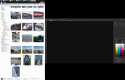
upload_2016-6-30_13-7-31.png

Photoshop application software is on the second monitor which is landscape, and right in front of me, I click and drag the tab of one of the images to the first monitor (portrait one on my left hand side), then maximums the window. You can zoom in to get it taller. By the way, it would still work the other way round if Photoshop was on the portrait screen, click and drag the document tab to the landscape. In theory, almost anything is possible and only limited by what Windows itself can or can't do.
 
I use my main screen for the main work area and the second monitor in LR for dgrid display of images generally and with PS I use the second monitor for my floating toolbars etc to unclutter my workspace...........Its always good to be able to open files etc on one screen and not have to flip windows as you do on a single monitor ............more elbow room is good for me
 
I've seen some people use the second display for survey mode, most seem to to prefer the Fit To single image view.

When I first had LR, I was making my own study notes, sort of my own quick reference manual in case I keep forgetting how to use LR and save time looking up in the Help or books.

According to my notes, I wrote notes, survey on second monitor (the portrait format one) would automatically adjust so two landscape photos would be top to bottom. I wrote there, that if you want to survey or compare two photos in landscape view, use the portrait monitor, if you want to survey two portrait photos, then use the landscape monitor.

Well, usually if I want to view portrait images, I tend to use the portrait monitor, if landscape images, then the landscape monitor. You can just freely swap them around between two monitors.
 
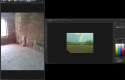
upload_2016-6-30_13-32-33.png
You could have LR on the landscape monitor (due to the side planes), view grid on landscape, while you take closer view of portrait photos on the portrait one. You can actually swap them around so grid on portrait if you want to view landscape images in full on landscape monitor.

However I should point out on which side you want the portrait monitor (in my case on my left side) is up to you, the reason mine is on the left is due to the fact that I am using a corner desk, the left hand monitor is pushed back against the wall, so I can sometimes turn in my office chair, face the left monitor, while I can watch the television which is at the other corner on my left side.

Hope that screencapture view gives you some ideas of how the view would look to you?
 
I seldom use the 2nd screen for LR, as its colour isn't good enough to make me comfortable with doing so, and as I use a graphics tablet, I find switching between screens on that more troublesome than simply using the shortcut keys to work on one screen.

For photoshop, I'll keep palletes just to the left edge of my right-hand monitor, and remap the tablet slightly to include this space. I then have my retouch notes on the right hand of the right screen, with plenty of workroom on the main screen.
 
Thanks guys, that's all helpful. It's good to know I can throw panels across as well as windows in PS. Still feel a bit clueless what will work best for LR but that might depend on the type of image I'm playing with. The bigger panel will almost certainly be used for editing in both...

Cheers!
 
Thanks guys, that's all helpful. It's good to know I can throw panels across as well as windows in PS. Still feel a bit clueless what will work best for LR but that might depend on the type of image I'm playing with. The bigger panel will almost certainly be used for editing in both...

Cheers!

Well, use the bigger monitor for the main LR window with the left and right side planes, mainly because you would see a lot more thumbnails on the bigger monitor, use the smaller monitor for LR's second monitor setting, and use it for loupe view. Similar to my screen capture of LR with Portmeirion photos, just image the right side one, showing the main LR window and grid view, just image it looking a bit bigger because of your bigger monitor.

It's a matter of getting more rows and columns for the grid view.
 
Thanks everyone (and @Major Eazy in particular) - the second monitor still hasn't arrived yet so it's all still theory at the moment. I have swapped my 24" to portrait format though and have been using it like that - it is absolutely perfect in that orientation for a lot of my work (documents and emails). Doesn't work at all as a single monitor for LR/PS but we all know that. Hoping its utility as the second monitor in both of those apps will come to the fore later today though (y)

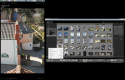
Edit: Ok, second monitor now set up (awaiting refund of "priority" delivery charge!) and this is a quick phone snap of how I'm setting up both the monitors, physically, as well as my Photoshop workspace... Probably not perfect but it's a starter for 10:

nVYgvkk.jpg


(Sorry for poor quality phone pic... it's not as if this site is a photography forum or anything!)
 
Last edited:
Back
Top