


Garry Edwards
Moderator
- Messages
- 13,475
- Name
- Garry Edwards
- Edit My Images
- No
I'm posting this more in hope than expectation, but I know that there are a lot of very clever people on here.
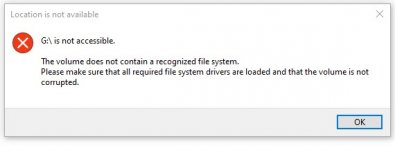
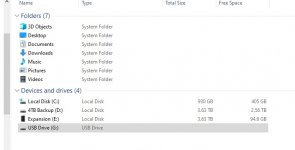
I used my D7200 for video yesterday, never had any problems. Tried to move the files to my PC (Windows 10) and got the error message saying that the card needs to be formatted, Re-booted computer, tried a different card reader, now I just get different error messages
Tried with my laptop, also Windows 10, which shows that the drive is working properly but there is nothing on it.
So, I put the card back in the camera and replayed the file that the computers say isn't there . . .
Now, the missing files aren't vital, it's just a nuisance, I can easily format the card and check that it now works, but I would like to recover the footage if at all possible.
If anyone has any suggestions, please bear in mind that I'm old, stupid and computer illiterate . . .
I used my D7200 for video yesterday, never had any problems. Tried to move the files to my PC (Windows 10) and got the error message saying that the card needs to be formatted, Re-booted computer, tried a different card reader, now I just get different error messages
Tried with my laptop, also Windows 10, which shows that the drive is working properly but there is nothing on it.
So, I put the card back in the camera and replayed the file that the computers say isn't there . . .
Now, the missing files aren't vital, it's just a nuisance, I can easily format the card and check that it now works, but I would like to recover the footage if at all possible.
If anyone has any suggestions, please bear in mind that I'm old, stupid and computer illiterate . . .


