

Screen Calibration

mrk123

Suspended / Banned
Messages
290
Name
kane
Edit My Images
No
I have viewed Lightroom edited pictures on phone, and on the phone they appear more vivid and bright, I don't seem to mind the look but not sure it's what I was going for.

Is there a best way to calibrate screen and how do we as photographers do this?
 
I have viewed Lightroom edited pictures on phone, and on the phone they appear more vivid and bright, I don't seem to mind the look but not sure it's what I was going for.

Is there a best way to calibrate screen and how do we as photographers do this?
You can't really calibrate a phone screen but many phones allow you to choose how colours are displayed in the settings. If it's a Samsung phone they tend to massively oversaturate colours out of the box. Have a look in your display settings and see if you can tone down the colours a bit.
 
You can't really calibrate a phone screen but many phones allow you to choose how colours are displayed in the settings. If it's a Samsung phone they tend to massively oversaturate colours out of the box. Have a look in your display settings and see if you can tone down the colours a bit.Screen Shot 2022-08-30 at 17.30.19.png
It's an Iphone 6 (I am not one for new tech).
I think for this project I have edited images to be quote muted, as in not flashy..
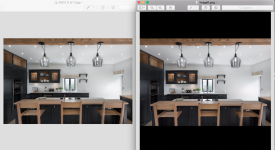
Left image was rendered from LR and on my mac, right image was screen grabbed on my iphone and emailed back to laptop to directly compare.
Does the right seem more flashy?
 
Last edited:
Back
Top