FishyFish
Suspended / Banned
- Messages
- 8,792
- Name
- Nige
- Edit My Images
- No
So...
Guess who's only just realised that, on the default settings, Epson Scan trims quite a bit from the edges of the image when scanning.
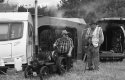
I shot a roll and a half of film at a steam rally at the weekend, and a couple of shots, when scanned were clearly not what I'd seen in the viewfinder. One, of a man and dog walking past a traction engine had the lower half of the dog cropped out of the shot, and another, with a couple of chaps beside a minature engine, had the bottom of the wheels and the top of the funnel missing. I knew that I'd composed both shots more carefully than that, so was quite pleased when it turned out that the scanner settings were to blame, and I've now altered them to not trim the negatives at all. It adds time as I now need to manually crop the edges of the images in Lightroom (although, once I've cropped a single landscape of portrait image, I can then sync the crop with all the other shots and then just do minor tweaks), but at least I'm getting the full shot now!
I wonder how many other shots that I've already scanned might've been marginally improved had I known this sooner?
Guess who's only just realised that, on the default settings, Epson Scan trims quite a bit from the edges of the image when scanning.
I shot a roll and a half of film at a steam rally at the weekend, and a couple of shots, when scanned were clearly not what I'd seen in the viewfinder. One, of a man and dog walking past a traction engine had the lower half of the dog cropped out of the shot, and another, with a couple of chaps beside a minature engine, had the bottom of the wheels and the top of the funnel missing. I knew that I'd composed both shots more carefully than that, so was quite pleased when it turned out that the scanner settings were to blame, and I've now altered them to not trim the negatives at all. It adds time as I now need to manually crop the edges of the images in Lightroom (although, once I've cropped a single landscape of portrait image, I can then sync the crop with all the other shots and then just do minor tweaks), but at least I'm getting the full shot now!
I wonder how many other shots that I've already scanned might've been marginally improved had I known this sooner?
Last edited: