Hi,
I've gone through the same process recently and I can share some of my findings. I would like to offer an alternative suggestion and urge you to buy the best relatively affordable scanner you can at this stage: the risk is that if you start scanning your 35mm film using sub-par equipment, you will, like me, be disappointed with the results and might potentially let go of film photography before getting to see what it's all about.
I mentioned 'the best relatively affordable' scanner. By this I mean a dedicated scanner, and not (for 35mm) a flatbed, IMHO. Plustek scanners are a good choice. Reflecta scanners are, I'm told, also good. I do have a very old Minolta Scan Dual III somewhere. They all still work on Windows 7, provided you purchase an (essential) bit of software called 'Vuescan'. This is my common interface to all my scanners. I highly recommend it.
Anyhow, why a dedicated film scanner? Well, I am the happy owner of an Epson flatbed, which works wonderfully well with medium format film. However, it is not satisfactory with 35mm material. I recently bought a Plustek series 7. You don't need to spend 300 pounds on one: I got mine used off ebay for 95 quid - you just need some paticence. By the way, my Plustek works without any problems on Windows 7 64bit via Vuescan.
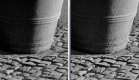
Here are two side by side examples of the Epson v550 vs the Plustek. Magnify the attachment to 100% to better see the difference:
(EDIT - looks like this forum won't allow zooming in to full image size - sorry about that)
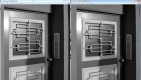

Other considerations: I find the Plustek, in operation, quite fast: my workflow involves a quick preview, which takes few seconds per frame, followed by a full scan, which takes 1 minutes or so. However I use the 'preview' function to identify the shots I like, which is never more than 5-10 per 36 frame roll, and I only fully scan those. The Plustek is also physically very small and will only have a small footprint on your desk. Hope it helps - any other questions feel free to ask.






 ).
).


