p1tse
Suspended / Banned
- Messages
- 2,391
- Edit My Images
- No
I have no editing experience and not looking for anything fancy.
But our little one along with his group from the ante-natal group are doing a joint birthday party.
Somehow I've managed to say I'll do it, but not sure best way and how.
I have Photoshop Elements 8 on Mac (no experience), (does Mac come with something like Paint on PCs)?
My other thought is maybe just use my work laptop (hope it has Paint), do circle cuts of the heads and then copy image into Microsoft Word. Would this be the easiest and best way, as I can picture doing it this way.
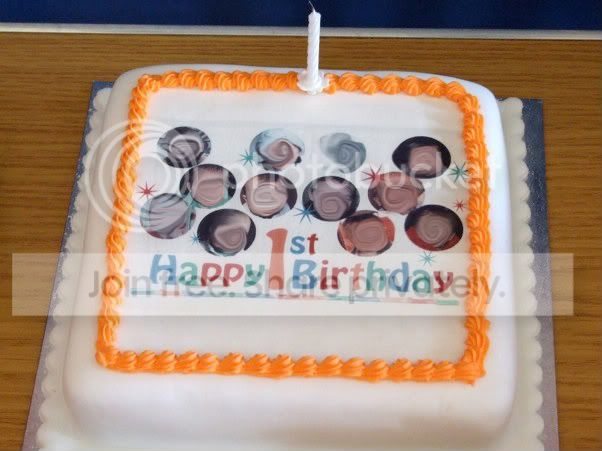
What I'm after will be to do cut and circle out the babies heads and put on one page, along with writing like Happy 1st Birthday.
So any thoughts, help, advice would be appreciated.
I think the other half is thinking of getting the cake from Tesco, will the image needed to be printed or on a soft copy (not sure what file type).
edit: sample of what i'm trying to acheive below
But our little one along with his group from the ante-natal group are doing a joint birthday party.
Somehow I've managed to say I'll do it, but not sure best way and how.
I have Photoshop Elements 8 on Mac (no experience), (does Mac come with something like Paint on PCs)?
My other thought is maybe just use my work laptop (hope it has Paint), do circle cuts of the heads and then copy image into Microsoft Word. Would this be the easiest and best way, as I can picture doing it this way.
What I'm after will be to do cut and circle out the babies heads and put on one page, along with writing like Happy 1st Birthday.
So any thoughts, help, advice would be appreciated.
I think the other half is thinking of getting the cake from Tesco, will the image needed to be printed or on a soft copy (not sure what file type).
edit: sample of what i'm trying to acheive below
Last edited: