Running out of NAS storage - options?

DigitalRelish

Suspended / Banned
Messages
2,240
Name
Will
Edit My Images
Yes
I currently have a Synology DS413 with 4 x 3TB Western Digital Red drives running as SHR. I use it to store wedding photography work, personal photography work and media for streaming around the home. The NAS is nearly out of storage so I'm currently weighing up my options. I need access to my photos from an iMac and MacBook via the internal network only. I find it useful to be able to access all the previous weddings (3 years worth approx 0.5TB per year) so I'd like to be able to continue to do so if I can.

I've been considering the following options, but wanted to see what you guys think before I take the plunge:
  1. Swap out 2 of the 3TB drives for 6TB drives @ £200 each. This should increase the NAS storage capacity from 9TB to 12TB.
  2. Move the streaming media content onto a separate device which may possibly not have any redundancy.
  3. I thought I had more options to consider, but my new-baby-mangled-sleep-deprived brain can't think what it was right now.
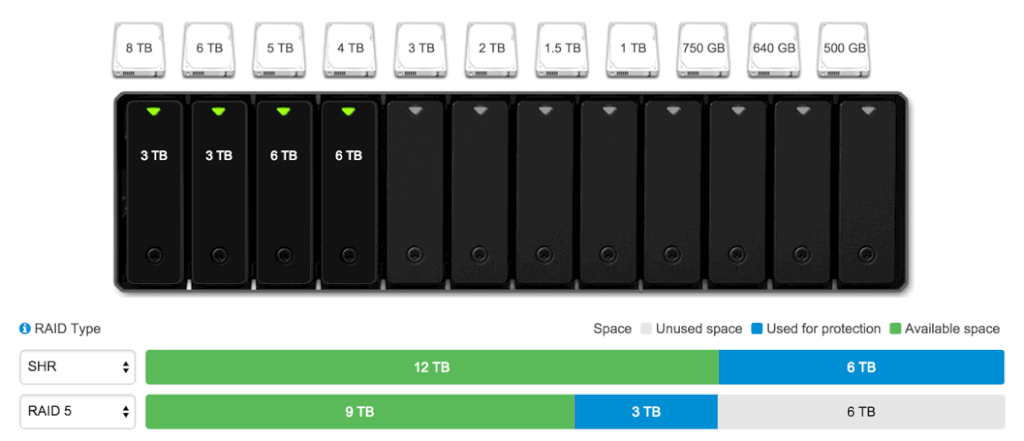
Not sure if this is telling me my DS413 is ready to run with 6TB drives. If so, then option might be my current preferred option, but I'm open to suggestions.
 
My thought is: I hope you have all that data backed up to more than 1 backup source since it would seem to represent some very important work.
All my photos are backed up to about 5 sources including some cloud storage.
.
 
Very quickly, from what you said you are running raid 5.

Don't know if you can run the 6tb drives, and how much space have you used ?
 
If it is RAID5 then the 6TB drives will not give you any extra as each element of the RAID is the size of the smallest and any extra is ignored.
 
My thought is: I hope you have all that data backed up to more than 1 backup source since it would seem to represent some very important work.
All my photos are backed up to about 5 sources including some cloud storage.
.

Yep, back-up is sorted with on-site and off-site backups.
 
Very quickly, from what you said you are running raid 5.

Don't know if you can run the 6tb drives, and how much space have you used ?

If it is RAID5 then the 6TB drives will not give you any extra as each element of the RAID is the size of the smallest and any extra is ignored.

I'm using Synology Hybrid RAID (SHR) rather than RAID 5 and currently I've less than 100GB space left.

Adding 2 x 6TB drives would give me an extra 3TB according to their capacity calculator...

2015-08-26_22-05-40_zpsjsrvh1ae.gif
 
I use an HP Micro Server with Unraid - it can be a little techy but it's getting better. The unit itself is pretty cheap, and as you can fit up to six HDDs in it,it means you can tale advantage of the sweet spot for HDD pricing (3tb) ATM and still have substantial storage at a reasonable cost.
 
I use an HP Micro Server with Unraid - it can be a little techy but it's getting better. The unit itself is pretty cheap, and as you can fit up to six HDDs in it,it means you can tale advantage of the sweet spot for HDD pricing (3tb) ATM and still have substantial storage at a reasonable cost.
You mean as a replacement set-up for my NAS or in addition to?
 
The cheapest immediate option would be to utilise SHR as intended and get two 6TB drives.

Only thing is that it would leave you with two unused 3TB drives.

I like synology and would probably then also get something like the DS713+ to utilise either the existing disks or for the new disks. Then when you need to grow even more you can utilise something like the DX513 expansion unit to give you more space.

And all can be administered from one system. I'm getting for gigabit sustained transfer rates to my 713/513 combination. It is very fast.
 
Either / or - whichever suits you better. You could split content between them, keeping photos on one and media on the other, or arrange in whichever way suits you best. If you're happy with the Synology, and want to stick with that system, then maybe another 4 bay Synology box is the answer. The Unraid option is Linux-based and has a reasonable GUI, but it's maybe not as slick as Synology and there can be some command line stuff occasionally. That said, the software is fairly cheap, has great support and gives you protection against a single drive failure as it has a parity disk from which it can rebuild the damaged data. So for example if you buy an HP box and 3x 3TB Reds, you'll have an extra 6TB of capacity (or thereabouts ) with some protection. Adding extra capacity is very simple - each extra drive you install will give you the full capacity of that drive, as long as it's no bigger than the parity drive. If you want to use bigger disks in the future you just swap out the parity drive and reuse it in the array. The system can run up to 24 disks (you'd need a different PC for that many though). The HP box is a reasonable PC, so streaming media is no issue at all - it can transcode unlike the lower-end Synology boxes. Unraid is well supported for Plex, iTunes and a bunch of other stuff. Plex for example let's you share your media with anyone via the net.
 
The cheapest immediate option would be to utilise SHR as intended and get two 6TB drives.

Only thing is that it would leave you with two unused 3TB drives.

I like synology and would probably then also get something like the DS713+ to utilise either the existing disks or for the new disks. Then when you need to grow even more you can utilise something like the DX513 expansion unit to give you more space.

And all can be administered from one system. I'm getting for gigabit sustained transfer rates to my 713/513 combination. It is very fast.

Yep, you are almost beyond an easy option. You are almost out of space and fast running out of time. I'd also look at expansion rather than putting in 2 drives that may only put off your issue for a year or so
 
Last edited:
Putting in 12tb to gain an extra usable 3tb doesn't sound the smartest thing to do in the morning.....
 
Okay, so if I look into the expansion route any thoughts on a DS1515+ (£565 enclosure only) plus 1 x 3TB Red (£85) vs DS713+ (£334 enclosure only or £565 with 2 x 3TB Red) plus DX513 (£324 enclosure only)? Presumably, I could simply migrate my existing 4 x 3TB into the DS1515+/DX513 and keep everything intact?
 
Okay, so if I look into the expansion route any thoughts on a DS1515+ (£565 enclosure only) plus 1 x 3TB Red (£85) vs DS713+ (£334 enclosure only or £565 with 2 x 3TB Red) plus DX513 (£324 enclosure only)? Presumably, I could simply migrate my existing 4 x 3TB into the DS1515+/DX513 and keep everything intact?

Hmmm, not sure if migrating it into the new system will work..... - I'm not sure I'd do it.

If it was me.

DS1515+ - excellent choice
+ 5 x 4Tb drives

Leave the old system setup - until you have 'moved' all the data over to the new one.

Sell it complete with drives on Ebay (formatted ready to go).
 
The reason for this is:

Your DS413 is fairly old & very slow...

I think the best bang for buck is with the 4Tb drives - although may be wrong.... ":D"

You have no downtime & retain full access.

The 1515+ is also scalable.....
 
Last edited:
To be honest, I wouldn't be 100% confident about the hardware migration route either.

I think I prefer the DS1515+ route. Just trying to get my head around the cost!
 
Wow 12 Terrabytes of storage and it isn't enough.
Are you sure you can't just archive some of this to off-NAS storage, that's what I would do but it's your system (and your money of course).
 
Synologys are great, The front end is simple and the OS is stable and efficient for SME usage. If your operations that rely on the NAS are mission critical then you should ensure there is a good warranty or support agreement still active for the product and do backup to a separate device (offsite) if possible.
 
Wow 12 Terrabytes of storage and it isn't enough.
Are you sure you can't just archive some of this to off-NAS storage, that's what I would do but it's your system (and your money of course).
It's only 9TB of usable space after you take the redundant element into consideration. It sounds a lot, but as a household that's been shooting DSLRs since 2008 it all adds up pretty quickly when you use it to consolidate all your data including back-ups of other machines.
 
Hmmm, not sure if migrating it into the new system will work..... - I'm not sure I'd do it.

If it was me.

DS1515+ - excellent choice
+ 5 x 4Tb drives

Leave the old system setup - until you have 'moved' all the data over to the new one.

Sell it complete with drives on Ebay (formatted ready to go).

Any thoughts on what my 2-year old DS413 and 4x3TB WD Reds might fetch?
 
£300 ish. I'd put it in at 250 & let it go from there.

Your drives are worth £50 ish each and then the box on top. The good news is it's a good bit of kit for a home user - but your needs have moved beyond that.
 
Back
Top