*Resolved* macOS - Screenshot question

gramps

Suspended / Banned
Messages
44,805
Name
'Gramps'
Edit My Images
No
I want to be able to record a streamed event on my iMac - it is not pirating, I am authorised.
I have never done it before (other than recording on Zoom) and a quick Google told me about 'Screenshot' & 'Quicktime' enabling this.
However, whilst both record the video admirably, neither record the audio content - Google appears to show this is a known issue/design feature.

My question is, how can I record both video & audio from the content streamed on my iMac.
This is a one-off occasion so I don't want to buy an expensive piece of software or tie into a subscription package ... free would be ideal, a small charge acceptable.

Any suggestions would be gratefully received. :)

I should add that it would need to record both video and audio at the time of being streamed to my desktop.
 
Last edited:
I'd suggest Audacity...


I've used it for many years and it does the job well. It's cross platform and quite simple to use. I've only used it to add sound to video a couple of times (and that a long time ago) but I don't recall any problems with it.
 
To add to the above: you may want to record the audio on a seperate computer, if one is available. Doing so should avoid contention issues.
 
I'd suggest Audacity...


I've used it for many years and it does the job well. It's cross platform and quite simple to use. I've only used it to add sound to video a couple of times (and that a long time ago) but I don't recall any problems with it.

To add to the above: you may want to record the audio on a seperate computer, if one is available. Doing so should avoid contention issues.

Thanks, just to clarify, I want to record the stream at the time of streaming.
Whilst Audacity can clearly import, edit etc, can it record streamed content as it appears on my iMac desktop?
 
It can definitely record in real time, I've done that many times.

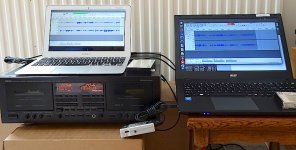
I think the real question is how the audio is handled by the Mac. Streaming does some weird things so I'd suggest taking a feed from the audio output socket (if your Mac is the type that still has one) and putting that output into another audio recording device, as I'm doing here...

Laptop computers and cassete tape recorder DSC00580.JPG

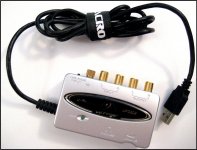
(the small siver box at the bottom centre is a Behringer USB <--> audio interface...

Behringer USB audio interface Ixus 70 IMG_4536.jpg

Having got the audio stored, you could then send it back into the computer and edit the video, writing back the audio that wasn't being recorded before.

Just a thought: a local college might have people using this type of technology, who would be happy to help you, if you give them enough notice.
 
Thanks, I was hoping for something like ‘Screenshot’ that would … well just do the job. :thinking:
 
QuickTime player will record both video and sound together.
Just be aware it records the sound via the internal mic, so will pick up any sound in your room along with the video stream.

 
it records the sound via the internal mic, so will pick up any sound in your room along with the video stream.
Yes this is a particular downside - SWMBO can be gagged ( :eek: ) but external noises like traffic etc cannot.
 
I've used Capto (amongst other apps) for this. There's a trial period, but I don't know if it has watermarks. It's £10 at the moment

edit https://www.globaldelight.com/capto/
 
Last edited:
Just found Blackhole, which is open source and free (donation) and after a bit of juggling to setup I appear to have cracked it. :banana:

Thanks for the help everyone. :)
 
Back
Top