bass_junkie83
Suspended / Banned
- Messages
- 4,367
- Name
- Dave
- Edit My Images
- Yes
I am having a spot of bother that is starting to really frustrate me.
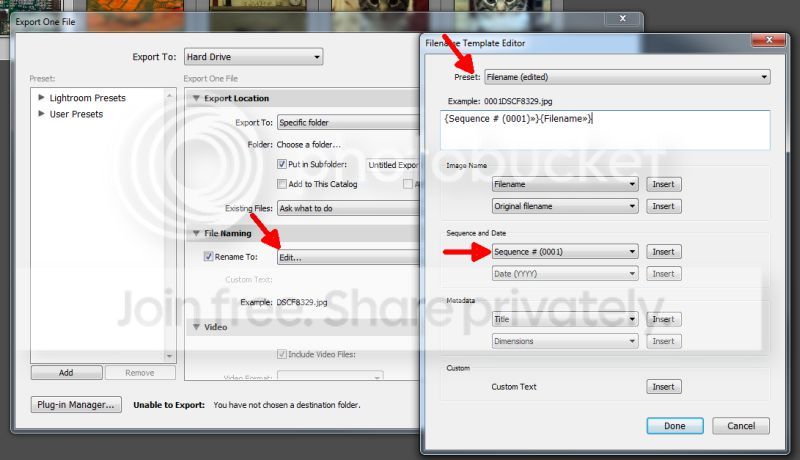
When I export from lightroom, I rename with a new filename and sequential number.
For example, for the last wedding I did the filename format was susie&sean1, susie&sean2, susie&sean3 etc...........
On the pc thats fine, but when I copy them onto my tablet, it all goes squiffy. The order it displays them is something like
1
11
12
13
14
15
16
17
18
19
101
102
103
.
.
.
2
20
21
22
23
You get the idea. It ends up showing the images in an order that jumps around. I can see the pattern it is following, but how on earth do I get it to order the images like a human being, not a bloody robot?
When I export from lightroom, I rename with a new filename and sequential number.
For example, for the last wedding I did the filename format was susie&sean1, susie&sean2, susie&sean3 etc...........
On the pc thats fine, but when I copy them onto my tablet, it all goes squiffy. The order it displays them is something like
1
11
12
13
14
15
16
17
18
19
101
102
103
.
.
.
2
20
21
22
23
You get the idea. It ends up showing the images in an order that jumps around. I can see the pattern it is following, but how on earth do I get it to order the images like a human being, not a bloody robot?