
and please use their services
You are using an out of date browser. It may not display this or other websites correctly.
You should upgrade or use an alternative browser.
You should upgrade or use an alternative browser.
Removing shadows from faces.
- Thread starter FlyTVR
- Start date

- Messages
- 29,876
- Name
- Dave
- Edit My Images
- Yes
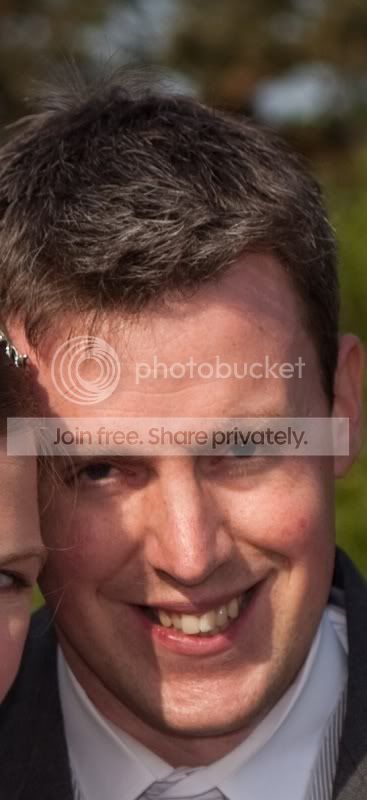
What's the best way? Tried a little dodge n burn but not a great result.
An image would be more helpful then we know what your dealing with, and we could give better advice

OP

FlyTVR
Suspended / Banned
- Messages
- 4,234
- Edit My Images
- No
An image would be more helpful then we know what your dealing with, and we could give better advice
Will do. Away from home at mo.

OP
FlyTVR
Suspended / Banned
- Messages
- 4,234
- Edit My Images
- No
Ok will keep me eyes open for your post
Star man!
hi
it depends how bad the shadow is.
it will be very hard to get rid totaly, but should be able to reduce it, u need to use a soft edge brush with feathered edge thats slightly bigger that area u want to fix, so u just click the mouse button dont try to paint!
also use correct range (shadow) and make exposure low something like 15% u may have to do it a few times to get something that looks acceptable
Gary
it depends how bad the shadow is.
it will be very hard to get rid totaly, but should be able to reduce it, u need to use a soft edge brush with feathered edge thats slightly bigger that area u want to fix, so u just click the mouse button dont try to paint!
also use correct range (shadow) and make exposure low something like 15% u may have to do it a few times to get something that looks acceptable
Gary

- Messages
- 4,405
- Name
- Zulfi
- Edit My Images
- Yes
I found a free action called Katrin Eismann Fill Flash at actioncentral.com.
It doesn't get rid of shadows, but reduces the harsness a little. Here is an example:

Sure some one will do a better job, but this only took under a ninute to do.
It doesn't get rid of shadows, but reduces the harsness a little. Here is an example:
Sure some one will do a better job, but this only took under a ninute to do.
hi
i dont think the shadows are that bad. i have seen worse! a reflector held out of shot would have helped
had a play with dodge and the problem is as you lighten the shadows it also effects the other side of shadow in some way lightening that too.
Gary
i dont think the shadows are that bad. i have seen worse! a reflector held out of shot would have helped
had a play with dodge and the problem is as you lighten the shadows it also effects the other side of shadow in some way lightening that too.
Gary
OP
FlyTVR
Suspended / Banned
- Messages
- 4,234
- Edit My Images
- No
hi
i dont think the shadows are that bad. i have seen worse! a reflector held out of shot would have helped
had a play with dodge and the problem is as you lighten the shadows it also effects the other side of shadow in some way lightening that too.
Gary
Thanks. Agree with reflector comment. Also, I could have used a second fill flash from the right hand side. Ho hum.
